This Week's Sponsor:

Turbulence Forecast

Know before you go. Get detailed turbulence forecasts for your exact route, now available 5 days in advance.


Posts tagged with "apple"

Lion’s Migration Assistant Allows Set Up From A Networked PC

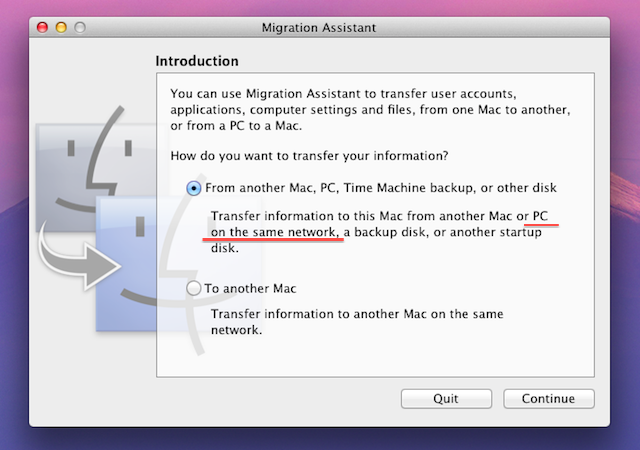
Another new feature discovered in the developer preview of OS X Lion is the ability to set up a Mac from a networked Windows PC as part of the Migration Assistant utility. Traditionally the only way to set up a new Mac and import all your files and settings was to use FireWire’s Target Disk Mode and hook up the old Mac or PC to the new Mac or use a Time Machine disk.

When Apple removed the FireWire port on some of its Macs it added the ability for Migration Assistant to import from a networked Mac, but not a PC. The Migration Assistant in the developer preview of OS X 10.7 Lion now brings the ability for new Mac users to set up Lion with data and settings from an existing Windows-based PC. The only caveat being that it requires a Migration Assistant helper client to be running on the Windows machine. For developers wishing to test this out, you’ll need to download that helper client from Apple’s developer site.

[Via AppleInsider]


With Real-Time API, Instagram Goes Beyond the App Store

Instagram yesterday released their real-time updates API which allows other developers to integrate Instagram photos, tags and locations in their own apps. The API is already in action on a number of apps including Foodspotting, Momento and Instagre.at.

Over 2000 developers signed up for access to the API and some other popular apps and services such as Flipboard and About.me will soon be adding Instagram API into their products. However at this stage the API is read-only as Instagram works to ensure a smooth implementation of the API, which was only announced earlier this month. Instagram has a demo of what the API can achieve, with a dynamic web page updating as new photos are uploaded to Instagram.

Read more


Engadget Awards iPad ‘Gadget of the Year’

Does it really surprise anyone that Apple’s iPad keeps winning awards? No, not really but it means Apple really knows how to make great products. Today, Engadget announced the winners of their 2010 Editors’ Choice Awards. Just a few days ago, Engadget posted their Reader’s Awards and the iPad also won ‘Gadget of the Year’ there too. Readers’ opinions are just as important as editors’ ones but it’s the editors’ decisions that more people see. Engadget is one of the most popular tech sites out there, besides us, so it’s cool to see the iPad standout from the crowd there as well. Read more


Apple Internal Document Confirms MobileMe Available Online Only

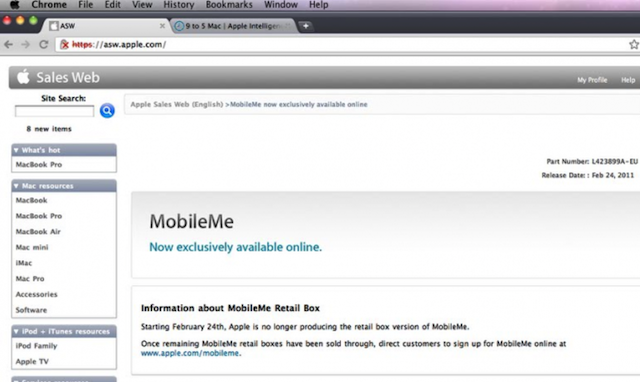
Apple has notified its retail staff that it will no longer be producing the physical MobileMe boxes and moving sales of the product solely online. This has all but confirmed what was was reported yesterday with customers to be directed to apple.com/mobileme to purchase the product once all existing stocks of the MobileMe boxes are sold.

The question still remains whether MobileMe will soon get a major revamp and possibly become a free product.

[Via 9to5 Mac]


Apple Prepares For Retina Monitors With HiDPI Mode in OS X Lion

Digging through the build of Mac OS X Lion that was seeded to developers yesterday, MacRumors discovered the presence of “HiDPI display modes” which suggests that Apple is planning for the possibility of Mac displays running something similar to a Retina display sometime in the near future.

Developers would, as they have done on the iPhone, provide each UI element in two sizes, one in the size they currently are and then one at twice the resolution. It would work virtually identically to how Apple implemented the Retina display for the iPhone, with the high-resolution displays using the double sized UI elements so that physically the size of the elements would stay the same.

MacRumors gives the example of a 15” MacBook Pro that has a resolution of 1440x900 that could be doubled to 2880x1800 and then use an app’s UI 2X elements and which would leave the application’s UI elements the same physical size, but with much greater detail. Apple had previously dabbled in the notion of creating OS X a resolution independent OS through a number of methods from using vector graphics to providing bitmaps for multiple screen resolutions, but none had previously eventuated.

The HiDPI mode is not turned on by default and must be done so through Lion’s Quartz debug in Xcode.

[Via MacRumors]


Milestones

Today is Thursday, February 24, 2011. Today has been full of Apple news everywhere, especially here at MacStories. Today Federico, Cody, Graham and myself have been chugging hard on rumors, announcements, first looks, previews, etc. You name it, we’ve probably done it. With that said, lets talk about today some more.

Milestones, what are they and what do they mean to us? Well, to MacStories it means forward progress, growth and evolving. We are celebrating 5000 posts as I write this now. It also means birthdays and achievements. Today is Steve Jobs’ 56th birthday and look at what he has accomplished in his lifetime.

Read more


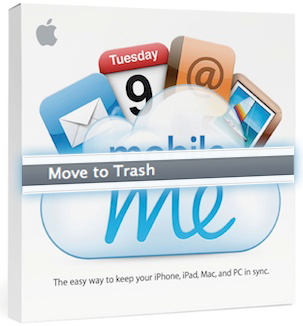
MobileMe Retail Boxes ‘Move To Trash’, Free Version Soon?

Back on February 7, we posted that an Apple initiative was to eliminate their retail box inventory. Today, Apple is notifying resellers that the company is discontinuing the retail box version of MobileMe, moving completely toward digital sales. Existing stock will continue to be sold while supplies last. MobileMe has also been removed from the ‘Configure’ page options when you buy a new Mac.

If you didn’t already know, boxed versions of MobileMe only have an activation code (no DVD) and Apple’s famous promo materials. The main reason they offer a retail box is to have a physical MobileMe product in-store for visibility (and the artwork on the box isn’t too shabby either).

Read more


What Is Thunderbolt?

Thunderbolt technology is what was Intel’s Light Peak. It’s not an Apple technology, but rather the culmination of Intel’s handiwork in combination with Apple’s mini DisplayPort. While Light Peak was developed to work over fiber (literally for light speeds), Thunderbolt is implemented over copper. Despite this, you’re still getting bi-directional (in and out as they say), 10 Gbps connection over a cable, plus a 10 Watt feed so you can power heavy equipment on the go (you don’t get that with USB). For comparison, your current USB 2.0 devices only get 480 Mbps through the cable! With this technology, you can drive multiple inputs including monitors, workstations, and audio equipment without a bird’s nest under your desk.

Read more


FaceTime for Mac Now Available in the Mac App Store, 720p Video Calling

Ahead of the new MacBook Pros, Apple launched the final version of FaceTime for Mac in the Mac App Store today. It’s priced at $0.99. The new version of FaceTime for Mac will allow 720p video calling Mac-to-Mac with supported Intel models that have a FaceTime HD camera – the new MacBook Pros. New MacBook Pro owners will get the app pre-installed, other users will have to buy it from the Mac App Store.

Video calls require a built-in FaceTime camera, an iSight camera (built-in or external), a USB video class (UVC) camera, or a FireWire DV camcorder; and a 128-Kbps upstream and downstream Internet connection. Making HD video calls requires a built-in FaceTime HD camera and a 1-Mbps upstream and downstream Internet connection. Receiving HD video calls requires a supported Intel-based Mac (for a complete list, visit http://support.apple.com/bk/HT4534).

Full description below. Read more