Posts tagged with "apple"

Tim Cook Writes Open Letter To Customers, Apologizes For Maps ‘Frustration’

Apple has just posted on its website a letter from Tim Cook to Apple’s customers, apologizing for not delivering the best experience with its new iOS 6 Maps. In the letter, prominently link to from the front page of Apple.com,  Cook describes how Apple “strives” to make products the “deliver the best experience possible”, but that the new Maps app has fallen short of this standard, frustrating millions of customers.

He re-emphasises the previous Apple statement on Maps, by saying that as time goes on and more people use Maps (there have already been nearly half a billion location searches), that the Maps app will get better. But in the mean time, Cook suggests that users try alternative map apps, and actually names some third-party apps available in the App Store such as “Bing, MapQuest and Waze” or alternatively to use “use Google or Nokia maps by going to their websites and creating an icon on your home screen to their web app”. Whilst that is certainly far from ideal, it’s quite extraordinary to see Cook actively name and recommend third party mapping solutions.

Cook explains that since they first shipped the original iPhone, they’ve been wanting to add new features such as “turn-by-turn directions, voice integration, Flyover and vector-based maps”. Cook claims that they had to create a new version “from the ground-up” to achieve these - there is no mention of Google’s role in the letter.

Tim Cook’s full letter to customers:

To our customers,

At Apple, we strive to make world-class products that deliver the best experience possible to our customers. With the launch of our new Maps last week, we fell short on this commitment. We are extremely sorry for the frustration this has caused our customers and we are doing everything we can to make Maps better.

We launched Maps initially with the first version of iOS. As time progressed, we wanted to provide our customers with even better Maps including features such as turn-by-turn directions, voice integration, Flyover and vector-based maps. In order to do this, we had to create a new version of Maps from the ground up.

There are already more than 100 million iOS devices using the new Apple Maps, with more and more joining us every day. In just over a week, iOS users with the new Maps have already searched for nearly half a billion locations. The more our customers use our Maps the better it will get and we greatly appreciate all of the feedback we have received from you.

While we’re improving Maps, you can try alternatives by downloading map apps from the App Store like Bing, MapQuest and Waze, or use Google or Nokia maps by going to their websites and creating an icon on your home screen to their web app.

Everything we do at Apple is aimed at making our products the best in the world. We know that you expect that from us, and we will keep working non-stop until Maps lives up to the same incredibly high standard.

Tim Cook
Apple’s CEO


Bad Piggies Is Now Available For Download On iPhone, iPad and Mac

Bad Piggies, the latest game from Rovio, is now available for download on iPhone, iPad, Android and Mac. This latest Rovio game is a twist on the infamous Angry Birds series in which you now control the pigs and must pilot them safely to the bird eggs. Unlike the simple mechanic featured in Angry Birds in which you simply slingshot the birds into the pigs and their structures, Bad Piggies requires you to make “the ultimate flying machine” and steer them through the levels.

With more than 60 levels, and free updates coming up, you have hours and hours of pig-crashing, exploding, and flying fun! Get three stars on every level to unlock 30 more puzzles! HINT: Sometimes you need to play the level several times to achieve all the objectives – try building a new device or steering in a different way to earn all the stars!

The game currently features 60 levels, with another 30 unlockable by getting three-stars on levels and will, like Angry Birds, receive free updates that add levels. There’s also 4 sandbox levels in which you can really have fun with making some awesome flying contraptions with various fans, wings, motors, balloons and other objects. If you’re interested in reading a review, check out this one by Polygon’s Chris Plante:

Bad Piggies’ levels aren’t nearly as fast as Angry Birds. They require attention and patience as the pig slowly travels from one end to the other. Unlike Angry Birds, it’s not as easy to play on a subway or during a coffee break. The main game is a fine distraction, something to do with your hands while watching sitcoms or talking on the phone.

Download links:

Jump the break to watch the Bad Piggies trailer.

Read more


Apple Airs First iPhone 5 TV Ads: “Physics”, “Cheese”, “Thumb” - Plus “Ears”

Today, Apple aired the first official iPhone 5 commercials. Available both on YouTube and Apple’s website, the TV ads focus on some of the marquee features of the iPhone 5.

“Physics” focuses on the design of the iPhone. It asks how’s it possible that the iPhone can be bigger, but also smaller – referring to the bigger screen of the device and its thinner form factor.

There are laws to physics, right? So explain this, how can something get bigger, and smaller? There’s more of it, and less of it. Well, I guess the laws of physics are more like, general guidelines.

“Cheese” is about Panorama. The ad shows a man trying to take a picture of a group of kids in costumes, using the iPhone’s Panorama functionality (which is not exclusive to the iPhone 5) to capture the whole group.

Every picture tells a story, of course some stories are bigger than others.

OK, guys here we go, everybody say Cheeeeeeeeeeeeeee…[breathes in]…eeeeeeeessssseee.

Got it!

The last one, “Thumb” is, again, about the iPhone’s screen, but this time from a user’s perspective. It tries to convey the message that, in spite of the taller screen, the iPhone’s display is still usable with one thumb, because Apple used “common sense” to make it bigger, but not too big.

Your thumb, it goes from here, to here. This bigger screen goes from here, to here. Now that’s either a, an amazing coincidence, or b, a dazzling display of common sense. Pretty sure its the common sense thing.

The three ads are available on Apple’s website and YouTube channel. We have embedded the YouTube versions below.

Update: Apple also posted an additional “Ears” ad for the new EarPods. The ad repeats the same message Apple explained at the iPhone 5 keynote – human ears are all different, and headphones should consider these differences.

Ears are weird. I dunno what shape that is, but its not round. So why would headphones be round? They should be shaped like this. Ear shaped. You know, so they fit in your ears.

According to initial speculation on Twitter, it appears the voiceover for the ads was done by Jeff Daniels, currently starring in the HBO show “The Newsroom”.
Read more


Great iPhone 5 Wallpapers

One downside of Apple changing the size of the display on the new iPhone is that all your iPhone wallpapers no longer fit properly without being stretched. Whilst Apple has included some new default wallpapers and made them all in the new iPhone 5 resolution, sometimes you just want a bit more choice. Thankfully quite a few people have already done the work to recreate their wallpapers for the new 1136 x 640 resolution of the iPhone 5. We had a bit of a search and found these collections and individual wallpapers that you might enjoy.

Collections

Individual Wallpapers

If you’ve made some iPhone 5 wallpapers or know of some other great ones we missed, let us know by tweeting us at @macstoriesnet.


Start Using Passbook Now with the Target App

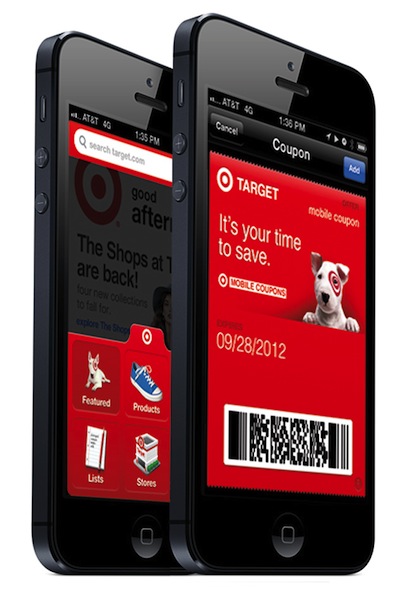
Passbook is one of the newest features of iOS: it’s brand new to iOS 6, and while many apps have yet to support it, there are a few that are working now. I have decided to take one of these apps for a spin to show you how Passbook really works.

The official Target app was updated yesterday to support Passbook, as announced by the company in a press release.

Now, many people know about Passbook, but when they first open it, the app simply redirects to a section on the App Store (when it’s working) without actually explaining how to fill this new digital wallet. Target has chosen to allow customers who receive Target Mobile Coupons to easily send, store, and access coupons in Passbook. Read more


Apple Releases Several Updates To iOS Apps

After iOS 6 and an update to Mountain Lion, Apple today proceeded to release updates to some of its iOS applications. We’ve collected them all in this post, so you can have an easily digestible list of every update released today.

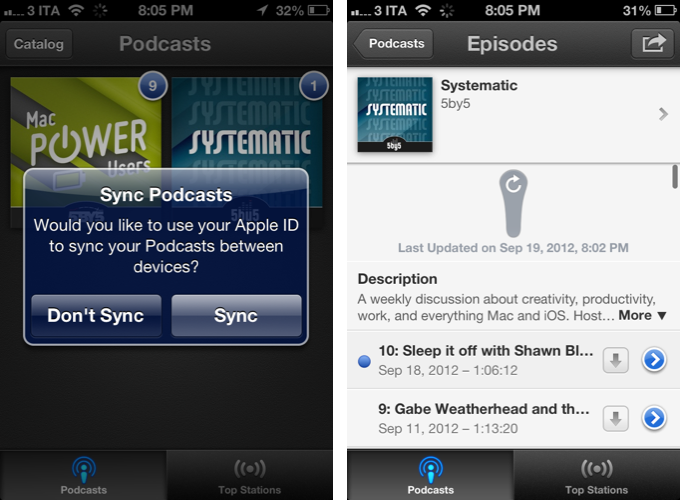
Apple’s Podcasts app (our original review) got a big update today. Version 1.1 brings iOS 6 support, and subscription syncing across devices with iCloud. There’s a new setting to choose to download new episodes automatically on WiFi, and pull to refresh for iOS 6. To enable sync, you’ll be asked if you want to keep subscriptions in sync through your Apple ID.

From my tests, I have noticed the app keeps the subscription list in sync, but not other podcast information, like Downcast does.

Podcasts 1.1

  • Automatically keep your podcast subscriptions up-to-date between devices using iCloud
  • A new setting to choose to automatically download new episodes only when on Wi-Fi
  • A new setting to choose whether to play episodes by oldest to newest or newest to oldest
  • Pull to refresh a subscription to check for new episodes on iOS 6
  • Additional performance and stability improvements

Read more


Behind The Scenes of “Sh*t Apple Fanatics Say”

Behind The Scenes of “Sh*t Apple Fanatics Say”

Ken Segall (author of Insanely Simple) has posted an article detailing the story behind ”Sh*t Apple Fanatics Say”, a viral video that ironically collects many of the things Apple fans typically say when “defending” the company and its (sometimes questionable) choices.

Produced by Scott Rose, Mac consultant and FileMaker Pro developer, the two videos of the series (Part 1, Part 2) have been viewed over 900,000 times on YouTube. Interestingly, the video started as a side project that should have been completed in a couple of days, but eventually the “team” behind it spent “one day of location scouting, one day of writing, 2.5 days of shooting and five days of editing”.

The pair wrote over 100 lines and recorded all of them at each location, and improvised as well. That resulted in over eight hours of video that had to be whittled down to just a few minutes.

Make sure to check out the full interview over at Ken Segall’s Observatory.

“Apple can totally survive with Tim Cook, as long as he keeps hiring great people like John Browett”. 

Permalink

Yerba Buena Poster Created By Stretching App Icons, Download A Recreated Version As A Wallpaper

On Friday, workers put up the traditional event banners on the Yerba Buena building in which Apple is holding its special media event next Wednesday. You can have a look at the banners here, but as an eagle-eyed reader of MacRumors realised, it seems as if Apple made the poster by stretching various app icons vertically. Another one of MacRumor’s readers, roosternugget, put together a little graphic to indicate which apps were most likely used (see below). It’s pretty clever by Apple’s designers to stretch iPhone app icons vertically and use it as the event poster, given we expect the iPhone 5 itself to feature a vertically larger (or “stretched) display. If you recall, Apple also had fun with the media event invitation which subtly features a shadow with the number “5” coming down from the number 12.

With this knowledge, I decided to open Photoshop and do my best to recreate the event poster. Now it certainly isn’t a perfect recreation but I’ve done my best and it comes close to the banner featured in a photo below. I’ve created multiple versions with and without the Apple logo and for various screen resolutions so that you can use it as a wallpaper, including the following:

  • [16:10] 2880 x 1800 - aka. Retina MacBook Pro
  • [16:9] 2880 x 1620
  • [5:4] 1280 x 1024
  • iPhone 4/4S
  • iPhone 5
  • iPad (Retina)

Download the wallpapers (.zip archive)

Direct links for iOS devices:


August 2012 In Review

August has been the lull between July’s Mountain Lion release and September’s inevitable iPhone announcement. But that’s not to say it was a quiet month - it certainly wasn’t. On the news front, we saw Apple and Amazon reacting to Mat Honan’s ‘epic hacking’, the first Mountain Lion update, internal promotions at Apple and of course - the verdict in the Apple v. Samsung trial. August also saw big Pixelmator, Things, Instagram, Drafts and Buzz Contacts app updates amongst a bunch of other updates and new release apps. Finally, in the stories department, we wrote up a bunch of how-to’s and I talked about the rise of third party services and fall of Google in iOS. Be sure to stay tuned this September, it’s going to be a big month.

You can review past ‘Month In Review’ posts here.

The Highlights


Everything Else