This Week's Sponsor:

Turbulence Forecast

Know before you go. Get detailed turbulence forecasts for your exact route, now available 5 days in advance.


Posts tagged with "apple"

The Apple Of Gaming

A great piece by Craig Grannell at Revert To Saved about the current state of Nintendo:

For a long time, I considered Nintendo the Apple of gaming—a company that cared about the details and about the right things (fun, excitement, enjoyment). Nintendo’s problem these days is that Apple is now the Apple of gaming—and the Japanese veteran needs to fight back, perhaps borrowing some of the tricks used by the plucky American upstart.

Yours truly, two months ago:

It’s always about the games, ultimately, but the hardware matters, too. More importantly, integration of hardware and software matters, and with my iOS gaming background I think Nintendo still has to get this right. Using the 3DS after years of iPhones and iPads feels strange because I’m dealing with a device that’s pretty capable spec-wise, yet doesn’t show the same amount of attention to detail, integration and flexibility that my iPhone has. I can play Angry Birds on my iPad, quickly look up a webpage, send an iMessage to my friend real quick and then effortlessly come back to the game. I challenge you to do the same on the 3DS with that joke of Internet browser and “suspended” software on the Home screen.

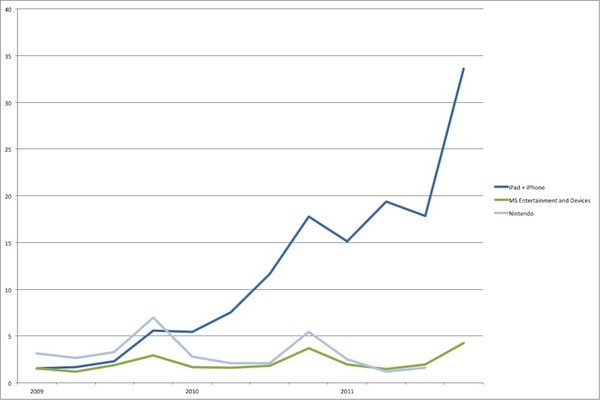
The problem with Nintendo is that for the longest time they thought only geeks and iPhone nerds were paying attention to App Store games, replacing their handhelds with iPads and iPods. It turns out, previous Nintendo customers are actually moving to mobile platforms – I’ll throw Android in the mix as well – for all their gaming needs. Blame changes in society, blame the recession, blame the advancements in graphics processing that made Infinity Blade II possible – mobile gaming is very much real, albeit immature, and Nintendo failed to forecast just how much of an impact it would have on its business. Shame on them for being so stubborn. Now they are paying the consequences, and will likely continue to pay until the Wii U comes out. To get a visual representation of what Nintendo is exactly facing, check out this chart by ngmoco’s Ben Cousins comparing Apple, Microsoft and Nintendo by revenue:

What’s next for Nintendo? That’s a question with no answer, really, as you can’t just know what the company’s up to without having some kind of inside knowledge of their secret plans. Rather, I’d start by proposing some ideas that might be worth considering at the light of iOS’ popularity in mobile games and the changes in consumer behavior:

- Ship a moden interface for managing a device: users don’t want to be treated like 3 years-old anymore. Make it accessible, flexible, elegant, fast. This is functional to the point below, which is:

- Make accessing, saving and managing digital content easier. Nintendo’s current solution is a joke – will Nintendo Network be any better? We shall see.

- Embrace social networking: let players link their Nintendo Network profiles to their Twitter, Facebook or Google+ identities, and allow them to interact with Nintendo content outside of Nintendo’s online platform.

- Create an ecosystem: make Nintendo Network the single marketplace for all kinds of Nintendo content. Drop regional restrictions and adopt an App Store-like distribution model with worldwide releases, price tiers, promo codes, developer pages. Unlike the App Store, drop user reviews and allow free trials. Let users rely on their Nintendo ID for all kinds of possible future Nintendo services.

- Drop resistive touch-screens: the future is multi-touch. Delay the Wii U if necessary to make it absolutely right.

- Don’t drop cartridges entirely, but embrace a digital distribution strategy that makes sense. Advise all developers to release digital versions of their games on Nintendo Network, and perhaps reward buyers of physical copies with free unlockable in-app extras. The goal is to achieve a win-win situation both if you’re buying digital or physical.

- Ditch friend codes. Because, seriously, why are we still using friend codes in 2012?

- Create fresh, innovative, strong new IPs while emphasizing the importance and value of historical brands. Fortunately, that seems exactly what Miyamoto is doing.

- Use cutting-edge hardware: let’s face it, people like to play Call of Duty and Uncharted these days. Whilst good graphics aren’t synonym of good games, they sure help in nurturing an ecosystem of variegate games – those who make presentation their selling point, and the ones that are more focused on gameplay with less impressive graphics. Angry Birds was possible in 2009, but that didn’t stop Apple from leap-frogging itself year over year with the A4 and A5. Make consoles that can stand the onslaught of the Tegras and A6s released every year.

- Ultimately, stay true to gaming. Users don’t want to read emails on their handheld or have Office on it. Internet-connected doesn’t mean PC-like.

This morning I retweeted three tweets by Zac Cichy:

I don’t know how Nintendo should implement these proposed changes in the next months, but I am sure these are ideas more than just a couple of bloggers agree with. The money just isn’t there anymore, and Nintendo needs to evolve before it’s too late.

[Nintendo Headquarters via David Offf]


Adam Lashinsky’s Inside Apple Is Now Available For Purchase On The iBookstore

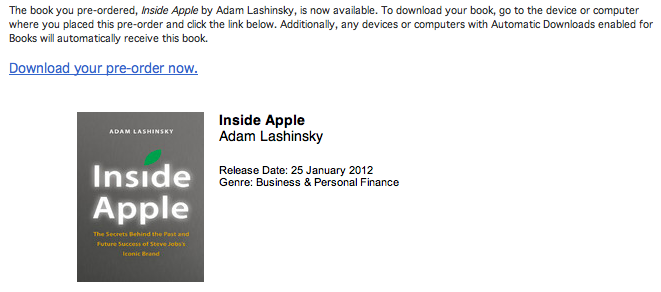
Adam Lashinsky’s new book Inside Apple is now available for purchase on the iBookstore and those who pre-ordered it can now download it. The book goes inside the secretive company, revealing a number of tactics, strategies and systems that has allowed Apple to “churn out hit after hit”.

Based on numerous interviews, the book offers exclusive new information about how Apple innovates, deals with its suppliers and is handling the transition into the Post Jobs Era. Lashinsky, a Senior Editor at Large for Fortune, knows the subject cold: In a 2008 cover story for the magazine entitled The Genius Behind Steve: Could Operations Whiz Tim Cook Run The Company Someday he predicted that Tim Cook, then an unknown, would eventually succeed Steve Jobs as CEO.

Inside Apple is available on the iBookstore for $12.99 and is also available on Amazon. We’ll be publishing a full review of Inside Apple sometime in the coming week, so stay tuned for that. A full description of the book is available below the break.

Read more


All The Statistics And Insights That Apple Revealed In Their Earnings Call

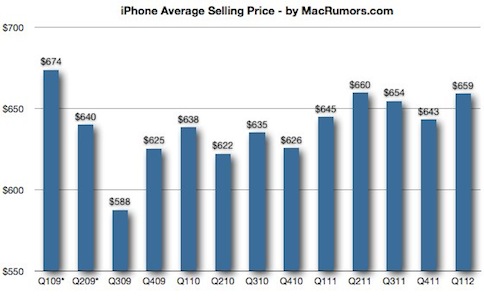
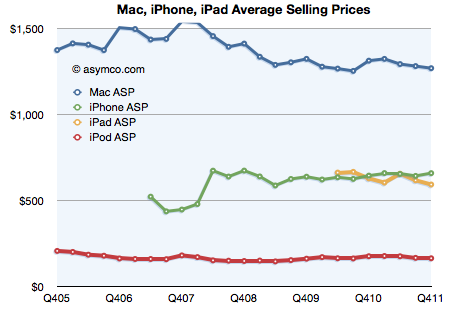
A few hours ago Apple released its Q1 2012 financial results and it saw Apple post its biggest quarter ever with revenue of $46.33 billion and see record sales of its Mac, iPhone and iPad product lines. We covered all the results in our Q1 2012 Results article earlier today so be sure to head over there if you haven’t already - it also includes a number of graphs that demonstrates Apple’s performance over the past 12 quarters and it paints a fascinating picture.

However, the earnings call itself is an interesting one hour, with Tim Cook (CEO) and Peter Oppenheimer (CFO) also answering a number of questions from select investors and analysts. In this Q&A section, a number of details are revealed - including additional statistics. We’ve re-listened to the call and have compiled the following post that highlights the more interesting aspects of this Q&A section and it is all below the break.

Further Reading:

MacStories: Apple Q1 2012 Results

MacStories: “Our Next Big Insight”

MacStories: More iPhones Than Babies Born Every Day

Apple’s Q1 FY12 Earnings Press Release

Audio Webcast of the Earnings Call

SeekingAlpha: Transcript of the Earnings Call

ReadWriteWeb: Apple’s Growth Rate Is Simply Incredible… And It’s Accelerating

Macworld: This is Tim: Apple’s CEO in his own words

Read more


PDF Expert 3.2 Brings Full PDF Searching And Better Support For Bluetooth Keyboards

PDF Expert for iPad was updated last night to version 3.2, adding some nice new features to further improve the capabilities of the excellent PDF manager, viewer and annotation iPad app. The big new addition is full text search, allowing you to search through all your PDFs, rather than just their file names. I gave this new feature a quick try and whilst the initial indexing took a few minutes, I did have 535 files saved in PDF Expert. Furthermore, once it was indexed, subsequent searches worked virtually instantly.

A new sorting panel is also present in PDF Expert 3.2, now allowing you to reorder your files by name, date or modified date. If you use a Bluetooth keyboard with your iPad you can now use those “Tab” and arrow keys for faster data entry, particularly for PDF forms.

Readdle has also improved the Handwriting and Wrist Protection features in PDF Expert so they work better with less accidental annotation because you have rested your wrist on the iPad’s screen. Included in this is a new eraser tool for your handwriting, so if you do make a mistake it is now easy to erase just what you want. Finally, yesterday’s update included the use of data protection APIs, so all your PDFs are now stored securely inside the app.

PDF Expert for iPad is available for $9.99 on the App Store.


Virgin America Names Jet “Stay Hungry, Stay Foolish” After Steve Jobs

The saying that Steve Jobs made popular with his 2005 Stanford commencement address, “Stay Foolish, Stay Hungry” has now (literally) made its way onto a Virgin America plane.

An Airbus A320 plane (tail number N845VA) that Virgin America owns and runs, has been named “Stay Hungry, Stay Foolish”, with the quote emblazoned on the front of the plane, as seen above. A Virgin America spokesperson explained to MacRumors that the name was chosen after an internal naming competition.

The quote originated from the 1970’s magazine The Whole Earth Catalogue as Steve Jobs noted in his commencement address:

On the back cover of their final issue was a photograph of an early morning country road, the kind you might find yourself hitchhiking on if you were so adventurous. Beneath it were the words: “Stay Hungry. Stay Foolish.” It was their farewell message as they signed off. Stay Hungry. Stay Foolish. And I have always wished that for myself. And now, as you graduate to begin anew, I wish that for you.

[Via MacRumors]


Apple Releases An iTunes U App

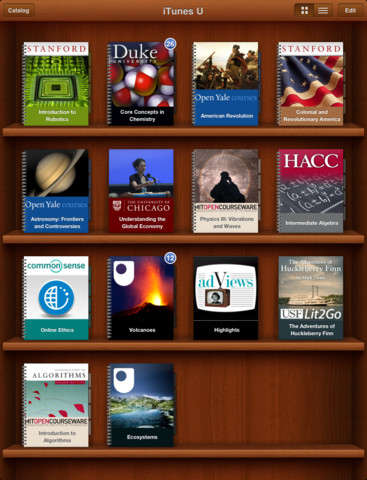
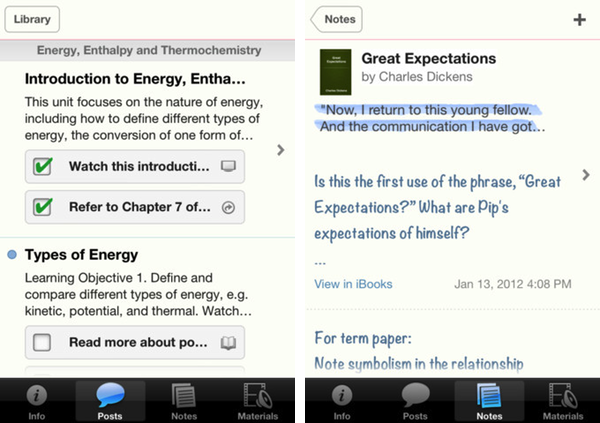
Apple has just announced and released the iTunes U App for iPhone and iPad. It’s a new app that lets teachers manage their iTunes U course and an app that helps students track all the content, assignments and messages from the courses that they study. iTunes U gives teachers the ability to customise their topics that they teach, give students information about office hours, post messages to their class and give students assignments.

The all-new iTunes U app enables students anywhere to tap into entire courses from the world’s most prestigious universities. -Eddy Cue

Effectively this new iTunes U app is similar to the various content management systems that are available for universities and other educational institutions. It’s fully featured with all the various video lectures, documents, apps and books available from within the app along with messages from teachers, the syllabus and even iBooks integration. In effect, it could be a great companion for any teacher or student. Over 100 courses have currently been created with the new iTunes U app from various universities and colleges across the US and further to that iTunes U is now available for K-12 institutions as well.

With the iTunes U app for iPad, iPhone and iPod touch, those barriers no longer exist. Students anywhere can take an entire course with complete access to all course materials right at their fingertips. With the iTunes U app, students are able to access new books right from within the app, and any notes taken in iBooks® are consolidated for easy reviewing.

Jump the break to view Apple’s press release on iTunes U for iOS. iTunes U for iOS is available here.

Read more


Apple Unveils iBooks 2.0 and iBooks Textbooks

Apple has just announced iBooks 2 at its education themed event in New York. It’s the next evolution of eBooks for the iPad that Phil Schiller calls “amazing — graphic, fun, engaging”. Apple also announced iBooks Textbooks, a new initiative to bring digital textbooks to students thanks to content deals with publishers, starting with the United States.

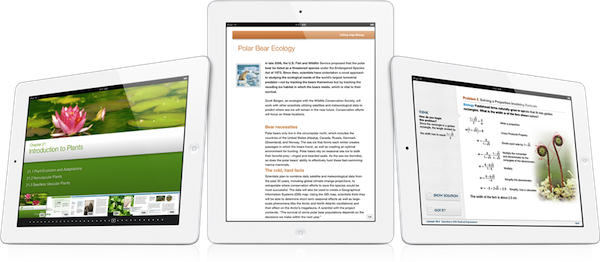
The new iBooks will support multitouch gestures to move throughout an iBook which can be full of “rich, engaging interactive experiences” — even featuring 3D models so a student can see, for example, inside a cell. In the demo iBook, switching the iPad to portrait re-orientated the content so that the student could focus on reading the text. That way, books can have two completely different experiences, simply by re-orientating the iPad.

As you can see, authors have total freedom in terms of laying out text and graphics.

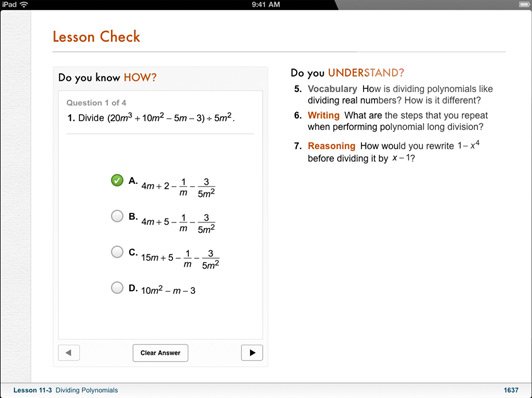
The iBooks can also bring up definitions that can include images; there is search within the book, links between pages, pages can have slideshows and more. As for those end of chapter review questions that are so common in textbooks, iBooks can now feature “visual, interactive Q&A sections” that are much more engaging than the typical, long list of unengaging questions.

Note Taking

Another super critical study tool is highlighting and notetaking — your finger is always a highlighter. You just swipe. You can change the color. If you want to leave a note just tap.

With iBooks 2.0, Apple has brought a range of note taking features to help students with their study routine. There is everything from the traditional highlighting (just drag your finger over the desired text) to adding notes by tapping and then typing. An awesome feature here is that iBooks automatically takes all of your notes and highlights, chucks in any glossary terms and creates some study cards for revision.

I don’t think there’s ever been a textbook that made it this easy to be a good student.


Textbook Section in the iBookstore

These new textbook iBooks are now all available in a new ‘Textbook’ section that is on the iBookstore - all collated in one section. As is standard with iBooks, you can even get a free sample to see what the textbook is like.

These are stunning books. They take full advantage of what can be created.

Apple has worked with some partners and has brought some high school textbooks to the iBookstore and they’ll be available for $14.99 or less. Some of the publishers that have begun creating textbook iBooks includes Pearson, McGrawHill and Houghton Mifflin Harcourt - the three publishers that make 90% of textbooks. DK Publishing is also on board with four iBooks – they’re publishers of educational books for younger children. Finally, the E.O. Wilson Foundation is also on board, bringing the book ‘Life on Earth’ exclusively to the iBookstore - the first two chapters are available for free with the rest coming as they are completed for a “reasonable price”.

Of course, the authors can make these books and keep them up to date. But what’s most exciting is that it’s their book, for students. They keep it.


iBooks 2.0 will be available as a free update to the iBooks app today. Jump the break for Apple’s full Press Release.

Read more


Apple’s Education Event To Focus on iPad, K-12, “Teaching Tools” for Self-Publishers

Less than 24 hours away from Apple’s “education announcement” in New York City, Bloomberg weighs in reporting that the event, set to begin at 10 AM EST at the Guggenheim Museum, will be focused on iPad, digital textbooks for students from kindergarten to 12th grade (K-12) and self-publishers. Initially rumored to be about “textbooks” as suggested by Steve Jobs in the authorized biography by Walter Isaacson, speculation leading up to the even has seen different sources claiming Apple will have a broader set of announcements with textbooks, but also a strong iPad presence and new tools to create eBooks on the desktop. Specifically, Ars Technica referred to these tools as GarageBand for eBooks.

Bloomberg now claims Apple’s educational plans will be primarily focused on showing the potential of digital textbooks and iPads in schools:

The plans, to be unveiled by Apple Internet software chief Eddy Cue, are aimed at broadening the educational materials available for the iPad, especially for students in kindergarten to 12th grade, the people said. By setting its sights on the $10 billion-a-year textbook industry, Apple is using the tablet to encourage students to shun costly tomes that weigh down backpacks in favor of less-expensive, interactive digital books that can be updated anywhere via the Web.

According to Bloomberg, there will be announcements for both publishers and authors. Authors will be able to create new digital editions of their works using a modified version of ePub, a file format that is already used in the publishing industry. Bigger publishers will be able to create digital textbooks with embedded graphics and video, suggesting that rumors of a simple interface similar to GarageBand for managing media and content within an eBook might be correct after all. It is unclear whether Apple is preparing one or more “digital tools” for independent authors and large publishing companies, although Bloomberg noted:

Apple also wants to empower “self-publishers” to create new kinds of teaching tools, said the people. Teachers could use it to design materials for that week’s lesson. Scientists, historians and other authors could publish professional-looking content without a deal with a publisher.

If true, this would suggest the company has created an improved eBook creation tool atop of the ePub standard with different options for independent authors and publishers to distribute their creations digitally through iTunes, or, for instance, locally in a classroom. Teachers willing to collaborate with students on a week’s lesson clearly wouldn’t need the App Store or the iBookstore for distribution, which may lead to some interesting speculation about “textbook sharing” and a possible iCloud implementation, too.

Highly anticipated then quickly dismissed as “over-hyped”, Apple’s education event is shaping up to be an interesting milestone for the company in the field of education. The iPad has become Apple’s second best-selling device behind the iPhone, with the company expected to report record sales for the holiday quarter next week. In spite of the iPad and iTunes offering a variety of educational content in the form of apps, eBooks and iTunes U content, in two years of iPad Apple has yet to officially commit to education and schools as a viable market for the device. Schools and universities have adopted iPads with independent programs and initiatives; now Apple has a chance to unify its educational offerings with publishers deals, a clear policy for independent authors, new tools for eBook creation, and perhaps simpler distribution methods that don’t require iTunes in the classroom and will allow for educational discounts on volume purchases (which Apple is already doing).

We’ll be covering the news from tomorrow’s Apple event starting at 10 AM EST (7 AM Pacific time) here on MacStories.


Apple Expands iTunes Match To 19 Countries Across South America & Europe

iTunes Match has today gone live in 19 more countries across South America and Europe, taking the total number of countries that now have iTunes Match to 37. iTunes Match first launched in the US just over two months ago, followed by Brazil and then Canada, Australia and some European countries in December. Today’s launch brings iTunes Match to the following countries:

Argentina, Bolivia, Chile, Colombia, Costa Rica, Dominican Republic, Ecuador, El Salvador, Estonia, Guatemala, Honduras, Latvia, Lithuania, Netherlands, Nicaragua, Panama, Paraguay, Peru, and Venezuela.

Most of these countries already had support for iTunes in the Cloud (the ability to re-download iTunes Music purchases for free), but Estonia, Latvia, Lithuania, and the Netherlands did not until today.

Apple is making quick work of finalising licensing agreements for iTunes Match, the service is certainly rolling out faster internationally than some of their previous efforts. The iBookstore or even the availability of TV Shows (which is still only available in a small selection of international iTunes Stores) come to mind as examples of Apple taking a long time to seal agreements internationally.

[Via MacRumors]