This Week's Sponsor:

Turbulence Forecast

Know before you go. Get detailed turbulence forecasts for your exact route, now available 5 days in advance.


Posts tagged with "apple"

Apple Announces Q2 2011 Conference Call For April 20

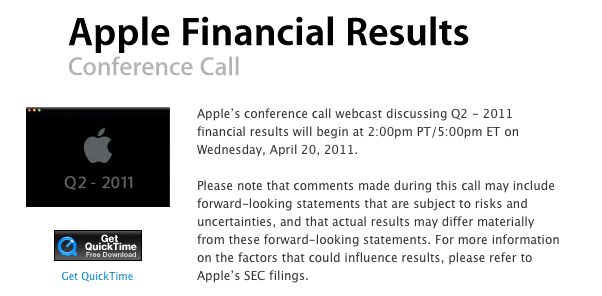
As widely anticipated in the past few days, Apple has scheduled its q2 2011 earnings call for April 20, 2011. The conference call will be streamed live on Apple’s website (audio-only) here.

Apple’s conference call webcast discussing Q2 - 2011 financial results will begin at 2:00pm PT/5:00pm ET on Wednesday, April 20, 2011.

Please note that comments made during this call may include forward-looking statements that are subject to risks and uncertainties, and that actual results may differ materially from these forward-looking statements.

In Q1 2011, Apple posted a record revenue of $26.74 billion with 7.33 million iPads sold, 16.24 million iPhones and 4.13 million Macs. The company posted record net quarterly profit of $6 billion, or $6.43 per diluted share. 19.45 million iPods were sold during the quarter. In the year-ago quarter, Apple posted revenue of $13.50 billion with 2.94 million Macs sold, 8.75 million iPhones and 10.89 million iPods sold.

The Q2 2011 earnings call is expected to provide more insight into Verizon iPhone sales numbers and the iPad 2, which was released on March 11 in the US and also went on sale last week in 25 more countries – just in time to fit into Apple’s second fiscal quarter window.


Week Calendar 3.0 Is A Powerful iCal Alternative for iPhone

In the past months, I’ve taken a look at different calendar applications for the iPhone and iPad that aim at bringing more functionalities (either through particular interface approaches, extended Google Calendar support, or other features) to a device’s built-in calendar software from Apple. The iOS calendar app, a tiny version of iCal for the desktop, is fast and elegant and works just fine for most users, but sometimes you want or need more from a mobile calendar or agenda. For instance, the possibility to have more views available (rather than the List, Day and Month ones designed by Apple) or “do more” with events and reminders. And while I know most of MacStories readers are huge fans of Calvetica and Cloud Calendar for the iPhone and iPad, respectively, I’m pretty sure some of you have been looking for a slightly more “powerful” or, dare I say, “geeky” alternative to Calendar.app. If so, meet Week Calendar.

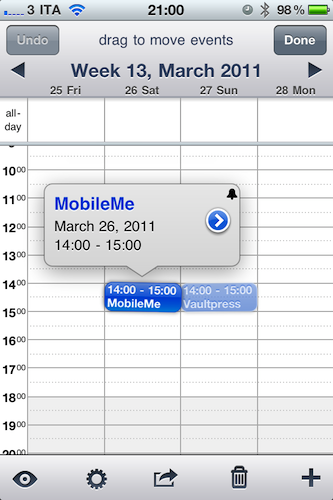
The name says it all: Week Calendar’s biggest feature is the weekly view that’s the focus of the entire experience and undoubtedly something that Apple’s calendar app really lacks. In the app’s weekly view you can pinch & zoom vertically or horizontally to show / hide hours and days, double-tap to focus on a specific event or rotate to landscape mode to gain an even broader view. Tapping on the top toolbar allows you to select a date to jump to, whilst selecting an event opens a desktop-like popup with related information. Tap on the popup, and you get to another screen with all the details you’ve entered and buttons to share, print (that’s right, AirPrint) or create a template off the event itself. You can edit an event at any time, and even display the assigned location on a map. Something that I really like about Week Calendar (well, weekly view aside): you can link contacts from the Address Book to an event. Like I said, everything’s pretty full-featured to offer a wide array of options and choices.

“Choices” seems to be a prerogative of Week Calendar: from the main screen, an iPad-like popover lets you switch between 7 different views: List + Search, Day, Week, Month, Year, Agenda, and Today. The “Go to a Day” shortcut lets you manually enter a date to open. Switching between sections and views felt fast and highly responsive to me, although I have to say I’ve only configured the app with two calendars: my personal one, and US Holidays. The app comes with this kind of optional, built-in subscriptions that you can activate from the Settings. Speaking of which, there’s a lot of stuff to choose from in there: from Time Zone support and “Week starts at” to an auto-coloring system for events with a specific title, you can stay assured the option you’re looking for has been implemented in Week Calendar. I can see how many will prefer the simplicity of an app like Calvetica, but sometimes an application for “nerds & power users” is more than welcome. Other features of Week Calendar that impressed me for the quality of the implementation were fullscreen support (you can activate it with a single / double tap and choose what UI elements to hide), possibility to cut and drag & drop events in any view for easy re-arrangement and TextExpander integration.

Week Calendar is an app that needs to be used for weeks – even months – to be fully appreciated. There’s so much stuff to play with, configure and customize it’s not really easy to fit everything into a single article – plus, I believe all these options have the added value of turning the app into a completely different experience depending on how you use calendars. So, head over the App Store now and buy Week Calendar 3.0 – at $1.99 it’s possibly the most “serious” calendar app for iPhone I’ve seen so far. Read more


First WWDC Ticket Shows Up On eBay For A Massively Inflated Price

If you missed out on snapping up a WWDC ticket, which is very likely considering the tickets sold out in less than 10 hours, but still desperately want one you could consider swallowing your pride (and emptying your wallet) by jumping on eBay. There has been at least one developer selling his extra unactivated ticket that was supposedly meant to go to a colleague who decided he couldn’t make it out this year.

But unsurprisingly the ticket is being sold at an insanely inflated price of US$3,500 – more than double the original price of $1,599. In fact that’s nearly $2,000 more.  Whether or not the story from the seller is genuine, this ticket scalping will probably attract the attention of Apple’s legal department. But it’s unlikely to stop others from at least attempting to resell their tickets, given the incredible demand for tickets – so if you are desperate you may want to keep your eye out on eBay, Cragislist and even Twitter.

[Via TUAW]


Software Developer Group Rebuts Senators Claims Over DUI Checkpoint Apps

If you recall, last week we reported on a request from four US Senators that Apple remove apps that warn and alert users of where DUI (driving under the influence) checkpoints are. Well the Association for Competitive Technology, a group of thousands of independent software developers has responded to this request by the Senators and objected to the reasoning of the claims.

Rebutting the contention that the apps are “harmful to public safety”, the group’s president, Jonathan Zuck, said that the concerns raised are actually “in conflict with the public interest on the issue of traffic safety.” Citing the National Highway Safety Administration, he goes on to say that heightened awareness of DUI checkpoints acts as a deterrent to illegal behaviour and that “several of the apps in question have received particular commendation from the law enforcement community.”

Furthermore some of the apps in question, including PhantomALERT (which is part of the A.C.T. group) and Trapster use data from the public domain - some of which is required by law to be published, this data will continue to live on regardless of whether some smartphone apps are pulled. Meanwhile, RIM last week removed PhantomALERT from it’s app store and was applauded by the Senators who issued a statement saying “Drunk drivers will soon have one less tool to evade law enforcement and endanger our friends and families. We appreciate RIM’s immediate reply and urge the other smartphone makers to quickly follow suit.” Jump the break for the A.C.T. group’s full response to the Senator’s request.

[Via Cult of Mac]

Read more


Never-used 20th Anniversary Macintosh Available on eBay

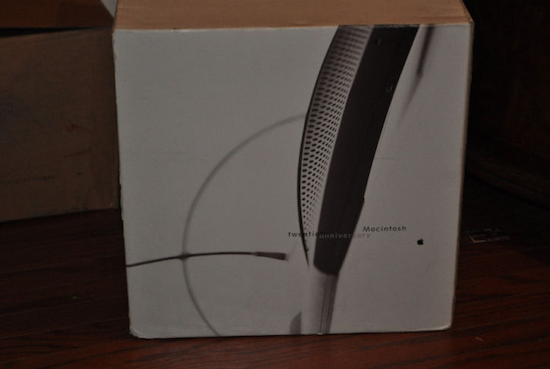
In the spring of 1997 Apple released a $7,499 computer produced in 12,000 limited copies and designed by Jonathan Ive. This computer, the Twentieth Anniversary Macintosh, was in fact the first “big project” for Ive at Apple, but its sales didn’t go very well. Widely regarded by true Apple aficionados as a unique piece of Apple history that can also run Mac OS 9 (initially developed with System 7 in mind), this Macintosh model was built by Ive to “have a very small footprint” on the desktop and be easy to “move around”. Many see it as the father of the popular iMac line that was introduced a year later, and to good reason: the Twentieth Anniversary Macintosh provided a better way to manage and install cables, had a standalone keyboard and, overall, was the first example of “all-in-one” design.

A never-used Twentieth Anniversary Macintosh has surfaced on eBay, and it’s currently bidding at $1,025.00. The box was opened for inspection, but the computer was never used and the packaging parts are still sealed. From the description of the item:

The TAM comes in one large box, with four smaller boxes inside consisting of the accessory box, keyboard, system and subwoofer. The accessory box was opened only to inspect the condition of the batteries out of concern that the corrosion of them over time could have damaged other components. The batteries did in fact expand but did not leak, causing no damage to any of the other accessories. The accessories themselves are all new, otherwise untouched, including the thick users manual which is still shrink-wrapped, and a special TAM pen and pencil set which come in a special Apple embossed leather case. The system and subwoofer boxes remain sealed, and therefore are to be in perfect condition, but because testing was not performed this system is being sold in as-is condition. Servicing of TAM’s is no longer available directly from Apple, but may be available thru an independent authorized service center.

The “TAM” was only released in the US, Japan, France, Germany, and UK – this is a great chance to get your hands on it if you’ve got money to spend (the auction will likely go up very soon) and you want to add a piece of Apple’s Macintosh history to your collection. Check out a video of Jony Ive talking about the Twentieth Anniversary Macintosh below, courtesy of Electronista.
Read more


WWDC To Be Software Focused, No iPhone 5 Launch?

There is speculation today from Loop Insight that this year’s WWDC, to be held from June 6 , will not include any new hardware announcements – namely the iPhone. Apple said in its press release earlier today that WWDC ’11 will  focus on unveiling “the future of iOS and Mac OS.”

Based on information from his sources and the focus of the press release, Jim Dalrymple believes that this means more than just a strong focus on iOS and OS X, but a complete focus on the software driving Apple’s hardware forward. The iPhone 5 has, until now, largely been expected to launch as previous iPhones have, during the WWDC launch. Dalrymple contemplates that instead of a new iPhone taking stage it would be Lion, which is set to launch around WWDC and the ever-important iOS.

Read more


Apple Australia Lets You Reserve An iPad 2 For Pickup

If you’re on the hunt for an iPad 2 and live in Australia you might just have a good chance of snapping one up from an Apple Store by reserving one online. That’s right, Apple Australia is letting customers reserve iPad 2’s for pick-up at an Apple Store and the next day no less!

There is however a (large) caveat in that you can only reserve an iPad 2 if that particular store has them in stock – and after going live only 3 hours ago I’ve looked through most of the Australian Apple Stores and none have stock of any of the 12 models.  Apple Stores do however receive stock fairly frequently, at least a few times a week so keep checking if you’ve missed out in this first batch of reservable iPad 2’s.

If you live close enough to an Australian Apple retail store and want to reserve an iPad 2 for pickup, jump over to the Apple retail site. At this stage it seems that Apple isn’t offering to do reserve iPad 2’s in any other country but one would suspect they may transition this system internationally and hopefully soon as it sure beats going to an Apple store everyday to ask if they have the model you want in stock.

[Via MacTalk]


Steve Jobs: Once Again One Of The “World’s Best CEO’s”

Just like every year, online publication Barron’s has posted its list of the “world’s best CEO’s”, and like last year Steve Jobs is included and considered “without a doubt” the most valuable one. The list, which includes names like Jeff Bezos of Amazon and Jamie Dimon of JPMorgan Chase, is made of 18 CEO’s of US-based companies and eight of them are new entries. Steve Jobs is mentioned – in spite of his medical leave of absence – for the amazing milestone of 100 million iPhones sold, the release of the iPad and the continuous success of Apple’s products overall.

Recently, Fortune named Apple “most admired company”. Complete list below, courtesy of Setteb.it:

  • Jeff Bezos (Amazon)
  • Warren Buffett (Berkshire Hathaway)
  • Jamie Dimon (JPMorgan Chase)
  • Larry Ellison (Oracle)
  • Larry Fink (BlackRock)
  • Reed Hastings (Netflix)
  • Steve Jobs (Apple)
  • Patrick Kron (Alstom)
  • Ma Huateng (Tencent)
  • Fujio Mitarai (Canon)
  • Alan Mullaly (Ford)
  • Gordon Nixon (Royal Bank of Canada)
  • Michael O’Leary (Ryanair)
  • Sam Palmisano (IBM)
  • Bruce Rockowitz (Li & Fung)
  • Peter Sands (Standard Chartered)
  • Jim Sinegal (Costco Wholesale)
  • Jim Skinner (McDonald’s)
  • Fred Smith (FedEx)
  • Tim Solso (Cummins)
  • Rex Tillerson (Exxon Mobil)
  • Miles White (Abbott Laboratories)

New entries after the break. Read more


Cydia 1.1 Is Here! Speed, Stability and Search Improvements Plus A Resume Feature

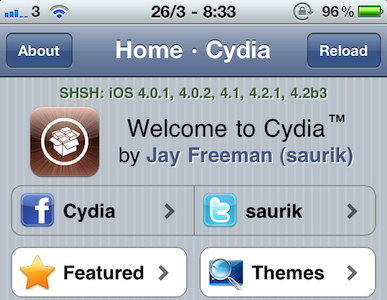
Jay Freeman, a.k.a Saurik just tweeted out that Cydia 1.1 is out; the update focuses on being even “faster, slimmer and more stable”. It also adds an improved search algorithm and a “resume where you left off” feature in what is a really solid update to the app. To get the update all you need to do is run Cydia and it will prompt you to run some updates.

Cydia 1.1: faster, slimmer, and more stable; including an improved search algorithm and “resume where you left off”. Available in Cydia now!

Many people will be glad to hear that speed has most definitely been improved in the app and it is now far quicker at loading to a fully loaded state as well as checking for updates, searching and loading the various categories of repositories. As Freeman says in his tweet, there is a new search algorithm, which as he explained in a comment earlier this month includes “an integer-arithmetic radix-sorted relevancy algorithm” which does make a little bit of difference from my quick testing. Perhaps more helpful is that the search results screen has been tweaked to make the results slightly smaller so that more can fit on the screen at any one time, helpful to quickly scan across the results to the one you want.

One of the oft-requested features for Cydia was support for multi-tasking, however as Freeman explained in some comments, this is not feasibly possible because of the requirement that Cydia run as Root whilst SpringBoard (which controls the suspension and resumption of apps) does not, meaning it could not control Cydia like it can a normal app and let it run in the background. However in Cydia 1.1, Freeman has managed to largely resolve the issue of multi-tasking with a “resume where you left off” feature which lets you quickly (I experienced less than 4 seconds wait time) get back to exactly where you were in the app, whether it be on a search page or inside a section folder.