This Week's Sponsor:

Turbulence Forecast

Know before you go. Get detailed turbulence forecasts for your exact route, now available 5 days in advance.


Posts tagged with "browser"

Tip: Automatically Add URL To A Downloaded File As Spotlight Comment

Also from Reddit, a nice little hack that allows you to automatically add a downloaded file’s URL as a Spotlight comment to the file itself. Spotlight comments are useful because they add metadata to a file, and they are supported across many 3rd party applications such as DEVONthink, Leap and Launchbar.

Spotlight comments are searchable, and having a URL automatically attached to a downloaded file can come in handy when you remember the website you downloaded something from, but you can’t find the file. Read more


Life Web Browser 1.5 Introduces iPhone Version and…Pull To Refresh?

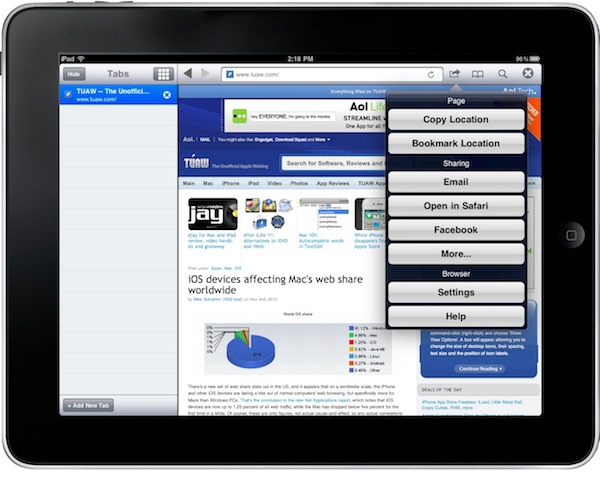
Life is an alternative web browser for iPad I reviewed back in June. The app was quite nice, but I ended up uninstalling it due to its numerous bugs. The feature set was interesting, though:

Life Web Browser tries a different approach, and it does so by telling us that we don’t need tabs and pages, we need to swipe.

Aseid Ghaffari and his team found out that users don’t find Safari’s behavior with new links exactly comfortable. Apple’s Safari forces you to go back and forth between a dashboard with thumbnails of pages, and another take on the subject such as iCab’s desktop-like tabs didn’t impress Ghaffari either. If it’s not about copying the desktop and it’s not about changing pages, then it definitely must be about gestures – the developers thought. So there you have it, you horizontally swipe between “windows”.

The latest 1.5 update, approved and released a few days ago, introduces iPhone support (the app is now Universal) and a couple of new options such as “Open sites” and pull to refresh for webpages. What, really? Read more


Seven Steps To Mastering Your Web Browser

Seven Steps To Mastering Your Web Browser

Thing is, the stock installation of any browser is only telling you half the story; it’s perfectly serviceable right out of the box, but there is a metric poop-ton of additional functionality and efficiency available. Thankfully, nerdy goofballs like myself have, mostly through trial and error, stumbled upon a host of great ways to make your browser work better and faster.

And lots of great tips in there. I agree: bookmarklets are little miracles.

Permalink

myPhoneDesktop 1.5: Still My Favorite Browser-to-iPhone App

When it comes to quickly sharing any kind of information between my desktop browser and the iPhone, I have one and only favorite tool of choice: myPhoneDesktop. What this app does is simple, yet effective: it allows you to share links, text, images, phone numbers and maps from your browser to the iPhone (or iPad, it’s universal) in seconds. You hit a button (of course, you have to create a mPD account first), and boom - you get a notification on the phone. Read more


Grazing: My New Favorite iPad Browser

I feel bad writing this. No, let me rephrase: I love when facts prove me wrong. I especially love when third party developers of iPad applications prove me wrong. A couple of weeks ago I wrote a piece called “Your Alternative iPad Browser Sucks” in which I basically stated that every alternative browser I had tried on the iPad couldn’t keep up with the elegance and powerful engine of Safari. I still stand by that statement: 3rd party developers are not Apple and I’m pretty sure Safari has got some exclusive features buried deep down in the code engine (such as memory management) which 3rd party devs have not access to.

What’s great now is that I found an alternative that doesn’t suck. Actually, it’s a beautiful, powerful and feature-rich app for iPad called Grazing that has been sitting on my homescreen for a week now. Grazing is now my favorite alternative browser for iPad. Read more


Your Alternative iPad Browser Sucks

I tried many alternative browsers on my iPad. So many, in fact, that I can’t even remember the last time I deleted one. Maybe it was Super Prober, or Atomic Browser. I really can’t remember. My problem with you, developers of alternative browsers, is that you’re not Apple. You’re not even close to being able to implement features and think - just think - that they could work better than Safari’s.

I’ve seen many bloggers and people I follow on Twitter claim that they found a browser better than Safari. In the past months I read dozens of articles about “I ditched Safari for Atomic Browser” or “I needed tabs so I installed this on my iPad”. Early and quick excitement is bad for the internet:  your words will stay there for the months to come as a living sign of your past ramblings. You said you ditched Safari, and now your homescreen.me profile lacks any alternative.

Step your game up, people. You don’t need to write about alternatives, because they all suck.

Read more


Web-based, Social iTunes Store Launching Next Week?

Now here’s an interesting rumor from All Things Digital. Apple sent invitations for a press event on September 1st to selected media outlets yesterday, and the speculation began about what Apple will announce next Wednesday. There are so many rumors and reports floating around one may think Apple is coming out with a new iPad next week. The invitation mail contains an acoustic guitar, just to confirm that - like every year - it’s a music-related event.

According to All Things D, Apple won’t launch “iTunes Cloud” next week, but a web-based version of the Store with revamped social capabilities.

Read more


Mozilla Releases Firefox 4 Beta 4 - Tab Candy Renamed to “Panorama” and Built-In

Firefox 4 is coming up great, and a huge Safari 5 fan is telling you this. Mozilla has just uploaded Firefox 4 Beta 4 to their servers (although the official Beta page hasn’t been updated yet) and you can go download it here. Update: official beta page now lets you download Beta 4.

The big news is, Tab Candy (or Tab Sets, or Firefox Uberview) has been renamed to Firefox Panorama (I love it) and it’s now built in Firefox 4, starting from this beta.

Read more