This Week's Sponsor:

LookAway

It helps you take regular breaks from your Mac to rest your eyes, without breaking your flow.


Posts tagged with "developers"

Apple Announces WWDC 2012: Kicks Off June 11

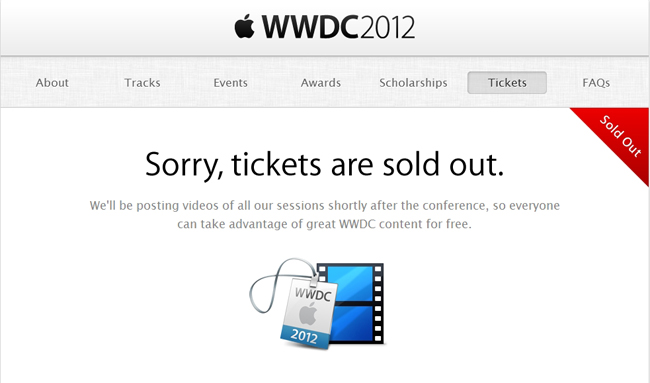
UPDATE: Apple has confirmed that tickets for WWDC 2012 are already sold out.

Apple has announced the official dates for WWDC 2012. The developer event kicks off in San Francisco on June 11 and runs through June 15. Tickets are on sale for $1599, and are limited to one ticket per person or five tickets per organization. This year, app developers under 18 years old (13 - 17) can have their legal guardian purchase a WWDC ticket and approve their attendance at the conference — budding developers do not have to miss out on this year’s events.  Despite being an ever popular event that sells out quickly, WWDC 2012 still takes place at Moscone West.

We have a great WWDC planned this year and can’t wait to share the latest news about iOS and OS X Mountain Lion with developers,” said Philip Schiller, Apple’s senior vice president of Worldwide Marketing. “The iOS platform has created an entirely new industry with fantastic opportunities for developers across the country and around the world.

Registration for the event will take place on June 10th starting at 9:00am. If the event cannot be attended, videos from this year’s sessions will be made available for download. It’s best to go in person so experts can answer your development related questions. This year’s topics will include information about OS X Mountain Lion, which will be made available later this summer, alongside iOS app development sessions.

WWDC 2012 will cover six technical tracks with over 100 sessions and labs. Tracks include:

  • Essentials
  • App Services
  • Developer Tools
  • Graphics, Media, and Games
  • Safari and Web
  • Core OS

Alongside ticket sales, Apple has opened nominations for the 2012 Apple Design Awards. Nominated apps will be considered for an ADA and must be made available on the App Store or Mac App Store by May 1st. Students can also look forward to a great time at WWDC, and earn the chance to attend the conference free of charge on a scholarship.

Activities at Apple’s WWDC 2012 include:
more than 100 technical sessions presented by Apple engineers on a wide range of technology-specific topics for developing, deploying and integrating the latest iOS and OS X technologies;100 hands-on labs staffed by more than 1,000 Apple engineers providing developers with code-level assistance, insight into optimal development techniques and guidance on how they can make the most of iOS and OS X technologies in their apps;the opportunity to connect with thousands of fellow iOS and OS X developers from around the world—last year more than 60 countries were represented;engaging and inspirational lunchtime sessions with leading minds and influencers from the worlds of technology, science and entertainment; andApple Design Awards which recognize iPhone®, iPad® and Mac® apps that demonstrate technical excellence, innovation and outstanding design.

PR after the break!
Read more


Promoting Software

In the pre-PC era, we built dedicated tools to fit different purposes. In the PC era, we learnt how to shift some tasks over to a single, centralized tool called the “personal computer”; we started exploring the concept of “ecosystem” through “digital hubs”, although we didn’t see the PC – whether “desktop” or “portable” – as a meaningful replacement for objects we depended upon in our daily lives. With mobile devices from the Post-PC era, we’re seeing tremedous growth in one particular aspect: that software can do (almost) anything. We’re in the process of learning how to use a single tool to fit multiple purposes at once.

This is especially true with the iPad. Following yesterday’s news of Cargo-Bot, an iPad game made on the iPad using Codea, I had yet another example of how software is changing the way we think of the distinction between tools for “work” and “entertainment” – and how it’s blurring the difference between computers for “production” and devices for “consumption”. John Gruber calls it “a glimpse of the future”. He’s right: here we have a device that is now capable of programming a game for its own platform, and it seems totally obvious in retrospect.

I never quite got the argument that devices like the iPhone and iPad were made for “consumption”. In the past five years, we have seen people making music on tablets, writing novels on them, and film-makers using iPhones as solid alternatives to their mobile capturing needs. The portability of the camera reinvented citizen journalism and revolutionized mobile photo sharing. I have seen doctors pulling out iPhones to do quick calculations and compare MRI images. I have been increasingly using my iPad as an “anything device”; on the other hand, I may have played no more than 4 games on my iMac since 2008.

It’s not just about “niches” or “bloggers” who want to find a way to do more on tablets than “normal people” would think is feasible. While the App Store has certainly seen a surge in popularity of text editors, Twitter clients, note-taking apps, and other kinds of apps writers and bloggers use on a daily basis, we shouldn’t forget about Final Draft, Procreate, Paper, the Business category, Apple’s Cards app, travel guides, books…just to name a few.

Software can do anything, but sometimes it is the combination of hardware and software that yields new, unexpected results that take advantage of the interplay of bits and guts. Apple based its mobile business on this. And third-party developers, too, understand that, in some areas, Post-PC hardware needs to be “extended” to address more specific needs. The Jawbone JAMBOX is a fantastic portable speaker that can augment your music listening or gaming sessions. The Nest thermostat is proving to be a hit among early adopters. Ten One Design is working on a Bluetooth-enabled pressure-sensitive stylus with an SDK for developers. Note how, even when extra hardware is needed, Post-PC devices leverage one thing to make these additions more natural, powerful, and connected: software.

It’s not just Apple. Other companies are making smartphones and tablets (and glasses), and some of them also recognize the importance of an ecosystem that fosters innovation and a stable business model for all the parties involved. It appears to me – and the numbers speak clearly for themselves – that only Apple, though, has so far acknowledged that a third-party software ecosystem needs to be nurtured, carefully encouraged, and educated about the latest technologies available to consumers and developers. And then again, Apple can do better.

The Times They Are a-Changin’. The multi-purpose, constantly evolving nature of software has changed us: most people don’t want to upgrade their devices every six months anymore, but they are always looking for new ways to unify the “things they have to do or want to do” into a single, intuitive, affordable experience capable of changing context and functionality with just a few taps.

In the Post-PC era, we are promoting software.


iCloud’s First Six Months: The Developers Weigh In

On October 12th, 2011, iCloud launched to millions of iOS users impatiently waiting to start getting their devices to sync with Apple’s new platform, which CEO Tim Cook went on to call the company’s next big insight for the next decade. Six months and 85 million customers later, iCloud has proven to be a substantial improvement to sync a user’s email, contacts, address book, and other data accessed by Apple apps. With third-party developers, however, adoption of iCloud sync and storage features has turned out to be a bit tricker, and possibly less intuitive than Apple’s own implementation due to the early nature of the platform. Read more


The (Big) Numbers Of The App Store Platform

Today’s news that Paper, a sketching app for iPad, has been downloaded over 1.5 million times in two weeks made me think about the size of the App Store platform and ecosystem of devices. Launched in 2008, the App Store now extends across the iPhone, iPad, and Mac, and distributes over half a million apps to customers (588964 apps per AppShopper). Last month, Apple reached the impressive milestone of 25 billion apps downloaded from the App Store – an important number that tops a history of exponential growth and adoption.

Below, I have compiled a list of noteworthy milestones reached by App Store developers in order to put Paper’s numbers in better perspective. For more App Store-related numbers, check out Wikipedia’s milestones table and our Mac App Store: Year One overview.

On January 24th, 2012, Apple announced the company paid over $4 billion to developers since the App Store’s launch in 2008. Over 315 million iOS devices have been sold to date; with these numbers, an average of 79 apps has been downloaded for every iOS device.

App Downloads: A History of Numbers

2009

July: Dictionary.com reaches 2.3 million iPhone app downloads.

2010

March: Doodle Jump for iPhone sells 3 million copies since launch.

June: Skype announces 5 million iPhone app downloads in four days.

June: Angry Birds for iPhone has been downloaded over 5 million times since its launch on December 2009.

September: Gameloft announces 20 million paid app downloads of its iOS games since the App Store’s launch.

2011

January: Pixelmator grosses $1 million in under 20 days.

January: Autodesk announces Sketchbook Pro for the Mac App Store has sold twice as many copies as the regular app in a year.

February: Fruit Ninja for iPhone hits 6 million paid downloads in 10 months.

May: Talking Tom 2 hits 1 million downloads in a single day.

June: Game publisher Chillingo announces 140 million downloads for its iOS apps since the App Store’s launch in 2008.

June: Gameloft announces 200 million iOS app downloads in 3 years.

October: Autodesk announces 3 million downloads of AutoCAD WS for iOS and Android.

October: Discovr announces 1 million downloads.

December: Flipboard for iPhone gets 1 million downloads in its first week.

2012

January: World of Goo downloaded over 1 million times by App Store and Mac App Store customers in 13 months.

February: Scribblenaut Remix sells 1 million copies since its launch in October 2011.

March: Camera+ sells 7 million copies in 1.5 years on the App Store (previously: 6 million copies in January 2012; 3 million copies in June 2011)

March: Angry Birds Space reports 10 million downloads in 10 days (the app is available on multiple platforms and devices, including iPhone, iPad, and Mac).

March: iPhoto for iOS downloaded by over 1 million unique users in under 10 days.

April: Draw Something hits 50 million downloads in under 2 months.

April: Paper for iPad is downloaded 1.5 million times in two weeks.

April: MLB.com At Bat 12 reports 3 million downloads. The app was released at the end of February 2012 on multiple platforms (including Android) and its developers also reported over 800,000 live streams per day.


Apple Seeds OS X Lion 10.7.4 to Developers

Following the release of the second Developer Preview of Mountain Lion earlier today, Apple has also released a pre-release version of OS X Lion 10.7.4 to developers. Build 11E27 is available now for download in the Mac Dev Center to registered Mac developers. A Server build for 10.7.4 has also been seeded to developers.

The last public version of OS X Lion, 10.7.3, was released on February 1st, adding bug fixes and addressing compatibility issues with Windows file sharing. A “supplemental update” to 10.7.3 was released on March 5th to resolve an issue with Time Machine backups.


Apple Releases OS X Mountain Lion Developer Preview 2

Apple just released the second developer preview of the next major version of OS X – Mountain Lion. The new developer preview is available in the Mac Dev Center to registered Mac developers, and it carries build number 12A154q. As with the first developer preview, the build can be downloaded from the Mac App Store with a redemption code. The Next Web has a list of known issues with the latest build of 10.8.

Mountain Lion, officially announced on February 16th, will be released this summer, featuring a number of new functionalities, including standalone Notes and Reminders app, Notification Center, Gatekeeper, and more. Check out our Mountain Lion overview for a roundup of all the new features.


Getting Your iPad App Ready for the new iPad

Editor’s Note: This is a guest post by Ken Yarmosh, the creator of the popular iOS apps Agenda Calendar and Buzz Contacts. Read more about him at his blog and follow him on Twitter.

With the announcement of “the new iPad,” developers are quickly readying their apps for the latest and greatest iOS device from Apple. Preparing an iOS app for a more powerful, Retina display device is a familiar task for those developers who got apps ready for the iPhone 4. Whether you do or don’t have that experience, it’s still helpful to have a checklist of sorts for preparing your app for the new iPad.

Here’s that list.

Download the Latest Version of Xcode

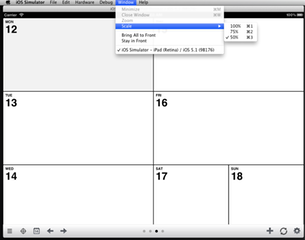
Before you get too excited, open up the Mac App Store to download Xcode 4.3.1. This will provide you with the “iPad (Retina)” simulator and the ability to build against the iOS 5.1 SDK. Even though an iOS 5.0.x iPad app will run on the new iPad (or any iPad running iOS 5.1), remember that the new iPad will ship with iOS 5.1. So, building against the proper SDK is always a smart choice.

Update Designs Assets for Retina display

Getting your UI assets updated for the new iPad’s Retina display should be relatively straightforward. Hopefully, you’ve built your application in a way that will mostly make it a design-related task of scaling up your images and applying the “@2x” designation to them. This can be slightly more involved than what was required for the iPhone 4 Retina display update because of the importance of both portrait and landscape on the iPad. Don’t forget to update your “Launch Images” for both orientations, as well as your “App Icons.” If you want more specifics on this topic, see the Apple-related documentation or read Marc Edwards’ post on designing for Retina display on the Bjango site.

Test in iPad (Retina) iOS Simulator

If you want your iPad app looking shiny the day the new iPad arrives, you’ll be stuck trying to use the ginormous iPad (Retina) simulator since the new iPad isn’t available now. Even on Apple’s 27-inch Thunderbolt or Apple Cinema Display, you’ll be struggling to view your app in portrait and barely be able to see it in landscape. Use the window scale and adjust it to 75% or 50% accordingly.

Check Wi-Fi Download Limit

Paul Haddad of Tapbots reported Tweetbot for iPad going from 8.8MB to 24.6MB post-Retina display upsizing. Since many iPad apps are content-intensive, definitely keep tabs on the total size of your app. Even with the new 50MB Wi-Fi download limit, Retina display assets will add up quickly.

Consider New Features

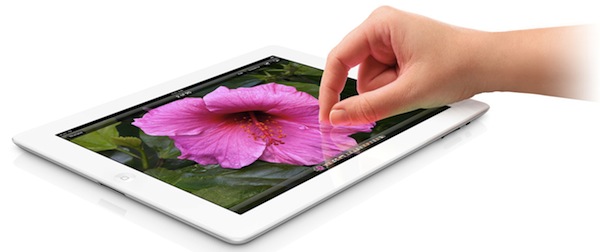
Should you be readying your app for the new iPad on launch day, you’re probably not going to add many new features to your app. But the new iPad does come with more than just Retina display, including the much faster A5X processor, a new camera, dictation (which is available to third-party apps), LTE, and Bluetooth 4.0. Think about how these new features can impact your app and consider how your app might be made better by specifically using them.

Submit to Apple

Apple is now asking developers to submit apps updated for iOS 5.1, including apps optimized for the new iPad. So, once you’ve gone through the steps above, submit to Apple and hurry up and wait. Make sure you mention in your “What’s New” release notes, as well as your version-specific App Store description that your app is now iOS 5.1 tested and Retina display ready. You’re not done yet though!

On-Device Testing

When you get that new iPad in your hands, the first thing you should do is open up your app. Do some pixel nitpicking and ensure everything is working as expected. Faster devices may cause certain parts of the user interface to load faster than others, can handle content pulled in from APIs to process differently, and more generally, may require some small tweaking.

iPad hero

iPad hero

Re-Submit to Apple

If you found issues during the on-device testing, prepare another update and once again, submit your iPad app to Apple. If any crashing or critical bugs were identified during on-device testing, consider (very carefully) requesting an expedited review.

Congratulations, you’re ready for the new iPad. Here’s to 25 billion more app downloads and many five star App Store reviews.


Apple to Developers: Update Your Apps for iOS 5.1

Following the release of iOS 5.1 earlier today, Apple has updated its developer portal with a new “Create Apps for iOS 5.1” webpage, asking developers to start submitting apps written specifically with the iOS 5.1 SDK. The checklist includes links to the iOS 5.1 SDK release notes, Xcode 4.3.1 for developers, and a detailed explanation of the various functionalities introduced in iOS 5.

iOS 5.1, the latest version of the world’s most advanced mobile operating system is now in the hands of millions of iOS customers. Install iOS 5.1 now and download Xcode 4.3.1 with iOS 5.1 SDK from the Mac App Store, so you can test and submit your iOS 5.1 apps today.

Furthermore, Apple has updated the iOS Human Interface Guidelines with new icon size information, as well as the iOS App Programming Guide.

Developers can head over this page to check out Apple’s resources for developing and submitting iOS 5.1 apps.


TestFlight Acquired By Burstly, Launches TestFlight Live

TestFlight, a popular over-the-air testing platform for developers, has been acquired by app monetization service Burstly, the company wrote in a blog post today. Based off Apple’s OTA install technology for beta applications and iOS’ certificate system, TestFlight has been used by thousands of developers in the past year to provide an easy and intuitive way to their users to install beta versions of iPhone and iPad apps without going into the manual process of managing .ipa files with iTunes on a Mac or PC. With a web app that works on desktop computers and mobile devices, TestFlight has powered ”over 70,000 developers sharing more than 130,000 apps with a group of 280,000 testers”. The acquisition, explained here, is meant to extend TestFlight’s capabilities as a platform to enable developers to offer beta apps, track revenue and monetization with Burstly, and collect other sets of data and user engagement with a new product launched today, TestFlight Live.

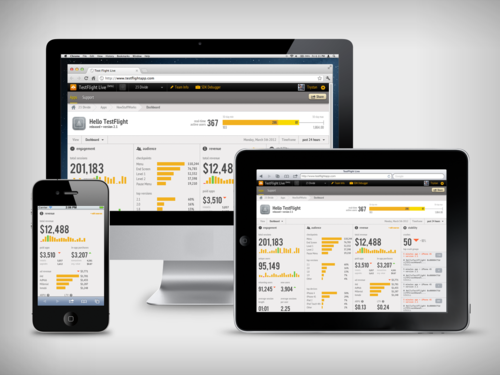
We always planned on launching a production version of TestFlight, but we wanted to push ourselves to start solving production problems and not simply copy the beta feature set. Along with help from the Burstly team, we think we have taken a great first step with TestFlight Live. Our goal with TestFlight Live is to provide a real-time dashboard that displays actions, symbolicated crash reports, and revenue. For the first time, developers will have a single dashboard that provides enough information to derive insights into Revenue Per User (RPU) and Customer Lifetime Value (CLV) to better understand your app business. Previously, this level of information would be from multiple sources and there was no easy way to collect it.

Burstly was the key contributor to the revenue portion of TestFlight Live, in addition to the concept they actually developed the APIs that make it possible. The revenue source options in TestFlight Live enable developers to include app sales data, in-app purchase data, and ad network revenue from multiple partners. You do not need to work with Burstly to pull in any of this data. If you do not want the revenue segment in your dashboard, we have provided a way for you to hide it.

The real-time, mobile-friendly TestFlight Live can be checked out here, and, apparently, developers willing to implement it in their App Store apps will simply have to add one line of code to their existing software to start getting reports from TestFlight Live, which is a free service. TestFlight Live can track things such as crash reports – allowing developers to instantly understand what’s causing an app to crash, thus enabling them to start working on a fix right away – and user engagement in the form of “checkpoints” (milestones that users unlock using an app, such as “launched the Settings screen”), in-app purchases, device types, and OS versions. This system works in real-time, any minute of any day, as long as a TestFlight-enabled app can connect to the Internet. TestFlight Live has a separate dashboard from regular TestFlight, which will continue to be available as a free service to manage over-the-air beta apps.

Burstly integration, on the other hand, opens the door to a bunch of different functionalities, most of them aimed at data gathering in relation to ads and monetization. Burstly can mediate ads from different networks, cross-promote and track installs, provide ads of different shapes and sizes, and offer “criteria” to developers to control what kind of ads are displayed on screen. The service comes with a series of features that are being used by partners such as Rovio, EA, and Zynga. More details are available here.

TestFlight, meanwhile, says that their products and Burstly will remain separate. TestFlight services will remain free, but the developers are looking at paid options for the future. New features on the roadmap (and on track for a March launch) include better performances, a desktop app for developers, and a new UI.

TestFlight, which launched an enhanced SDK back in September, has become one of the most popular options available to developers to manage apps in their testing stages without forcing users to manually install them with a Mac or PC. Another similar service is HockeyApp, which we covered in May of last year (and has improved a lot since). To read more TestFlight’s new owners and the new services, check out the company’s blog post.