This Week's Sponsor:

Turbulence Forecast

Know before you go. Get detailed turbulence forecasts for your exact route, now available 5 days in advance.


Posts tagged with "health"

Jobs, Healthcare, and the Apple Watch

Tim Bajarin, writing for TIME:

I recently spent time with Apple executives involved with the Watch. I asked them to explain the real motivation for creating the device. Although Apple has made fashion and design a key cornerstone of its existence, it turns out that this was not at the heart of why they created this product.

The late Apple CEO Steve Jobs developed pancreatic cancer in 2004. He then spent a great deal of time with doctors and the healthcare system until his death in 2011. While that personal health journey had a great impact on Jobs personally, it turns out that it affected Apple’s top management, too. During this time, Jobs discovered how disjointed the healthcare system can be. He took on the task of trying to bring some digital order to various aspects of the healthcare system, especially the connection between patients, their data, and their healthcare providers.

Permalink

Activity++ Review

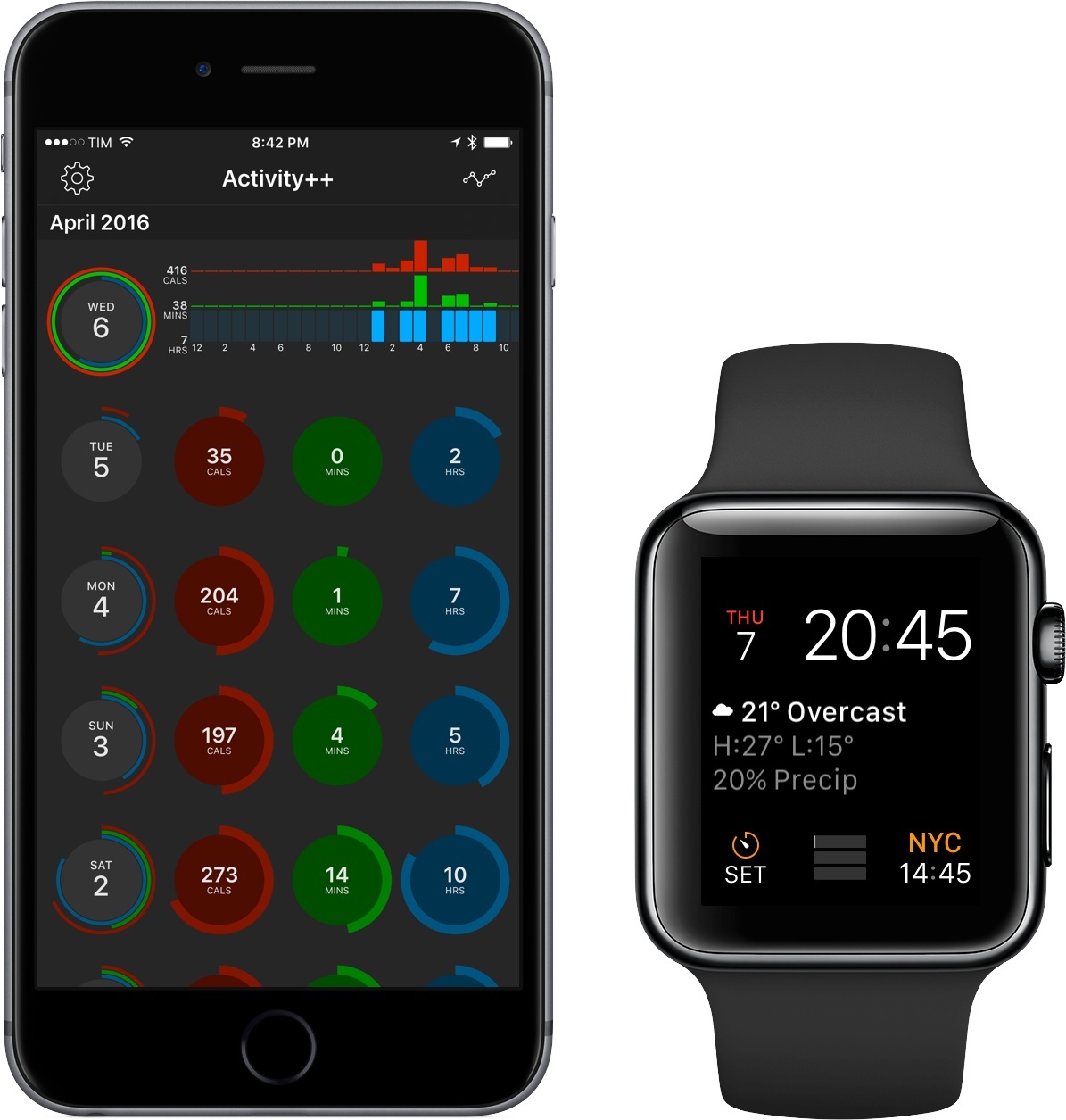
After creating the wildly useful Sleep++ and Pedometer++, iOS veteran David Smith has returned with Activity++. Smith’s newest venture is set on improving what’s already been done with activity tracking for the Apple Watch. Along with its $2.99 price tag, Activity++ is a bold move in the progression of solid apps from Smith and one that, rather unsurprisingly, looks to be a great step forward.

Read more


Researchers Look to Smartwatches to Prevent Strokes

Speaking of Apple Watch and heart problems, here’s the opposite end of the spectrum: the developers of Cardiogram are working with researchers of the UCSF Health eHeart Study to understand if heart rate data captured by smartwatches can generate insights to prevent strokes.

Heart researchers from the University of California, San Francisco as well as developers behind the heart rate-tracking app Cardiogram are teaming up to investigate if the tech built into smartwatches could be used to identify those at risk for a stroke or heart failure.

The research team will be honing in on one of the most commonly undiagnosed irregular heart conditions: atrial fibrillation, an irregular and often rapid heart rate also known as a type of arrhythmia.

Working within an observational study dubbed mRhythm, which kicked off on Wednesday, researchers will track data from participants using both the Apple Watch and Android Wear-based devices while looking for signs of irregular heart rates. These kinds of watches don’t have advanced electrocardiogram (EKG) machines inside. But they do include cheaper technology, such as LED lights, which can be used to measure blood flow in the wrist.

Like Apple’s ResearchKit, if these crowdsourced studies can lead to early diagnoses and better prevention, the impact of wearable devices on our lifestyle will be meaningful.

Those interested in the study can check out the details here.

Permalink

Kardia Band for Apple Watch

Interesting idea for an Apple Watch band by AliveCor: the Kardia band will allow users to capture EKG directly from their wrist by placing a finger on the band for 30 seconds.

Users can record a single-lead EKG by simply touching Kardia Band’s integrated sensor that communicates with the Watch app, Kardia by AliveCor. The Atrial Fibrillation (AF) Detector then uses Kardia’s automated analysis process (algorithm) to instantly detect the presence of AF in an EKG, the most common cardiac arrhythmia and a leading cause of stroke. Also included is the Normal Detector, which indicates whether your heart rate and rhythm are normal, and the Unreadable Detector, which tells you when to retake an EKG so physicians receive only the highest quality recordings.

Users can also record voice memos on their Apple Watch to accompany each EKG that give doctors and caregivers a clearer picture of what was happening at the time of the recording — describing symptoms such as palpitations or external factors like caffeine intake. Kardia also integrates seamlessly with Apple’s Health app to include EKG data with steps and calorie intake to provide richer, personal analysis over time.

The Kardia band isn’t meant for fitness aficionados – rather, it’s designed for people with heart-related problems who would benefit from medical-grade EKG and the ability to store detailed reports and notes (including voice memos dictated on the Apple Watch). I’m curious to see if more companies (including Apple) will come up with Apple Watch bands with embedded sensors that can transfer data directly to the Watch (there were some rumors about this last year).

Also worth noting: AliveCor is run by Vic Gundotra (former Google VP and head of Google+) and they have a whole line of Kardia products (which also include smartphone cases for similar measurements).

Permalink

The Verge: ‘The Age of Indie Fitness Apps Is Over’

A sad but true post by Lauren Goode at The Verge:

What do Endomondo, MyFitnessPal, MapMyFitness, Runtastic, FitStar, and RunKeeper all have in common?

Aside from all being smartphone apps that track your health and activity, all of these apps have been acquired by bigger companies — bigger brands — over the past couple of years, the latest being RunKeeper, which was just bought by running shoe maker Asics. Endomondo, MyFitnessPal, and MapMyFitness went to Under Armour. Runtastic was acquired by Adidas. FitStar was bought by Fitbit, which at the time wasn’t yet a public company, but in its own right has swelled to become the market leader for activity trackers.

Large companies operating at scale with free services and lots of users who don’t bother to pay for extras? It’s photo management, all over again.

If history does repeat itself, we’ll continue to see, as Goode argues, consolidation of independent services being acquired by bigger brands. The good news: smaller, more focused health and fitness utilities seem to have a profitable niche in which they can thrive, while still retaining the ability to save data into HealthKit. I appreciate how Apple’s Health puts everyone on the same playing field – from brands to solo developers (the real indies in this case) like David Smith.

At which point, though, do we expect Apple and Google to make their own all-encompassing fitness and meal tracking apps for smartphones? Apple may be pushing the Watch as their premier fitness device, but they know how much people use their phones for these tasks, and a future Sherlocking wouldn’t surprise me at all. Just like it happened with photos.

Permalink

HeartWatch 2 Review

A couple of months ago, Federico linked to David Walsh’s Medium post detailing HeartWatch, a deeply functional heart monitoring app. HeartWatch, according to Walsh, is a better way to visualize heart rate data pulled from your Apple Watch.

Now in version 2.0, HeartWatch looks to be a more all-encompassing aggregator of your heart information. After spending some time with the newest version of the app, I can highly suggest HeartWatch – not only for its capabilities but also for its potential.

Read more


Sleep++ 2.0 Brings Improved Sleep Analysis to Apple Watch App

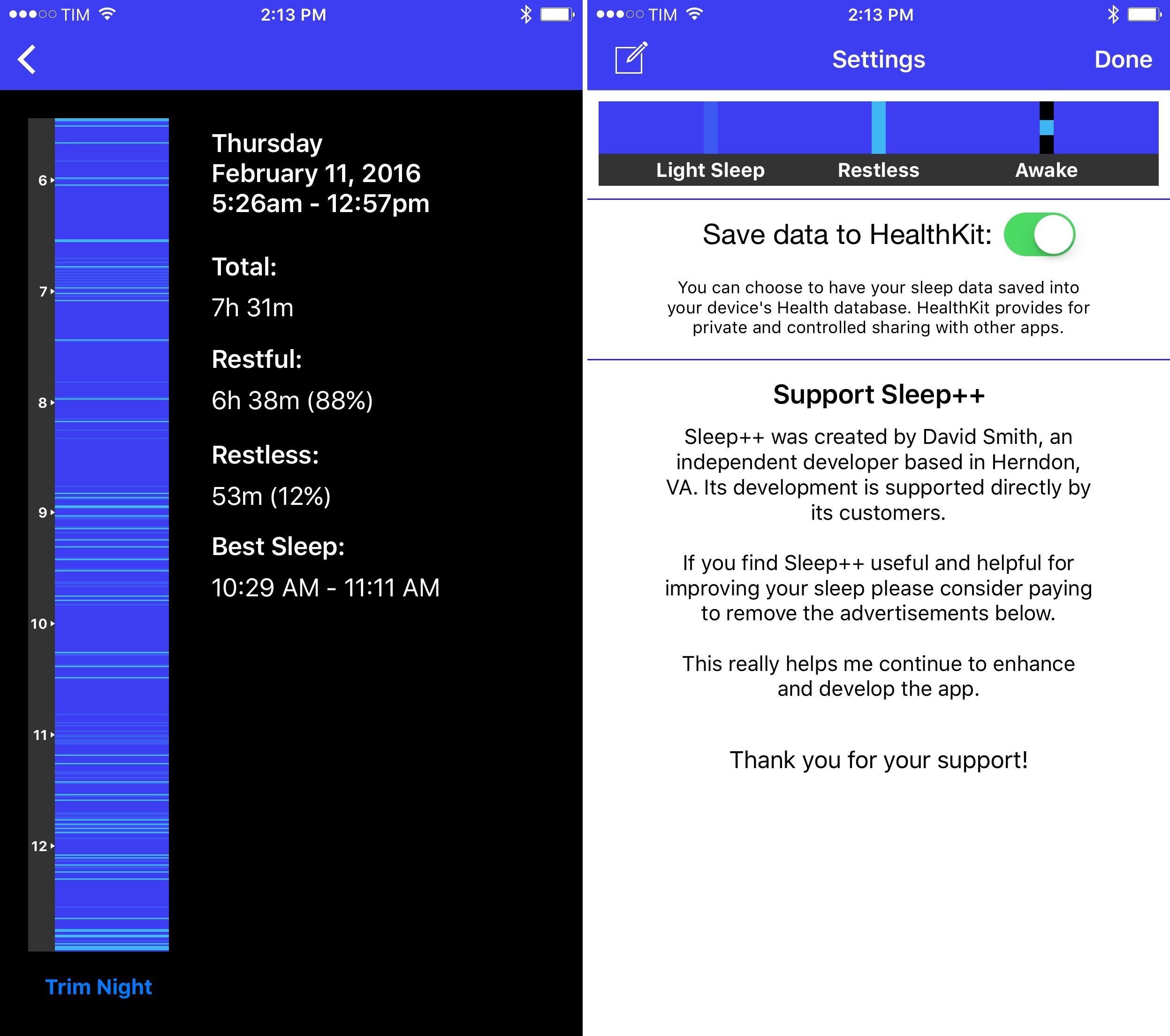
I’ve previously noted how, almost a year into the Apple Watch, I haven’t found myself depending on any particular Watch app. I mostly use my Apple Watch for basic features such as notifications and timers, and I like wearing it because it looks nice. All the productivity or utility apps I’ve tried are either too slow, too complex for a tiny screen, or they don’t launch at all because of watchOS performance issues.

Read more


HeartWatch: An Accidental but Heartfelt App

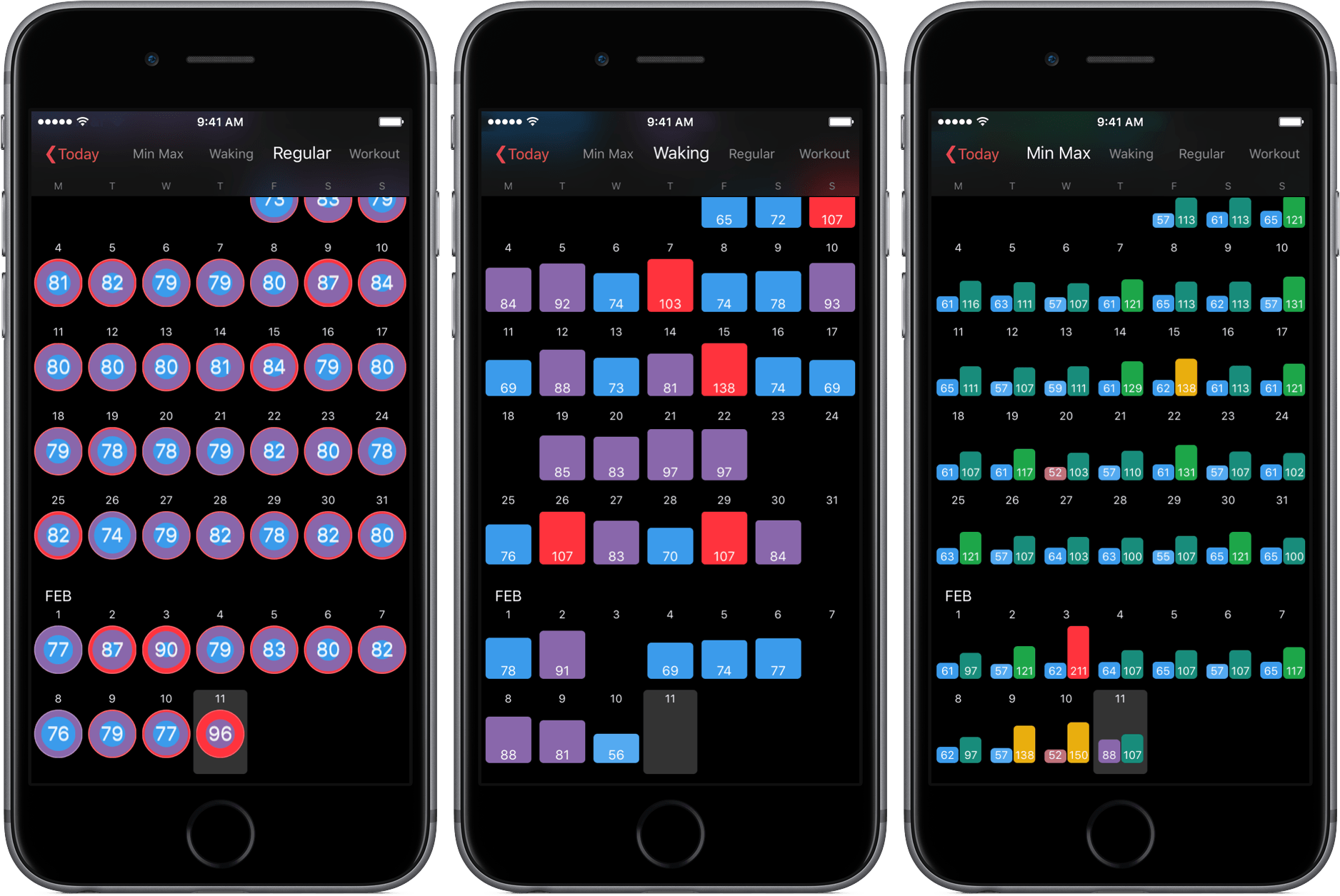
Great story and app idea by David Walsh: dissatisfied with the presentation of heart rate data in Apple’s Health app, he created HeartWatch – a dashboard for your heart rate data. The app works best if you’re an Apple Watch wearer (you get readings every 10 minutes) and it includes features such as peak zones, timelines, and – my favorite – separate tabs for regular, waking, and workout heartbeats.

Heart Watch lets you see how your heart is beating across three simple views. Waking, Regular & Workout. Each of these views are isolated because, while you may want a higher heart rate during a workout, if your heart is racing when you aren’t doing any exercise then this is likely not a good thing and probably something you might want to show your medical practitioner.

David has shared the full story behind the creation of HeartWatch in a blog post:

Now I wanted to dig a bit further to find when and what was happening with my heart. Unfortunately, the Health app wasn’t very much help from here forward. There’s a summary graph, then to go any further, you have to read every single heart beat reading captured. With no search! Proverbial needle in haystack. So I looked around to see if there were any apps to help. Short answer. No. They seem to fall into finger on the camera apps, “fitness junkie” apps or just giving a simple average.

My research also made me realise a simple average is close to useless if you work out. Obviously your heart rate will be higher when you work out. This then throws out the daily average compared to days you don’t work out.

So I started a side project. Something that could show me what was going on. This then of course grew, as these things tend to do.

I took HeartWatch for a spin, and I like what David is doing. The app imported months of heart rate data from Health in less than a minute and it presented me with a clear calendar view of different reading types. HeartWatch can show percentage changes from previous readings, and it neatly breaks down a day’s data with colored charts and labels. I would love to see these kinds of average stats for weekly and monthly stats too, but, overall, HeartWatch is off to a good start.

Like David Smith’s Pedometer++, HeartWatch is another app that uses data from the Apple Watch in an interesting and useful way. If you care about your heart rate as measured by the Watch (and you should), I recommend giving HeartWatch a try.

Permalink

Pedometer++ Gets Smarter Step Counting on Apple Watch and iPhone

David Smith’s Pedometer++ is one of the apps that got me back in shape and I’ve always appreciated the thought and care that he puts into it.

Today, David released a substantial update to Pedometer++ with an entirely new logic to coalesce steps registered by the iPhone and Apple Watch:

You might be wondering why I don’t use Apple’s Health.app merging system for this. After extensive testing about how that works I determined that it doesn’t really do a good job for step data. The Apple Health algorithm works around the concept of a ‘priority’ device. This priority device’s steps are then used in all instances except where that device is completely unavailable. In which case the secondary devices data is used to fill in the gaps.

The concept of a fixed priority device doesn’t really work for step data. As you move between the various activities of your daily life, the best device for measuring your movement is constantly switching. Thus you need a data merging algorithm that can dynamically analyze your step data and determine which device’s data is best at any particular time.

That is exactly what Pedometer++ now does. It goes through your daily data and can dynamically determine which device to use for any particular point in your day. The result is a much richer and complete picture of your daily activity than you’d get from Health.

I’ve tried many pedometer apps for iPhone and Apple Watch over the past few months, and I’ve noticed annoying discrepancies between data recorded by my iPhone and steps measured by Apple Watch. David’s intelligent system to reconcile steps taken sounds like what I’m looking for. It’s been a while since I wanted to really check out a new watchOS app, too.

Permalink