Posts tagged with "iOS"

Presence Puts Your Mac In The Cloud, Lets You Connect from iOS

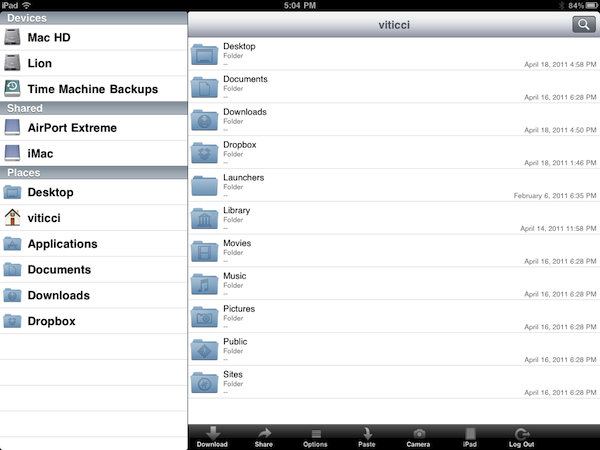
Over the past few months, I have tried several iOS apps to access my Mac’s filesystem and screen while away from my home office. These apps, either standalone VNC clients like Screens or all-in-one solutions like Cloud Connect Pro, usually relied on a Mac’s built-in sharing and remote login capabilities to create a secure connection between the machine and iOS devices trying to access its contents. To work with these apps, I simply had to set up a global DynDns hostname or a VPN server so that I could log into my Mac, view files, and control its screen. The VPN method, for instance, was actually based on the same DynDns hostname I had already configured in Edovia’s Screens, Cloud Connect Pro, Plex, FileBrowser and many others. For as much as I loved being able to remotely connect to my OS  X machines with a standard web address (DynDns allows you to create a custom URL), now I can’t use it anymore. We have recently upgraded our Internet connection to a new ISP, and whilst the speed bump is noticeable and generally useful when it comes to downloading large files, the new router provided by the ISP doesn’t offer a public IP address (without entering all the details, it’s based on NAT), thus preventing me from using all those neat Mac and iOS apps that needed DynDns to be working correctly. I can access my Mac’s content locally, but as soon as I go out DynDns becomes useless thanks to the new router. This means Here, File File doesn’t work anymore in 3G, as well as Screens (through DynDns), Plex and Cloud Connect. I may have a faster Internet connection now, but the lack of DynDns support changed the way I can access my machines from outside my home network.

So I tried to come up with new solutions to work from anywhere in these past weeks. Screens comes with an optional Screens Connect option that lets you set up a hostname that works through Edovia’s servers (and it’s not blocked by my router) and LogMeIn comes with its own Mac application that handles connections independently. From what I’ve seen so far, apps that provide their own connections through a “server” Mac app and don’t require me to enter a global DynDns hostname are working just fine. But this also means that apps based on OS X sharing features and lacking proprietary remote access capabilities won’t work unless I change my ISP again. Presence, a new version of the popular FarFinder tool by FlyingMac, allows me to access my Mac – all its files, folders, and drives – through a web service that puts the computer in the cloud and makes it accessible from any web browser, iPhone, or iPad. Read more

Official Moleskine App for iOS Now Available

Moleskine, a popular brand of notebooks, diaries and sketchbooks, released its first official app for iPhone and iPad yesterday in the App Store, bringing the look and note-taking capabilities of Moleskine products to iOS devices – also adding features only possible on smartphones and tablets like geo-location and image inserting functionalities.

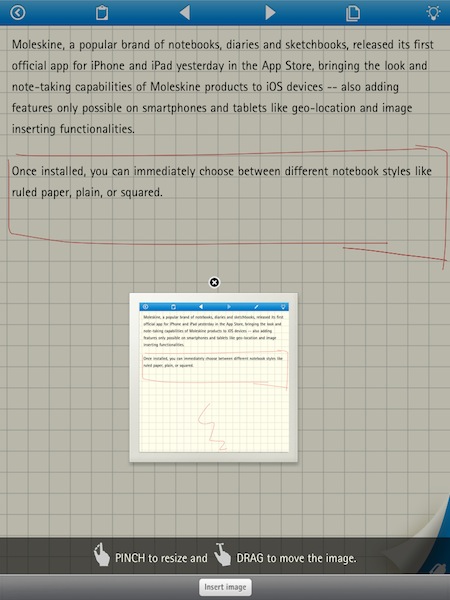
Once installed, you can choose between different notebook styles like ruled paper, plain, or squared. From the settings, you can set a text size, text color, or edit the cover picture that will appear upon launching the app. Moleskine uses a mix of custom UI elements and standard iOS graphics for displaying popovers and menus; the result is, in my opinion, very elegant and minimalism. Unfortunately, playing around with this first version I noticed there’s no way to sync the iPad app with the iPhone counterpart – your notes are going to stay local on each device.

Notes – or, as Moleskine calls them, “thoughts” – can be organized by category and location. The main screen, called myThoughts, displays two buttons in a bottom toolbar to visualize categories and location points. Once you create a new note, you’ll notice a clipboard icon in the top toolbar that allows you to bring up a custom, animated pop-up menu to rename the note, assign categories / colors / labels, choose paper styles and share via Twitter, Facebook or email. The animation of this menu is really nice, although it caused the app to crash a couple of times. As far as true note-taking capabilities go, you can type text, sketch and insert images. Both text and sketches can have different sizes and colors, whilst images can be zoomed and cropped before being inserted into a document. Text automatically wraps around an image as you move it around, but images (and sketches) will be removed when you share a note via email.

Overall, this app is a good first attempt to bring the Moleskine experience to iPhones and iPads. The lack of syncing might be a deal-breaker for many nowadays, and I believe Dropbox integration could come in handy and should be considered by the developers. The app is free in the App Store, and you can check out a gallery of screenshots below. Read more


#MacStoriesDeals - Friday

We’ll tweet the daily deals at @MacStoriesDeals as well as exclusive weekend deals too, so please follow! Here are today’s deals on iOS, Mac, and Mac App Store apps that are on sale for a limited time, so get ‘em while they’re hot!

Read more


Printopia 2.0: AirPrint From iOS To Your Mac Apps

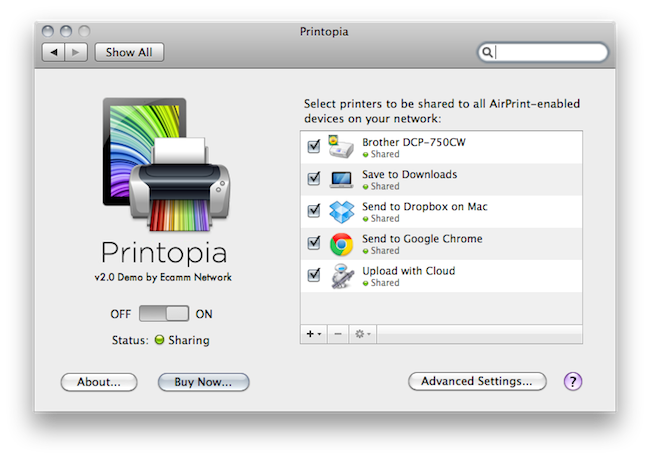
When I first reviewed Printopia by Ecamm back in November, I was impressed by how easily the app allowed me to send documents from an iOS device to a shared printer on OS X via AirPrint. The problem with AirPrint we discussed in November – which Apple hasn’t fixed yet – is that unlike the first betas of OS X 10.6.5 and iOS 4.2, the final versions of these OSes didn’t ship with AirPrint support for shared printers. AirPrint works out of the box with a bunch of HP printers, but Apple promised last year that it would also work with any printer previously configured and shared on a Mac. No need to install additional drivers on iOS: as long as a printer was shared on OS X, it would show up in AirPrint. With 10.6.5 final, that wasn’t the case. AirPrint support for shared printers was pulled at the last minute, and a series of unofficial hacks surfaced to re-enable it without reverting back to a beta of 10.6.5 (Mac OS X has reached version 10.6.7 since then). Among those hacks and apps, Printopia was without the doubt the most elegant one because it provided a GUI in System Preferences to manage shared printers, and allowed you to print a document to a virtual location on your Mac or Dropbox.

Version 2.0 of Printopia, released yesterday, builds on the great virtual printing functionality by adding support for unlimited printers in any location (could be your Downloads folder, the Desktop – you name it) and PDF workflows and applications as well. The feature is more exciting than it sounds on the changelog: with Printopia 2.0, you can send a document from your iOS device (through AirPrint) to any app on your Mac that can preview, say, PDFs. Example: I’m on my iPhone, and I find a PDF I want to read on my computer. Both devices are on the same local network (but it should work with this kind of VPN setup as well), and Printopia is running on my Mac. I take the PDF, and “print it” to Evernote. The document will automatically open in the Evernote app on my desktop. I tested this with Google Chrome, Preview, DEVONthink, Yojimbo, Numbers, Pages – it works really well. But there’s more. Not only you can print to applications, you can also print a document to an Automator workflow that supports the file type. Here’s another example: last night, I sent a PDF document to CloudApp’s own “Upload with Cloud” workflow, and AirPrint sent the document to CloudApp, automatically returning the file’s URL on my desktop.

Printopia 2.0 opens the door to a lot of possibilities for virtually printing documents anywhere on your computer, and of course support for physical shared printers is still there. Printopia 2.0 also introduces support for passwords you can assign to any virtual or real printer and settings for paper size / tray and colors.

If you want to get the most out of AirPrint and you have a Mac, Printopia is the utility to install. With support for real and virtual printers and system-wide integration with apps and Automator, Printopia is a full-featured solution to get any document from iOS on to the desktop. A demo version is available, and a full license can be purchased at $19.95. More screenshots below. Read more


World of Goo Now Available for iPhone, Now Universal

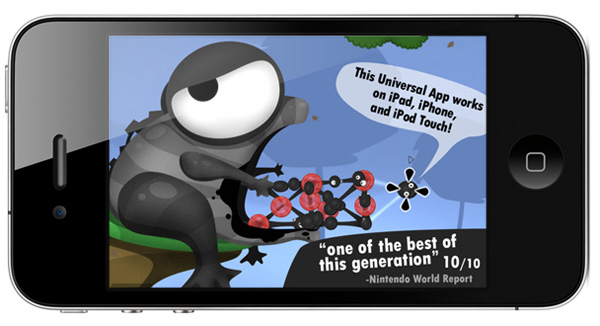
2D Boy’s mega hit World of Goo set records for iPad sales and just last week we told you that a universal update was awaiting approval. The universal update is now available with support for iPad, iPhone and iPod Touch. So instead of walking around in circles waiting for Tweetbot (and our review), why not grab the universal update to World of Goo HD? It’s only $4.99 and you can get your gooey hands on it right here.

An iPhone/iPod Touch only version is also available for only $.99, you can get it here.


#MacStoriesDeals - Wednesday

We’ll tweet the daily deals at @MacStoriesDeals as well as exclusive weekend deals too, so please follow! Here are today’s deals on iOS, Mac, and Mac App Store apps that are on sale for a limited time, so get ‘em while they’re hot!

Read more


Oscium’s $300 Kit Turns iPad into Oscilloscope

For anyone that doesn’t know, an oscilloscope, or O-scope, is an electronic measuring instrument that creates a visible two-dimensional graph, on a screen, of one or more continuously varying voltages or currents. Oscium has revealed the iMSO-104, a combination of a free universal iOS app and a $300 hardware kit that attaches via the iDevice’s dock connector. Read more


#MacStoriesDeals - Monday

If you didn’t already know, we’ve set up a new twitter account for Deals, it’s @MacStoriesDeals. We’ll tweet the daily deals there as well as exclusive weekend deals too. Help spread the word! Here are today’s deals on iOS, Mac, and Mac App Store apps that are on sale for a limited time, so get ‘em while they’re hot!

Read more


#MacStoriesDeals - Friday

If you didn’t already know, we’ve set up a new twitter account for Deals, it’s @MacStoriesDeals. We’ll tweet the daily deals there as well as exclusive weekend deals too. Help spread the word! Here are today’s deals on iOS, Mac, and Mac App Store apps that are on sale for a limited time, so get ‘em while they’re hot!

Read more