


If you didn’t already know, we’ve set up a new twitter account for Deals, it’s @MacStoriesDeals - please follow for Deals-only posts. We’ll tweet the daily deals there as well as exclusive weekend deals too. Help spread the word! Here are today’s deals on iOS, Mac, and Mac App Store apps that are on sale for a limited time, so get ‘em while they’re hot!
Posts tagged with "iOS"
#MacStoriesDeals - Monday
#MacStoriesDeals - Friday

I Want This Tetris-like Stand For iOS Devices On My Desk
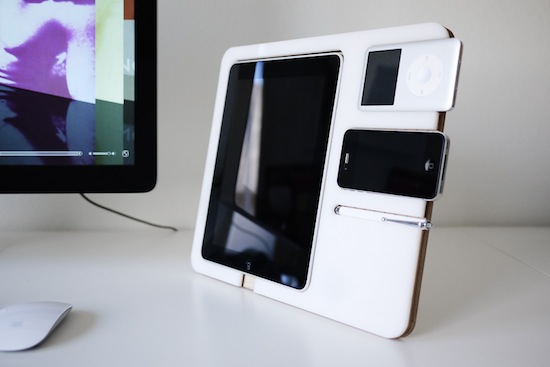
This product will likely never see the light of day on retail stores’ shelves, but it’d be so perfect on my home desk next to my iMac. The Polyply is a multi-device stand designed by Andrew Kim, and it’s made out of acrylic plastic and birch plywood. Realized as a two-week project by Kim to see how such an accessory would fit on an Apple’s fan desk, all parts were cut on a laser cutter. The Polyply could easily keep in place an iPad, an iPhone, and iPod and a stylus. It’s got room to plug in your Apple 30-pin dock connector and it even lowers for a better typing angle.
The design is simple and clean and, in spite of the times, it’d be just right for my desk that is daily cluttered by iPad, iPhone and, yes, an iPod Classic.
Like I said though, this was just an experiment. But I’d be ready to open my wallet if it was a Kickstarter project. [via Cult Of Mac]
Scribd To Switch Millions of Old Embeds Over to HTML5, iOS Devices Rejoice
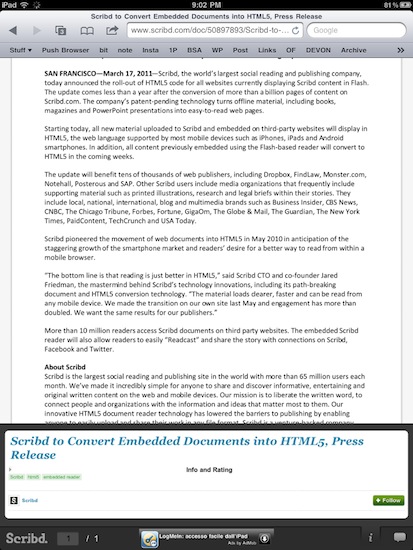
Social document sharing service Scribd has made a major announcement today: they’re in the process of switching millions of old Flash-based embeds scattered around the web over to the new HTML5 layout they started implementing last year. The conversion process will be automatic, shouldn’t break anything for publishers and website owners and, most of all, will dramatically increase the quality and speed of Scribd embeds.
As Scribd swaps Flash with HTML5 on old document embeds, iOS devices like the iPhone and iPad will benefit from the change: the HTML5 tool developed by Scribd is fully compatible with iOS’ Mobile Safari and now every webpage containing a new or old Scribd document will be perfectly viewable on Apple’s phones and tablets.
When Scribd launched its HTML5 reading platform last summer, they said user engagement with the Scribd experience “surged”. The conversion of 20 million embeds to HTML5 should definitely make things even better for Scribd.
#MacStoriesDeals - Thursday

Happy St. Paddy’s Day all over the world and Happy National Unity Day in Italy! Here are today’s deals on iOS, Mac, and Mac App Store apps that are on sale for a limited time, so get ‘em while they’re hot!
Angry Birds HD Updated: 15 New Levels→
Angry Birds HD Updated: 15 New Levels

Just in time for the release of the iPad 2, Rovio updated (again) Angry Birds HD last night to include 15 new levels and continue “the adventures in the frontier badlands”. A new golden egg has been included in version 1.5.3 as well.
Looking at early iTunes reviews, it sounds like Rovio also changed something in the “pause” screen of the app, putting a news section (some people say ads) in there and forcing users to wait for the animation to finish before resuming the game. If you’ve noticed this too, please let us know in the comments below.
Angry Birds HD is available here.
Google Adds A Bar to Gmail iOS Webapp
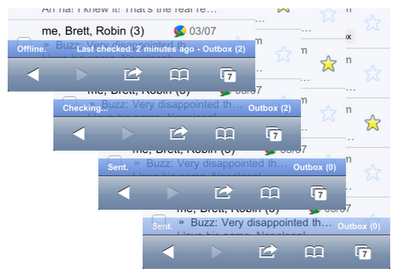
Fear not, Google didn’t add a #dickbar to Gmail for iPhone. What the Gmail did is actually pretty smart: to better communicate the status of their inboxes to iPhone users, Google recently tweaked the Gmail webapp for iOS devices to include a “connection bar” that displays information for outgoing and sent mail, internet connection, and so forth. It doesn’t appear all the time, it only shows up when a certain activity is triggered – like an email you’re sending from your phone.
It also appears when your phone is offline, back online and sending, and then again when it finishes sending all messages.
You can see the connection bar in action by visiting mail.google.com from your iPhone or iPod touch now, running iOS 4 or later. If you don’t see it, try clearing Safari’s cache in the Settings app. Too bad Retina Display support in the Gmail webapp is still nowhere to be seen.
#MacStoriesDeals - Wednesday

Here are today’s deals on iOS, Mac, and Mac App Store apps that are on sale for a limited time, so get ‘em while they’re hot!
Photoshop Express For iOS Updated To 2.0, Adds Enhanced Camera Features
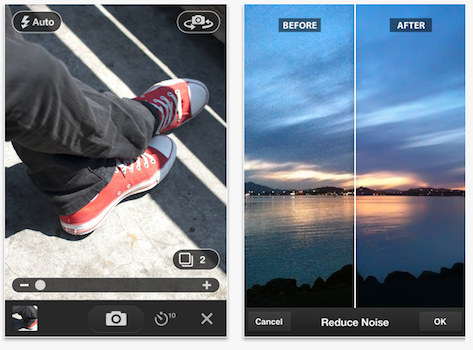 Adobe’s Photoshop Express
for iPhone and iPad has today been updated to version 2.0 and it brings a few substantial, and much needed improvements, to the mobile photo editing app. Perhaps of most importance is the addition of full Retina display support and multi-tasking support, which is a feature that all apps really should have had a few months ago.
Also included in the update is a new camera workflow for what they describe as “rapid in-app photo-taking” but in addition to that is the inclusion of a $4.99 in-app purchase for an ‘Adobe Camera Pack’. This pack improves upon the apps in-built camera functions by adding the features of reducing noise, self-timer and auto reviewing functions.
The app remains free and the 2.0 update can downloaded now, but to get the Adobe Camera Pack you’ll need to fork out the cash for that in-app purchase.
[Via The Loop]