

Posts tagged with "iOS"
#MacStoriesDeals - Friday

OpenFeint Connect Promises Cross-Platform Integration, But No Simultaneous Play

It looks like mobile gaming OpenFeint has no intention on leaving all the fun to Apple’s Game Center. In fact, OpenFeint has become more than a simple alternative to the Game Center with cross-platform integration (OpenFeint works on Android devices, too) and in-app purchasable content that’s not tied to App Store approval. The service sports 65 million users and it’s about to expand a lot more with the upcoming launch of OpenFeint Connect.
Connect will allow iOS, Android, Windows Phone 7, OS X and Windows users to communicate through the OpenFeint platform, share leaderboards and achievements as if everyone was playing the same game on the same device or computer. In fact, Connect could also work with Facebook games and a plethora of other online gaming services. Unfortunately though, simultaneous cross-platform play won’t be possible (guess it’s a little tricky to implement real-time multiplayer on iOS vs. Android).
A private beta of OpenFeint Connect is available here for developers who want to experiment with the API. [via Download Squad]
Gamerami Serves News, Upcoming Game Info On Demand

Growing up, I was a subscriber of Nintendo Power and the later (manlier) Game Informer as I grew into my predestined Xbox phase. High school was great for zombie killing, but between college and MacStories I’ve little time to play or let alone get a heads up about the latest upcoming games. Gamerami is a mobile news stand that makes sifting through the latest titles easy and rather painless, and it just might save your butt when you’re on the spot. At least now I don’t look like a total nobody when I’m asked what cool & new games are coming out on the PS3.
iOS Game Developers - Is $0.99 Too Low?→
iOS Game Developers - Is $0.99 Too Low?

Interesting discussion over at Pocketful of Megabytes. The author concludes:
So is $0.99 really too low? Well, yes and no. It’s not too low, because that’s where it needs to be for games in this ruthless and uncharted territory to prosper (and because consumers love cheap goods), but it is too low because it inaccurately depicts the worth of a game’s contents. Without higher profits, money cannot be spent on improving the overall quality of the content found therein. Low profits mean low budgets and low budgets mean cheaply-made apps… the price tag is low out of necessity. It’s not ideal, but we’re stuck with it.
With $0.99 apps you attract more customers, but hard work is undervalued. On the other hand it is true that you never know what app you’re going to buy (no trials), but we also have to consider Apple’s 30% cut on those .99 cents.
So here’s an idea. What if Apple discontinued the $0.99 price tag, and automatically raised all prices to $1.99 – thus making it the lowest price point? Perhaps a more feasible business model for indie developers?
Would that stop you from buying the next Angry Birds or Trainyard?
Unicode Symbols In The iOS Keyboard with Jailbreak Tweak

You know Unicode symbols, right? The ones you might find in tweets from time to time, or in links from Daring Fireball and Shawn Blanc’s website. Yes, these symbols. It turns out, they’re pretty cute. And it also appears that people love to use them to prettify their messages, tweets, Facebook walls and whatever else you can do on the Internet (suggestion: don’t use them too much on Reddit). Anyway, thanks to the efforts of the folks over at Vintendo, jailbreakers can now install a tweak that brings Unicode symbols onto the default iOS keyboard.
The tweak, called Vmoji and available in Cydia through Vintendo’s repo, can be activated the pressing the numeric keys in the keyboard. It’s kind of obtrusive, but I guess it gets its job done. So there you have it: a new way to get those cute symbols into your tweets. Just use them responsibly. [via RazorianFly]
#MacStoriesDeals - Tuesday

You can always tell when an holiday passes, app prices jump back up! Here are today’s deals on iOS, Mac, and Mac App Store apps that are on sale for a limited time, so get ‘em while they’re hot!
Real Page Numbers Come to iOS Kindle App
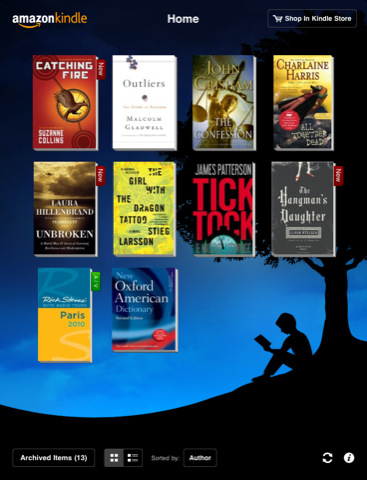
The official Kindle app for iOS (universal, free) was updated a few minutes ago to introduce a new feature recently launched on the physical Kindles: real page numbers. Page numbers (currently available for thousands of Kindle books, more coming soon) allow you for instance to make proper citations that other people using Kindle can follow along. It’s a very welcome addition to the app.
The 2.6 update also brings Google and Wikipedia lookup without leaving the app, reading percentage for iPhone and reading progress on the iPhone and iPad Kindle homescreen through the list view.
Kindle 2.6 is available as a free update here. The app was last updated in January to add features like multitasking and iTunes file sharing support.
#MacStoriesDeals - Monday

Happy Valentine’s Day lovebirds! Here are today’s deals on iOS, Mac, and Mac App Store apps that are on sale for a limited time, so get ‘em while they’re hot!
How To: Send Any Webpage From iOS To Your Mac Browser

Yesterday, I asked on Twitter if there was an easy way to send a webpage from the iPhone to the Mac. Currently, there are several iPhone apps that allow you to get links from your Mac browser onto the iPhone or iPad: most of them either work with a bookmarklet or browser extensions that, with just one click, let you “push” webpages to iOS. Apps like Handoff (review) and Push The Page even work remotely with the iPhone on a 3G connection. But the other way around, iOS to Mac, is not just as easy to achieve.
In my Twitter poll, many followers recommended AirLink, a web service that, once installed on the Mac and iOS, allows you to send an receive webpages remotely. AirLink, however, requires you to visit a special webpage on your browser to retrieve the link you have shared. What I’m looking for, and what I’m sure others like me have dreaming of for a while, it’s a simple system that allows me to send with a few taps any webpage from the iPhone (on WiFi and 3G) to the Mac, and have a new browser tab open on the desktop. So when I get home, I’ll find the link I shared on iOS ready in my browser. It turns out though, this “simple system” wasn’t so simple to achieve but now, thanks to the help of my friend @MisterJack, I think I’ve got something here that just works and does exactly what I need. Most of all, it requires three taps to be activated. Read more