Posts tagged with "iOS"

More Evidence of iOS Gaming on the Apple TV Unearthed, Online Multiplayer too?

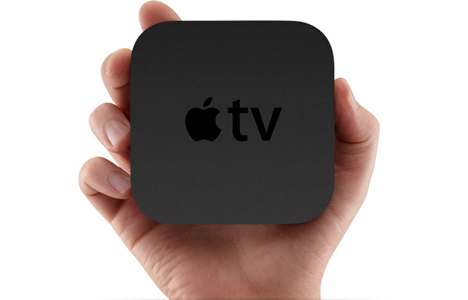
Since the Apple TV was revised last year with an iOS backend there has been ample speculation that Apple would eventually allow users to run apps and games and Engadget has today reported that some code in iOS 4.3 beta 3 further backs up that speculation. More specifically, the uncovered code references “ATVGames” and “ATVThunder” which also point to leaderboards, a controller, a way to schedule games and a storefront.

Two other strings were particularly noteworthy; “com.apple.appletv.play.live.thunder” and “.play.archive.thunder”. No one is really sure what they fully mean but as Engadget points out, the AppleTV is limited to 8GB’s of storage which is admittedly fairly minimal possibly suggesting that “archive” or “live” could mean streaming games or multiplayer. Engadget’s source also comments that  “OpenGL is mature and thoroughly implemented enough that streaming low bandwidth data and computing locally could happen”.

Read more


Twitterrific 4 For Mac Review

My first exposure to Twitterrific was when MacHeist casually offered Ollie as part of their first nanoBundle, alongside great applications such as WriteRoom and TinyGrab. While the third version quickly grew outdated in part because of Twitter’s continual feature growth and the IconFactory’s focus on providing parity between iPhone and iPad iterations, Ollie remained perched in my menubar for quite a while thanks to its minimal HUD interface. It was this Aqua-less client that faded into the background as I went about my other tasks that was supposed to be a permanent mainstay on my MacBook. I loved everything about it despite criticisms of it being ugly or lacking features, and if I wasn’t as vigorous on Twitter as I am today it would still be perfect for simply reading the latest incoming tweets. Though times changed, and I shelved my favorite mascot for Echofon while Tweetie garnered droves of followers in its presence.

While the OS X version of Twitterrific remained seemingly stagnant, the IconFactory made a rather large push into the Twitter realm with the iOS versions we’re familiar with today. Starting with the iPhone, the IconFactory practiced bringing a familiar experience across mobile devices by simplifying how we interact with Twitter. There is no excess interface or useless presentation of information: the IconFactory replaces Twitter’s originally dull and now confusing web interface with an inline, color-coded approach whose design is recognizable across the Apple community. Macworld named Twitterrific the ‘Twitter Client of the Year’ in 2010’s App Gem Awards, and you can bet the IconFactory would take their award winning design to the desktop. Steve Jobs wasn’t kidding when he said everything was coming, “Back to the Mac.”

Today, I’m glad to say that with the launch of Twitterrific 4 for OS X, it has once again reclaimed dominance on my Coca-Cola bottled desktop.

Read more


iOS and App Backups

iOS and App Backups

Craig Grannell is right about iOS lacking an option to easily restore game backups:

That Apple doesn’t provide a workaround for this is inexcusable now that we’ve reached iOS 4.x. In the days of 10 MB iOS games, it wasn’t a problem: you could stuff dozens on a device without problem. But in this age of Rivens and Puzzle Quest 2s, Apple’s (from a gaming standpoint) fast turning its high-end devices into the equivalent of crappy cartridges without battery back-up. The only difference is that an iOS device can hold a bunch of ‘cartridges’, but when one’s removed, the result is the same: all your progress is lost.

Game Center could have been a solution with cloud-based backups for gamers, but I think this is a wider issue. Apple should provide single backups for any app, not just games. Either cloud-based (tied to your MobileMe account, would be nice) or local, users could restore an app’s library after an OS update in seconds. The problem with the current iTunes backups is that they keep everything in a single package that’s often incompatible with updates / downgrades because, again, apps aren’t separated from system files in the backup file.

A single-app backup method would make everything much easier.

Permalink

Rowmote Pro: iOS Trackpad and App Launcher For Your Mac

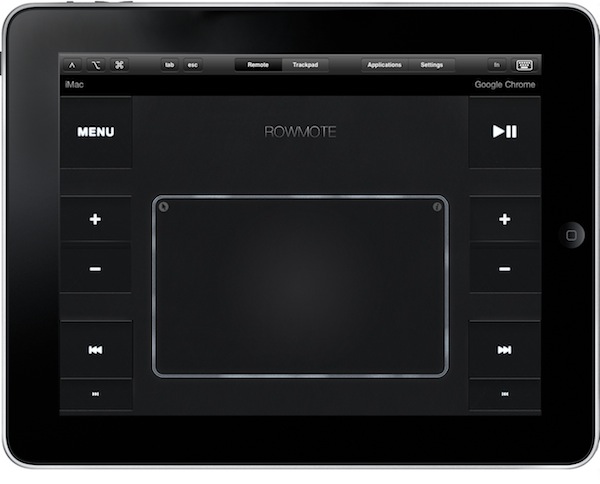
This app has been around for months, yet I’ve come to use it only a few weeks ago when several readers pointed out on Twitter that it was a better alternative to Remote Conductor. Rowmote Pro, which is a universal app for iPhone and iPad that requires a server component to be running on your Mac, is an elegant multitouch trackpad that comes with other functionalities such as quick volume / pause / next shortcuts, an app launcher and a virtual keyboard. Rowmote Pro won’t display the screen of your Mac computer on your iPhones and iPads, but it provides access to a plethora of commands that can come quite in handy if you’re controlling your Mac from the couch, watching a movie or listening to some music. Read more


Stream Media Back to Your Mac with Banana TV

In the past we have covered some great Mac/Airplay apps from Erica Sadun, one of our favorite fangirls over at TUAW. We’ve shown you AirFlick, which lets you drop files and URLs to play the content on your Apple TV. We’ve also covered AirPlayer, which we think is incredible, that allows you to play AirPlay content on your Mac. She is previewing a new app that may be coming to the Mac very soon: Banana TV. Read more


Another Apple Patent, Further Details on Touch Bezels

A few weeks ago, I published an article about the idea of “smart bezels” in iOS devices to avoid conflicts with third-party applications using multitouch gestures. With Apple playing around with the concept of “multitasking gestures” in the latest iOS 4.3 betas, it has become an issue for developers to find a way to enable 3,4 or 5 finger gestures without interfering with Apple’s own implementation:

The problem with the new gestures is that Apple decided to make them system-wide, activated with a preference panel in the Settings app. Once gestures are enabled, they override any other four or five finger gesture developers may have implemented in applications. Personally, in fact, I have experienced issues trying to use multi-touch gestures in Edovia’s Screens or other piano apps — software that makes extensive use of gestures above two and three fingers. Apple’s implementation overrides options set by developers, and there is no way to let the iPad know whether a user wants to perform an app-specific gesture or a system one, like “open the multitasking tray”.

Read more


#MacStoriesDeals - Monday

So what did you like better - The Super Bowl’s commercials or the game? Here’s today’s deals on iOS, Mac, and Mac App Store apps that are on sale for a limited time, so get ‘em while they’re hot! Read more


#MacStoriesDeals - Friday

Thanks again to AppShopper.com and MacAppDeals.com for helping me find great deals for our readers! Here’s today’s deals on iOS, Mac, and Mac App Store apps that are on sale for a limited time, so get ‘em while they’re hot! Read more