Posts tagged with "iOS"

#pastblast - The Potential of MobileMe

#pastblast - The Potential of MobileMe

We think Shawn Blanc’s “Blast from the Past Link Day” initiative is a great idea: today only, get to share and discover again great & interesting articles from months or years ago. I thought I might link back to an article from Shawn himself, from October of last year. The article is about the potential of MobileMe, and I think it’s still particularly relevant to Apple fans and iOS users as it provides exquisite insight into features we’re still waiting for Apple to implement:

In many ways Dropbox and Google are driving the iOS / OS X relationship more than MobileMe is. While MobileMe is syncing my contacts and calendars, Dropbox is syncing my most-dear files: the projects, articles, and notes I’m interacting with every day. What are iWork.com and MobileMe for if not for the sharing and syncing of everything between our Macintoshes, iPhones, and iPads in sync?

Imagine if you will what a merging of Dropbox and MobileMe might look like. Something simple and completely expected, I suppose. It would be free, it would sync and share info and files, and it would let other apps use it for syncing. Imagine setting up your iPhone with your Apple ID once, and then any app that has a Mac and/or iPad counterpart would sync. Sounds like mobile bliss.

To keep some bit of a revenue stream, there could easily be a paid version of MobileMe as well. The free version could offer syncing and come a small yet reasonable 2GB of data storage. Paying for an upgrade might buy you increased cloud storage, an @me.com email address, Find my iPhone support, and that photo gallery thing which nobody uses.

Sounds like the perfect solution for geeks, or those OS X users who know what app-to-app OTA sync is. I don’t know if the average iOS user – your friend who bought the iPhone for Angry Birds – would be excited about a Dropbox-like feature in iOS, though. And that’s why Apple is working on two features that can be easily explained to anyone: Photo Stream and Media Stream.


Permalink


iOS 4.3 Gestures, Bezels and An Apple Patent From Last Year

In the first beta of iOS 4.3, Apple introduced “multitasking gestures” for iPad: offered as a preview for developers to play with and test compatibility with apps, these 4 and 5-finger multitouch gestures allow users to execute a series of actions otherwise assigned to the Home button. You can switch back and forth between apps, open and close the multitasking tray or pinch back to the homescreens. The gestures need to be activated through Xcode as, again, they are a developer preview of a feature that won’t even be enabled in the public release of iOS 4.3, as Apple let devs know last night.

The presence of gestures that offer some functionalities previously exclusive to the Home button also let the rumor mill run wild, with some bloggers speculating that Apple may get rid of the Home button in the next iterations of the iPad and iPhone. Personally, I think gestures on the iPhone’s tiny screen are a terrible idea – and it gets worse if you have non-average, big hands.

Gestures are a neat new feature for the iPad that provide a glimpse at something Apple is clearly working on: more multi-touch capabilities for iOS devices. These very same gestures, though, gave several developers a hard time trying to figure out how to integrate them with their apps. Read more


Further Evidence of Camera in iPad 2 and Photo Booth and FaceTime Apps

After digging around the 4.3 Beta 2 of iOS for iPad, Mac Rumors has found fairly solid evidence that pretty much confirms not only a camera addition to the iPad but also the addition of a Camera app (obviously), FaceTime and Photo Booth apps.

An image (homeScreenOverlayFaceTime~ipad.png)  used by the iPad in the Setting’s app to preview the wallpaper was found by Mac Rumors to contain three extra icons that do not exist on the image contained in iOS 4.2, those additional icons were those for a FaceTime, Camera and Photo Booth app.

FaceTime and Photo Booth are also largely dependent on the presence of a front facing camera, whilst a Camera app would seem rather redundant without a rear facing camera and so it could be thus presumed that this latest discovery seems to confirm previous reports of both a front facing and rear facing camera on the iPad 2.

Mac Rumors also says they found filters for Photo Booth that included the effects of Thermal Camera, Mirror, X-Ray, Kaleidoscope, Light Tunnel, Squeeze, Twirl and Stretch.

[Via Mac Rumors]


New iOS Features? An Apple Social Network? Photo Stream and Media Stream

Digging into the latest iOS 4.3 beta build seeded to developers a few hours ago, we found references to two new features related to MobileMe called “Photo Stream” and “Media Stream”. There are several files, folders and code references buried deep into iOS that point to these new features as part of MobileMe and accessible through a device’s Settings.app.

As detailed by the folks over at 9to5mac, who also found out about these new features and went ahead to discover more of the implications of “Photo Stream” and “Media Stream” in iOS, Apple may be working on a serious MobileMe overhaul to offer social networking functionalities that would allow Apple to directly fight Facebook in the future, perhaps with iOS 5, with a social network built into iOS and tied to MobileMe and the Cloud. Read more


Cydia Adds Ability to Easily View All Your Past Purchases

Cydia, the App Store equivalent for all those jailbreak required apps that Apple has or would deny, has just received a handy new feature that allows you to view in one place all the packages that you have purchased from the Cydia store.

Jay Freeman, creator of Cydia has been working hard in recent months to improving Cydia in many ways from decreasing the all to common “Reloading” times, improving the polish and adding new features. This new feature has been a fairly common suggestion not only for Cydia but the App Store too, which whilst present in the Mac App Store has yet to reach iOS App Store - something which those of us at Macstories are hopeful Apple will add in the near future.

Read more


Office To Follow Someday? Microsoft’s OneNote Comes To The iPhone

Office To Follow Someday? Microsoft’s OneNote Comes To The iPhone

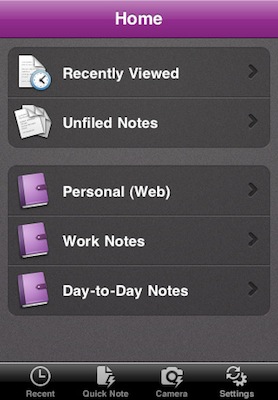
Earlier today, Microsoft released a new version of its note-taking application OneNote that’s specifically meant for iPhone users. The app is available for free (limited time offer) in the App Store. Even though this is no confirmation the full Office suite is coming to iOS soon, the arrival of OneNote on the iPhone sure suggests the Office team has been thinking about iOS apps. Even if Ballmer was disappointed at initial iPad sales (we wonder if he still is), rumors surfaced in the past pointed at the Microsoft Office team considering development of an iPad version of Office.

As for OneNote:

We know people care more about what they do than where they do it,” Microsoft Office unit Vice President Takeshi Numoto says in a blog post being published on Tuesday. “Whether it’s on a PC or Mac, a mobile phone or online through the Web Apps on multiple browsers, we continue to bring Office to the devices, platforms, and operating systems our customers are using. It should be about the ideas and information, not the device, right?”

Of course, OneNote is just one piece of Office–and one of the newer and least used of the main components at that. It’s also an interesting choice since OneNote isn’t available natively for the Mac. But, Microsoft seems to be leaving the door open to bring other pieces of Office to the iPhone.

The app can be downloaded for free here.

Permalink