Posts tagged with "iOS"

Apple Featuring “College Survival Guide” in App Store Homepage

Once again, Apple is featuring apps for college students in the iOS App Store homepage. The new section, called “College Survival Guide”, is available here and showcases more than 40 free and paid apps for iPhone and iPad.

Among the apps included in the guide, iBooks from Apple, iStudiez Pro, AP Stylebook, Momento and Instapaper. We’re not totally sure about Twitter and Facebook during classes but hey, at least they’re useful tools to stay in touch with friends. What about Netflix and Pandora Radio, though? I’m personally not sure about them either. Still, it’s good to see gems like Evernote and Put Things Off in the list.

Apple’s College Survival Guide can be accessed from the App Store’s homepage here.


Tweak Brings Mail Rules to iOS | Cydia Store

One feature iPhone (and iPad) owners have been asking Apple to implement in iOS for a while now is the possibility to create “rules” for the Mail application, just like on the desktop. On Mac OS X, users can assign rules to incoming messages on Apple Mail so that certain pre-defined actions will be applied to messages that meet specified criteria. Rules allow users to quickly process emails and mark messages from frequent sources as important, for example. The customization offered by rules on the Mac made many users wish the feature would find its way to iOS. It never happened.

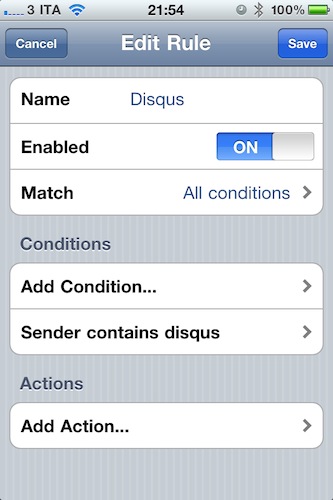
Luckily for us, Cydia developers have (once again) fixed what Apple didn’t want to. Or maybe is just waiting to implement in iOS 5. Whatever the reason is, Mail Rules is a package sold at $1.99 in the Cydia Store that allows you to play around with a pretty decent list of rules to assign to your incoming mail messages, organized by account. This tweak doesn’t come with the plethora or criteria and actions found in Apple Mail for the Mac, but it provides a good amount of options that should be enough on the iPhone and iPad. The Rules options can be accessed directly from the iPhone Settings app, and they support the following criteria: Sender, Recipient, Account, Headers, Subject. Actions you can apply to messages include: Delete Messages, Mark as read and unread, Copy or Move to folder. Setting up a new rule takes seconds.

Mail Rules works fine on the iPhone and iPad and, most of all, rules really go through. I’ve been running the tweak for over a week now, and the few rules I created allowed me to keep a cleaner inbox, when possible, thanks to actions that automatically delete or mark certain messages as read. At $1.99 in the Cydia Store, it should be a no-brainer if you’ve always wanted to have Rules on iOS.


VLC for iOS Pulled From The App Store, Now on Cydia

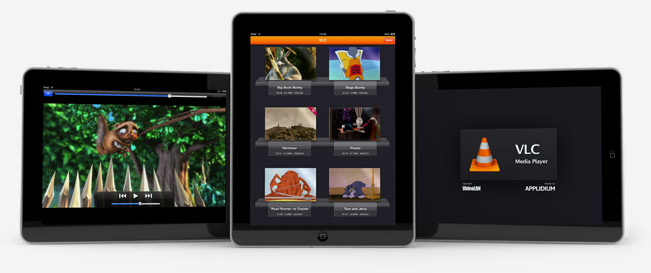
Just like we expected in October, VLC for iOS has been removed from the App Store. But this time, the removal of one of the most popular free apps for iPhone and iPad has nothing to do with Apple and the app review team’s rules. Instead, we have to thank developer Rémi Denis-Courmont, who since October has been busy trying to get the app out of the App Store because it violated VLC’s GNU public license. Rather than keep calm, carry on and let other developers (Applidium, the guys behind the VLC port to iOS) distribute VLC for iOS for free, he forced to get the app removed. Read more


Mac App Store Review: Unretina, Simple Utility for iOS Designers

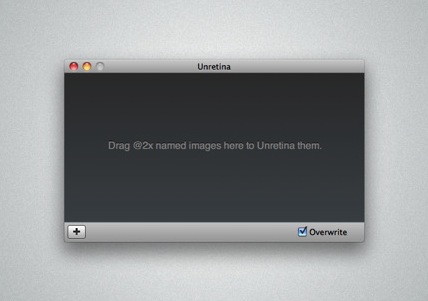
Released for free in the Mac App Store and developed by Bonobo Labs, Unretina is an OS X utility specifically geared towards iOS designers and developers. What this app does is very simple: it provides a way to easily resize “2x” images built for the Retina Display in order to make them compatible for artworks on older Apple devices.

Unretina takes graphic files designed for the iPhone 4 and iPod touch 4th gen and resizes them to a resolution compatible with, say, the iPhone 3GS and older iPod touches. It should work for all devices that don’t come with a Retina Display. Through a simple drag & drop interface, Unretina looks like a straightforward utility for designers that does one thing well.

Looking at the reviews in the Mac App Store description page, it appears that the app uses Bicubic resampling to resize graphic files. This may lead to a tiny sharpness loss, and a few pixels off. Something that, apparently, most designers won’t care about.

Unretina is available for free in the Mac App Store.


First-Gen Apple TV Gets AirPlay Support with Remote HD

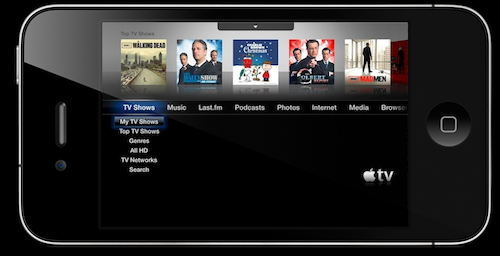
Remote HD is a new app developed by the Fire Core guys – the same folks behind the ATV Flash browser / utility – which brings AirPlay streaming to the original Apple TV, the first-generation silver model. Once installed on your iOS device from the App Store and on the original Apple TV through the Install Extras menu, you’ll be able to beam videos, Youtube, video podcasts and photos from your iPhone or iPad to the Apple TV.

If your iOS device is jailbroken and has AirPlay enabled for 3rd party apps, you’ll get the possibility to stream video from anywhere. Remote HD also lets you stream videos from iTunes on your computer.

Remote HD for iOS is available at $3.99 here.


Huge Canabalt Update: Game Center, Retina Display, 60fps

If you enjoyed playing Canabalt on your iPhones and iPads before, I think it’s time you give the app another try. Because, frankly, you didn’t really break any records. You can do better, and you know it. Most of all, the latest 1.6 update that just showed up in iTunes adds true Retina-ready graphics to the iPhone 4 and iPod touch 4th gen, 60fps on all Retina devices (that means it’s now super-smooth in all its pixel glory), Game Center integration (for leaderboards, I guess) and various tweaks and bug fixes. The update is free for all existing owners of the recently open-sourced game.

It’s the same Canabalt you know and love, only a lot smoother, faster and beautiful. Available at $0.99 for iPhone and iPad. You can’t miss this.