This Week's Sponsor:

Turbulence Forecast

Know before you go. Get detailed turbulence forecasts for your exact route, now available 5 days in advance.


Posts tagged with "iOS"

Byword For iOS Gets Improved URL Scheme

In a minor update released today, Byword developers Metaclassy have brought an improved URL scheme (based on x-callback-url) to the app, enabling actions for creating, opening documents, and manipulating text. Documentation is available here.

The actions supported by the URL scheme are:

  • new
  • open
  • append
  • prepend
  • replace

With these actions, you can now send text to a specific file in Byword, choosing to either create/open an existing document, insert text at the top (prepend) or bottom (append), or replace the entire contents of a document with new text. When using the Byword URL scheme, you’ll need to percent-encode text, which can be easily done using Launch Center Pro’s encode actions or Drafts’ double curly brackets.

This improved URL scheme creates some new interesting possibilities for iOS automation with Byword. I imagine many will experiment with workflows to append or create text from Mr. Reader’s Services menu, take notes with Drafts, or prepend text from Safari or Chrome using a browser bookmarklet. However, I still think that the URL scheme could be expanded to include support for triggering Publishing actions automatically, optionally supporting x-success to go back to another app after a post has been sent to a service integrated in Byword. With Poster no longer receiving updates, I believe the folks at Metaclassy have a great opportunity to keep Byword the simple and elegant iOS text editor that many love, while also adding advanced functionality that power users will come to rely upon in their daily workflows.

Permalink

Check Dev Center Status From iOS with Pythonista

A great idea by reader Nicolas Hoibian, which uses BeautifulSoup to fetch the source code of Apple’s System Status page, parse it, and print it with custom fonts and colors in Pythonista’s console.

Here’s my modified version that uses Pythonista’s notification module to re-run the script every 6 hours by firing a local iOS notification on your iPhone or iPad (it assumes the script is named “DevCenter” in Pythonista).

Permalink

Resolve Short URLs with Pythonista on iOS

Clean URLs

Clean URLs

I don’t like it when third-party apps or services force me to share links to articles or webpages using their own custom shortened links. I understand the appeal of personalized short domains – after all, we tweet mcstr.net links with the @macstoriesnet account – as they can provide analytics to track clicks, can save characters, and, at least in theory, they “look cool”. However, I’ve been long considering the idea of dropping our mcstr.net links, but I think the issue is worse (and more annoying) for apps and services that don’t tweet links to their own content (like we do) but that override others’ links with different domains. An example is Pocket, which gives you the clean, original URL when you choose the “Copy Link” action from the sharing menu, but that instead returns pocket.co links when sending text to Drafts (which I do often). I’ve grown tired of this practice (in Pocket and other services), and I’ve put together a workflow based on a Python script that allows me to easily resolve short links without having to open the browser and tap on multiple menus. Read more


HEARD

HEARD appeared on the App Store at the end of June then suddenly disappeared without a trace. There was no blog post and no real explanation on Twitter — just a couple of Tweets asking to get in touch with so-and-so at the time. The whole thing was kind of strange, and I honestly believed the app had been acquired. The app looks to have been pulled due to a bug, and rather than risk poor app reviews, I surmise that the devs decided to pull it. The launch was quiet and there wasn’t too much to lose at the time. After several days, HEARD came back to the App Store with a small update. It’s here for good.

Correction: Apple pulled the application without warning after deciding the app didn’t need full background access. HEARD appealed and won their case, and the app returned to the App Store as it was originally introduced. My assumption was incorrect.

I was disappointed that I didn’t download the app right away after it disappeared (fearing I had missed the chance to try it), given that what it does is nothing short of intriguing. HEARD lets you save anything your iPhone has heard in the past five minutes. The idea that you can suddenly save a conversation to your iPhone that happened five minutes ago sounds magical. But then you start wondering if it’s even all that practical given that you’d likely want more than just five minutes if you’re intent on recording something.

HEARD is an app that runs in the background, its ability to record only limited to how much battery life you have left. By pressing a big red button, HEARD begins actively listening. There’s nothing to log into and no quirky settings to configure. Like you would see with apps like Skype or Voice Memos, HEARD changes the color of the status bar system wide to indicate that the app is listening. When you return to the app, pressing the button again saves whatever was buffered in the last five minutes to its library as a recording. You can then listen in, edit the file’s title, add tags, or delete it if you’re not happy with it. The app continues listening and the cycle begins anew.

That’s what makes HEARD kind of killer. It gives you the potential to record everything that happens. If your phone can hear it, it’s in the app’s buffer for at least five minutes.

While having this kind of power can certainly be useful, is it impractical? Sometimes. Obviously if you want to record a thirty minute meeting then you’re dead in the water unless you use another app. HEARD will let you turn off background audio to record audio snippets, but it only records as long as you hold down the button. If I can put myself in the mindset of the developer, what they’re trying to do is prevent you from accidentally recording something for so long that you run out of storage space. Personally I would like the option of not having to hold down that button, even if it meant I couldn’t leave the app if that’s the tradeoff the developers want to make. I want to use HEARD over Voice Memos and as my destination for everything, both for whatever stuff I happen to capture from the airwaves and stuff that I want to record intentionally.

I would love IFTTT integration. Just imagine saving a snippet and having it automatically end up in Evernote or another app. That’s my only want for this app going forward.

There are some aesthetic things I don’t like, particularly the ‘HEARING’ button in the center of the tab bar. I keep pressing it trying to pause and start recordings to no avail. As for recordings, those text boxes look a little dated. And the only real way to turn off background listening is to flip a switch in the settings or close the app from the multitasking bar (I feel there should be a way to pause background listening). For these things, the app does encourage feedback via a button in the settings.

Given the premise and despite being a sort of purposefully limited voice recorder, HEARD works. I felt this way when HEARD first disappeared, and I still feel this way today, that it’s something that was built for attracting attention from bigger fish in the pond, and I wouldn’t be surprised if someone did snap it up just for the idea. Yet, I do recommend at least trying out HEARD. It’s free, the limitation being that only things heard in the past few seconds can be saved. An in app purchase of $1.99 will unlock the full five minutes. Download it from the App Store.

Update 5:00 pm: @heardapp reached out to me on Twitter to point out an inaccuracy in my review of the app concerning the app’s sudden disappearance. I’ve embedded the tweets below and have updated the review.


Google’s Document On Data Compression In Chrome For iOS

Last week, I wondered whether Google’s new data compression feature for Chrome for iOS was partially motivated by the inability to use the Nitro engine to speed up page load times. Today, I have stumbled upon the technical document that details how the data-saving process actually works – in short, it uses Google’s proxy to optimize web traffic sent by Chrome.

The proxy server receives the request initiated on the mobile device, initiates a request for the required resource on your behalf, and then optimizes each asset before delivering it back to the client. The content optimization is performed by our open-source PageSpeed libraries, which are specifically tuned for the Chrome Mobile browser. The rendering of the page, and all JavaScript execution, is performed by the client’s browser.

Of note, the transcoding of images from JPEG and PNG to WebP:

Over 60% of the transferred bytes, for an average page, are images. Hence, the proxy takes great care to optimize and transcode all images to the WebP format, which requires fewer bytes than other popular formats, such as JPEG and PNG. The proxy supports the new WebP lossless format for certain images, and also optimizes the perceptual quality of each image based on device screen resolution and pixel density of your device.

I’ve never been a fan of speed optimization through proxies personally, but I’m curious to try out Google’s implementation. The feature is still rolling out for Chrome users on iOS.

Permalink


Editorial for iPad

Ole Zorn is finally talking about his upcoming new app, Editorial, publicly on his website:

I tweeted earlier today that I’ve registered the name for a new app in iTunes Connect. It’s called Editorial, and I’ve actually been working on this for over a year now.

At its core, it’s a Markdown editor for iPad, but you can also think of it as a Pythonista spinoff, or a workflow automation tool, not unlike Automator.

I say “finally” because I have been testing Editorial since November 2012. All my reviews have been written and edited with Editorial; I have built workflows that, for me, make working with text on the iPad better than using Sublime Text 2 on my MacBook Air. When I’m on my Mac, I miss Editorial’s automation and editing features. And if I haven’t posted a screenshot of my iPad’s Home screen in a while, it’s because I had Editorial in my dock and I couldn’t share it.

Ole Zorn is the developer of Pythonista, which I have written extensively about. I can’t wait to share more about Editorial.

Permalink

IFTTT for iPhone: A Different Kind of iOS Automation

IFTTT for iPhone

IFTTT for iPhone

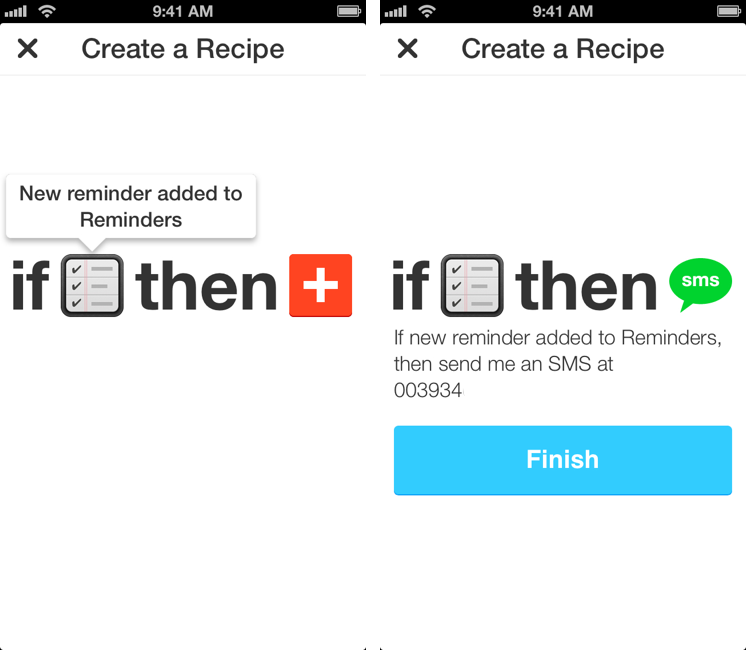
I used to heavily rely on IFTTT for my daily automation workflows that involved appending bits of text to files in my Dropbox, forwarding tweets to my OmniFocus inbox, generating PDFs, or archiving Instagram photos to my Dropbox account. IFTTT, acronym of If This Then That, is a web service that lets you connect other web services together to create automated workflows that run every time a piece of data is triggered: by leveraging a variety of APIs from compatible channels (such as Facebook, Dropbox, Evernote, Feedly, and more), IFTTT lets you automate the web in powerful (and sometimes unexpected) ways. Browsing Popular recipes on the IFTTT website can give you an idea of the scope of web automation that’s made possible by the service, and we’ve covered IFTTT in the past on MacStories as well.[1]

However, I stopped depending on IFTTT because, once I got more comfortable with my own Mac mini server as a remote automation assistant, I wanted to control the pipes of my personal data. I’m still using IFTTT for things like receiving an email if it’s going to rain tomorrow or a new SMS for press releases published by Apple (just an example of the power of IFTTT channels and recipes), but it’s not the primary system that I rely upon for automating daily tasks. The new IFTTT app for iPhone, which I have been testing and has been released today on the App Store, may make me (partially) reconsider my decision. Read more