


We have many great deals for #MacStoriesDeals today. You can find us as @MacStoriesDeals on Twitter.
Posts tagged with "iOS"
#MacStoriesDeals - Friday
#MacStoriesDeals - Thursday
We have many great deals for #MacStoriesDeals today. You can find us as @MacStoriesDeals on Twitter.
Google Now Coming To iOS?→
Google Now Coming To iOS?
Engadget has posted what they believe is a “leaked” video of Google Now for iOS that was accidentally posted on YouTube and then removed.
Supposedly, Now will be accessible in an upcoming iOS app update simply by swiping up from the main screen. Of course, there’s always the chance that is an impressive fake or even a canceled project that’s only being leaked now. We’ve reached out to Google for comment, but even if the search giant remains silent, we’re confident the truth will be known soon enough.
Two weeks ago, I said this when comparing Google Voice Search to Siri:
Now, four months after Google Voice Search launched, I still think Google’s implementation is, from a user experience standpoint, superior. While it’s nice that Siri says things like “Ok, here you go”, I just want to get results faster. I don’t care if my virtual assistant has manners: I want it to be neutral and efficient. Is Siri’s distinct personality a key element to its success? Does the way Siri is built justify the fact that Google Voice Search is almost twice as fast as Siri? Or are Siri’s manners just a way to give some feedback while the software is working on a process that, in practice, takes more seconds than Google’s?
In that post, I was speculating on the possibility of a Google Assistant that would play by Apple’s rules to mix voice commands with native iOS apps like Reminders and Messages.
However, rather than going through the effort to develop such a Siri clone, it appears Google may be taking the “obvious” approach: porting Google Now to iOS by putting it inside the existing Google Search app. It looks like built-in Twitter and Messages sharing is as “native” as Google will go on iOS.
Engadget’s video may be fake, but I think it’s safe to assume Google is considering Google Now for iOS. Code references were spotted in Google’s Chrome browser and OS, and iOS seems like a logical step considering the nature of the product. Giving the “right information at the right time” is meant for mobile devices – phones and tablets that tend to be always with us.
It used to be that Android was the platform for Google users, but I’d argue that Google has been narrowing the gap between iOS and Android in the past months. With Chrome, Maps, YouTube, Gmail, Search, and (allegedly) Google Now, Google has been building a solid ecosystem inside iOS, and, as a user, I see that as a “best of both worlds” scenario: I can use (what I believe are) Apple’s superior devices, user experience, and third-party ecosystem with (what I believe are) Google’s superior web services.
Launch Center Pro 1.1
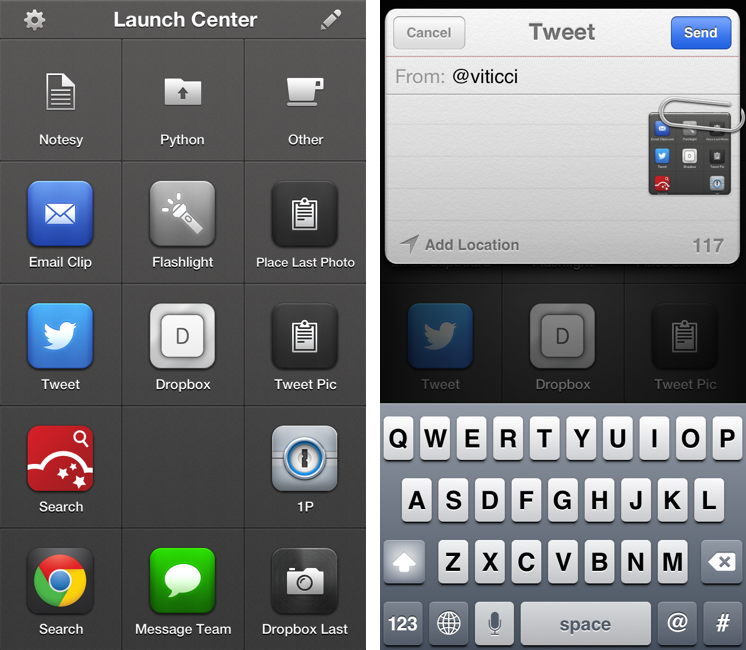
Released in December 2011, App Cubby’s Launch Center re-ignited interest in iOS URL schemes – shortcuts to automate communication between apps and get specific things done faster with less manual tapping and interactions. Its direct sequel, Launch Center Pro, was released in the summer of 2012 and doubled down on the entire idea of automating iOS tasks by providing a “Home screen for your actions” to allow users to better and more visually organize their shortcuts.
Launch Center Pro 1.1, released today, focuses on improving three key aspects of Launch Center Pro: native in-app actions, the Action Composer, and TextExpander support in URLs. Read more
#MacStoriesDeals - Thursday
We have many great deals for #MacStoriesDeals today. You can find us as @MacStoriesDeals on Twitter.
Chrome for iOS Updated With Messages Sharing, New History Menu
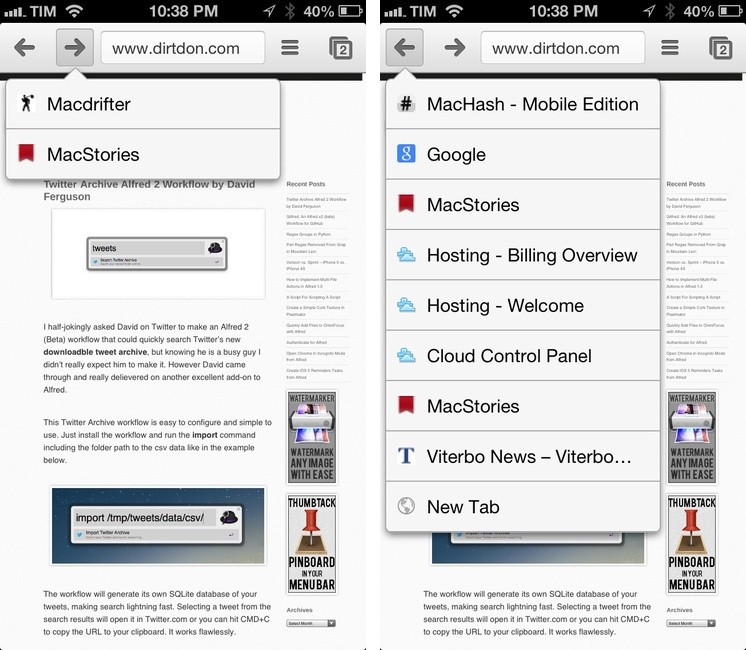
Released earlier today, Google Chrome for iOS has been updated with built-in Messages sharing and a new menu to access previously-visited webpages.
Available from the Share menu in the top toolbar, Messages integration brings up a modal Messages window to send a webpage’s title and URL to someone else. This is a good addition – I’ve long relied on bookmarklets and third-party apps to forward Chrome links to Messages – but unfortunately one I’ll make little use of, as iOS doesn’t let you quickly address a message to a pre-defined group of contacts.1
I find the new History menu much more interesting for my daily Chrome workflow. Similarly to Safari, you can now tap & hold the Back/Forward buttons to show a list of websites you have navigated to; tapping on one will take you back to that page. Like Apple’s implementation, this is a per-tab history; unlike Safari, the list of pages is shown in a dropdown menu rather than a full-screen modal view (on iPhone).
#MacStoriesDeals - Friday
We have many great deals for #MacStoriesDeals today. You can find us as @MacStoriesDeals on Twitter.
#MacStoriesDeals - Tuesday
We have many great deals for #MacStoriesDeals today. You can find us as @MacStoriesDeals on Twitter.
#MacStoriesDeals - Wednesday
We have many great deals for #MacStoriesDeals today. You can find us as @MacStoriesDeals on Twitter.