This Week's Sponsor:

Turbulence Forecast

Know before you go. Get detailed turbulence forecasts for your exact route, now available 5 days in advance.


Posts tagged with "iOS"

Alex Guyot Chains 5 Apps with Drafts

Alex Guyot Chains 5 Apps with Drafts

As I expected, people have started experimenting with chaining apps and services using Drafts, and Alex Guyot quickly beat me in chaining 5 apps. From his explanation of the workflow:

Follow the bookmark in Chrome and it will take the URL of the webpage you are on, send it to Drafts as a draft, upload it to Dropbox, send it to Due (where you choose a reminder time for it to remind you), take you back to Drafts, send you to Instapaper (Where you choose to save the link to Instapaper), then send you back to Chrome.

He also posted a quick video showing the workflow in action on his iPad. I like how, unlike me, he chained each action as an x-success parameter of the previous one.

As I’ve argued on multiple occasions here on the site, URL schemes are certainly a stopgap solution to a problem – better inter-app communication on iOS – that I wish Apple will tackle in the near future. However, that doesn’t mean people can’t get real work done with URL schemes and apps today. Looking ahead, I can only imagine new possibilities of iOS automation based on URL schemes that, however, abstract the need of manually building URLs from the end user’s workflow – using a more Automator-like interface to visually represent actions. And, who knows, perhaps in a future version of iOS “switching” between apps won’t even be required anymore, as “parts” of other apps will be linked to each other using something like XPC.

Permalink


Chris White’s iOS Workflows

Chris White’s iOS Workflows

Chris White is putting together an impressive collection of JavaScript bookmarklets, URL schemes, and iOS services and actions in a GitHub repo:

It seems like we’ve recently been seeing a ton of new ideas, clever tricks and tools for making users who are willing to dive into the deep-end more productive on our iOS devices through automation, seamless app communication and some really great shortcuts. This is a collection of bookmarklets, scripts and custom URL scheme actions that help bridge apps and manipulate the data you can send between them.

Chris included some of my bookmarklets and URL schemes in his collection, which I recommend checking out if you’re looking for a single place containing several moderately advanced tips for doing more than just launching apps via URLs.

iOS automation is, of course, a subject that I’ve been covering on a daily basis on MacStories for the past months. While I haven’t had the time to put together a GitHub repo like Chris did, allow me to list the various articles and tag pages where you can get started:

URL scheme tag page

Bookmarklet tag page

Automation with Drafts and Chaining Apps with Drafts

Pythonista review and scripts

Pythonista tag

I’m very glad Chris decided to collect these resources in a repo. I especially like the Drafts bookmarklets he made, which contain a check to see whether the browser has an active text selection (something I haven’t been doing as I’ve always created separate bookmarklets for Chrome and Safari).

Permalink


View Mac App Store Links On iOS

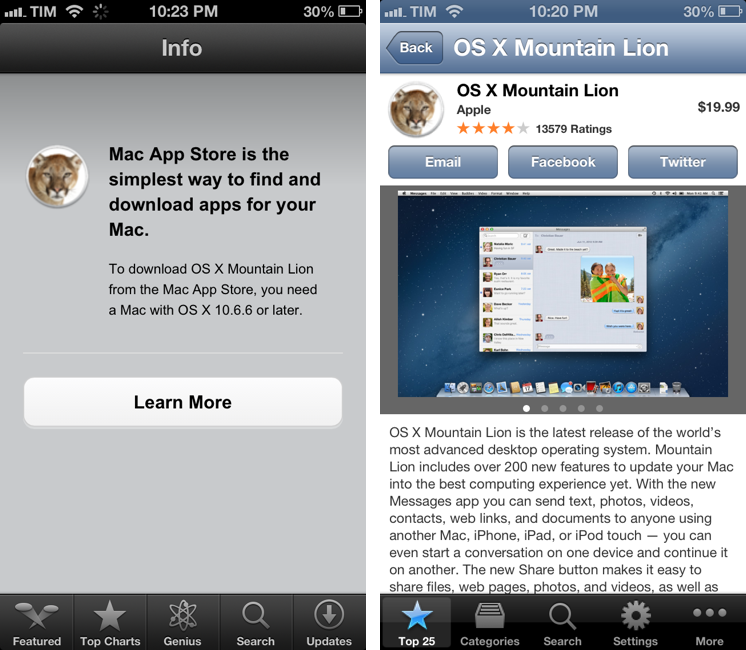
I don’t like how iOS devices can’t preview the contents of an iTunes link for a Mac App Store app (shown in the screenshot above on the left). While I (partially) understand the limitation from an infrastructure standpoint, I still think “incompatible” App Store pages should at least display text, screenshots, and a link back to the developer’s website without a Buy button.

There are solutions to preview a Mac App Store link on iOS. As far as browsers go, you can “Request Desktop Site” in Chrome for iOS and choose a different user agent in iCab Mobile (my two favorite third-party browsers). Chrome is my go-to browser these days, and I like how the feature is limited to single tabs, rather than the entire app.

Thanks to @AppleSpotlight, I’ve also found a non-browser app to achieve the same functionality and also a bit more. Desktop Apps lets you browse the Mac App Store from an iPhone or iPad (the app is Universal and free with ads). You can view the Top Free/Paid/Grossing apps, categories, and you can search for a specific app. You can open an app’s page, view screenshots, share a link via Email, Twitter, or Facebook (with native iOS integration), and even select text displayed as a description. Unfortunately, the app doesn’t fetch additional information like Developer Website, ratings and reviews, and there’s no URL scheme to easily turn itunes.apple.com links into URLs for the app (like Documents does for Safari).

Desktop Apps’ graphics aren’t entirely Retina-ready: the app is optimized for the iPhone 5, and two out of five tab bar icons are Retina-ready, but three of them aren’t – just like the icons of the Mac App Store apps. It’s a strange mix of fuzzy and crisp graphics. Desktop Apps has a $0.99 in-app purchase to remove ads; if you’re really into the idea of browsing the Mac App Store from iOS, go ahead and unlock it. Otherwise, I think you’ll be fine using the free version alongside Google Chrome.

Permalink


iOS Automation and Workflows with Drafts

The latest update to Drafts – a “quick note capturing” app that I’ve covered several times on MacStories – adds a series of features aimed at increasing the possibilities of workflows automation on iOS devices. Obviously, this is something I’m interested in.

It seems like enabling users to save time while using apps has been a common thread in the past few months. The success of Launch Center Pro probably “raised awareness” in regards to the whole concept of URL schemes, but it’s been the increased adoption of x-callback-url and interest in automated workflows that proves better inter-app communication is something that (at least) third-party developers are thinking about. Google included a powerful URL scheme in Google Maps and Google Chrome; more recently, Mr. Reader showed how to enable a “services menu” by requiring users to mix URL schemes from other apps with parameters for an article’s title or selected text. These aren’t ideal solutions, but it’s all we have for now.

Greg Pierce, creator of the x-callback-url specification, has improved Drafts in ways that not only make the app more useful to get text onto other services, but also broaden the possibilities for automation through the use of URL schemes.

There are three main new features in the new Drafts: Dropbox actions, URL actions, and an improved URL scheme with support for callbacks and action triggers. I am going to explain how they work and include various actions and bookmarklets to demonstrate different use cases. Read more