
Posts tagged with "iOS"

iOS Automation and Workflows with Drafts

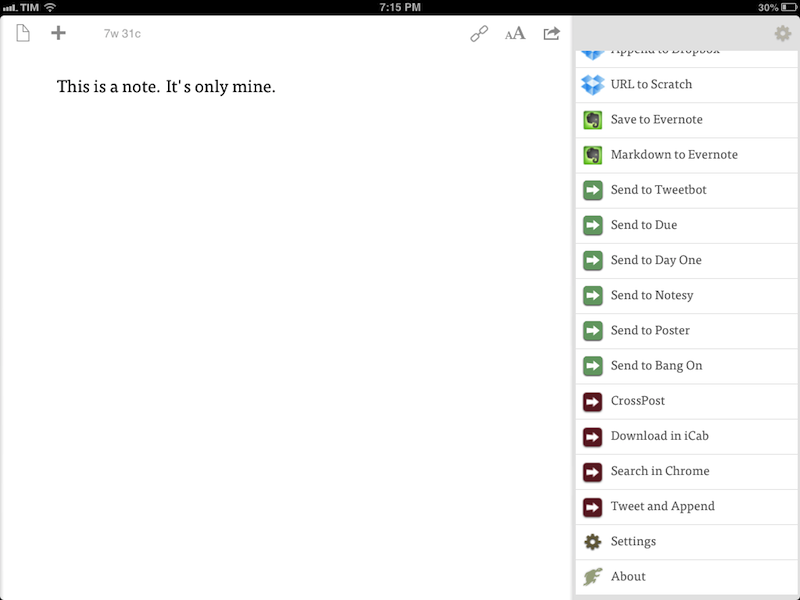
The latest update to Drafts – a “quick note capturing” app that I’ve covered several times on MacStories – adds a series of features aimed at increasing the possibilities of workflows automation on iOS devices. Obviously, this is something I’m interested in.

It seems like enabling users to save time while using apps has been a common thread in the past few months. The success of Launch Center Pro probably “raised awareness” in regards to the whole concept of URL schemes, but it’s been the increased adoption of x-callback-url and interest in automated workflows that proves better inter-app communication is something that (at least) third-party developers are thinking about. Google included a powerful URL scheme in Google Maps and Google Chrome; more recently, Mr. Reader showed how to enable a “services menu” by requiring users to mix URL schemes from other apps with parameters for an article’s title or selected text. These aren’t ideal solutions, but it’s all we have for now.

Greg Pierce, creator of the x-callback-url specification, has improved Drafts in ways that not only make the app more useful to get text onto other services, but also broaden the possibilities for automation through the use of URL schemes.

There are three main new features in the new Drafts: Dropbox actions, URL actions, and an improved URL scheme with support for callbacks and action triggers. I am going to explain how they work and include various actions and bookmarklets to demonstrate different use cases. Read more

Due Clipper For Google Chrome

When there are no actual news or notable app releases, I prefer investing my time in creating something for other people.

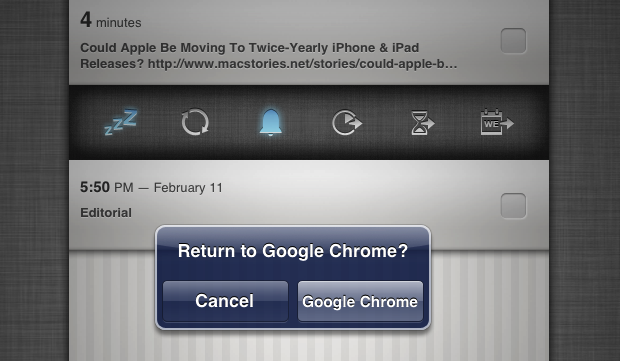
Continuing my ongoing series of tips on iOS URL schemes, here’s an adaptation of my existing Due bookmarklet to work better with Google Chrome for iOS (which, as I’ve pointed out several times, has a very nice URL scheme). The following code (to install it, simply copy it and paste the entire string into a bookmark) grabs a webpage’s title and URL and sends them to Due (also powered by a great URL scheme). Read more


Chrome for iOS: Send A Webpage Back To Safari Via Bookmarklet

Sort of. Here’s a fun experiment.

Today, I wanted to quickly send a URL from Chrome for iOS – my default browser – back to Safari. I know there are ways to do Safari-to-Chrome, but I wanted the opposite: from Chrome back to Safari. I needed to install some custom Mr. Reader actions, and Chrome was giving an error when tapping on the downloadable files. I figured I could make a bookmarklet to take the current webpage in Chrome and send it to Safari.

Not so fast. There’s no documented URL scheme on iOS for opening web links in Safari, except, well, the http:// scheme itself. In testing various bookmarklet ideas, I thought that replacing googlechrome with http in Jon Abrams’ bookmarklet would force Chrome to send a link to Safari. But as It Turns Out™, doing this sort of trick in Chrome for iOS:

javascript:window.open('http'+location.href.substring(4));

…simply opens a new tab in Chrome.

What I ended up using is a hack – and a very curious one – to leverage Chrome’s support for x-callback-url to open a link back into Safari. I was inspired by Cormac Relf’s script, which I discovered yesterday when he showed me another script he made for Pythonista.

javascript:window.location='googlechrome-x-callback://x-callback-url/open/?url='+encodeURIComponent(location.href)+'&x-source=Safari&x-success='+encodeURIComponent(location.href);

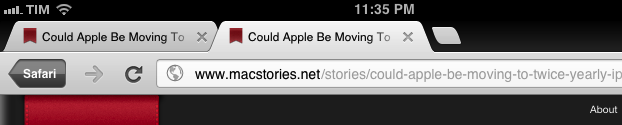
As you can see above, we’re telling Chrome to open a new tab using…itself. The trick, at least theoretically, is to use an encoded location.href string to call back Safari, which is registered for the http:// scheme that Chrome, in this case, opens “externally”. Displaying x-source is needed per Google’s URL scheme specification; the name you give to x-source will be displayed as a “back” button in Chrome (as shown in the image above).

This is a profoundly inelegant and ultimately flawed solution. To make this “work” you have to:

  • Type the bookmarklet’s name, because Chrome has no bookmarks bar;
  • Nothing will happen.
  • Close Chrome;
  • Re-open it;
  • A wild new tab appears!
  • Tap the Safari button. It’s super-effective.
  • Safari will launch the link, closing the additional tab Chrome decided to open.

What is going on, exactly? Via JavaScript, we’ve forced Chrome to open a tab in itself, but doing so with x-callback-url inside a bookmarklet creates, for some reason, quite a strange behavior: the tab isn’t opened unless you close and re-open Chrome, therefore partially defeating the whole purpose of this bookmarklet, which is to quickly open a webpage in Safari. But, in spite of the clunky process, a new tab with a “Safari button” is created nevertheless, allowing you to tap it to launch Safari and close Chrome’s extra tab.

My conclusion is that we have three solutions: a) it’s not possible to create a straightforward Chrome-to-Safari bookmarklet; b) it’s possible in another way that I haven’t explored; or c) it’s possible with the x-callback-url hack, but in a different way.

If you have ideas, ping me on Twitter.


“Open In” and Mobile Safari

“Open In” and Mobile Safari

Continuing the discussion about the “Open In” menu for iOS, David Chartier proposes “Open In” for Safari URLs:

Finally, Document Sharing in Mobile Safari would further promote an app-centric workflow on iOS. Bookmarklets are often designed to open another web service in a new browser tab, and let’s face it, working on the web is a crummy experience. But even if they’re wired to open an app, bookmarklets are still a colossal pain to install which cuts off most attempts at the knees. This largely confines Mobile Safari and its content to an island, making iOS’s URL-to-app workflow needlessly tedious for anyone brave enough to try it.

In its current form, Mobile Safari only supports “Open In” for documents displayed in the browser, such as PDFs that Safari can render. The (new in iOS 6) share sheet doesn’t come with options to send a URL around, but only to copy it to the system clipboard.

Bookmarklets were never meant to take off among consumers, because they require a minimal amount of knowledge (or steps) that average users don’t want to deal with. However, developers had to resort to using bookmarklets because it was the only way to provide something that worked to pass a URL from Safari to a third-party app/web service. Some developers have gone out of their way to provide an “Install Bookmarklet” experience that wouldn’t scare off the majority of users.

Overall, “Open In” for links doesn’t sound like a bad idea. Imagine being able to quickly send a YouTube video to Facebook or a link to the Twitter app with an Apple-sanctioned menu and not some JavaScript hack. There are aspects I don’t know how I’d solve right now (How do supported apps appear in the iOS 6 share sheet? Are they available in a dedicated page, or can users re-arrange them? Could Siri be told to perform such actions?), but, generally speaking, providing better web-to-apps communication would be a good start.

Two years ago, Marco Arment offered some ideas on a possible “Send To” panel for Safari. This is absolutely still relevant today, because it hasn’t gotten better.

Obviously, that would be far from my envisioned iOS automation for power users. I’ve been trying the beta release of Alfred 2 lately, and I like how the developers created a workflow visualization that is both powerful and intuitive in the way it connects visually triggers to actions and outputs. Ideally, I’d love to see Apple considering an “Automator for iOS” – the kind of feature that most users don’t care about but that would likely make a subset of them reconsider iPads as “real work” machines. Apple could even go as far as making that kind of user automation look “cool” with the right interface decisions and a powerful inter-app communication layer that is not limited to Apple apps (read: with an API).

I hope this kind of stuff is in the cards for iOS 7.

Permalink