


Here are today’s @MacStoriesDeals on hardware, iOS, and Mac apps that are on sale for a limited time, so get them before they end!
Read more
Posts tagged with "iOS"
#MacStoriesDeals - Wednesday
Apple Releases iOS 6.0.1 [Direct Links]
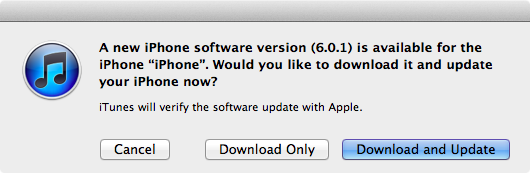
Apple just released iOS 6.0.1. The software update has hit Apple’s servers and is propagating now; iOS 6.0.1 is a bug fix release, which improves reliability of the iPhone 5 and iPod touch 5th gen on WiFi networks with WPA2 encryption, fixes the widely-reported issue of horizontal lines showing up on the software keyboard, and improves the behavior of the Camera flash.
iOS 6.0.1 changelog
- Fixes a bug that prevents iPhone 5 from installing software updates wirelessly over the air
- Fixes a bug where horizontal lines may be displayed across the keyboard
- Fixes an issue that could cause camera flash to not go off
- Improves reliability of iPhone 5 and iPod touch (5th generation) when connected to encrypted WPA2 Wi-Fi networks
- Resolves an issue that prevents iPhone from using the cellular network in some instances
- Consolidated the Use Cellular Data switch for iTunes Match
- Fixes a Passcode Lock bug which sometimes allowed access to Passbook pass details from lock screen
- Fixes a bug affecting Exchange meetings
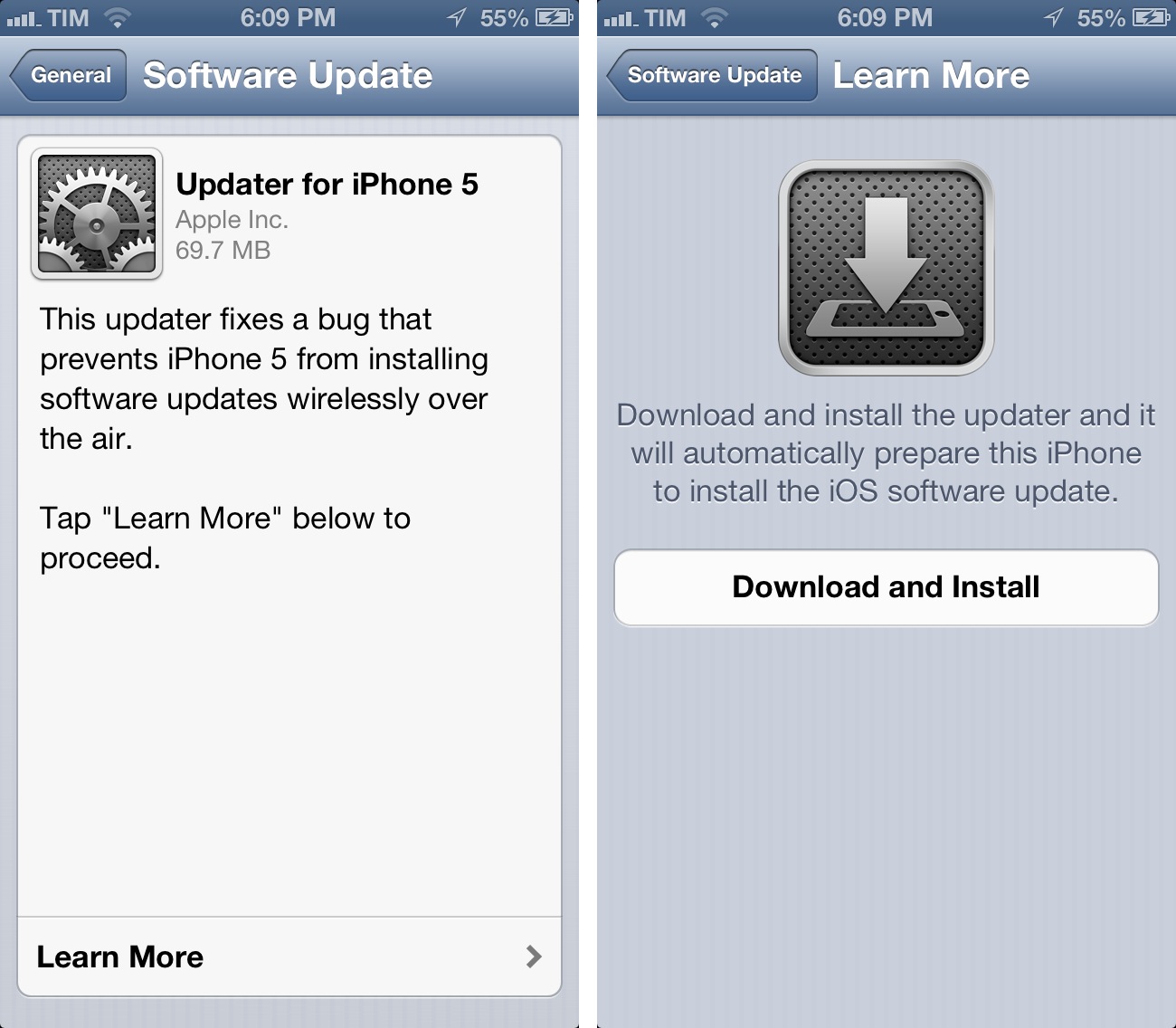
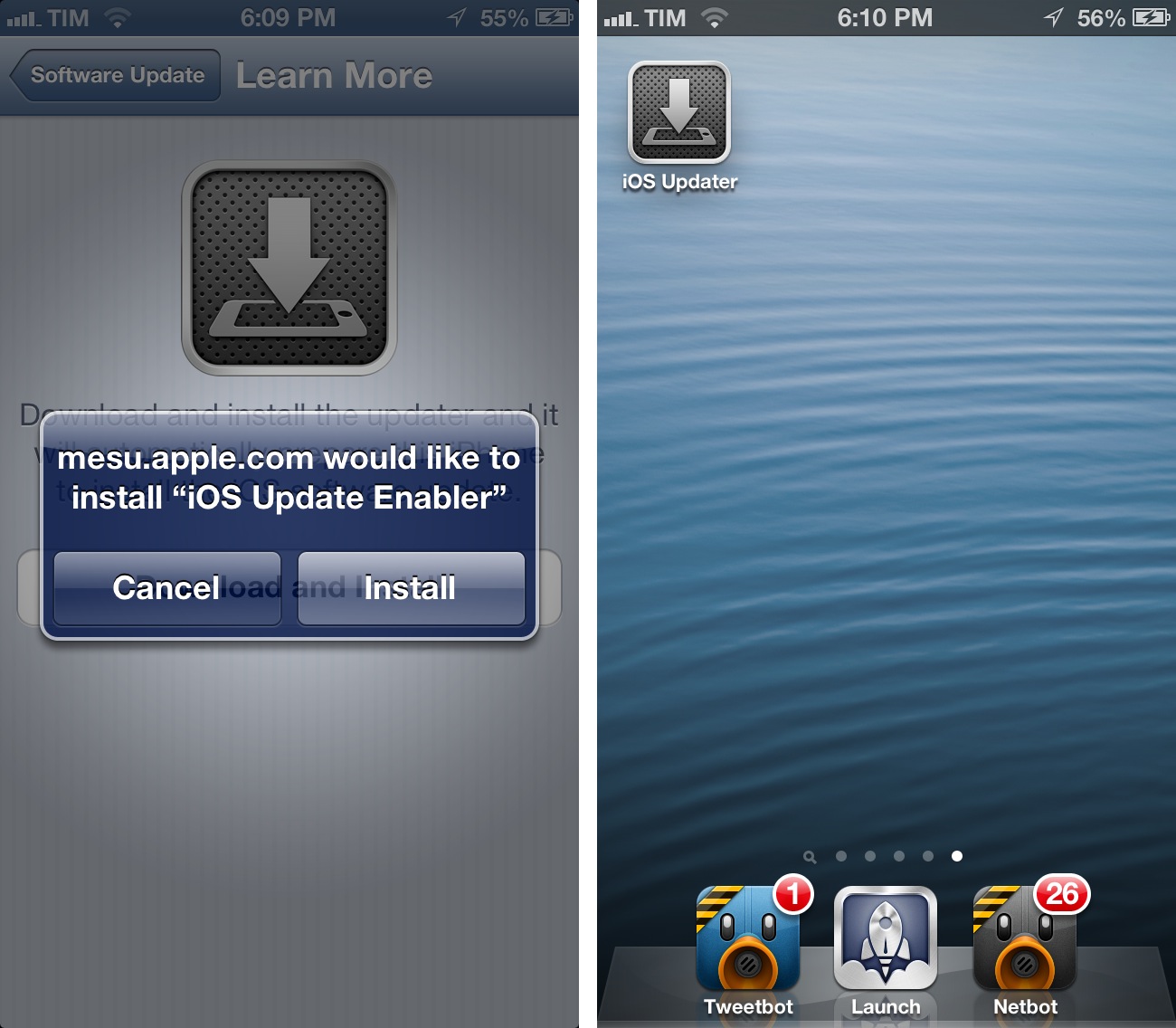
For over-the-air updates, iPhone 5 users will have to install an iOS Updater utility first, which requires a full reboot of the device before installing iOS 6.0.1. After the restart, the Software Update panel in settings will allow you to download iOS 6.0.1.
Direct Links
iOS 6.0.1 direct download links below (build number 9B206).
- iPhone 3GS
- iPhone 4 GSM
- iPhone 4 CDMA
- iPhone 4S
- iPhone 5,1 (model A1428, AT&T/Canada)
- iPhone 5,2 (model A1429, all others)
- iPad 2 (also iPad 2 AT&T and iPad 2 Verizon)
- iPad2,4 (32nm 16GB iPad 2)
- iPod touch 4th gen
- iPod touch 5th gen
- iPad 3 WiFi
- iPad 3 CDMA (3,2)
- iPad 3 Global (3,3)
- iPad 4th gen (3,4)
- iPad mini (2,5)
#MacStoriesDeals - Wednesday

Here are today’s @MacStoriesDeals on hardware, iOS, and Mac apps that are on sale for a limited time, so get them before they end!
Read more
The Future of iOS→
The Future of iOS
Kyle Baxter writes about the future of iOS from a functionality standpoint. He uses his app Basil as an example for what better communication between installed apps could lead to:
For example, Basil could declare that it handles web URLs. Then, I could build the recipe saving feature of Basil as a mini application (stored in Basil) that users can use from any other application that deals with the web. If someone who uses Basil is browsing recipe websites in Safari, they could tap a “Basil” icon in the action sheet, and my mini application would pop up, save the recipe to Basil and get out of the way—all without the user ever leaving Safari. The same could be true for Reeder (save recipes from cooking websites you subscribe to while browsing your feeds), Twitter applications, or anything else—and those developers wouldn’t have to know that Basil even exists.
This is a shared sentiment among developers. In my interview with Loren Brichter, the man behind atebits said there will be an “explosion in innovation” when Apple will allow XPC (the technology Kyle refers to) to work with third-party apps – more specifically, he mentioned “faceless apps, doing neat things for you in the background without presenting any UI and using minimal hardware resources”.
This is a subject I’ve been writing about for the past two years as well. In using my iPad as my main “computer” regularly every week, I have come to the conclusion that what I’m missing from the Mac isn’t multiple windows – it’s the glue that allows apps to work together in harmony. Maybe it’s a service to send text from Safari to Evernote. Or perhaps a simple script that puts a Mail message into OmniFocus. This kind of trusted, efficient communication between apps is what I’m really looking forward to seeing on iOS. This is why we should be excited for the future: it feels like we’ve only scratched the surface with third-party software on iOS.
Read Kyle’s post here. See also: Ole Begemann’s series on Remote View Controllers.
#MacStoriesDeals - Tuesday

Here are today’s @MacStoriesDeals on hardware, iOS, and Mac apps that are on sale for a limited time, so get them before they end!
Read more
#MacStoriesDeals - Monday

Here are today’s @MacStoriesDeals on hardware, iOS, and Mac apps that are on sale for a limited time, so get them before they end!
Read more
Improve iOS Screenshots with Status Magic

Status Magic is not a “mainstream” app: you’ll only need it if you care about quality and precision in your iOS screenshots.
I write about a lot of apps on a daily basis. For these apps, I take screenshots, which, when it comes to iPhone apps, are automatically resized and combined with a Keyboard Maestro macro. But, sometimes, the screenshots I take aren’t perfect, in that the status bar is cluttered with icons or, even worse, showing a red battery indicator. Personally, I think showing a red battery in screenshots is a sign of poor attention to detail and quality. This is where Status Magic comes in.
Status Magic lets you replace the status bar in a screenshot with a clean one in just two clicks. It can apply clean status bars to multiple screenshots at once, and it works with the latest Apple devices such as the iPhone 5 and Retina iPad. Read more
#MacStoriesDeals - Thursday

Here are today’s @MacStoriesDeals on hardware, iOS, and Mac apps that are on sale for a limited time, so get them before they end!
Read more
#MacStoriesDeals - Wednesday

Here are today’s @MacStoriesDeals on hardware, iOS, and Mac apps that are on sale for a limited time, so get them before they end!
Read more