Posts tagged with "iPad"

CNN Releases Official iPad App

CNN released its first official app for the iPad earlier today, and it’s a solid first iteration on the tablet. It’s available now for free in the App Store.

The CNN app is meant to let you enjoy the full CNN experience with stories, insights and videos directly on your iPad. Being the iPad both a personal and communal device, the developers over at CNN thought it would be appropriate to build sharing features and a commenting system right into the app. You can share stories on Facebook and Twitter, send them via email, save a story for offline viewing (as you can guess, very useful on iPad WiFi devices). Read more

Fotopedia Heritage 3.0: Instant Slideshows, Suggestions, iOS 4.2 Support

Fotopedia Heritage is one of those iOS apps (universal, free) that keeps on getting better on each release. First they released a 1.0 version that aimed at becoming the digital encyclopedia for humanity. Version 2.0 added support for the Retina Display, 25,000 more photos and shuffle mode. Today, with the release of Fotopedia 3.0, the developers re-imagined the app from the ground up and redesigned the whole experience to make it more intuitive, fast and beautiful. Read more


MacStories Giveaway: Win A Copy of Screens for iPhone & iPad

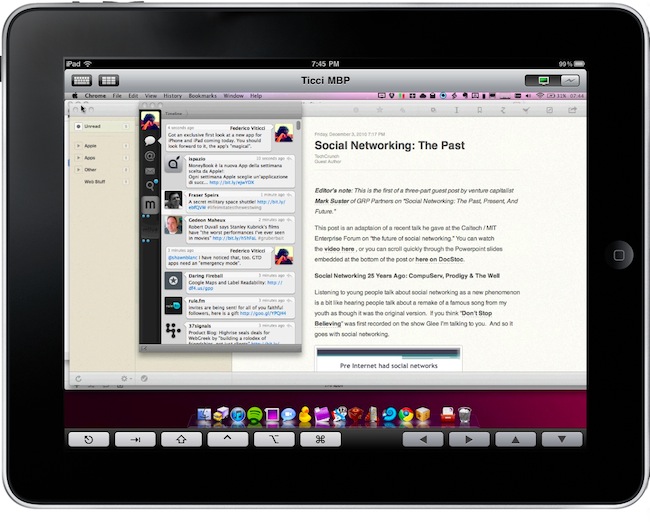
Screens is an excellent new VNC client by Edovia which, unlike other similar apps in the App Store, it’s not aimed at letting you move a cursor on your computer through the iPhone and iPad. It’s an app specifically meant to take advantage of the platform it runs on – iOS – so that you can actually touch your computer remotely.

From my review:

The “simple approach” doesn’t stop at touch controls, however. Once you’re controlling OS X on your device and you’d like to do some actual stuff with it, Screens offer two separate keyboards to execute most of the commands you know and love on the Mac. The first keyboard is a standard iOS keyboard with an additional bar on top which allows you to navigate using the arrow keys, or press Mac-only keys like Command and Control. Those buttons stay pressed until you tap on them again — useful. The second keyboard, though, is much more functional: it contains the same Mac-only and arrow keys on top, but there are no letters at the bottom. Instead, you get these “action buttons” that let you perform tasks that would require a series of taps and dialogue boxes instead. For instance, you can cut, copy, minimize, log out and activate Spolight with a single tap. Huge time saver.

We have 5 copies of Screens to give away to lucky MacStories readers. Check out the giveaway rules below (it ends tomorrow!), and if you can’t wait the app is available here. Read more


Flipboard To Launch A Web App?

As spotted by The Next Web earlier today, the Flipboard team is hiring. Most specifically, the latest job openings on Flipboard’s website reveal that the company is looking for a “Designer-Web Developer” and a “Front-end Web Developer”, together with an additional iOS developer. Flipboard was named iPad App of the Year by Apple last week in the annual “iTunes Rewind” compilation.

The web developer Mike McCue’s startup is looking for should be able to “envision and design the future of reading content online” across “web and mobile”. Standard JavaScript, HTML, CSS, PHP and Photoshop skills are required for the front-end web developer opening.

A web version of Flipboard, in my opinion, would make a lot of sense, especially considering the availability of magazine and newspaper web apps in Google’s recently launched Chrome Web Store. Flipboard for the web would directly compete with the already popular paper.li service, which allows you to build digital newspapers around Twitter links and users. What’s for sure is that if this is true, if Flipboard’s really planning a full-featured web version, we won’t be seeing it until 2011. We’d also appreciate an iPhone version, a lot.


A Rapper, 10 iPads, 20 Apps

What would you expect from a rapper and his crew freestyling with 10 iPads and 20 music apps? A Youtube video that’s making the rounds of the Internet, you’re right. Featuring hip hop vocalist Tinchy Stryder and his crew using apps such as djay or the popular ReBirth and I Am T-Pain, the result is cool, although we would have loved to see more. Perhaps we’ll just have to wait until the next rap.

Check out the video below, and full list of apps after the break. [9to5mac via iPadevice]

Read more


iPad Cutting Board Actually Better Than The iPad For Food

Remember this? That’s probably one of the weirdest…things that every showed up here on MacStories. A Japanese guy that thought eating off an iPad would be a good idea.

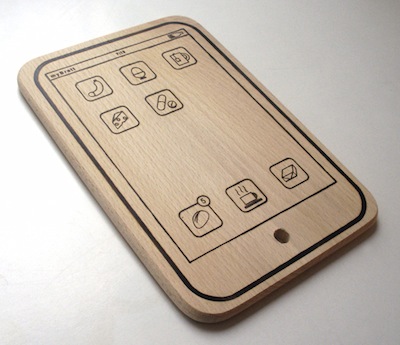
While we don’t recommend such an original usage (but hey, you can try!), we have to admit it was “particular” enough to deserve a post. If you’re looking for a way to use the tablet for cutting, and not eating, food, but you don’t want to ruin the precious Apple glass washed in unicorn tears – look no further than the iPad cutting board.

It’s laser cut from a chunk of wood, it’s got fake food icons on its “Springboard”, and the author wants to remind you that it can be used both in landscape and portrait mode. Also: the battery icon has been replaced with a bottle of wine.

The iPad Cutting Board is available here at 15 Euros (around $20). We think this deserves a spot on every Apple-themed Christmas dinner this year. For real. [TUAW via MyBrett]


iPad As A Communal Device

iPad As A Communal Device

First, we must think of the computer (PC). It may not be very personal, but it is made for the individual. Same goes for the laptop. Same for a netbook. Same for a smartphone. The iPad, however, is *communal*. Actually, more than that. The iPad is at once both personal and communal. This has never before existed in computing and it is the combination of price and form factor that makes it so. The iPad is another Apple trebuchet that will destroy barriers, gates, walls and re-make the current state of computing.

Brian makes several good points in his piece. The iPad is meant for a new era of computing based on collaboration, open workspaces and apps. The “other tablets”, the seven inchers, are meant for personal use.

I don’t know about the Playbook (a very few people have actually tested it so far), but I do know the iPad is great for “local collaboration”. Great for games, meetings, sketches, and so forth.

As for built-in online collaboration, we’re all waiting.

Permalink

Zombie + Snow White = Etsy iPad Sticker

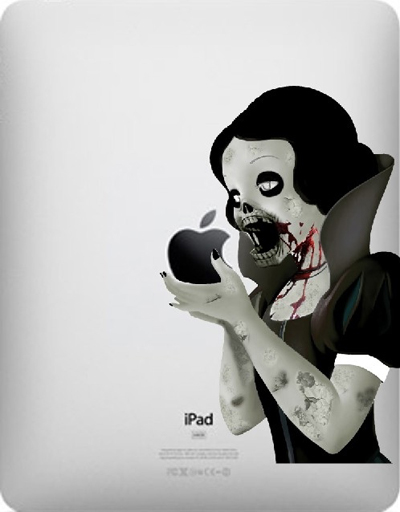
ZOMG! Now we’ve seen it all. Walt Disney would roll in his own grave if he wasn’t already a zombie. This Snow White only eats Apple Fan Boy hearts! A creepy twist on a popular genre and look at the scary detail on this thing! But in all seriousness, this is creepy cool - just peel and stick this die-cut vinyl decal on your iPad. It’s from Etsy for $15 and also available for MacBooks and iPhones.

Read more