Posts tagged with "iPad"

Elements 1.5: Sub-folders, Markdown Preview, Better File Saving

Second Gear’s Elements for iPhone and iPad has been updated to version 1.5 today, a major revision of the popular Dropbox-based text editor that adds lot of new (and much requested) features together with a plethora of bug fixes. We previously covered Elements here and here.
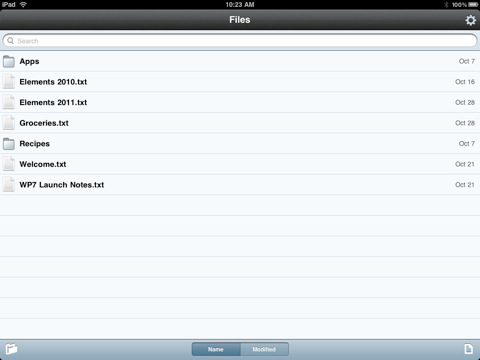
First off, Elements now supports sub-folders and Markdown previews. Sub-folders are really a huge deal for many users out there, as now you’ll be able to hook Elements up with other Dropbox-based apps that organize their documents with a similar structure, such as Plaintext. The family of Dropbox text editors keeps on getting more connected and better integrated.

For me, however, the really huge deal is the improved Markdown support: the app can now view Markdown formatted files (.md, .markdown, .mdown, .mdwn) and open Markdown files from external applications that support the “Open in…” feature. Similarly to Second Gear’s own MarkdownMail, Elements can now generate a live HTML preview of Markdown formatted text for you to instantly check on. Read more


Newsday’s New iPad Ad Doesn’t Really Impress

This is what happens when Apple legal forces you to take a genius commercial down and release a more “normal” one. In case you missed Newsday’s story, they once released a clever commercial in which a man killed a fly using an iPad instead of a regular newspaper. The iPad, of course, was shattered.

That ad was aimed at proving that tablets are anything like old media, and you shouldn’t think of them in that way. Like I said, a clever advertisement that went viral. But Apple didn’t like and Newsday was forced to take the ad down (copies can still be found on Youtube, though).

Now Newsday is coming back with a new ad, but it doesn’t really impress much. There are some trippy animations here and there, as RazorianFly also notices, but the style and cleverness of the first attempt is far, far away.

This is exactly what happens when Apple legal messes up with your stuff. We’ve embedded the old ad below. Read more


Project Sword Renamed “Infinity Blade”, Coming This Holiday

Remember Project Sword by Epic Games? Yes, that impressive tech demo we saw at Apple’s last music event on stage, the one that made our jaws drop due to that stunning graphics, light effects and animations. The same day, we were also able to download a demo of the demo, called “Epic Citadel” and based on the same graphic engine (the Unreal Engine 3 for mobile devices) but limited to a single town without any people and / or enemies.

Today Epic Games announced the final title of the game, which is now dubbed “Infinity Blade” and will be available on iPhone, iPad and iPod Touch this holiday season. Infinity Blade will feature both a single player and a multiplayer mode based on Game Center, RPG elements, even better graphics than before and free updates with new features in the next months.

The developers worked hard for 4 months on the development of Infinity Blade and, hopefully, we’ll enjoy the great results of the Unreal Engine 3 together with an equally great gameplay in a few weeks.

Check out the press release, screenshots and the old demo video of Project Sword below. Read more


John Gruber On The Idea of iPad Apps Running on Mac OS X

John Gruber On The Idea of iPad Apps Running on Mac OS X

I can prove it, practically, that iPad apps aren’t going to run on the Mac as a standard feature. iOS apps do run on Mac OS X, today, in the iPhone/iPad emulator that ships with the iOS developer kit. Ends up they’re just not that pleasant to use on a Mac. Gestures that are natural and fun with direct touch are awkward and clumsy using a mouse or touchpad.

And we thought this idea of iOS apps running as “widgets” on the desktop had been buried in the darkest corners of the blogosphere. Turns out some people are still claiming it’d be a “great addition to OS X”. Too bad Apple is not Adobe, and they don’t care about “cross-platform interoperability” as much as they care about “single-platform excellence”.

Permalink

Dribbblr: Elegant Dribbble Client for iPad

I wanted to write about this app before, but I couldn’t manage to get it working properly on my iPad running iOS 4.2 beta. Luckily enough, the Tapmates developers worked hard on releasing a compatibility update, and here I am testing Dribbblr on my iPad running iOS 4.2 GM. Dribbblr is a free client for Dribbble.com, a gallery of great works submitted by popular and new designers who managed to get an invite to the website. It’s a great place to discover new talents and, why not, new apps coming out on iOS and OS X.

You can browse Dribbble from your iPad without an account, but thanks to the recently opened API Dribbblr adds native features like a completely redesigned interface and navigation that wraps Dribbble’s screenshots around a polished and minimal iPad interface. The app is free, but you can upgrade to a Pro version via in-app purchase ($2.99) that removes all the ads, although they’ve been cleverly integrated in the “timeline” and they’re good-looking enough to not get in the way all the time. Read more


JotAgent for Dropbox: 5 Promo Codes Up for Grabs

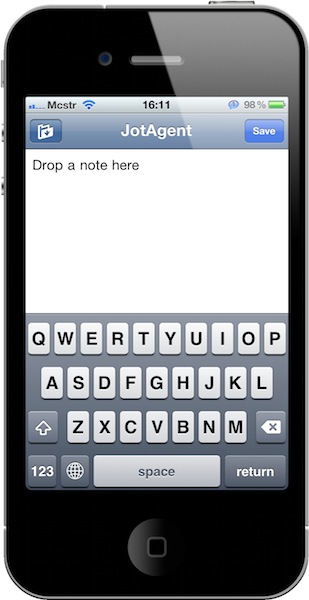
JotAgent is a neat little utility for iPhone and iPad that lets you quickly save notes in Dropbox with literally two taps. I reviewed it here a few weeks ago:

The concept is simple: you link the app to your Dropbox account, you fire it up and start writing. With the tap of a button, the note gets quickly saved in Dropbox. That’s it. You can then browse all the notes you saved, or simply write a new one.

JotAgent is not a tool for professional writers: it’s a lightweight app to “jot” down an idea and have it stored on Dropbox, which runs on your iOS devices, the web and Mac. It’s a great way to save random ideas, thoughts and pieces of text in a service that works anywhere, on any device.

The app is available at $0.99 in the App Store, but in case you haven’t bought it yet we have 5 promo codes up for grabs. Jump after the break, check out the giveaway rules and good luck!

Read more


3D Rotating Molecules On The iPad Will Blow Your Mind

Speaking of cool webapps running just fine on the iPad and iPhone: check out this cool demo of molecules rotating in 3D on the iPad (where the jaw-dropping effect is guaranteed), iPhone and any other browser that supports 3D transformations. Everything is accomplished through CSS, the developer says.

To accomplish this in CSS, we take advantage of a technique called “billboarding”. Billboarding involves rotating an object (in our case, each of the colored balls), in such as way that it remains facing directly at the camera at all times. This is a fairly common technique in the world of 3D gaming, used to render things such as trees and grass — and in our case, it gives the illusion that the circles are really spheres.

Try it yourself, it’s impressive. Yet more proof that the open web is more than welcome on iOS.


Running iPad Apps On The Mac

Running iPad Apps On The Mac

Dave Winer:

Why didn’t I see this? One of my first wishes when I got my iPad was that this software would run on a Mac. I forgot that, and Uncle Steve said it the other way. The store is coming to the Mac. The store is coming to the Mac. That’s the sleight of hand. What he really meant to say is that IOS software is coming to the Mac. Or maybe it’s the IOS hardware I’m writing this on is running Mac software, kind of the way Carbon ran old lifeless legacy Mac apps. Which one is the “real” OS and which one is running in a compatibility box? I have a funny feeling that right now, as I type this on an AirBook, I’m using the compatibility box. Right?

The iPad can run apps from another iOS device, the iPhone. Will the Mac be able to run apps coming from iOS, even if the Mac is a machine running OS X? We don’t know. The thing is, if iOS is actually OS X coming back to the Mac after 3 years of mobile adventures (and if Lion is “OS X meets iPad”), then Winer’s option could make sense. Developers could adapt iPad apps to bigger screens with relative ease, though I don’t know how you’d be supposed to run apps requiring tilt controls on a desktop computer.

In the end, it’d be a cool feature – as long as you don’t pay attention to the trade-off.  Mobile apps don’t make any sense on the desktop, not as we think. Perhaps Apple will prove us wrong. The way I see it, Jobs simply wants to reinvent the way Mac software is discovered and distributed; a Mac App Store doesn’t necessarily mean the App Store is coming to the Mac.

Permalink

Chalk: Sketching Webapp for iPad by 37Signals

We have already seen what can be achieved with the power and knowledge of open web technologies on iOS thanks to our buddy Steve Streza’s Swearch for iPhone. A webapp that lets you search on a variety of different search engines without requiring you to go look for the app in the App Store and wait for Apple to approve updates.

Great things can be achieved with HTML5, Javascript and a few lines of CSS.

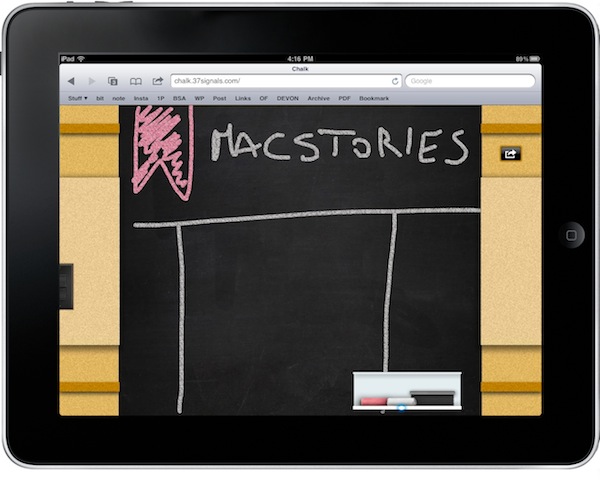
37Signals unveiled today a side project they’ve been working on “just for fun”, available as a free webapp for iPad users at chalk.37signals.com. Chalk is very similar to 37Signals’ Draft (which is sold in the App Store) but it’s entirely browser-based and you can add it to your homescreen to get a nice icon and easy web access. As the name suggests, Chalk allows you to sketch on a chalkboard: you can use white and red colors, pick up the eraser, turn off the lights to focus on what you’re sketching and saving the result to your image library. All within Safari. Read more