
Posts tagged with "iPad"

Working on the iPad: One Year Later, Still My Favorite Computer

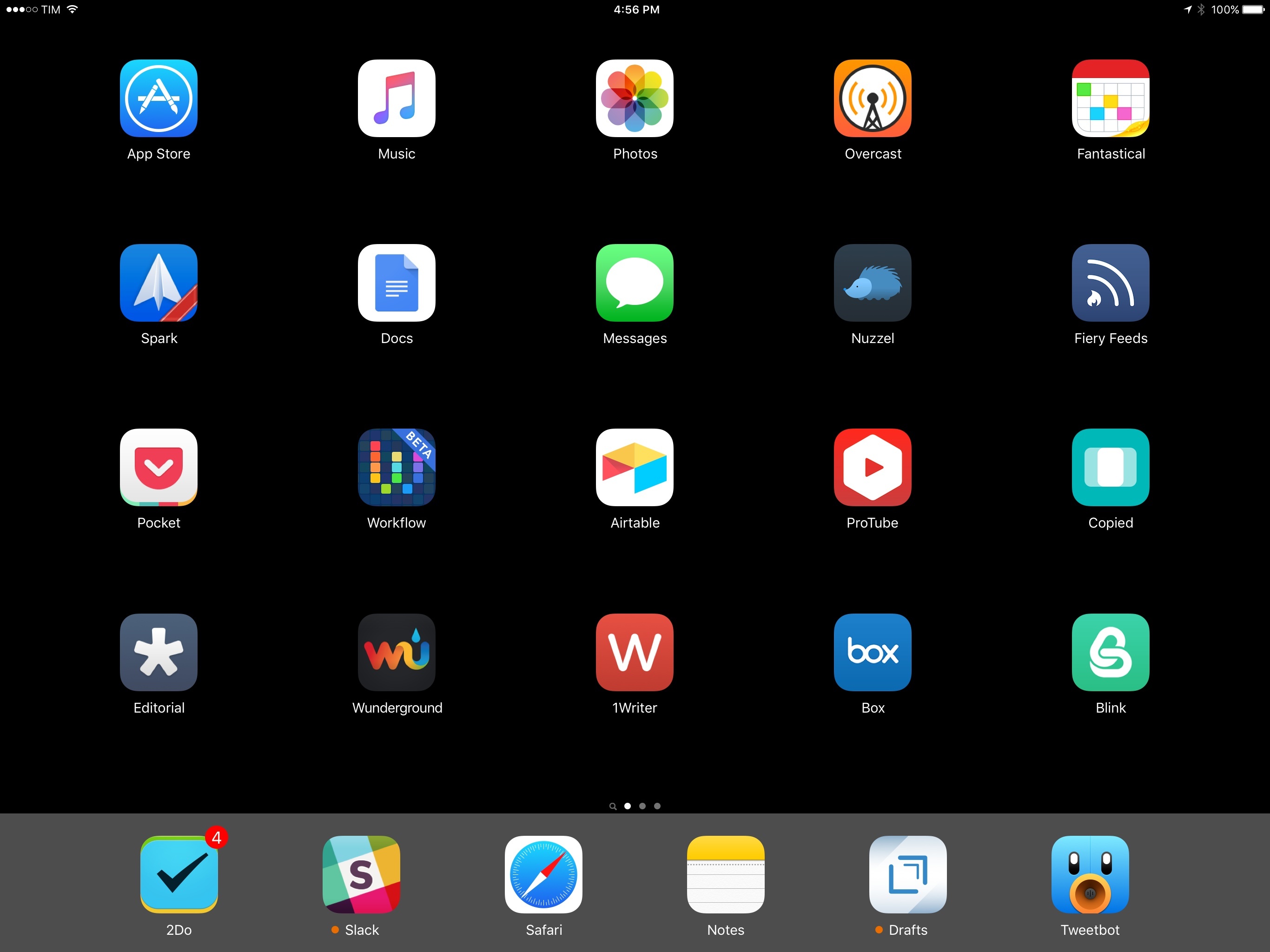
My iPad Pro Home screen.

My iPad Pro Home screen.

Four years ago, I struggled to move from a Mac to an iPad. Today, I only have to open my MacBook once a week. And I wish I didn’t have to.

In February 2015, after years of experiments and workarounds, I shared the story of how the iPad Air 2 became my primary computer. The article, while unsurprising for MacStories readers who had been following my iPad coverage since 2012, marked an important milestone in my journey towards being Mac-free.

As I wrote last year:

Three years ago, as I was undergoing cancer treatments, I found myself in the position of being unable to get work done with a Mac on a daily basis because I wasn’t always home, at my desk. I was hospitalized for several weeks or had to spend entire days waiting to talk to doctors. I couldn’t write or manage MacStories because I couldn’t do those tasks on my iPhone and I couldn’t take my MacBook with me. I’d often go weeks without posting anything to the website – not even a short link – because I couldn’t do it from my bed. I began experimenting with the iPad as a device to work from anywhere and, slowly but steadily, I came up with ways to speed up my workflow and get things done on iOS. I promised myself I’d never let a desk set my work schedule or performance anymore.

Being tied to a desktop computer isn’t an option for me. No matter what life has in store for the future, I have to be ready to work from anywhere. I have to consider the possibility that I won’t always be okay, working from the comfort of my living room. That means having a computer that can follow me anywhere, with a screen big enough to type on, and a higher degree of portability than a MacBook. That means using an iPad. That means iOS.

The past 12 months have cemented this vision and raised new questions. But, more importantly, the iPad and iOS 9 have been essential to launching a project I’ve been working on for years.

At this point, I can’t imagine using a computer that isn’t an iPad anymore.

Read more


Khoi Vinh Is Done with MacBooks

Khoi Vinh:

I’ve been using laptops for decades. The first one I ever owned was a PowerBook 3400c, and I’ve never not owned one since then. But now, in contrast to my iPad, my laptop seems altogether much more cumbersome than I prefer to deal with. It’s much, much heavier and bulkier than my iPad, especially when you factor in its power supply and a carrying case.

It’s much more fragile, too—I regularly toss my iPad around in ways that I would never do with my MacBook—and as a result, it’s much less versatile, at least for me. This is partly because the MacBook also restricts my movement; I have to be sitting or standing in a way that accommodates typing, whereas I have so much flexibility with my tablet that I’ve become accustomed to using it while positioned in just about any variant of laying down, sitting, standing or even walking.

He’s not done with OS X – an important distinction.

Permalink

Using Classic Mechanical Keyboards on Modern iPads

Kevin MacLeod, following up on one of the geekiest photos I’ve seen on Twitter in a while:

You found a mechanical keyboard. An old Apple keyboard, or Dell, IBM, Focus, Acer, Cherry - doesn’t matter. It has good mechanical switches, and you want to use it with your iPad.

The good thing is, once you connect your keyboard to the iPad, iOS is fully capable of using it - the keys all work, you don’t need to install any drivers, jailbreak anything, or take any special steps. The tricky part is actually connecting these keyboards to your iPad.

I’ve never tried a mechanical keyboard myself (I probably should, given that I write at my desk quite a bit?), but I know this is going to be a fun weekend project for many.

Permalink

Real Design Work on an iPad

Khoi Vinh makes some good points about using an iPad for design work. Among his list of suggestions, I’d point out better clipboard support on iOS:

Robust clipboard. The Mac’s clipboard is still relatively simple—it holds one thing at a time and allows you to paste it in any app that supports its current contents—but iOS’s clipboard isn’t even as capable as that. It would be a boon in itself to have more pervasive support for that simple level of copy and paste throughout the app ecosystem, but I would argue that iOS’s far more constrained interaction model should sport an even more advanced clipboard than the Mac’s. You should be able to save multiple clipboard items of multiple media types; each app that supports the clipboard should allow you to paste the most recently copied compatible item. That would significantly reduce the friction inherent on iOS in pulling together content from multiple sources.

Requests for better clipboard management on iOS go back a long way. Even trivial tasks such as copying rich text from one app and pasting into another one can be problematic on iOS (for “fun”, try to build workflows to paste rich text in iOS 9’s Notes. I’ll wait.). There are excellent solutions for third-party clipboard management (Clips and Copied – I use the latter now), but it should be native to the OS. There’s still plenty of low-hanging fruit for Apple to pick on the iPad.

Permalink

Can the MacBook Pro Replace your iPad?

This article by Fraser Speirs is going to upset some longtime Mac users – for me, it perfectly encapsulates all the reasons why I decided to move from a MacBook to an iPad (and now an iPad Pro) as my main computer. Two highlights:

Firstly, consider the hardware. The huge issue with the MacBook Pro is its form factor. The fact that the keyboard and screen are limited to being held in an L-shaped configuration seriously limits its flexibility. It is basically impossible to use a MacBook pro while standing up and downright dangerous to use when walking around. Your computing is limited to times when you are able to find somewhere to sit down.

And:

If you are a road warrior, the MacBook’s total lack of cellular connectivity options would be a serious hinderance to a cloud-based storage lifestyle in any case. You would think, for a device that costs up to twice as much as the most expensive cellular iPad, that Apple could afford to offer LTE radios in these devices. Sadly, MacBook Pro owners are stuck with tethering to their iPhones and burning through data plans. While tethering Macs to iPhones has improved in recent years, it will never be as good as a built-in LTE radio.

I couldn’t have said it better and the entire premise of the article is genius. This is exactly why I don’t want to use a MacBook any longer – I simply feel constrained by what others see as benefits of the platform.

One particular mention for Fraser’s note at the end – “If journalists reviewed Macs like iPads”.

Permalink

New Tricks for Old Dogs

Jason Snell, who’s been a using a Mac for 26 years, has been trying to do as much as possible on an iPad Pro for the past few days. His takeaway is spot on:

That’s sort of how I view the iPad and the Mac today: One is not fundamentally better than the other, but the Mac is the one I know by heart. The Mac is the one on which I’ve built numerous scripts and workflows and shortcuts to make my work manageable. Leaving it isn’t something I can do lightly, and would need to provide large, tangible benefits.

As I argued in today’s Connected, instead of continuing to spend time on discussing what is a “computer” and what’s “better” for other users, perhaps we’d be better served by understanding what works for us.

This “Mac vs. iPad” debate is taking us nowhere. Today – right now – millions of people are using phones, laptops, and tablets as their computers. They couldn’t care less about the traditional idea of a computer. Most of them don’t even call them “computers” anymore. That’s powerful and empowering. It gets rid of the weight of any preconceived notion of how technology should be used. For some, this change is uncomfortable. For others, it’s liberating. And somewhere along this spectrum, there’s the “computer” for each one of us.

As far as Apple devices go, I believe it’d be more interesting (and intellectually motivating) to talk about how OS X and iOS can improve in their individual areas and as part of the iCloud ecosystem. Exploring the present and imagining where we could go next, rather than telling others how they’re supposed to get work done.

Jason’s probably not going to stop using a Mac, and I’m going to keep using an iPad. No one’s right or wrong here.

Use whatever works for you.

Permalink

iPad 2015 Display Technology Shoot-Out

In their annual iPad display technology shoot-out, the experts at DisplayMate have compared the new displays of the iPad mini 4 and iPad Pro to 2014’s iPad Air 2. The result surprised me:

The nicest surprise this year is the tremendous improvement in the display quality and performance of the iPad mini 4 after the poor showings of previous minis – the mini 4 is now very impressive and breaks many Tablet display performance records. The iPad Pro has also made a strong entrance and first appearance.

If you’re into this kind of technical overview, you may want to save a couple of hours to dive deep into this. Incredible research.

Permalink

Working with an iPad from the Camino De Santiago

In late August, web developer Thaddeus Hunt and his wife decided to hike the Camino De Santiago in the Fall. Early on, Thaddeus chose to only bring an iPad Air 2 running iOS 9 to get his freelance work done while on the Camino. Back in August, he concluded Part 1 of his series with:

My hardware needs have been met, I will be traveling super light, and connectivity is no longer a concern… but quality web development is only as good as the tools you have at your disposal.

I mentioned above, that in my pre-prep there was very little that I could not accomplish with my current iPad and keyboard setup. But hardware has only been half of the equation. In truth, the software is where all the magic has been happening. Luckily, the iOS dev community has created some beautiful, highly capable tools that will help me accomplish my day-to-day.

Three months later, he has returned from the Camino with the results. Thaddeus assembled a solid setup of hardware and software, and I find his final thought to be a refrain among users who try to replicate their OS X setups on iOS:

As a freelance web developer with paying clients, I obviously found this setup to be a more than capable replacement for my 13 inch MacBook Pro while traveling. Depending on what you do for a living, your mileage will vary. I definitely recommend giving it a shot though. For the portability of the hardware and the singular focus of the software alone, it’s worth your time I think. You may be surprised at just how much you can get done.

You can read all the entries in the series here.

Permalink

On Multiple App Views for iPad Multitasking

Clayton Miller thinks that iOS should offer a way to view multiple documents from the same app side by side in iPad multitasking:

It’s not too hard to imagine a solution that can leverage the app-centric paradigm of iOS into something supporting multiple documents from the same app. Apps and documents both share the metaphor of the window on the desktop, so why not let them share the iOS pane model?

In an application that supports it, the slide-over menu gains a new option at the bottom for the current app. Tapping that instantiates another view of the app, defaulting to the document management or “open” view. The underlying iOS process model would likely need an overhaul for this to become a reality, but it’s a necessity.

I like the concept he came up with, using the lower section of the Slide Over app picker to open a second pane for another document. But I’d go a step further and argue that users should have the ability to pin any view from the same app next to the current view, not just documents.

As I argued in my review:

One of the key aspects of Slide Over and Split View is that they cannot show two sections of the same app at once. Only individual apps can be displayed concurrently on screen: you can’t split Safari in multiple views and display both views on screen at the same time. If you were hoping to manage multiple Safari tabs or Pages documents in Split View, you’re out of luck.

Splitting apps into multiple atomic units for standalone views and documents seems like an obvious next step going forward.

If Apple brings the ability to split the current app in multiple instances for Slide Over and Split View, I hope they’ll do it for any view available in the app. Documents are ideal candidates for this, but all apps would benefit from such addition.

Permalink