This Week's Sponsor:

Turbulence Forecast

Know before you go. Get detailed turbulence forecasts for your exact route, now available 5 days in advance.


Posts tagged with "iPad"

iPad and “Content Creation”

iPad and “Content Creation”

In doing research this week, I came across an article by Richard Gaywood that I found to be one of the most balanced takes on the three year-old iPad is for consumption/creation subject.

No device is one-size-fits-all, including the iPad. It’s fine to acknowledge the shortcomings of an iPad for content creation, whilst keeping in mind that these are only shortcomings – not hard limits. What’s important is understanding your needs and the ways different devices can fulfil or frustrate them. What’s important is the nuance; the shades of grey between the “the iPad is a toy” and “the iPad is the future of computing” extremes.

Whenever I “criticize” a shortcoming of iOS or the iPad, I’m accused of being a “bored geek” who doesn’t consider “real life scenarios”. In this regard, I particularly appreciate Richard’s real-life practical examples:

Other tasks are complicated by the way you can only see one app at once and because switching back and forth is relatively slow and relatively laborious (which is why many bloggers have asked for cmd-tab support on iOS.) Try making a calendar entry from details sent in an email, for example – if the automatic tap-to-make-entry fails you, lots of tedious back-and-forthing between two apps becomes necessary. Try collating data from a dozen disconnected cells in a spreadsheet into a wordprocessor document. Try cross-checking two spreadsheets against each other. Try following a tutorial in a web page about how to carry out a task in your presentation software. Try plagiarising a Wikipedia page by subtly rewording it into a high school paper. And so on, and so forth.

Saying that the iPad can be used for “content creation” isn’t a crusade against people who don’t like Apple, iOS, or the iPad. Similarly, blindly insisting that the iPad is for “consumption only” is just silly and shortsighted. More importantly, the term content is awful. So, for the sake of this linked post, I’m going to refer to the issue as: doing real work and/or tasks that you’d normally do on a computer.

Once iOS reached a certain degree of “basic functionality”, I’ve always thought this discussion sounded like arguing about your favorite color. Being “objective” in regards to the iPad’s capabilities is, ultimately, subjective: I can say that the Nebulous Notes macros are objectively fast and they make writing in Markdown easier for me; my girlfriend can objectively state that graphic design work is severely limited on the iPad. So who’s right? Well, nobody is. But nobody is “wrong”, either.

Like Richard says, the truth is more nuanced. And I will add: it really depends on the kind of software you’re looking for. Out of the box, the iPad can’t do much for a writer, but there are hundreds of good/great apps for text editing on the App Store. On the opposite side of the spectrum, even a jet fighter pilot managed to make an iPad work for him thanks to third-party apps and accessories. Now consider all those shades in the middle: teachers, students, corporate employees, sale reps, doctors. Condemning and glorifying the iPad on principle as a “work” machine won’t let us get to the core of the subject – because the actual core are those millions of people using the iPad every day for thousands of different tasks. And in that case, a single blogger can’t expect to cover all the possible combinations. Keep in mind that many of those “iPad is consumption” complaints come from journalists who often deal with complex web-based CMSes, multi-author editing workflows, and lots of email attachments. Admittedly, the iPad isn’t as efficient as the Mac at completing those tasks.

Which, again, is why I like Richard’s article. Judging a device with a black/white meter isn’t the way to go. But: there are pragmatic examples worth mentioning as areas of improvements. He touched upon many of the topics I’ve covered as well: opening documents in various apps; text selection; switching from a browser to something else. I believe we can safely agree that those areas could use some attention by Apple now.

The thing is, I’m not writing headlines about the iPad being “the best device for creation” or “consumption only”. I am sharing what works for me and I’m just happy to show other people that the App Store comes with great apps that we can leverage when it comes to writing, reading, doing research, and other tasks that I care about.

Permalink

Apple Launches 128 GB Retina iPad

Apple Launches 128 GB Retina iPad

Apple announced today a new version of its 4th-generation Retina iPad with an increased capacity of 128 GB. Starting this Tuesday (February 5), the 128 GB iPad will be available in two colors (black and white) at $799 for the WiFi model and $929 for the WiFi + Cellular model.

Apple’s Phil Schiller was quoted in the press release:

With more than 120 million iPads sold, it’s clear that customers around the world love their iPads, and everyday they are finding more great reasons to work, learn and play on their iPads rather than their old PCs,” said Philip Schiller, Apple’s senior vice president of Worldwide Marketing. “With twice the storage capacity and an unparalleled selection of over 300,000 native iPad apps, enterprises, educators and artists have even more reasons to use iPad for all their business and personal needs.

In the same press release, Apple also included quotes from third-party developers such as AutoCAD. Apple included the same numbers they shared yesterday in regards to the App Store: more than 800,000 apps are available, with 300,000 made for the iPad. According to Apple, iPad “also supports the more than 5,000 newspapers and magazines offered in Newsstand, and the more than 1.5 million books available on the iBookstore” – the same numbers the company announced in October 2012 for the release of the iPad mini.

Permalink

Measuring iPhone 5 vs. iPhone 4S availability

Measuring iPhone 5 vs. iPhone 4S availability

Horace Dediu of Asymco today wrote and shared data on the availability of the iPhone 5 and iPhone 4S by potential buyers - measured by the subscriber counts of the carriers that sell the iPhone. It’s an important and valuable extension of an article I wrote last week, discussing the international rollout of each generation of iPhone and iPad. That analysis had a weakness in that I treated all countries as equal which isn’t necessarily true (depending on why you’re looking at the data).

Announcing availability in Mauritius is not nearly as important as announcing Madagascar. A better measure would be to track the countries’ populations being added, or, better still, the populations which subscribe to operators who have a distribution contract with Apple.

So instead, Dediu looked at which carriers held the iPhone in each country and what their approximate subscriber count was. By calculating the availability this way, you can now see the potential number of iPhone buyers, as seen in Horace’s graph here.

That’s a handy measure: the iPhone 5 was 30% more available than the iPhone 4S. The big contribution was having China and Indonesia available during the fourth quarter rather than in January 2011.

Make sure to head over to Asymco to read the full article and all of Horace’s observations, it’s an interesting read. If you didn’t catch my article last week, it’s also available to read here. Just note that if you are trying to compare Dediu’s graph with the one in my article (shown here), Dediu went with actual dates whereas I went with relative time. This is because I wanted to look at the first 110 days of every iPhone, Dediu was specifically looking at the fourth quarter availability.

Permalink

Could Apple Be Moving To Twice-Yearly iPhone & iPad Releases?

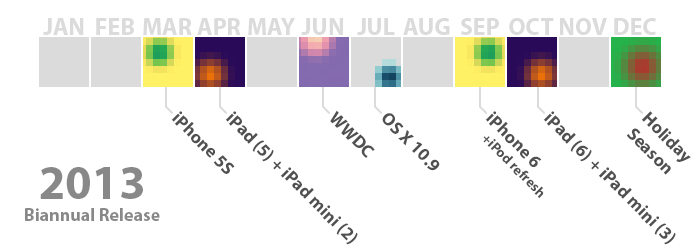
Just over a month ago, Horace Dediu of Asymco penned an article entitled ‘Does S stand for Spring’ in which he hypothesised that perhaps Apple might be moving to a biannual (twice-yearly) release cycle for the iPhone and iPad. Over the past month I’ve gone back to read Dediu’s hypothesis as news articles and analyst opinions surfaced and I did some analysis of Apple myself. It’s got to the point that I really think Dediu’s hypothesis has got real potential to become reality. So I decided to take some time to present Dediu’s evidence in a slightly different way, elaborating on some of his evidence and hopefully add to the discussion. But if you haven’t read the Asymco article yet, I’d highly recommend you do so before proceeding:

‘Does S stand for Spring?’ - Asymco

Read more


Mapping Apple’s International iPhone & iPad Rollouts

Apple has on three seperate occasions announced that the iPhone 5 will have the fastest international rollout of any iPhone ever - at the announcement keynote, during the Q4 earnings call, and in their press release announcing opening weekend sales of the iPhone 5 in China. The claim was, no doubt, meant to impress investors, press and the general public, but I was curious as to how fast it really was compared to previous iPhone rollouts. So I decided to track down the launch schedules of all the iPhones to date and then again with the iPad. In the end I found a few trends, some oddities and that Apple’s claim was (mostly) true.

iPhone 5 will be available in more than 100 countries by the end of December, making it the fastest iPhone rollout ever.

- Apple Press Release

Read more


ScriptKit - Drag and Drop Programming for iPad

ScriptKit - Drag and Drop Programming for iPad

Mark Wilson profiles Scriptkit by Kyle Buza, a new “touchable programming” app for iPad.

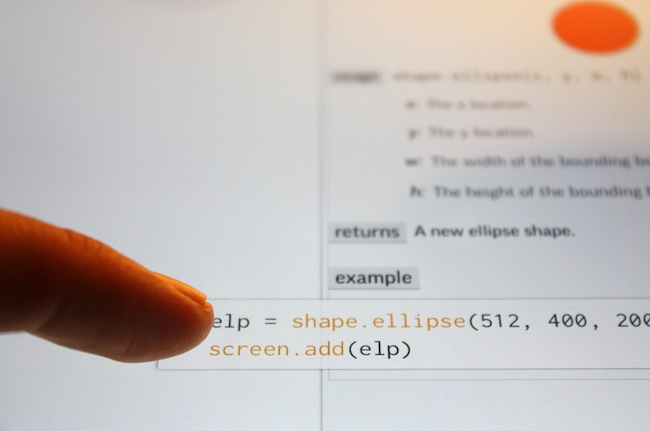
The app I’m using is Scriptkit, by Kyle Buza, and it allows you to drag and drop snippets of code from a library of well-annotated APIs. The goal? Rapidly prototype your app ideas on the very device you’re looking to run them on. Sure, you’ll still get your hands dirty on the iPad keyboard from time to time, tweaking the X/Y values determining size and shape of a button, for instance, but building a functional app really isn’t much harder than a few taps and a few drags–especially if you already know what you’re doing (which I don’t).

Only last week, I wrote:

I believe that, going forward, Pythonista and other similar apps will show a new kind of “scripting” and task automation built around the core strenghts of iOS.

I had no idea ScriptKit existed, but this is exactly what I was referring to in my Pythonista article. Yes, ScriptKit is limited, it’s confined in its own sandbox, and its initial set of APIs could use some additions. But look at what ScriptKit already enables: a touchable programming interface for building prototypes that use real data (Facebook photos, Dropbox files, etc) with real iOS core elements such as Camera and Location Services. Developers can use ScriptKit to build quick working prototypes; users with an interest in scripting like me can learn a basic syntax to build scripts and app demoes that may lead to bigger interests in other areas of iOS and languages. All within a touch-based interface, with real APIs, on an iPad.

Codea, Pythonista, ScriptKit – the future of iOS couldn’t be more exciting to me.

Permalink

Apple Airs New iPad mini Commercials

Apple Airs New iPad mini Commercials

Following the “Piano” ad launched after the announcement of the iPad mini, today Apple aired two new commercials for the device. Named “Books” and “Photos”, both commercials focus on showing the size difference between the regular iPad and the iPad mini. More importantly, both ads want to communicate the simple message that the iPad mini is smaller in size, but also just as capable in terms of functionality: the iPad mini runs the same apps of the bigger iPad, therefore making it a “real” iPad, only smaller (and thus more portable). This follows the tagline on the product page: There’s less of it, but no less to it.

As noted by Jordan Golson at MacRumors, the commercials rely on clever pairings of books and photos to compare the two iPad models. For books, Apple uses The Sun Also Rises and The Valley of the Moon; East of Eden and How the West Was Won; Moby Dick and Gone Fishing.

The new commercials aren’t available on Apple’s YouTube channel yet, but they have been uploaded to Apple’s website. You can watch them here.

Permalink


The 4th Generation iPad Brings iPad Up to Date with Lightning Connector, Faster A6X Processor

Before the Phil Schiller introduced the brand new iPad mini, he surprised the audience in attendance with the introduction of Apple’s 4th generation iPad during today’s Special Event.

The 4th generation iPad comes in the same chassis as the 3rd generation iPad. It’s been updated with Apple’s new dual-core A6X processor with quad-core graphics, which offers performance that’s twice as fast as the previous generation model. The camera has been updated to a FaceTime HD camera, able to record 720p video and snap 1.2 MB photographs. A Lightning connector has also replaced the old dock connector.

It’s an incremental update that’s big on performance, but not so substantial that purchasers of the 3rd generation iPad should feel the need to upgrade. The launch of the 4th generation iPad is a simple revision to the existing model that neither reduces weight or thickness. It does, however, possibly change Apple’s release cycle by placing the iPad ahead of the holiday shopping season instead of after it. The updated iPad also brings it up to date with Apple’s most current technologies, such as Apple’s new Lightning connector that was introduced with the iPhone 5.

As a buyer’s note, Apple hasn’t replaced the iPad 2 with the 3rd generation iPad. Instead, the iPad 2 remains for sale, while the 4th generation iPad simply succeeds the 3rd generation. If you want a new iPad, you’re still choosing between a model that has a Retina display and doesn’t.

For more coverage, check out our October 23 news hub and follow @macstoriesnet on Twitter.