This Week's Sponsor:

Turbulence Forecast

Know before you go. Get detailed turbulence forecasts for your exact route, now available 5 days in advance.


Posts tagged with "iPad"

Steve Jobs And The iPad 27 Years Before The iPad

Steve Jobs And The iPad 27 Years Before The iPad

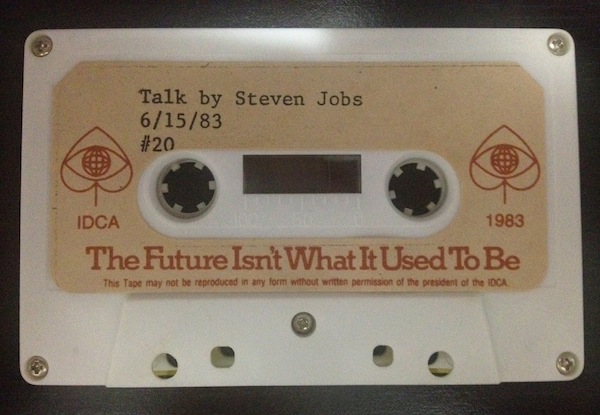
Matthew Panzarino has published a summary of a “lost” Steve Jobs speech from 1983 uncovered in its entirety by Marcel Brown. Brown was given a cassette tape with the full recording of a speech Steve gave at the International Design Conference in Aspen (IDCA) in 1983 (photo). During the speech, Steve shared some forward-looking ideas for the future of computing including what would become the App Store and, 27 years later, the iPad.

He says Apple’s strategy is to “put an incredibly great computer in a book that you can carry around with you that you can learn how to use in 20 minutes”. Does that sound like anything we are familiar with today? And they wanted to do it with a “radio link” so that people wouldn’t need to hook it up to anything to communicate with “larger databases” and other computers.

And about the App Store:

He thought that the software industry needed something like a radio station so that people could sample software before they buy it. He believed that software distribution through traditional brick-and-mortar was archaic since software is digital and can be transferred electronically through phone lines. He foresees paying for software in an automated fashion over the phone lines with credit cards.

When these tapes and old video recordings surface, it’s easy to dismiss them as “inevitable”. It was “inevitable” for Apple to come out with a tablet that looked like an iPad, and it was “inevitable” for software to be distributed digitally in an App Store-like marketplace.

Of course, progress itself is inevitable. But I don’t think it’s that easy – I don’t think we can dismiss innovations as “inevitable” or “obvious”. What supporters of the “inevitable” theory are missing is the work and vision and effort of dozens of people that it took to get there. In hindsight, it’s easy to look at any product and think it had to be in that way.

The speech uncovered by Marcel Brown is the perfect example of how some people, in this case Steve Jobs, have a vision that is only constrained by technology. A vision that, after years of research and design iterations, will become real and, at that point, “inevitable”.

Permalink

Bad Piggies Is Now Available For Download On iPhone, iPad and Mac

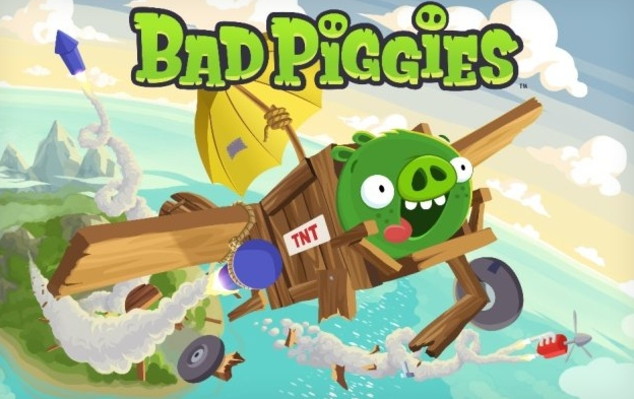
Bad Piggies, the latest game from Rovio, is now available for download on iPhone, iPad, Android and Mac. This latest Rovio game is a twist on the infamous Angry Birds series in which you now control the pigs and must pilot them safely to the bird eggs. Unlike the simple mechanic featured in Angry Birds in which you simply slingshot the birds into the pigs and their structures, Bad Piggies requires you to make “the ultimate flying machine” and steer them through the levels.

With more than 60 levels, and free updates coming up, you have hours and hours of pig-crashing, exploding, and flying fun! Get three stars on every level to unlock 30 more puzzles! HINT: Sometimes you need to play the level several times to achieve all the objectives – try building a new device or steering in a different way to earn all the stars!

The game currently features 60 levels, with another 30 unlockable by getting three-stars on levels and will, like Angry Birds, receive free updates that add levels. There’s also 4 sandbox levels in which you can really have fun with making some awesome flying contraptions with various fans, wings, motors, balloons and other objects. If you’re interested in reading a review, check out this one by Polygon’s Chris Plante:

Bad Piggies’ levels aren’t nearly as fast as Angry Birds. They require attention and patience as the pig slowly travels from one end to the other. Unlike Angry Birds, it’s not as easy to play on a subway or during a coffee break. The main game is a fine distraction, something to do with your hands while watching sitcoms or talking on the phone.

Download links:

Jump the break to watch the Bad Piggies trailer.

Read more


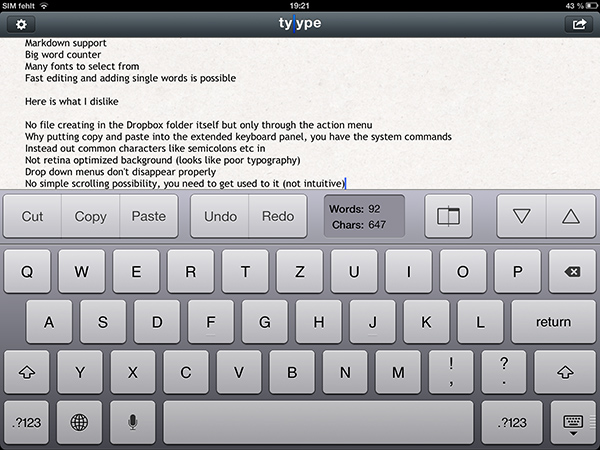
Review: Tyype HD for iPad

Text editors on iOS are always difficult to review. More or less everyone who writes on a computer or other digital device has a favorite mobile and desktop text editor, and is accustomed to the workflows connected to it. To give an example, I am totally in love with iA Writer. Its easy iCloud sync options, readable typography, and Focus Mode fit my needs. I don’t need Markdown, lots of different fonts, or an extensive amount of settings. I just want to write, and with iA writer I found the perfect, distraction-free environment to do so.

However, when I recently discovered Tyype, a new iOS text editor by Polish app development company Appvetica (who also developed apps like QRSight, an OS X QR code scanner), I got curious. Their clean, minimalist website and product video promise a text editor with easy text navigation, selection, and copying using custom gestures. Its interface seemed easy to understand, and the icon looks gorgeous. So I went ahead, downloaded Tyype HD for the iPad (which I’ll refer to as “Tyype”) and starting writing with it. Unfortunately, I have to say that Tyype does not work as great as it is shown in the demo video on the app’s website. But it’s certainly not a bad app either. Read more


iPad + Linode, 1 Year Later

iPad + Linode, 1 Year Later

Last year, programmer Mark O’Connor decided to swap his MacBook for an iPad and Linode. Foregoing any discussion as to whether the iPad could be considered a PC, Mark simply started doing real work with it. Using Vim as a work environment, O’Connor relied on a combination of Mobile Safari, VNC apps, email, and SSH console to work from anywhere. The article in which he described his experience and workflow took off.

One year later, O’Connor says the experiment is over. But not because he stopped using his iPad as his main device – in fact, he’s using it even more. In a follow-up to last year’s post, O’Connor says that the iPad stopped being an experiment a long time ago – having become a natural part of his setup that has allowed him to work “on river islands, half-way up trees and on exclusive rooftop terraces”.

The 10-hour battery life, 3G connection and small form-factor of the iPad + wireless keyboard combination frees me from so much; today I can work wherever I can sit.

As he says, however, not everything’s perfect. In noting the deficiencies of Mobile Safari in terms of performances as a full desktop browser replacement (though JavaScript is much improved in iOS 6), O’Connor admits he’d be interested in checking out the Surface, Microsoft’s upcoming tablet effort.

Last but not least, the Metro vibe feels fresh and new and I’m intrigued by Microsoft’s choice to make Javascript + HTML5 a first-class way to develop for the system. I’m already looking forward to hacking my own tiles together to smooth my workflow and simplify my day.

I am no web developer or programmer. From my personal experience, however, I can say that, in the past year, I’ve seen several apps coming out for the iPad that filled some of the most glaring omissions in my workflow. Poster and Posts, two great apps to write for WordPress; OneEdit, for batch processing of images; iStorage, a decent file manager; Diet Coda, to access FTP servers and upload images; Nebulous Notes, to write plain text even faster with macros. And these are just a few examples.

The iPad is still no full Mac replacement for me. But as Apple keeps giving more great tools to developers, I am looking forward to the apps they’ll come up with to enjoy an increasingly more mature platform.

Permalink

Harry McCracken: “One Year Later, the iPad Is Still My Favorite Computer”

Harry McCracken: “One Year Later, the iPad Is Still My Favorite Computer”

Harry McCracken has been working a lot from his iPad. And by “a lot”, I mean Harry McCracken was one of the first journalists to bring his iPad full-time and turn it into a serious work machine for writing. He shared some great tips and workflow ideas last year, and his experience was the inspiration for this article of mine, which analyzed the iPad’s journey from early adopters to mass market as a “Post PC” device. McCracken’s story also motivated me to use the iPad more for work-related purposes, and I was not alone.

One year later,  McCracken interviews himself about the pros and cons of the past 365 days as a proficient iPad user. More importantly, he argues that it’s not about the writers and bloggers anymore – the iPad is being used by “regular” people, who are finding the iPad to be a viable solution for variegate tasks like reading and checking emails, or more specific activities like screenwriting and managing medical records in healthcare.

I’m pretty sure it’s not just journalists who are using iPads as computers. I see people doing it in airplanes. I’ve seen them doing it on the subway. When I’m out and about, strangers run up to ask me about my keyboard. Something’s happening here, and it’s happening quickly — and so I thought I’d update you on my experiences as of the one-year mark.

Skipping the question as to whether the iPad can or can’t be a “computer” altogether, what we really should consider is that, ultimately, consumers aren’t wasting their time arguing on the nature of the device, they’re just using it. As it turns out, arguing on productivity isn’t nearly as productive as just getting work done, like McCracken (and others did).

Read Harry McCracken’s post over at TIME.

Permalink

Review: Magellan Virtual Analog iPad Synthesizer

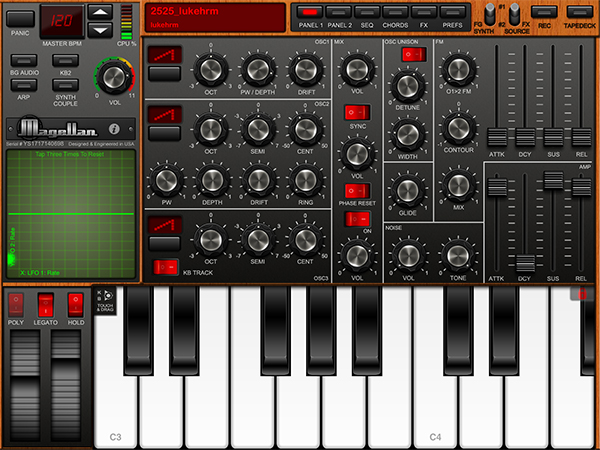
In my post about the current state of music-making and discovery on the iPad, I concluded with a roundup of the best, most sophisticated software to professionally create music on the iPad. As I did with shuffler.fm and discovery, I would today like to add a new app to the list of the best software synths available for the iPad. The app that I found worthy of being added is the newest product by music software company Yonac Inc, called Magellan.

Yonac made a name for itself by producing an extensive amount of music-related apps since early 2010. One of their most elaborate and popular efforts has been the Shredder guitar synth to create analog and digital synth leads or pads by playing guitar into the iPad through an interface like the IK Multimedia iRig or the Apogee JAM. The company was also right there when the iPad got unveiled. They developed and promoted one of the very first synth software for the iPad, the Yonac miniSynth.

Magellan is their new masterpiece. It’s a fully fleshed-out virtual analog synth with a lot of power. Let me sum up its basic feature set: two synthesizer engines running at the same time, each of them equipped with three oscillators for basic sound generation, frequency modulation, a step sequencer, and two filters plus eight effects. The app has got an easy to understand interface and produces an immense variety of sounds in very high audio quality. This review not only judges the quality and usability of Magellan, I will also give so detailed instructions and tricks so that you immediately can start making sophisticated music tracks with the app right after you’ve downloaded it. So, if you are curious, stay a while and let me explain you how Magellan works and why it may become a strong competitor to other high-end iPad synths like the KORG iMS-20 or the Sunrizer.

Read more


Jury Finds Mostly Against Samsung, Apple Entitled To Damages Of $1.049 Billion

The jury sitting on the Apple and Samsung trial in California has largely found Samsung guilty of infringing on Apple’s intellectual property. The nine jurors unanimously came to agreement, largely finding in Apple’s favour and thus awarding Apple $1.049 billion in damages.

Apple was succesful on a number of claims it put to the jury, but not necessarily against all the phones and tablets that Apple claimed to infringe. One such claim that Apple was particularly succesful in claiming ingringement was the notorious ‘bounce-back’ patent in which the jury found every one of the accused devices infringed on - similarly with Apple’s scrolling and two finger gestures, the jury agreed that nearly all the devices did infringe the patent.

But Apple certainly wasn’t succesful on every front, and one notable area in which the jury did not agree with Apple was in regards to the claim that Samsung’s patents were invalid. In fact the jury didn’t find a single patent, on either side, was invalid.

When the verdict was read, there was minor mistake in the damages calculation that lead the jury to go back and reconsider the decision. It had arisen when Samsung pointed out that the jury had awarded damages for some devices that the jury had said didn’t infringe.

[via AllThingsD, The Verge]

Next: Injunction Hearings

Now that the jury’s verdict has been handed down, the next step will be a preliminary hearing on injunctions. Apple will have to file its requests by August 27th (this coming Monday), at which point Samsung will have two weeks to respond. The actual hearing will be held on September 20th.

[via The Verge]

Samsung Responds To Verdict

Today’s verdict should not be viewed as a win for Apple, but as a loss for the American consumer. It will lead to fewer choices, less innovation, and potentially higher prices. It is unfortunate that patent law can be manipulated to give one company a monopoly over rectangles with rounded corners, or technology that is being improved every day by Samsung and other companies. Consumers have the right to choices, and they know what they are buying when they purchase Samsung products. This is not the final word in this case or in battles being waged in courts and tribunals around the world, some of which have already rejected many of Apple’s claims. Samsung will continue to innovate and offer choices for the consumer.

[via The Verge]

Apple Responds To Verdict

We are grateful to the jury for their service and for investing the time to listen to our story and we were thrilled to be able to finally tell it. The mountain of evidence presented during the trial showed that Samsung’s copying went far deeper than even we knew. The lawsuits between Apple and Samsung were about much more than patents or money. They were about values. At Apple, we value originality and innovation and pour our lives into making the best products on earth. We make these products to delight our customers, not for our competitors to flagrantly copy. We applaud the court for finding Samsung’s behavior willful and for sending a loud and clear message that stealing isn’t right.

[via AllThingsD]

Tim Cook Emails Apple Employees

Today was an important day for Apple and for innovators everywhere.
Many of you have been closely following the trial against Samsung in San Jose for the past few weeks. We chose legal action very reluctantly and only after repeatedly asking Samsung to stop copying our work. For us this lawsuit has always been about something much more important than patents or money. It’s about values. We value originality and innovation and pour our lives into making the best products on earth. And we do this to delight our customers, not for competitors to flagrantly copy.
We owe a debt of gratitude to the jury who invested their time in listening to our story. We were thrilled to finally have the opportunity to tell it. The mountain of evidence presented during the trial showed that Samsung’s copying went far deeper than we knew.
The jury has now spoken. We applaud them for finding Samsung’s behavior willful and for sending a loud and clear message that stealing isn’t right.
I am very proud of the work that each of you do.
Today, values have won and I hope the whole world listens.
Tim

[via 9to5 Mac]

Microsoft Responds To Verdict?


[via The Verge]


Flip’s Escape Offers Tons Of Pixel Fun For iOS

Last week, Shaun Inman (creator of the popular statistics and RSS server software Mint and Fever)’s newest game, Flip’s Escape, got approved by Apple. It ties in with the loose storyline of The Last Rocket after escaping from the collapsing factory. Flip, the rocket you play the game as, needs to flee from the shockwave which resulted from a large explosion. At the same time Flip has to avoid colliding with asteroids during his epic escape. Read more


Review: Things 2 With Cloud Sync

Things by Cultured Code, a developer company based in Stuttgart, Germany, has been around since the day the App Store and iOS 2.0 were unveiled. The app is famous for its minimalist, iconic interface and features which are a perfect mix of simplicity and serious business from the very first version on. It’s the perfect example for the ethos of “If 1.0 sucks, all other versions will suck as well”, it was done right the day it came out.

Yet, the first Things just didn’t work for me — I don’t know why, but it didn’t stick. I’ve never tried out other solutions, neither complex workhorse that is OmniFocus, nor have I tried a basic to-do app like Remember The Milk. The last three years, I was a Simplenote guy. I’m really into minimalism; in fact, that’s the reason why I initially desperately wanted to try out Things. But Simplenote worked better than Things for me. You could paste anything into it and the new content would be immediately available across all your devices, and on the web. My notes were always with me. And after I found Notational Velocity for Mac, a Simplenote desktop client, I completely stopped searching for other solutions.

But now, Things have changed. After over a year of beta testing, Things 2 with Cloud sync has finally arrived, and besides its big syncing feature, it’s got a bunch of other cool refinements and new possibilities along the way. Read more