This Week's Sponsor:

Turbulence Forecast

Know before you go. Get detailed turbulence forecasts for your exact route, now available 5 days in advance.


Posts tagged with "iPad"

On iPads and Personal Computers: A Post-PC Retrospective

There’s been a debate lately as to whether the iPad can fit into the so-called PC category. Following the release of several estimates and market research studies showing much different results when the iPad is included in the overall PC sales of the entire industry, a number of people have voiced once again their opinions on the matter, producing a variegate mix of diverging points. Our writer Graham Spencer chimed in as well, analyzing the reasons behind certain people’s assertion that the iPad can’t be a PC because it can’t fully replace a personal computer.

I, however, would like to take a different route and look at this issue from a broader perspective that includes data, Apple’s history, the current market’s situation, and the tech community’s change of direction on the “iPad as a PC” debate over the past two years.

The starting point, I believe, lies in the words Steve Jobs used to introduce the iPad back in 2010:

Everybody uses a laptop and a smartphone. And a question has arisen lately: is there room for a third category of device in the middle? Something that’s between a laptop and a smartphone. And of course we’ve pondered this question for years as well. The bar’s pretty high. In order to really create a new category of devices, those devices are going to have to be far better at doing some key tasks. Better than a laptop. Better than a smartphone. Now, some people have thought…that’s a netbook. The problem is, netbooks aren’t better at anything. They’re slow, they have low quality displays and they run clunky old PC software. So, they’re not better than a laptop at anything. They’re just cheaper. They’re just cheap laptops. We don’t think they’re a new category of device.

In the few minutes that led to the iPad’s introduction, Jobs carefully set the tone and Apple’s position for the upcoming discussions on the true nature of the device: the iPad is meant to be a “third category” that executes “key tasks” better than a laptop, and better than a smartphone. He didn’t compare the iPad to a PC, but he did mention that Apple wouldn’t follow the trend of releasing cheap “netbooks” that “aren’t better at anything”. Of course, Steve Jobs iterated on his statements regarding the nature of the iPad a few months later at D8 Conference. This is where Jobs famously compared PCs to trucks:

When we were an agrarian nation, all cars were trucks, because that’s what you needed on the farm,” Jobs said at D8 last month. “But as vehicles started to be used in the urban centers, cars got more popular. Innovations like automatic transmission and power steering and things that you didn’t care about in a truck as much started to become paramount in cars….PCs are going to be like trucks. They’re still going to be around, they’re still going to have a lot of value, but they’re going to be used by one out of x people.

As you can see, Jobs’ public definition and positioning of the iPad slightly changed in the months between January and June 2010. I believe the more intimate setting of D8 got Jobs into a talking mood which helped him express what he truly felt about the iPad and PCs; I also believe Apple itself was (is) still trying to understand what the iPad ultimately is, thus definitions and public statements might change and evolve over time. Tim Cook stated numerous times that, whilst excited about the opportunities opened by iPad, Apple still has to fully understand just how much market there is behind it. Furthermore, keep in mind how Apple initially touted the iPad as a productivity machine (2010 keynote), then an entertainment platform (iPad 2 keynote) and subsequently as an educational machine (January 2012). Apple still has to fully grasp the potential of the iPad, and is firing on all cylinders to gain as much share as possible before the market is too crowded. That’s not to say Apple doesn’t have a strategy; in fact, they have multiple ones and they are trying to optimize the proper sequence for the company to put them in place.

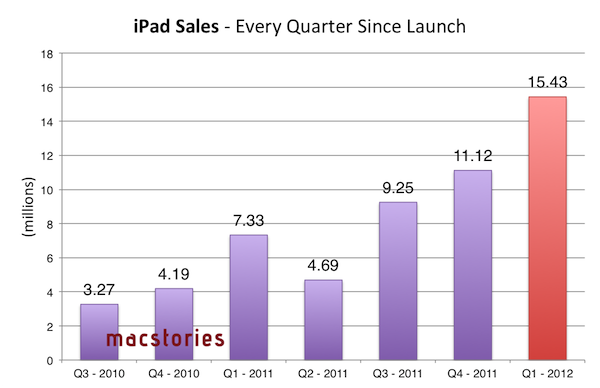
Strategies, typically, are based on patterns, and Apple wouldn’t have gotten to exceed $46 billion in revenue if these patterns hadn’t been associated with the numbers and data coming in after the launch of the original iPad. The numbers speak clearly for Apple: of all iOS devices, the iPad has the most rapid trajectory in every quarter since launch with an impressive growth from 3.27 million units (first quarter) to 15.43 million units sold (last quarter). Horace Dediu has put together a nice chart showing the penetration of the iPad in terms of shipments and growth.

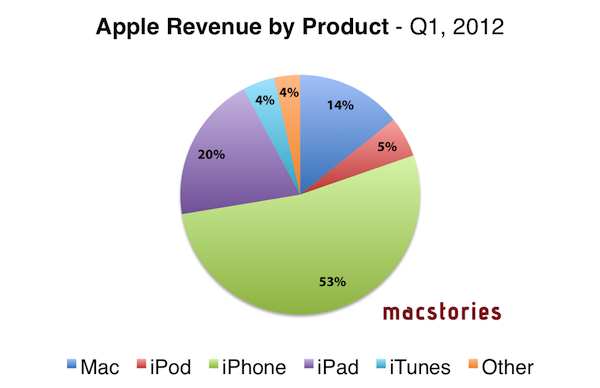
Numbers help establishing patterns that define strategies and business models. Sure enough, the early success of the iPad has allowed Apple to turn a product that represents a good 20% of revenue into a category worth focusing on for the future. As I explained in this article, if the source is to be believed, Tim Cook hinting at the iPad being a better alternative than a possible ARM-based, iPad-like MacBook Air is interesting for a number of reasons. First off, it sort of implies that tasks that can be accomplished with an iPad-inspired MacBook Air (that is, regular PC tasks with instant-on and a slimmer form factor) could be easily, if not better executed by the iPad itself. Indeed, the same report goes on to note that Tim Cook believes the iPad “satisfies—or will soon satisfy—the needs of those who might have been interested in such a product”. More importantly, assuming an ARM-based MacBook Air has ever been in testing within Apple and that such a machine would be positioned as an ultra-portable, fast and durable low-end Mac, it means Apple sees the iPad as the portable and lightweight personal computer for the masses seeking a high-quality product in the low end. Read more


Focusing On iPads

The latest report from AppleInsider claims that, after a meeting with CEO Tim Cook and CFO Peter Oppenheimer, Citi analyst Richard Gardner left with the impression that Apple is focusing on iPads, leaving little or no possibility for an ARM-based MacBook Air, which was previously rumored.

Apple doesn’t refer to iPad as a PC, but as a “post-PC device,” leaving the ARM-based tablet distinct from the company’s Intel-based Macs. Gardner further indicated the meeting dispelled the notion that Apple might introduce ARM-based Macs, countering rumors that a new MacBook Air featuring an ARM processor might appear sometime soon.

Gardner cited Cook as alluding to “rapid innovation on the iOS platform” that will “significantly broaden the use case for tablets,” and stated he “walked away from this meeting with the impression that Apple feels iPad satisfies—or will soon satisfy—the needs of those who might have been interested in such a product” as an ARM-based MacBook Air.

The rumors of Apple switching from Intel to ARM-based architectures on Macs left many wondering when they first surfaced online. And whilst it wouldn’t be a surprise to know that Apple has at least tested A5-based MacBook Airs and other sorts of ARM CPUs for portables – of course a company like Apple wants to experiment with as many hardware alternatives as possible – many debated whether it would make sense for the company to switch in the near future, when quad-core ARM processors are seemingly ready for the next-generation of iOS devices.

That Apple doesn’t believe an ARM-based MacBook Air – or, as the competitors would call it, an ARM Ultrabook – would be needed on the market isn’t a surprise, either. Assuming there is a market for users who want a low-power, battery life efficient portable machine in the range of 11” and 13” – a machine that, in theory, should be used for tasks such as word processing, lightweight image editing, browsing, and email – Apple believes that market can be satisfied – or will be “soon” satisfied as AppleInsider writes – by the iPad.

From a user’s standpoint, I think Apple’s reasoning here is that, ultimately, someone who’s seeking an 11-inch or even 13-inch machine with the technological perks of the iPad would be better off with an iPad, which is lighter, more portable, and has a richer selection of apps (from Apple’s perspective in looking at simple App Store numbers). There are edge cases, such as people who would strongly argue against iOS’ virtual keyboard, but I believe what Tim Cook is saying here – again, at least according to AppleInsider – is that the hypothetical market for an ARM MacBook Air should just settle with an iPad, as it’s a versatile, innovative machine that will get more feature soon. I don’t always want to look much into reports about interviews out of their original context, but if that “soon” is to be believed, I wouldn’t mind seeing more productivity-oriented software from Apple at the next iPad event – apps such as Aperture and, who knows, maybe even a portable programming suite would be perfect to further showcase the iPad’s capabilities as a “real” PC.

More importantly, Gardner’s “impression” that Apple feels satisfied with the iPad is also backed up by the numbers: in the past quarter alone, Apple sold over 15 million iPads, and “only” 5.2 million Macs. In the amount of time that Apple should spend transitioning a Mac product (the MacBook Air) to a new CPU architecture and getting developers to begin supporting this new “hybrid” machine, the company could easily sell another 20 million iPads. That’s not to say Apple will never switch to ARM (never is a dangerous word) on the desktop and that they haven’t considered it, but I’ve never believed it could happen in a short period of time as some of the early rumors claimed.

Looking at the first quarters of iPad sales and reception, I’d say Tim Cook is right to be focusing on iPads.


To Be Or Not To Be, Is The iPad A PC?

A few hours ago I listened to the latest episode of Shawn Today (a daily podcast from Shawn Blanc available to members of his site), and in it he discussed the issue of whether the iPad is a Personal Computer.  This follows an article by Matthew Panzarino on The Next Web yesterday, titled “Look, tablets are PCs, get over it”. In fact I could point to quite a few articles and discussions about this question of whether tablets (specifically the iPad) are PCs. But Shawn’s episode and Matthew’s post have inspired me to also weigh in on the discussion today, with why I believe the iPad should legitimately be counted within the PC market.

I’ll just start with this question: what computer is more personal than an iPad? The tablet form factor and iOS software combine together to make using the iPad a far more personal computing device than a traditional PC desktop or laptop, where you have to interact with the software from an arm’s length away, using a mouse or trackpad and a keyboard.

So the iPad is personal device, but is it a fully functional computer? John Mello at PCWorld says no, because in his opinion people don’t use it for content creation. Matthew’s article on TNW does a great job at dismantling this oft-quoted “complaint” about the  iPad and I recommend reading his entire argument. When the iPad first came out I must admit I had the same thoughts about the device, but as time has gone on I have increasingly used it for content-creation — whether it be annotating PDFs for studying, writing, and even some (very average) efforts at using iMovie. Content-creation on the iPad will continue to become more common as people adjust to the device and as app developers continue to adapt to creating great software for the iPad – just look at how productivity apps have improved and advanced in the past year on the iPad.

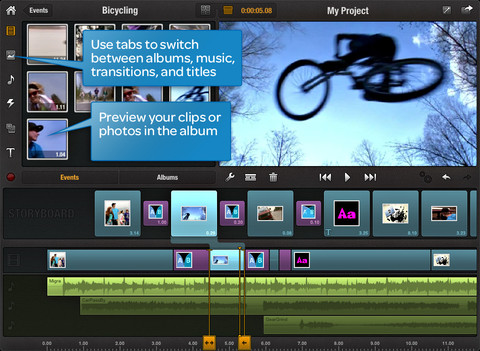
Sure, some content-creation tasks may never be as easy to do on an iPad compared to a more traditional PC – things like advanced video editing or long stretches of writing. But by the same token, a small netbook isn’t good for those tasks either and yet it is counted as a PC. I know I would always choose an iPad over a netbook for virtually any task because in my opinion it is a far more capable personal computer. On the flip side, I think the iPad is actually a better computer for things like annotating PDFs with apps such as PDF Expert. Then for things like advanced video or audio editing it’s only inevitable for those apps to transition to iOS, in fact just today Avid Studio was released – it may be a distilled version of the advanced desktop version, but it will evolve and become increasingly powerful for most tasks that an average user and even “pro-sumer” will need. The iPad is personal and (in my opinion) it is also a functional computing device.

So if you are excluding the iPad from the personal computer category, does that mean there is some checklist of requirements for a device to be a PC? Does it need a keyboard, or perhaps a trackpad or a mouse, or does it just have to be able to install any application you want (without the approval of a gatekeeper such as Apple)? All of these ‘requirements’ are completely arbitrary - with no practical reason as to why they are required to be on a PC. You can still connect a keyboard to the iPad if you need one for extended periods of writing, your finger is the “mouse” and Apple’s App Store has mostly protected consumers from nefarious apps or excessively useless/buggy apps – virtually everything I need is on the App Store (in fact there are over 170,000 apps just for the iPad). You may not like this policy (I can understand that, even if I don’t agree with it), but is it really a reason to bar the iPad from being counted as a PC? Again, that’s completely arbitrary.

Arbitrary: Based on random choice or personal whim, rather than any reason or system.

If you are still thinking that the iPad doesn’t count as a PC, what will all those Windows 8 computers in tablet/slate form be counted as? You can’t bar them from being “a PC” because they will be able to “morph” into what is essentially a Windows 8 laptop with a traditional Windows desktop, use a keyboard (and even mouse) and yet you can use it like them as tablets with a different, touch-based UI.

But if you do count them as a PCs, you surely have to count the iPad as a PC too then. They will be virtually identical devices from a functionality and experience point of view, unless you say the Windows 8 tablet is a PC because it will still have the traditional Windows desktop, and then I go back to the fact that it is an arbitrary requirement. One might actually argue (from what we know at the moment), that the iPad is more functional and will provide a better experience because it has two years of developer support with apps that have been specifically designed for the touch interface, whereas any Windows 8 tablet may be handicapped with the Windows desktop because it isn’t designed for touch-input and Metro may lack many apps at launch. The reality is that both should be counted as PCs: it is the only logical solution.

But…but…..but….

You might now point to the fact that Apple has touted the iPad as a Post-PC device, so surely if Apple themselves aren’t calling it a PC, it shouldn’t then be counted in any PC marketshare analysis. It’s a decent point, but I think Apple did that as more of a marketing move, to point out that it is a different, unique device. In fact, it is the next evolution (if not revolution) of the personal computer. Maybe the solution is just calling the “traditional” PC category something different (Desktops & Laptops perhaps?) that would make much more sense than trying to arbitrarily force the iPad out of the PC category.

One other decent rebuttal may be to then ask, if you are including the iPad, why not also include the iPhone. It’s a very good point, because I think it is also a personal computing device to some degree. I think the reason why it’s legitimate to leave the iPhone and other smartphones out of most PC market analysis is because there are enough points of differentiation between the traditional PC/iPad and the smartphone in the way it is used and experienced. These include the fact that smartphones have a distinct use case of being always-on communication devices, time management devices (Calendar/To-Do apps, etc), time-wasters (Angry Birds in a long queue, anyone?), and are occasionally used for content-creation or content consumption. They are also devices you spend using for a few minutes at a time (typically), multiple times a day — rather than PCs (including iPad), which you use for longer periods of time.

You might claim these are arbitrary reasons and, yes, to some degree they are, but that’s because the line between whether a smartphone can also be counted as a PC is a far blurrier line than that of iPads as PCs. In my opinion at least, it would be OK to include smartphones as PCs in a market analysis if there is a good reason as to why it’s an important conclusion - such as an analysis of trends. A good example of this is Horace Dediu, who included smartphones as PCs in the final graph of his article entitled “The rise and fall of personal computing”.

So as Matthew Panzarino said yesterday in a very succinct title and what I completely agree with, “tablets are PCs, get over it”.


Avid Brings Its Video Editing Tools To The iPad With Avid Studio

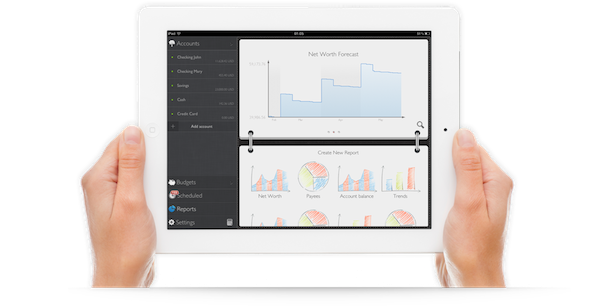
Avid has today brought its “pro-sumer” video production tools to the iPad with its new Avid Studio app. Avid is the maker of a number of high-end video and audio production tools that have also gained appeal in the pro-sumer marketplace.

The new iPad app is claimed to be a “distilled” version of their more complete film-editing applications available on the desktop. This certainly won’t be a replacement for Avid’s full-featured tools, but it may be good option for small projects or for people who want something a little bit more than what Apple’s iMovie for iPad offers. Avid believes the app is a complement to their existing offerings with users able to transfer project files between the apps through iTunes or iCloud.

“We’ve seen a shift in how creation is happening, and it’s really happening on almost any device,” said Tanguy Leborgne, vice president of consumer and mobile technology strategy at Avid. “We think the tablet is more than just a consumer device; more and more people are creating on it.”

Priced at just $4.99 for the first month and $7.99 after that, the app is also priced at a very competitively for its capabilities. Pro-sumer video editing apps on the desktop start at least $60 and go up to $299, with Avid’s desktop app itself at $129.99.

[Via AllThingsD]


Review: Logitech Tablet Keyboard for iPad

As I mentioned in my post about new apps and tools for 2012, I’ve been playing around with a Logitech Tablet Keyboard for iPad, which is available at $69 through Logitech’s website or $59 on Amazon. The Tablet Keyboard connects to the iPad (or any iOS device) wirelessly over Bluetooth, comes with built-in batteries, a carrying case that can be turned into a stand for the iPad, and media keys that trigger some of the tablet’s functions such as audio controls and Spotlight. Here are my impressions so far.

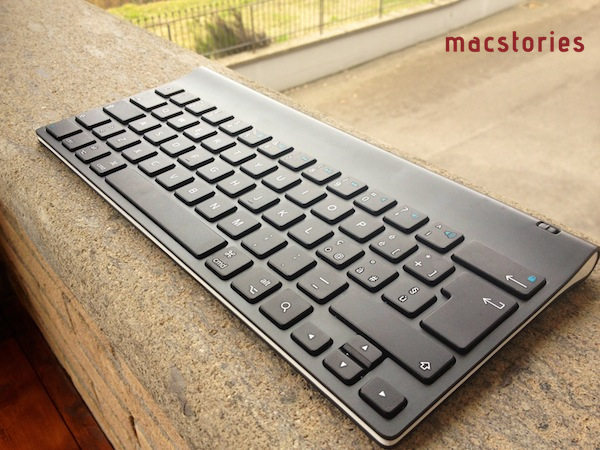
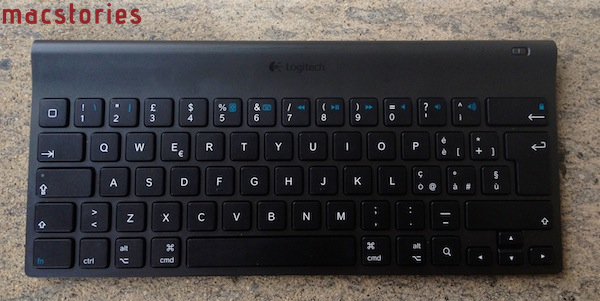
Normally, I wouldn’t have much to say about a keyboard except for “it’s comfortable” or “I can’t type anything on this”. Fortunately, the Logitech keyboard for iPad fits into the former category, with a sturdy plastic design that feels “premium” when compared to other keyboards available on the market, a good keyboard layout, and a carrying case that’s not as premium as the device but certainly gets its job done. Below, the Italian layout of my Logitech Tablet Keyboard:

As you can see, the keyboard isn’t necessarily “standard” as it’s been designed to include iOS-specific keys like shortcuts for Spotlight search, Home button, volume controls, slideshows, media playback and screen lock/unlock controls. The basic layout is the one of a Mac keyboard, and the function keys can be activated by holding fn. Obviously, this isn’t as intuitive as simply reaching out to the screen with your finger to adjust volume, but if you’re going to work with your iPad using the keyboard, you’ll want to know it’s possible to do more than just type.

Which brings me to this: why would you want a physical keyboard for your iPad when the system one is more than acceptable? I don’t know about you, but I’ve been working mainly from my iPad in the past month, and I found a physical keyboard to be a must-have if you’re serious about getting real, regular writing done in a text editor or word processor. iOS’ multitouch keyboard is fine to fire off quick email replies and tweets (and iOS 5’s new split keyboard helps a lot for “general typing” in every day usage), but I still can’t give up on the allure of plastic QWERTY for long-form content and serious email time. Logitech’s iPad offering fits nicely in my workflow (and Tom Bihn Ristretto Bag): I can get it out of its case, turn it on, wait a few seconds for the iPad to connect (once paired, the Bluetooth connection process is very fast on iPad 2) and start writing. Read more


Phraseology for iPad: Write, Remix, and Markdown

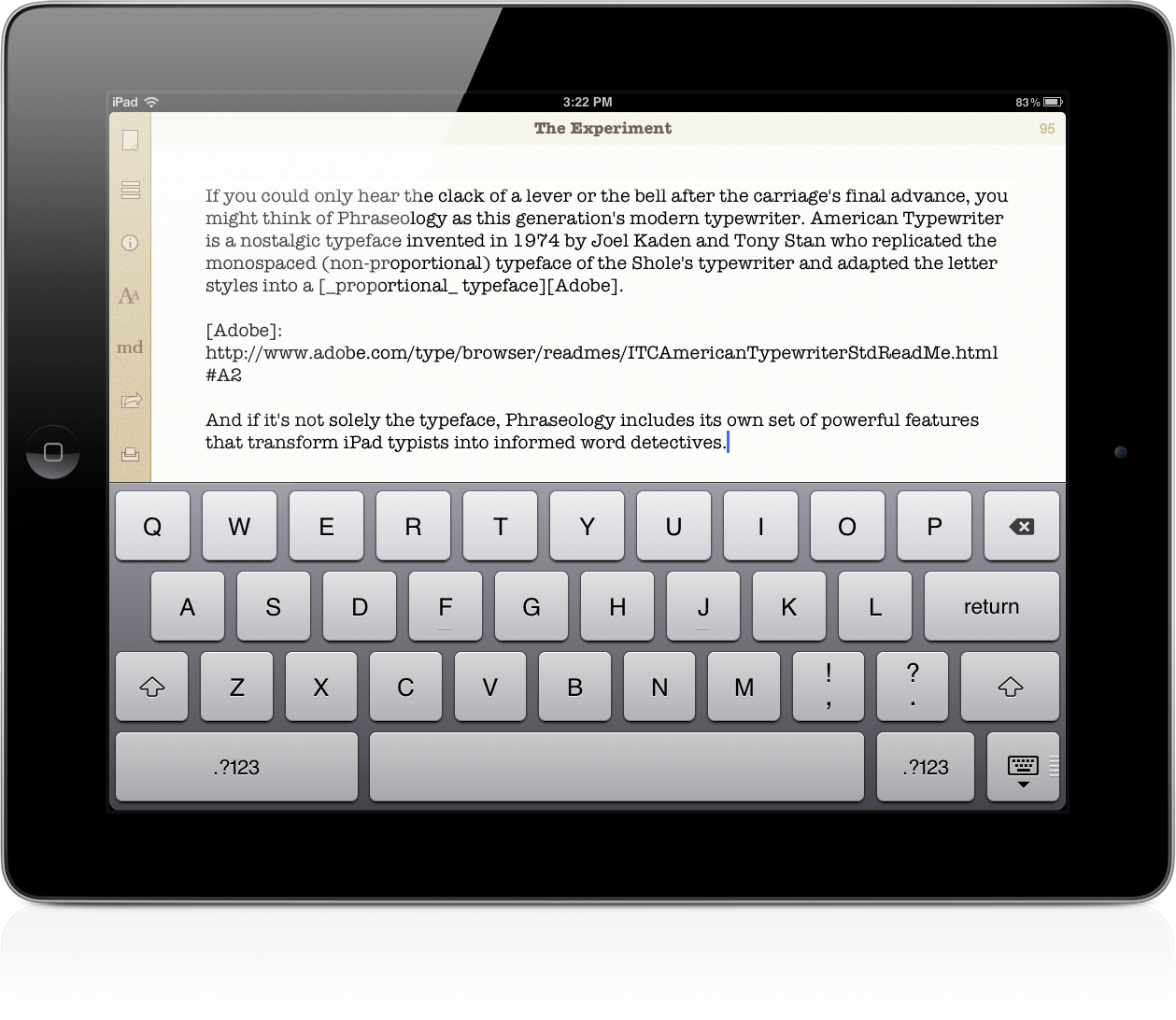
You could choose to write in Helvetica Neue, Marker Felt, or Georgia, but Phraseology has a personality all its own that’s best reflected in American Typewriter or Courier. Plenty of text editors on the iPad offer one or both of these font types, but there’s something about Agile Tortoise’s sandy colors and subtle paper-like textures that make Phraseology feel more tangible. It’s the modern equivalent of a typewriter explained through a text editor.

Read more


iPad Users Have Downloaded 3 Billion Apps in One Year

Thanks to a rich marketplace, consistently good apps that are featured in the App Store, and the constant attention blogs like ours bring to developers and consumers, the iPad has had its fair share of owners downloading tons of applications. Not only did iPad users download more than 3 billion apps from the App Store since the iPad’s launch in 2010, developers published 120,000 apps specifically for the iPad in the third quarter of 2011. ABI Research notes that iPad downloads are only 19% of all the cumulative downloads by Apple users. With lots of choice and a device that just works, users are eager to try out the latest innovations in touch-based software.

In comparison, Android users have only downloaded 440 million applications. It could be that there simply aren’t as many Android tablets in consumers’ hands as there are iPads, or it could because that developers simply aren’t making apps formatted for the tablet experience like they are on the iPad.

According to Lim Shiyang:

Discounting all those apps that were originally developed for Android smartphones, Android still trails greatly behind the iPad in terms of its tablet app offerings. Many Android tablets in the market are still using older versions of Android, which disadvantages users from enjoying the better effects of apps produced from more advanced software development kits.

As for Android’s phone ecosystem, ABI Research expects Android users to rack up 58 billion app downloads by 2016, compared to only 27 billion by iPhone users.

I wonder how many of these downloads will be because of Angry Birds?

[ABI Research via GigaOM]


Google Translate for iOS Updated with iPad Support

Previously available exclusively for iPhone and iPod touch owners, earlier today Google updated its official Google Translate iOS app to include a native interface for the iPad. The updated Google Translate, available here, heavily resembles its iPhone counterpart with larger interface elements ported to the iPad’s screen – there are three tabs at the bottom to switch between translations, favorite items and Settings, a microphone icon to speak directly into the device’s mic, and you can choose between multiple languages from a popover menu.

Unlike the surprisingly refreshing (for Google’s iOS standards) Google Search app, it appears Google Translate didn’t receive any particular iPad treatment in the conversion process.

Among the lesser known features of the app, you can specify input for English, Chinese and Spanish languages, display translations in full-screen mode, and tap on results for text-to-speech.

Google Translate 1.3 (changelog simply reads “Added support for iPad”) is available for free on the App Store.


Mage Gauntlet Now Universal iOS App

Rocketcat Game’s excellent RPG, Mage Gauntlet, has released a major update, one important feature being that it is now Universal. There are also some tweaks as well. Some spells have been changed, reviving after being beaten now grants a free spell, some levels were shortened, and save files can now be exported or imported through iTunes – allowing you to copy your unlocked items and experience points to your other devices.

As with most updates, the new update also has bug fixes as well. Here’s the full release breakdown:

What’s new

*** Hotfix approved, grab this update, especially if you’re on iPad
*** iPad display bugs fixed
- Universal support for iPad and all iOS devices!
- Flip Screen option in the Settings menu!
- The View Map panel in the pause menu how has indicators showing how many notes/books you’ve found in the current level, and whether all monsters have been cleared!
- Spell changes! Silence has been merged into Time Circle to create a single all-powerful buffing spell, Sword Fury and the elemental summon spells have been improved, and the less useful Lucky and Shield spells have been removed from the random spell drops, though you can still obtain a Shield by collecting hearts or overflowing spells!
- Several weapons have been given new, upgraded effects and updated description text. Make sure to check them out, some were completely changed.
- Rabbit’s Foot now increases the hat drop rate by five times.
- Ring of the Zealot now resurrects you, once, at half health with a Sword Fury buff applied to you.
- Reviving after being defeated now grants a free spell.
- Save file! You can export or import your save data (in save.dat) via iTunes File Sharing to copy your unlocked items and experience points to your other devices! This also allows backing up saves to your PC.
- Many level tweaks! Additional urns added to most levels. Backtrack-blocking doors removed for most levels. Many overly long levels were shortened a bit and/or had more urns added. This should improve the pacing of Story Mode.
- Various bugfixes, including some achievement bugs and dialog typos.

Mage Gauntlet is a great RPG (888 5-Star ratings in iTunes) with a classic NES feel and excellent game play. If you haven’t yet played it, maybe Universal support will magically draw you in. The app is $2.99.

[via TouchArcade]