


Here are today’s @MacStoriesDeals on iOS, Mac, and Mac App Store apps that are on sale for a limited time, so get them before they end!
Posts tagged with "iPad"
#MacStoriesDeals - Wednesday
Adobe Adds Full Support For Newsstand In Its Digital Publishing Suite
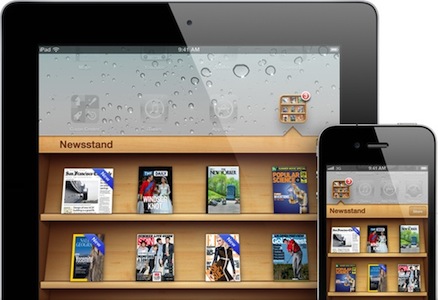
Adobe has today announced that publishers who use the Adobe Digital Publishing Suite will be able to create newspaper and magazine files that appear in Apple’s new Newsstand feature. Announced at WWDC and arriving in iOS 5 this Fall, Newsstand will allow new editions of Newspapers and Magazines to be automatically downloaded (in the background) as soon as they are made available - and storing them all in a pseudo-folder on a user’s home screen.
Today’s announcement by Adobe reveals that their Digital Publishing Suite will be able to create files that are compatible with Newsstand, allowing publishers to create and deliver new editions directly to users with little fuss. Todd Teresi, from Adobe’s Media Solutions department said the “support for Newsstand will provide Adobe’s publishing customers the ability to deliver engaging content directly to the digital doorstep of subscribers on their iPads”.
Applications built with Adobe Digital Publishing Suite and enabled for Newsstand will allow publishers to better merchandise their content with support for Newsstand push notifications and icon covers displayed on the Newsstand shelf, reflecting the latest issue of the magazine or newspaper.
This move by Adobe is quite a significant motion of support for Apple’s Newsstand feature because their Digital Publishing Suite is already used to create more than 600 titles, including high profile publishers such as Conde Naste and Reader’s Digest. With little effort, all these publishers can now add support for Newsstand.
[Via MacRumors]
Verizon Promotes The 3G iPad 2 In New Commercial

It certainly doesn’t have the flair and emotional connection of one of Apple’s iPad adverts, but Verizon has aired its own iPad 2 commercial, promoting the use of the device with their 3G network. It highlights a few specific iPad features that are made functional with Verizon’s network such as downloading a new book from iBooks at the beach and tweeting at a campsite. Consistent with other Verizon adverts, specific mention is also made towards the end of the advert of Verizon’s network coverage across the US, stating that it is “America’s largest and most reliable network”.
Salesperson: It’s faster, thinner and lighter and with the power of Verizon you can stay connected almost anywhere. Lets say you want to download a best-seller at the beach. Done. Or if you want to stay connected when your miles away from WiFi. No problem! You can even tweet when you’re nowhere near your followers… and you can post pictures too! So what do you think?
Customer: I’ll take it.
Narrator: The iPad 2, on America’s largest and most reliable network. Verizon.
Jump the break to have a watch of the Verizon iPad commercial for yourself, as well as one of Apple’s own iPad adverts, to see for yourself some of the differences. [via 9to5 Mac]
#MacStoriesDeals - Tuesday

Here are today’s @MacStoriesDeals on iOS, Mac, and Mac App Store apps that are on sale for a limited time, so get them before they end!
Makayama Movie Mount for iPad 2
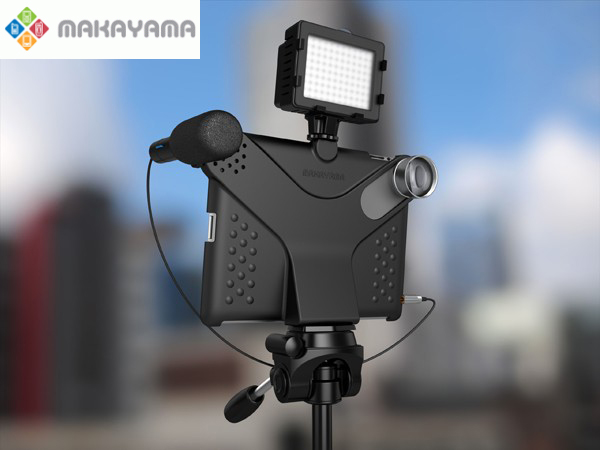
The iPhone’s built in camera is one of the most popular cameras in the world – ask Flickr. Many people were asking for a camera on the iPad 2, but it seems a very few use it because of its lackluster quality and awkwardness. Makayama, makers of mobile apps and software, has released the Movie Mount, an iPad 2 accessory that improves the way you can record video/pictures with the iPad 2.
The Movie Mount is a unique piece of hardware which allows the user to greatly improve video capture with Apple’s iPad 2. It has an arrangement of optional accessories that all snap onto the Movie Mount such as a tripod, tele and wide angle lenses, an optical viewfinder, a microphone and lights too. When outfitted with all Makayama’s accessories, it almost passes as a semi-pro setup. The Movie Mount also has a free iTunes app that will allow the iPad 2 to manually control video recording. You can check out the app right now, but it’s not necessary to use the Movie Mount and its accessories. Video demo after the break.
Acquire Connects Your iOS Camera Directly to Photoshop
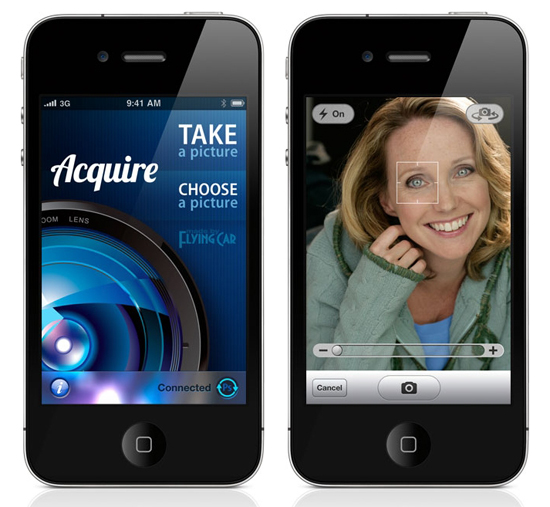
Acquire, by FlyingCarLTD, is an iOS app that lets you shoot images from your iOS camera directly into Photoshop CS5.
Acquire is simple and instantly sends images from your iOS device’s camera into Adobe Photoshop CS5 over a WiFi network. With Adobe’s Remote Connect feature, an image taken with an iPhone, iPad or iPod touch is instantly and wirelessly transmitted into Photoshop so you can work with it automatically, no importing needed.
There are many iOS photo apps that let you edit or add effects to an image in the phone but many times edits are permanent and the original image is lost. If you like a more professional and do-it-yourself approach with your iOS camera images, all the tools and effects you’ll ever need are right there with your mouse or trackpad.
“Whether you are a photographer who wants to immediately evaluate the quality of an iPhone photo, an artist who needs a quick image for reference, a manager who needs to add a digital signature to a receipt for email, or a developer who needs to instantly ingest screen shots from your iOS device, Acquire is the perfect tool for you.”
Acquire is only $1.99 in the iTunes store and is available now. An app that works with an Adobe product and it’s only $2? Color me sold. [via John Nack]
#MacStoriesDeals - HUGE Friday!

Labor Day deals are continuing! Here are today’s @MacStoriesDeals on iOS, Mac, and Mac App Store apps that are on sale for a limited time, so get them before they end!
#MacStoriesDeals - Thursday

Labor Day deals have started! Here are today’s @MacStoriesDeals on iOS, Mac, and Mac App Store apps that are on sale for a limited time, so get them before they end!
Parallels Desktop 7 For Mac Available This Week, Updated Parallels App For iOS
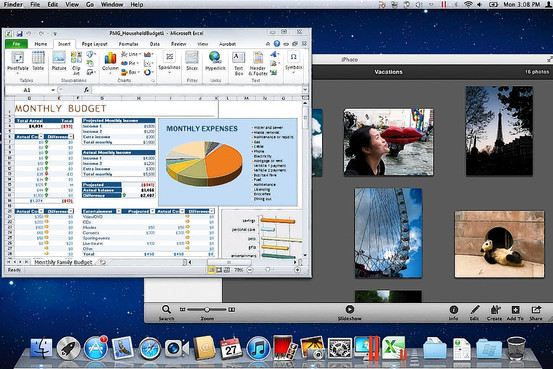
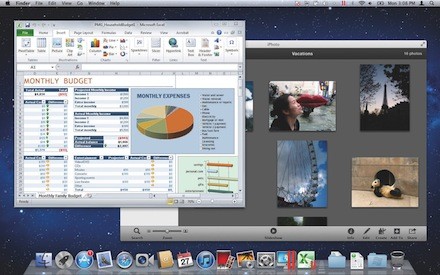
Earlier today Parallels Desktop 7 for Mac was unveiled, bringing more features and substantial speed improvements to the popular desktop virtualisation software. Headline features of the new version include greater Lion support such as Full Screen Mode and Mission Control, iSight/FaceTime Camera support and those speed improvements which include up to 60% faster resuming and 45% faster 3D graphics.
Mac Developers will now be able to emulate a copy of Lion in Parallels whilst on a Lion installation as per the new Lion license agreement. Installing Windows has also been simplified with a “Windows on Demand” service offering users the ability to instantly purchase and download Windows - particularly helpful for those with new Macs that no longer include DVD drives. Walt Mossberg reviewed the new Parallels on his Late-2010 MacBook Air and said it “ran Windows quickly and smoothly, and integrated well with some of Lion’s new features”.
Windows, and Windows programs, can be displayed in Lion’s new Launchpad feature, which mimics the main screen of an iPad. They also show up and behave like Mac programs in Lion’s new Mission Control feature, which shows all the programs running on the Mac in miniature. Windows programs can also run in Lion’s new full-screen mode.
Also revealed today was that the Parallels Mobile App is receiving a substantial update so that it can completely control a users Mac rather than just the virtualised environment as had been the case prior to this update. The app, available for the iPad, iPhone and iPod Touch, is on sale at a special introductory offer of $4.99 but the update is free to existing users.
Parallels Desktop 7 for Mac is available from today for those upgrading from Parallels 5 or 6 at a cost of $49.99 whilst it will be available generally on September 6th for $79.99. There is also a Student edition available for $39.99, a ‘Switch to Mac’ edition available for $99.99 (which comes with a number of Mac video tutorials) and there are also Enterprise volume licences available.
Jump the break for some promo videos of the new Parallels products.
[Via AllThingsD]