


Here are today’s @MacStoriesDeals on iOS, Mac, and Mac App Store apps that are on sale for a limited time, so get them before they end!
Posts tagged with "iPad"
#MacStoriesDeals - Thursday
iPhone and iPad Dominate Smartphone and Tablet Choices for Small and Medium Businesses
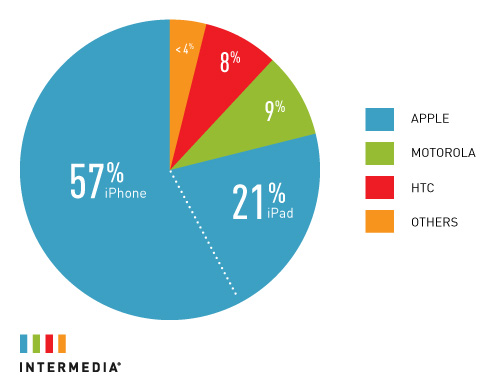
The iPhone and iPad are leading the charge in small and medium-sized businesses (SMB) for smartphones and tablets according to Intermedia. In a study by Intermedia, who handles 350,000 premium hosted Microsoft Exchange servers, Apple’s iOS devices are dominating the stats when it comes to ActiveSync activations performed by the company. The iPhone has an overwhelming 57% coverage in this bracket and the iPad has 21% as well. That leaves only about 22% for competitors such as Motorola, HTC and others. The nearest competition to the iPad’s 21% is Motorola with only 9%. See above graphic for full stats.
The graph data compares the use of ActiveSync devices in Intermedia’s clientele. ActiveSync is the syncing protocol that smartphones use to sync email and other information with Microsoft Exchange. Intermedia supports email, contact and calendar syncing for smartphones, including iPhone, Android, BlackBerry and Windows 7 phones.
#MacStoriesDeals - Wednesday

Here are today’s @MacStoriesDeals on iOS, Mac, and Mac App Store apps that are on sale for a limited time, so get them before they end!
Measures for iPad Is A Powerful Unit & Currency Converter
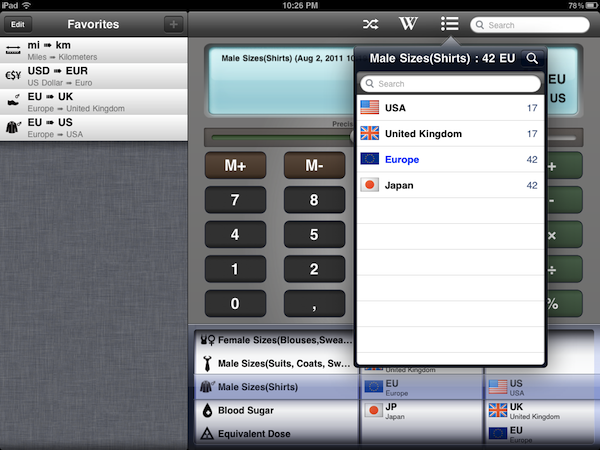
Back in 2009, I installed a simple currency and unit conversion utility on my iPhone called Measures. Developed by Michael Neuwert, I remember Measures as one of the first “popular” converter apps for the iPhone, one that actually managed to move thousands of sales back when the App Store was still relatively small. Two years and hundreds of thousands of app later (let alone the iPad and two new App Stores), Measures is coming back with an HD version built specifically to take advantage of the iPad’s screen. Retaining the same icon and UI color scheme of its iPhone counterpart, Measures HD packs 170 currency exchange rates (constantly updated over the air) and 1000 different units, organized in 40 categories.
I like Measures HD not because of its design, but because it’s functional. Measures may lack the amount of polish seen in any Tapbots or Iconfactory app, but as far as the actual unit and currency conversion goes, Measures works better than anything else I’ve tried on the iPad to date. There are two aspects of the app that truly stand out to me: the Favorites sidebar, and the fact that Measures doesn’t stop at normal units like those pertaining to length, area, speed, or temperature. Measures adds dozens of categories ranging from Male Shoe Sizes and Data Storage to Radioactivity, Male Sizes for suits/coats/shirts, and Typography. With all these types of “units” available at your fingertips, Measures lets you convert, say, a European shoe size to a UK or US one, or your milligram/deciliter blood sugar level to millimol/liter. And again: you can easily convert megabytes to yottabytes, short tons to pounds, and obviously US Dollars to Euros and other currencies as well.
Measures’ unit database is huge, and if it’s not the biggest one on the App Store yet, then it definitely get very close to it. Whilst most converter apps focus on providing a fresh interface for the usual units and currencies, Measures sacrifices some attention to the overall design (I don’t like the slider to adjust decimals and the looks of the keypad – but this is just personal taste) to focus on “real life usage” with options like the aforementioned shirt sizes, or fuel consumption and data storage. This is the kind of stuff I always need to check (especially when buying some cool t-shirt from a website that doesn’t list EU sizes), but that very few apps provide. In fact, most of the times I’m forced to look it up on Wikipedia. Speaking of which, Measures HD comes with a Wikipedia search function to look up the selected unit on the website’s database. Multiple Wikipedia articles (when found, otherwise it’s just a single one) are listed inside a popover, and you can decide to open the webpage within Measures, in Safari, or in Sophiestication’s Articles. Next to the Wikipedia button in the top toolbar, there’s also a “list” icon to see all converted results without being restricted to a single conversion.
Another nice feature is the Favorites sidebar, which enables you to save any conversion for quick access at a later time. If you find yourself converting Euros to Dollars pretty often, you might want to consider saving that conversion as a shortcut in the Favorites so you won’t have to use the (gimmicky) unit picker at the botton; Apple itself suggests in its Interface guidelines to use a “date and time picker” for iPad inside a popover rather the main screen – I agree, as the result is not really pleasant in Measures and it feels unresponsive if your finger runs down to the iPad’s bezel.
Overall, I enjoy having Measures on my iPad because it’s useful. The app could use some UI refinements and re-thinking, but as it stands now it is the converter app for iPad with the largest array of options I’ve seen so far. You can download Measures HD at $1.99 on the App Store. Check out more screenshots of the app after the break. Read more
iPad 2 Getting Retro iPWN Gameboy Case

This is not for the Apple purists, the ones that leave their devices raw and uncovered or only clothe them in Cupertino-issued skins. But for the rest of the world, most people want their Apple products to be as original as the people that buy them. We’ve seen cases/covers in the past that look like classic Nintendo gaming systems but this one supersizes the original Gameboy for the iPad 2.
Lootiful already carries a series of iPWN cases that snap on the back side of your iPhone to make it look like a Gameboy. The iPad 2 version looks just like the iPhone version, only larger. The case not only provides protection from bumps and scratches, but retains full access to your touchscreen and all the buttons.
There has been no word on availability for the iPad 2 case, but according to the Lootiful site, pre-orders will be open soon. Pricing has not been announced yet either, but the iPhone versions retail for only $18. I agree with the header graphic, “It’s friggin’ sweet.”
I can only imagine someone carrying their iPad 2 on the bus and sitting down while a curious onlooker snaps some blurry photos and posts them as “Apple + Nintendo Collaborating on New Project - iPadBoy!”
[via TUAW]
#MacStoriesDeals - Tuesday

Here are today’s @MacStoriesDeals on iOS, Mac, and Mac App Store apps that are on sale for a limited time, so get them before they end!
Iomega’s “Mac Companion Hard Drive” Combines USB, FireWire, and iPad Charger
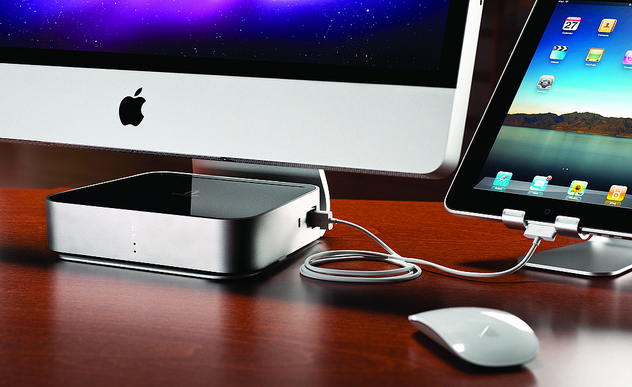
Iomega today announced a new Mac Companion Hard Drive which incorporates a large capacity desktop hard drive (2 TB or 3 TB models are available) with two USB ports to connect a printer or another external drive, two FireWire ports and an additional high-powered USB charging port for an iPad or iPhone.
With the new Iomega Mac Companion Hard Drive, Mac users now have a convenient and stylish way to quickly charge their iPads with the bonus of plenty of new storage capacity for their Mac computer,” said Jonathan Huberman, president of Iomega Corporation. “With more than nine million iPads sold in the last quarter alone, the new Mac Companion Hard Drive is the perfect complement for all those iPad owners.
Iomega has made special effort to make a device that matches and suits Macs, which is most notable in the design and stylings of the device – not only is it sleek with its metal enclosure but the very shape of the Mac Companion Hard Drive has been sculpted so that it sits perfectly on the iMac or Thunderbolt Display stand, tapering out at the back. The whole device is fairly simplistic but stylish in design and it hides all but the high-powered USB port at the back of the device. Iomega has left the three visible sides with nothing but the high-powered port on the right hand side of the device and four LED lights on the front panel of the device to indicate HDD capacity.
The charging port is a high-powered 2.1 Amp hookup that makes it easy and convenient to charge your iPad and other portable Apple devices so they’re ready to go when you are.
The hard drives are also pre-formatted as HFS+ so that they are compatible out of the box with Mac OS X, and whilst the lack of Thunderbolt is a little disappointing, this device looks like a solid option for anyone looking for an external hard drive for their Macs. The Iomega Mac Companion Hard Drive will initially be exclusive to Apple online and retail stores at a cost of $195 for the 2 TB model and $295 for the 3 TB model.
Jump past the break for some more pictures of the device.
Skype for iPad Released

Skype for iPad, first “leaked” online back in late June, has finally been released for free in the App Store as a standalone app, as noticed by TUAW. The app isn’t a universal update for the iPhone version, meaning you’ll have to download it as a separate app on your iPad, and it’s not yet available in the US App Store. The app will likely be released in the US Store later today, perhaps in a few hours.
Skype for iPad features an all-new interface design with larger contact pictures, a buddy list on the left, and possibility of starting a new video-calling session in full-screen with video being captured from the iPad’s rear or front-facing cameras. The app can do video and audio calling both on WiFi and 3G, much like the iPhone version already can.
A list of features from the iTunes page:
- Talk face-to-face or show what you’re seeing with front and back-facing cameras.
- Use Skype for iPad to call anyone else on Skype – and enjoy near CD quality (SILK) sound.
- Instant message and add emoticons to personalize your messages.
- Make cheap calls to landlines or mobiles from your iPad.
- Get an Online Number from Skype so people can call you on your iPad.
- Pay As You Go with Skype Credit - great for when you’re using Skype every now and again.
- Pay monthly with a subscription – best if you use Skype a lot.
We will update this story with more details on the app and first impressions as soon as we get our hands on it. More screenshots and original “leaked” promo video below.
Update: Skype for the iPad is now live in the United States. Download it here.
Update 2: We have first impressions and some screenshots up past the break.
Update 3: Skype has pulled the app from the App Store, saying that it went live “prematurely”.

Update 4: It appears the app is back and can be downloaded from the App Store.
#MacStoriesDeals - Monday

Here are today’s @MacStoriesDeals on iOS, Mac, and Mac App Store apps that are on sale for a limited time, so get them before they end!