


Here are today’s @MacStoriesDeals on iOS, Mac, and Mac App Store apps that are on sale for a limited time, so get them before they end!
Posts tagged with "iPad"
#MacStoriesDeals - Monday
Students Can Save Big With Amazon Kindle Textbook Rentals
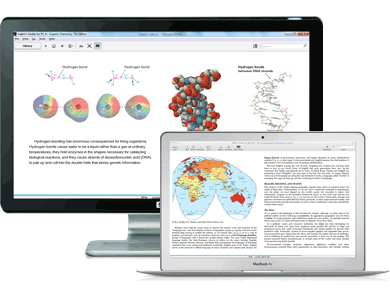
As companies experiment with the idea of digital textbooks (look at Inkling for a perfect example on the iPad), new and affordable models for distribution will be thought of along the way. Amazon announced this morning that students will have the opportunity to save up to 80% on textbooks by renting them from the Kindle Store. The 80% discount applies to the initial 30-day renting period, which students can adjust to fit the length of their short or long semesters (normally eight to sixteen weeks at my community college). You can rent books for up to a year, but at that point I’d just buy the book.
What’s interesting to me is how Amazon is tackling the ability to retain your notes. My biggest fear with digital textbooks is that they aren’t cheap enough to buy (I can always sell a textbook back and get up to 60% back of what I initially paid), and that any notes I’ve taken will be lost if I’ve written in the margins. This same concern is expressed by Amazon, whom have tied these features in with Whispersync. All of your notes will be kept in the Amazon Cloud, where you can pull notes back down and read related passages even after the rental period of your textbook is up. I find this intriguing (particularly so if notes are easy to take in the first place).
I’ve always purchased textbooks from Amazon, but now they raise the question of whether I should rent a digital book. Textbooks are available to read across devices from the iPad, iPhone, Mac, and the Kindle itself (along other devices that support Amazon’s Kindle app). Students who want to remove a couple of six pound textbooks from their backpacks (and save their backs) might want to invest in a slim messenger back and an iPad instead, but with the Kindle you know there will the issue of finding pages (with its weird take on page numbers), and its unclear how well graphics and margin notes will be presented. Maybe one of you dear readers would be bold enough to take the dive? Have you purchased digital textbooks in the past? Let us know in the comments!
Twitter and Google+ Polls: The iPad’s “Must-Have” & Top Productivity Apps
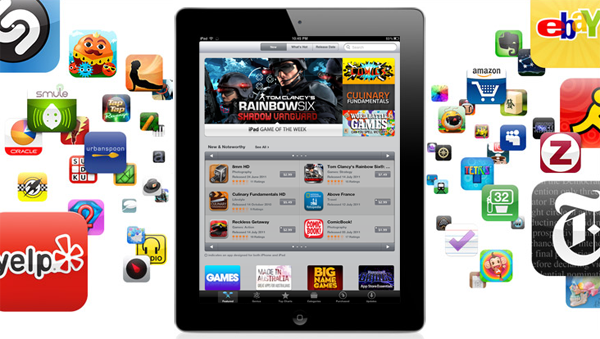
Over the past two months, I’ve run what I consider an interesting experiment with my Twitter and Google+ followers: I’ve asked them what their favorite iPad apps were, and noted down the results. More specifically, back in May I asked my Twitter followers what their “5 must-have” iPad apps were. That question included all the possible categories of the App Store, free and paid apps, universal and iPad-only apps – literally anything that could run natively on the iPad. I received dozens of replies, saved the results as “votes” in Evernote, and filed the note away for future usage. Then on July 13th, I asked about “top productivity apps” on Google+. This second poll was more specific: whereas the first one was just a matter of personal preference for any category and app type, the Google+ poll implied that people had to decide what they considered “productive” on the iPad. And because I was asking people, and not a computer-generated algorithm, the results of what people considered as “productive” were noteworthy. I waited a few days, saved the replies as votes, and created another note in Evernote.
The results are listed below but before you jump after the break, a disclaimer: by no means this is an official “poll” or “survey” – it’s just the results of two questions I asked with my personal accounts on Twitter and Google+. I don’t know each person that follows me on these social networks, but if I had to guess – I’d say they’re mostly geeks passionate about great apps and new software. For this reason the demographic of these polls is pretty much restricted to a certain category of App Store users – those who spend time browsing for new apps, care about the quality of design and, when possible, like solutions that are available cross-platform on the Mac and iOS.
That said, check out the Top Productivity Apps and Must-Have iPad Apps after the break. Read more
#MacStoriesDeals - Friday

Here are today’s @MacStoriesDeals on iOS, Mac, and Mac App Store apps that are on sale for a limited time, so get them before they end!
iUsers Allows User Accounts on the iPad
Everyone may not have to share Macs and iOS Devices with others, but there are many of us that do. For the Mac, it’s easy and a great idea to set up User Accounts for times when someone needs guest access or has a different OS setup than what we normally use from day to day. A common complaint for iOS users is that there are no User Account options, only parental controls and such. Dave Caolo recently posted on 52 Tiger how to child proof your iPhone, which we recommend reading. He lists many ways to child-proof your iOS device but an easier way for Apple to do this would allow User Accounts on iOS devices.
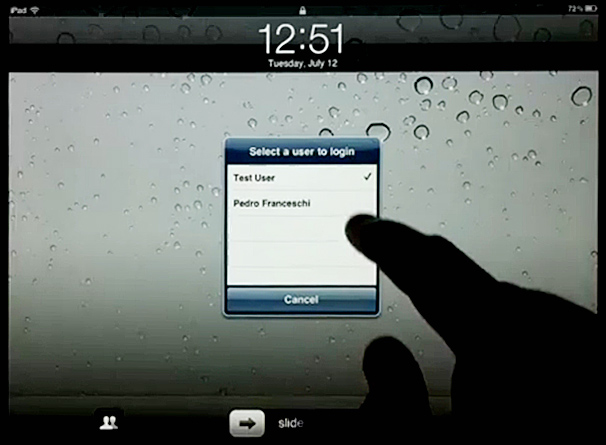
iUsers for iPad is a Cydia hack for jailbroken iPads by Pedro Franceschi that gives you something close to having OS X’s user accounts. The hack is set up inside Settings.app » Extensions » iUsers. Add a user by simply tapping “Add User”, insert a name, passcode and choose whether they have admin rights or not. This means each user can have their own set of app positioning, home screen wallpapers, settings, etc. Now this won’t save your iPad from wondering fingers or accidental App Store purchases but it does offer some deal of restriction for your personal iPad setup.
According to the video, if you want to switch accounts once they are added, simply go to the lock screen and tap the Accounts button. The iPad does a quick springboard reboot (which could bother some people) after selecting the account you want to open and it even remembers apps states for each account. Obviously this is dangerous for backups, but if you want to try something like this, it looks cool.
This isn’t Pedro’s first Cydia tweak, back in May we showed you PhySwitch, which lets you cycle through apps with the volume keys. iPad Jailbreakers, if you want to try out iUsers, add the repo: cydia.iblogeek.com to see it in your Cydia apps.
Demo video after the break. Read more
#MacStoriesDeals - Thursday

Here are today’s @MacStoriesDeals on iOS, Mac, and Mac App Store apps that are on sale for a limited time, so get them before they end!
Nuance Releases Another iOS App, Dragon Go! with Intelligent Voice Search
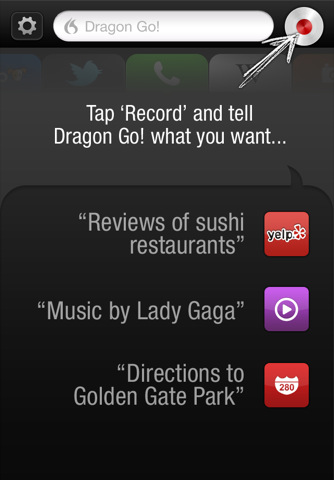
Voice-powered search has become increasingly popular in recent years as more and more people purchase smartphones such as the iPhone or an Android device. Google has extensive voice-integration on Android and similarly has iOS Apps that include the ability to search by voice commands, others such as Microsoft with Bing, Nuance and Siri have done similar things. Furthering their previous efforts, Nuance yesterday released a new app, Dragon Go!, that combines Nuance’s top-notch voice recognition with the intelligence to do what is actually being said.
It plugs into various services from the typical Google Search to Pandora, Fandango, Wikipedia, Yelp, IMDB and many more – in fact at launch the app supports more than 180 options. Consequently saying, “What’s the weather like?” will pull data from AccuWeather, whereas saying “Super 8 showtimes” will direct you to Fandango.
Not only does Dragon Go! hear what people are searching for, but it understands what they want, giving them direct access to relevant results from 180 of the most trusted and reliable content providers, including AccuWeather, Bing, ESPN, Facebook, Fandango, iTunes, Last.fm, LiveNation, Milo.com, OpenTable, Pandora ® internet radio, Rotten Tomatoes, Twitter, Wikipedia, Yelp, YouTube, Yahoo! and many others – with the list of content providers growing each day
Dragon Go also integrates with the iPhone so that if you say “Play Coldplay” you can play music straight from your device, similarly it will integrate with the Phone app, the Maps app and more. This is now Nuance’s fourth iOS app, and it complements their Dragon Dictation app and the more tradition Dragon Search app. Earlier this year there had been a number of rumors that Apple was set to do a deal with Nuance to integrate a service similar to what this app offers, but at the base iOS level. Dragon Go! is available for free in the US App Store.
[Via AllThingsD]
Read more
#MacStoriesDeals - Wednesday

Here are today’s @MacStoriesDeals on iOS, Mac, and Mac App Store apps that are on sale for a limited time, so get them before they end!
Ahead Of Next Week’s Earnings Call, Analysts Predict High Mac, iPhone And iPad Sales
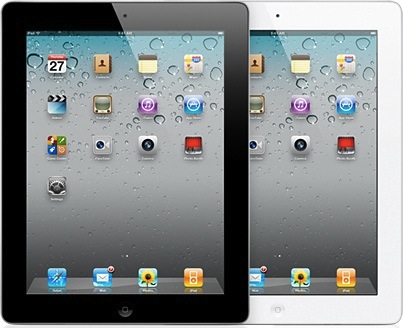
Ahead of next week’s earning call, there are two reports out today by analysts that paint a rosy picture of Mac, iPhone and iPad sales. The first report by Barclays Capital anaylst Ben Reitzes, claims that Apple is likely to exceed 22% growth in Mac computer shipments during the June quarter. This is despite US market data that has been less optimistic, but Reitzes suggests that overseas sales may compensate for the “somewhat muted” US sales due to the fact that many consumers are waiting for new MacBook Air models.
The second report from Brian White of Ticonderoga Securities included some revised figures and claims that Apple is likely to have sold a record of 8.5 million iPads and an impressive 17.53 million iPhones in the June quarter.
After our recent trip to Asia, we indicated that we felt our iPhone estimates for the June quarter were overly conservative, while our iPad projections were achievable and well above the Street.
Apple’s previous record for iPad sales was last years holiday quarter where they sold 7.3 million units. The iPhone sales according to White would be less than last-quarter’s record 18.65 units but still more than double the 8.4 million units Apple sold in the same quarter last year.
While many larger tech companies rely on more cyclical trends to grow sales, we believe Apple enjoys the tailwind of strong secular industry trends, hot new products and market share gain opportunities
[Via Barrons, AppleInsider]