This Week's Sponsor:

Turbulence Forecast

Know before you go. Get detailed turbulence forecasts for your exact route, now available 5 days in advance.


Posts tagged with "iPad"

New Mineral Discovery Will Ease Component Supply Pressures For Consumer Electronics

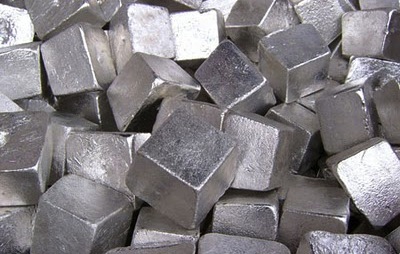
As the market for consumers electronics continues to grow, there is one problematic question that faces the industry - can supply keep up with demand? More specifically, there are a number of “rare earth” minerals that are crucial in creating electrical components for an array of consumer electronics that include the iPhone and iPad but also more generally in LCD TVs and laptops, but have been very hard to locate in large quantities.

The concern about supplying such rare earth minerals may be quelled, however, with Japanese scientists discovering huge deposits of these rare earth minerals on the floor of the Pacific Ocean around Hawaii. more promising is that the deposits are of a heavy concentration with just “one square kilometer (0.4sq miles) of deposits [from the region] able to serve one-fifth of the current global consumption”. The discovery was made by a team from the University of Tokyo, led by Yasuhiro Kato, an associate professor of earth science.

He estimated rare earths contained in the deposits amounted to 80bn to 100bn tonnes – compared to global reserves currently confirmed by the US Geological Survey of just 110m tonnes that have been found mainly in China, Russia and other former Soviet Union countries, and the US.

The news has been met with positivity by consumer electronics companies and has seen a boost in share prices of non-Chinese mining companies that specialise in rare earth mineral mining. It comes after consumer electronics companies last year faced uncertainty when China last year slashed rare earth exports. The move, primarily in trade of the minerals of tantalum and yttrium, was frowned upon because China currently produces 97% of the global supply.

Sony said at the time that the move was a hindrance to free trade. Japan, which accounts for a third of global demand, has been stung badly, and has been looking to diversify its supply sources, particularly of heavy rare earths such as dysprosium used in magnets.

[Via The Guardian]


PhotoForge 2 Update: iPad Version and iOS 5 Fixes

Back in May I covered the release of PhotoForge 2, the successor of a popular image editor for iOS that, with the point-upgrade, gained a completely redesigned user interface, as well as a broader set of options aimed at turning the application into the most powerful image editing software for iPhone and iPod touch. Released as a standalone app (as the App Store doesn’t allow for paid upgrades) and sporting revamped social sharing functionalities with an OS X-like dock UI, PhotoForge had an incredibly successful launch – but one piece was missing: the iPad version. The developer teased the app ahead of the launch as a universal application for iPhone and iPad, yet in May users only got the “smaller” iPhone counterpart that, due to the limitations of the device, couldn’t fully take advantage of real screen estate for image editing.

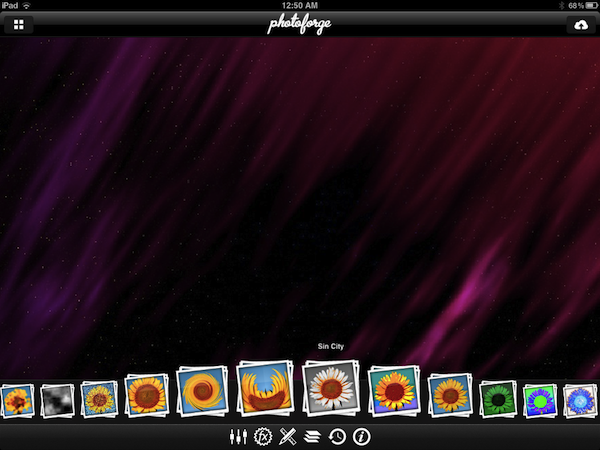
Released today as the promised universal update, PhotoForge 2 now runs on the iPad as well and it’s available for download right now at $1.99. The iPad version of PhotoForge 2 doesn’t surprise, but it’s better than the iPhone version: whereas most of the times I’d despise an iPad porting that only makes the iPhone UI bigger, this time the conversion seems appropriate for PhotoForge: controls are made bigger but don’t get in the way because of the iPad’s large screen, toolbars provide a nice minimal frame around the photo you’re editing. And because the iPad 2 comes with cameras, this means you’ll be able to edit and improve photos shot with your device. Furthermore, the new PhotoForge 2.0 fixes several bugs reported by developers running iOS 5. The same features of the iPhone version have been ported over: layers, exposure control, brightness and contrast, or standard RGB levels are all there. The app comes with a selection of effects similar to those seen in Instagram and Camera+ that you can apply to your files in real time, in seconds. As also tested on the iPhone’s original version, the app has full layer management capabilities with handy controls on the side, a detailed info panel to check metadata of an image, and various sliders and menus to tweak the appearance of a file with levels, curves, brightness and noise regulation, or noise reduction. There’s a lot to explore and play with in PhotoForge 2, and I like I said the iPad’s screen makes the whole experience ultimately better when it comes to tapping, sliding and moving your finger around to edit an image.

Other changes in this release include:

  • Mask painting has been dramatically improved. Painting is now incredibly fast even on super large images.
  • New composition mode while mask painting allows you to see the layers below, making masking the easiest way to selectively apply filters and effects to your photos.
  • Cropping handles have been redesigned and implemented making cropping much easier to control than before.
  • The rotation gesture in the cropping tool has been removed and replaced with 1 degree rotation buttons.
  • Added ability to save photos back to the documents directory. Making it very easy to get your images back onto your computer.
  • Can now save images in JPEG, PNG and TIFF. PNG and TIFF will maintain any transparency in your images. (Not all upload locations support all image formats).
  • Can now control compression quality of JPEG.

PhotoForge 2 was the image editor to have on the iPhone, and the universal update is simply a must-have at this point. You can download PhotoForge 2 at $1.99 on the App Store. Check out more screenshots of the app after the break. Read more



The New York Times Enables In-App Subscriptions For Their iPad And iPhone Apps

The New York Times has today released an update for their iPad and iPhone apps that now enables users to purchase in-app subscriptions for their content that is behind a paywall. There are three subscriptions available for the content, the first is $15 for website plus iPhone access, then $20 for website plus iPad and finally all digital access (website, iPad and iPhone) for $35 – all of which are charged on a monthly basis.

The implementation of Apple’s subscription service comes the day after the rumored deadline that was imposed by Apple. Although that deadline was made somewhat easier for content providers after Apple backed down on certain requirements of the subscription guidelines. Most notably is that they are no longer forced to offer in-app purchases or subscriptions for content and that they can offer the content at a different price to what they offer on their websites.

However, one rule that didn’t change was that if an app offered In-App purchases or subscriptions, they cannot offer users an external link to purchase content from outside the Apple ecosystem. The New York Times seems to have played nice with this rule, but has offered existing subscribers an easy way to gain access to the content for free – as is permitted by Apple. Today’s implementation comes after they first implemented their paywall for the iPad app in April of this year and nearly four months after they first promised that they would implement iOS subscriptions. It also follows the adoption of iOS subscriptions by other publications such as Wired Magazine, The Daily, The Telegraph and Bloomberg’s BusinessWeek.

Read more


Captio 2.0 Released, Adds iPad Version

Back in September I reviewed Captio, a simple utility for the iPhone aimed at letting you easily send an email to yourself with just one tap. What’s the deal with sending emails to yourself, when you can take a note in apps like Simplenote, Evernote, or Apple’s Notes app itself? For some people, quickly sending an email with apps like Captio, or Note 2 Self, is faster than opening up a full note-taking app and creating a new note with the proper formatting options, tags, or more. Captio allows you to launch the app, type, and hit the Send button to find the note later in your inbox. When combined with desktop tools like OmniFocus, which has excellent support for email integration, Captio and similar apps become simple yet powerful solutions to get thoughts out of your brain and into your trusted GTD system. The same applies to online services like Basecamp, Evernote or Remember The Milk, which support quick email input.

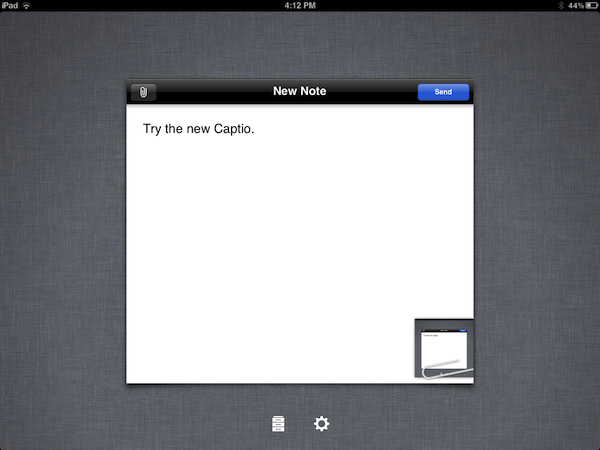
Captio 2.0, released today, finally adds native iPad support to send notes from your device to your preferred email account, and – this is also new in version 2.0 – lets you configure an IMAP account in-app if you don’t want notes to be delivered using the developers’ email system. I found that notes delivered via IMAP took a few seconds more than the developers’s built-in account, but if you don’t want to route your notes through an external service now you have an option. The interface designed for the iPad is very straightforward, with the popular linen background sitting below a floating panel to write your note and insert attachments. In spite of its simplicity, Captio’s design is elegant and pleasant. In this new version, you can also access a notes archive to see old emails you sent for one month. In the preferences located in the Settings app (not the account settings in Captio), you can choose to disable the message footer, repeat the first line of the note in the email body, and tweak the subject prefix. On top of that, TextExpander Touch support has been enabled in Captio 2.0 as well.

At this point, with local storage, IMAP options and a native iPad version, Captio has become the best way to send an email to yourself from any iOS device. You can download Captio at $1.99 on the App Store. Check out more screenshots of the app after the break. Read more

Apple Expected To Surpass HP In Global Portable PC Shipments In 2012

DigiTimes is today reporting that industry sources are expecting Apple to become the number one portable PC vendor globally. Hewlett-Packard (HP) is currently the number one vendor for portable PCs, but if tablets are included in the calculation, Apple will far surpass HP in 2012.

According to the sources, Apple is expected to ship 60 million iPads in 2012, accounting for 75% of all tablet shipments, which are expected to hit 80 million units in 2012. Meanwhile Apple’s MacBook line is expected to total 15 million units in 2012, bringing a total of 75 million units of portable PCs if tablets are included.

HP will continue to increase their portable PC shipments in 2012 but would be unlikely to match the success of Apple, instead shipping between 45-50 million portable PCs. Shipments of HP tablets aren’t expected to add much to this total, leaving Apple to ship roughly 20-30 million more units of portable PCs.

[Via DigiTimes]


AppShopper 1.4: Top 200, App Ratings, Reviews, and more

Last week, Arnold Kim gave twitter a little preview of some new features and functionality of AppShopper 1.4 for iOS. The new update was just approved by Apple and now has features like Top 200 and App ratings. Other new features include:

  • Links to 3rd party app reviews like 148apps and TouchArcade
  • Automatically load apps when scrolling to the bottom of a list
  • New filters for search
  • Email notification settings
  • Disable push notifications during certain times of the day (Yeah!)
  • In-app AppShopper account registration
  • Share an app’s info via Twitter, Facebook, email and more
  • Various bug fixes

Screenshots for iPhone and iPad after the break.

Read more


Jailbreak Tweak Could Let You Run Multiple iPhone Apps Side By Side On The iPad

In what can only be described as borderline ridiculous, but a very awesome tweak, Aaron Ash has managed to hack together a way in which two iPhone apps can run side by side on the iPad. In a blog post, Ash makes it clear that at this stage it is only really a proof of concept, not yet ready for a public release. In particular there are some bugs that are preventing audio from playing and accelerometer data from being detected by the apps.

The bottom right button turns on “edit mode” which allows you to rearrange applications, and rotate them (Angry Birds normally runs in landscape, here they’re turned). I’m debating on if I should go for the typical desktop feel or make it more SpringBoard-like and keep apps in preset locations.

Nonetheless he says he managed to “waste plenty of time already playing 2 games of Angry Birds at the same time” on the same screen. In fact he managed at one stage to play 3 at a time, which worked until he added a fourth, which crashed the tweak. He notes that “performance is actually pretty good, definitely useable” but with those bugs he says he probably wont release it for a few months. That said, he does note that he might show the tweak off at the jailbreak meetup in New York that is happening on Saturday, July 10th.