Posts tagged with "iPad"

Mr. Reader Gets A Great Update with Evernote, Send2Mac, Terminology Support

There’s no doubt Mr. Reader is becoming one of the most powerful and integrated RSS apps for the iPad. Ever since I reviewed version 1.0 back in April, the developer went back to work to implement several features that are making Mr. Reader a Google Reader client that’s not limited at fetching and marking items as read from a native interface. Rather, Mr. Reader shipped with a good selection of external services to send your favorite articles to, but version 1.1 added support to create tasks in OmniFocus and integration with third-party iOS browsers like iCab. Whereas most feed readers want to provide a good reading experience but don’t focus on letting you get those feeds out of the closed Google Reader experience, Mr. Reader aims at filling the gap between online services / apps and RSS.

Version 1.2, released yesterday and available now at $3.99 in the App Store, takes the whole concept of getting articles out of the app a step further. With Evernote, Send2Mac and Terminology support, you’ll be able to save articles as notes in your Evernote account, send webpages to your desktop browser in the background thanks to the great Send2Mac service (which already works on Lion), or get definitions of words you don’t know if Agile Tortoise’s app is installed on your iPad. Unlike Instapaper, definitions are not provided in a popover inside the application (at least on iOS 5): when you select a word and hit the Terminology button, you’ll be brought directly to Terminology with the selected word at the top of the list and a popup at the bottom saying that you opened that word from Mr. Reader.
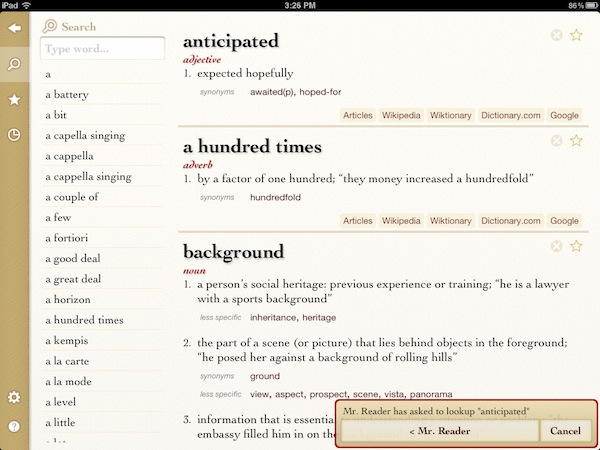
Evernote support is really simple, and I like it: the app will create a blank note with just the title and URL section saved from Mr. Reader. As for Send2Mac, it works perfectly but it only allows you to configure one computer – I’d love to add both my MacBook Pro and iMac to Mr. Reader.

There’s a lot more in Mr. Reader 1.2 though. Tapping on an article will let you open all feeds from the original source; you can send articles to Readability, if you’re a fan of the service; a new theme, Sydney, has been added and others have been refined; the annoying modal sync window has been changed to an unobtrusive spinning indicator that doesn’t overlay the feed list. Alongside dozens of other bug fixes and improvements, Mr. Reader now remembers your preferred view for each feed automatically.

At $3.99 and with updates coming out every few weeks to make the app more stable and integrated, I’m excited to see Mr. Reader taking on Reeder as the most powerful (yet elegant) iPad RSS reader. While looking forward to iOS 5 and (perhaps) iCloud integration, you can get the app here.




Apple Confirms “Extremely Small” Verizon iPad 2 Recall

Reports surfaced earlier today indicated Apple was in the process of recalling Verizon iPad 2 models that were being shipped from China (where they’re made) to the United States, leading to speculation that faulty units had been produced by Foxconn. In a brief note to All Things Digital, however, Apple has confirmed that they have recalled an “extremely small” number of Verizon iPad 2 due to a problem with device identifiers, otherwise known as ”mobile equipment identifiers” (MEIDs), which play a key role when setting up a new iPad for cellular data activation. Due to a problem with Verizon flashing the same MEID on different iPads, users could run into the impossibility of activating their device as it’s already registered on the carrier’s network.

Duplicate MEID numbers were flashed onto an extremely small number of iPad 2 units for the verizon 3G network,” an Apple representative said on Friday.

Although most of the small number of devices involved were still in the process of hitting the market, a few had already found their way into customers’ hands.

Some iPad 2 customers have reported receiving credits and free accessories as a compensation for the delay, although Apple hasn’t issued an official statement or policy in regards to this recall. It is also unclear what the company will do for those customers who have already got their hands on a Verizon iPad 2 with the wrong MEID, but it wouldn’t be a surprise if Apple contacted this small number of people to issue a full refund or send a new unit free of charge.


Will Older Devices Get All of iOS 5’s Features?

It doesn’t come as a surprise when Apple’s latest and greatest software updates end up killing off compatibility with older devices, but the intrigue here is that something as recent as the original iPad may not be included in iOS 5’s full feature set. For example, developers have access to enabling special multi-touch functions for multitasking between apps, launching the multitasking bar, and closing apps with a four finger pinch in iOS 4.3. These functions, that work well on any enabled iPad or iPad 2, may not be included for use on the original iPad. According to Appadvice the iPhone 3GS doesn’t have access to many of the photo features available on the iPhone 4.

Perhaps these are temporary bugs, or Apple is really looking for reasons for people to buy an iPad 2 when iOS 5 drops over the less expensive iPad elsewhere. Bryan M. Wolfe from Appadvice writes,

We’ve received numerous reports the upcoming gesturing feature in iOS 5 will not work on the original iPad. If proven correct, this would be the first time the first-generation iPad was denied a key feature besides those that require the iPad 2′s camera.

The iPad’s touchscreen is exceptional, and there’s no reason why Apple wouldn’t (or shouldn’t) enable these features. If Apple does remove any features, I’d bet the iPhone 3GS and the 3rd generation iPod touch would be the most likely to be at risk.

[Appadvice via Cult of Mac]


iOS 5: 10 Videos From Around The Web

We have covered all the iOS 5 announcements in the past few days in our roundups and daily coverage, but there are so many new things about the new OS for iPhone and iPad that it would be impossible to list them all in a single article. So we have collected 10 videos from YouTube that show some of the most interesting aspects of iOS 5, such as Notification Center or the new custom vibration alerts for your Address Book contacts.

Check out the video gallery after the break.

Read more


OnLive To Bring Cloud Gaming to iPad This Fall

OnLive, the cloud-based gaming platform that allows you to play a variety of PC and console games from a web browser on your computer or any TV through a cheap set-top box always connected to the Internet, has announced that the official app for iPad and Android tablets will be available this Fall in both the United States and Europe. Teased several times in the past, it appears the final version of the OnLive Player app has been completely rewritten to fully take avantage of cloud gaming features such as voice chat and multiplayer, but more importantly the developers have figured out a way to run PC games on a server, send video to the iPad, and let iPad owners interact with the game using touch input – not just buttons. In fact, it’ll be possible to enjoy OnLive on the iPad with a standard controller, but according to OnLive CEO Steve Perlman some games will be updated to support touch controls on the iPad and the server. This means that whilst you’ll be playing a game that doesn’t actually run on your local machine and doesn’t normally support touch on consoles and PCs, thanks to the iPad app (and developers’ support) it will.

The power of the cloud is definitely the theme this week, displacing what had been assumed to be platforms that could never be displaced,” said Steve Perlman, Founder and CEO of OnLive. “The OnLive Player App for iPad and Android shows how with the power of the cloud, the question is not whether cloud gaming will be able to catch up to consoles, it will be whether consoles will be able to catch up to cloud gaming.

Check out the demo video from OnLive CEO after the break. Currently, OnLive comes with a native Mac app that enables gamers to play the rather large selection of title available through the platform.

[image via]
Read more