Posts tagged with "iPad"

MindManager 9 for Mac Coming June 23, iOS Versions Due Mid-June

What is “Mind Mapping?” Well, if you want to take your analog thoughts and put them into the digital world, Wikipedia tells us that “a mind map is a diagram used to represent words, ideas, tasks, or other items linked to and arranged around a central key word or idea. Mind maps are used to generate, visualize, structure, and classify ideas, and as an aid to studying and organizing information, solving problems, making decisions, and writing.”

MindJet, who makes MindManager, one of the premiere apps in the market selling 1.8 million copies worldwide,  is scheduled to ship MindManager 9 next month. It will cost $249 for new customers and $149 for current users wanting to upgrade. New features will include a presentation mode, “quick entry,” WYSIWYG priting, dynamic content like schedules and web links, offline import/export for iWork and Office, plus project management mode. For more info, read the Mac press release here. Read more


Federal Government Agencies Embrace The iPad, iPhone and Gmail

iPads, iPhones, Gmail and Android phones; typically they have been the devices and services used (and loved) by consumers around the world. Yet in recent times they are increasingly becoming a reality for employees within the confines of the bureaucratic world of government departments. An article today in the Washington Post details how ‘federal government 2.0’ has embraced consumer devices, to solve real world problems and to appease government employees across the US.

Somewhere in America, perhaps at this very moment, a bad guy is under video surveillance. He is being watched, every movement, every step — but not on a little TV. That’s so 2009. Instead, a special agent from the Bureau of Alcohol, Tobacco, Firearms and Explosives is keeping tabs on an iPad.

It isn’t just President Obama that is lucky enough to own an iPad, employees in various departments in all arms of the US government are bringing them in to work and the IT staff have stopped restricting them and started embracing them. Vivek Kundra, the federal government’s chief information officer says that it’s not that people don’t like government or corporate style technology – they despise it.

Kundra’s answer to the issue of people using unauthorized devices is simple: Give them what they want.

Agilex, one of the companies contracted by the government to integrate Apple products into government agencies has said that “the demand we are seeing now in the last 90 days has been just extraordinary.” – “It’s like everybody is saying, ‘This is really happening here now’”. Gmail too has been widely adopted across many agencies in the Federal government including the State Department, NASA and the Army . Yet the best part is that it doesn’t just make the lives of government employees better, but it is also saving the government money.

[Via Washington Post]


Instamap for iPad Lets You Browse Instagram Photos By Location, Tags

Ever since the release of Instagallery in March, there haven’t been many Instagram clients coming to the iPad. Whilst the platform has seen an explosion of iPhone-connected applications, Mac and web tools aimed at enhancing the regular Instragram experience with features like postcard printing and screensavers, the iPad feels like it’s been left behind in the race to shipping the ultimate third-party Instagram app to browse photo streams with the comfort of a 9.7-inch screen. Instamap, a new app by NextRoot, is probably the nicest and simplest use of Instagram’s API that I’ve seen on the iPad so far. Available at $1.99 on the App Store, Instamap doesn’t let you upload photos but it’s got some clever maps-related features that you can use to browse photos by location – say you want to see Instagram pictures shot in Paris, just enter “Paris, France” in the search box and hit Go. Instamap will display a new photo stack on a map (If you choose map view) or a simple (animated) grid of photos for you to tap around, like, and comment. Similarly, in the same “subscriptions” section in the sidebar, Instamap enables you to enter a tag to browse photos associated to a specific keyword, useful if you’d like to see photos sorted by context rather than location. These subscriptions can be deleted and refreshed at any time – the grid design is beautiful and the animations pretty neat.

All the way down in the sidebar, Instamap also gives you access to your stream and currently popular photos on the service. While I generally avoid the Popular tab because I don’t care about vintage kitten photos and other people’s meals, the possibility to check out my feed within Instamap is really welcome. It would be even better with native uploads. I also would like to see buttons to load more photos and “shuffle” in a future update.

At $1.99, Instamap is an elegant and lightweight Instagram client that feels good on the iPad and works well in the way it can group photos by tag or location. Get the app here.


MacStories Product Review: SuperTooth Disco

Bluetooth AD2P has opened up a market of fantastic audio products that allow us to stream high quality stereo audio from our smartphones to speakers, headsets, and to car electronics. SuperTooth is just one of many companies who focus specifically on handsfree, bluetooth accessories for travel that work seamlessly with iPhones (and other smartphones of course). Straying from the tradition of car kits and speakers, SuperTooth has launched into the fray of home and portable audio with the SuperTooth Disco, a 28 Watt RMS Bluetooth AD2P speaker that can blast tunes without the need for an electrical outlet. Our full review past the break!

Read more


Back to School Announcement at WWDC with Special iPad Discounts?

BGR reports one of Apple’s announcements at the upcoming WWDC will be about the Back to School 2011 program, which was initially rumored to launch this week. According to the website, this year’s Back to School will continue offering a free iPod touch to students who purchase a new Mac, although it’s possible that Apple will also kick off a new promotion with a $200 discount off an iPad following the purchase of a new Mac.

We have been told Apple will continue to offer educational discounts on computers and either a free iPod touch, or $229 towards the purchase of any other iPod. Our source also let us know that there might be something new in the works, as well… they heard that it’s possible Apple might offer students up to $200 off an iPad with the purchase of a new Mac.

The Back to School program has usually been announced in late May or early June. With the WWDC starting on June 6, the promotion could play nice with other major announcements such as Lion and iOS 5 made on stage. In the past years, Back to School allowed students to get a free 8 GB iPod touch, and the current family of iPod touches starts at $229 with the 8 GB model featuring the Retina Display and FaceTime camera. Apple’s push in the educational market was brought to the press’ attention again two weeks ago as the University of Delaware said an “Apple Store” would come on campus, enabling students to check out and buy products directly next to university’s library. With a wide selection of apps targeting students available on the App Store, $200 off an iPad combined with, for example, a MacBook Air indeed would be a good deal.


iChromy Wants To Bring The Chrome Experience To The iPad

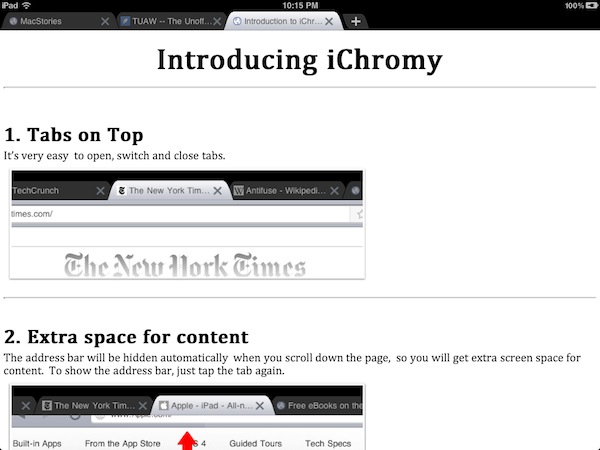
Released earlier today for free on the App Store and developed by the same folks behind web-based bookmarking service Diigo, iChromy is a new third-party iPad browser that aims at bringing the Google Chrome experience on the tablet, obviously without using Chrome’s underlying Chromium open-source project, which can’t be implemented by developers due to Apple’s restrictions. From the name of the app to the iTunes description, the developers of iChromy don’t hide their intentions of developing a heavily Chrome-inspired browser for the iPad; while it still might not look as beautiful as this mockup, I took the app for a quick spin to see whether Chrome (which I love and use on my Mac desktop) could have a proper, unofficial, lightweight counterpart on the iPad.

iChromy is free and the developers will likely introduce a Pro version with more features and deeper Diigo integration in the future, but right now what we have is a simple iPad browser that lacks several must-have functionalities (most of them also available in Safari and not necessarily in powerful alternatives like iCab Mobile) but it’s got tabs on top, a Lion-like Reading List (with the same eyeglasses icon) and decent memory management. More importantly, iChromy has an Omnibox that allows you to search and type addresses in the same bar, like Chrome. So while tabs on top and the Omnibox make for a nice Chrome-like experience that reminded me why it’s still possible to innovate in web browsers on any device, iChromy falls short in the details: you can’t re-arrange tabs, you can’t tap on the status bar to scroll a webpage to the top, you can’t pin tabs. The Omnibox is really, really nice, but the app’s keyboard doesn’t have a .com button and there’s no way to get search suggestions or modify the default search engine. Bookmarks and history are displayed in the Omnibox, but the lack of the .com button on the iPad’s soft keyboard is annoying. Similarly, you can create bookmarks by hitting the “star” button in the Omnibox, but you can’t organize these bookmarks in folders, sync them back to the cloud or import / export them. The Reading List, however, works fairly well in the way it makes entire webpages available offline. Too bad it doesn’t sync anywhere else either, which comes as a surprise considering Diigo’s cloud-oriented nature.

In spite of its missing features, I can’t say iChromy isn’t “nice” in how it mimics Chrome for Mac. The browser is very lightweight, it never crashed on me with multiple pages open in the background and, personally, I think it’s always great to see a browser with tabs on top (I was a huge fan of Safari 4 beta, until Apple killed that magnificent tab implementation). Overall, I see Chromy as an interesting experiment that a) needs some obvious adjustments like the .com button, top scrolling and search suggestions and b) with an upcoming Pro version could have a chance to become a Chrome-inspired, powerful competitor to my personal favorite iCab. We’ll see. In the meantime, go download the app here.