This Week's Sponsor:

Turbulence Forecast

Know before you go. Get detailed turbulence forecasts for your exact route, now available 5 days in advance.


Posts tagged with "iPad"

Square Unveils “Card Case” and “Register” To Reinvent Digital Payments and Wallets

Mobile payment company Square teased last weekend they had some big announcements to make this morning. After the 2.0 update to the iPhone and iPad application that hit the App Store earlier today, Square’s Jack Dorsey announced with a live stream event on TechCrunch Disrupt a few minutes ago the next-generation of payment processing for merchants and mobile payments for customers: Square Register and Square Card Case, two new products aimed at revolutionizing the mobile payment scene and the whole concept of digital wallet.

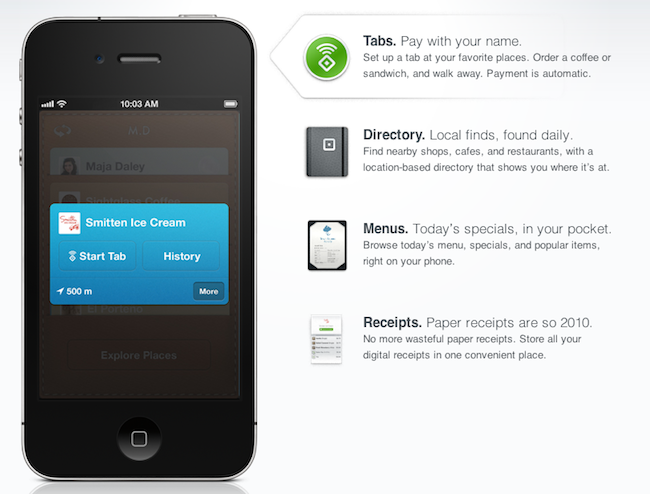
With 500,000 card readers shipped across the United States and $1 billion gross payment volume, Square undoubtedly changed the way people thought of phones and tablets as point of sale units capable of receiving credit card payments with a simple swipe. But Square wanted to go one step further, and allow everyone, merchants and customers, to get rid of cumbersome cash registers, POS devices and wallets altogether by unifying the Square experience into a single software that takes care of the data, personal information, credit cards on file, location, and more. The Card Case is the first step to allow customers to forget about wallets, cash and credit cards to carry around all the time: within a single iPhone application, users are getting access to a virtual wallet that contains place-specific cards to pay, check out products, and get receipts. TechCrunch explains:

Once you’ve downloaded your mobile Card Case, you can fill your case with ‘cards’ of all the merchants you visit and buy from who accept Square. When you click on an individual merchant’s card, you’ll be able to see a map of where the merchant is located, contact information, your own order and purchase history, and receipts with the merchant and a daily live menu of items or services from the merchant. You’ll also be able to see what other customers are buying at the store, and merchants can serve customized offers to specific customers based on their purchase history.

So here’s where things get interesting. In a merchant’s card within the case, you can press a “use tab” button which allows the frequent customer to essentially put a purchase on their virtual tab with Square at the merchant. So once you press that button within two blocks of the merchant, you’ll be able to tell the cashier your name and your card will be charged on the merchant’s backend Square register. Because you are a repeat customer, Square already has your payment information. The purchaser will then receive a push notification when the merchant processes the payment.

The Card Case basically acts as a wallet to keep all the places you frequently visit together and set up tabs so payments will be processed automatically without even swiping a real credit card. In a video reel showcased by Jack Dorsey at the announcement event, a Square user was shown entering a coffee shop, ordering a cappuccino and simply asking the cashier to put it under his name. No swiping necessary, no need to sign any receipt or carry a wallet around – just an iPhone. After a purchase however, the app of course handles virtual receipts emailed or texted to you, so you’ll be able to organize all your expenses and view the places where you spent your money. The concept’s really simple and disruptive from a user standpoint – as long as you have an iPhone and the credit card on file, it’s as simple as walking into a bar and ordering what you want with your name. The software takes care of the rest.

On the merchant’s end, Square has also announced a new product, the Register, which will dramatically improve the way business owners used to deal with POS machines and real cash registers and engage with customers as well. Merchants have always been able with the Square reader to store customers information and send them a receipt via email or SMS; with today’s update, merchants get the possibility to send customers a link to download the Card Case app so next time payments will happen faster, over the air, and with more features to engage with a local shop and nearby places that support Square. Again, it all comes together with the reader used to set up a credit card for the first time, the iPhone app for customers to pay with their mobile device, and the iPad Register for merchants to check out analytics and customer data. From the website:

  • Transform your iPad into an elegant point of sale. Customize it with product photos, prices, and sortable categories. Accept cash and credit cards.
  • Swipe a card, let customers sign directly on the screen, and send them an email or text message receipt. Customers can add a tip as they sign.
  • Know how many cappuccinos you sell each day. Download full reports that give you insight into your sales patterns and inventory.
  • Let your regular customers set up a tab right from their phone and pay with their name. Publish your menu and share daily specials.

At this point, it’s clear Square isn’t a cool startup with a neat credit card gadget anymore. Square wants to disrupt mobile payments, bringing merchants and customers together socially, locally, just with software, phones and tablets. Square Register and Card Cases are rolling out today through 50 US merchants in New York City, San Francisco, Washington DC, St. Louis, and Los Angeles.


BlueNube Is The First CloudApp Client for iPad

If you love CloudApp as much as I do and you own an iPad, you’ve probably been looking for a way to upload and share items from the tablet without having to use Safari and the web application. There’s no shortage of CloudApp-enabled clients on the iPhone – the excellent Cloud2go is a staff favorite here at MacStories – but the iPad hasn’t seen a real native CloudApp client so far. BlueNube is a $1.99 app I bought a few months ago but never really used because it was only focused on letting you see uploads to your CloudApp account from the iPad, without letting you send an actual file or URL to the service from the device. I was told the next version would include full upload support and other features, so I decided to leave the app in my iTunes library and wait for it. Version 1.1, released yesterday, indeed adds upload capabilities to BlueNube, thus making it the first CloudApp client that runs natively on the iPad.

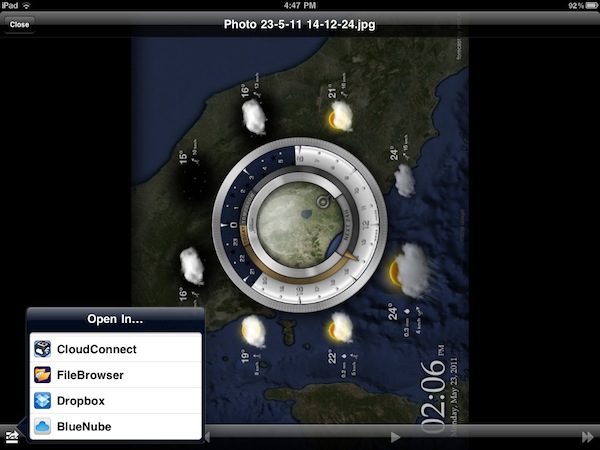
The interface design of BlueNube isn’t as delicious as the one I’m currently testing in the upcoming Stratus for iOS, nor does the app support live streams and other fancy things as in Cloud2go, but it sure is functional to the main purpose of uploading files and bookmarks to CloudApp using the iPad and third-party applications. The biggest feature of version 1.1, in fact, is the possibility to upload anything from any other app thanks to the “Open In” menu integration that allows you to select a file from 3rd party apps like, say, iFiles or GoodReader and send it to BlueNube, which will start uploading automatically and paste a link to the file in your clipboard.

You can also upload photos and videos within BlueNube with Camera Roll support, upload an image or link from your pasteboard as you open the app thanks to clipboard detection and even cache entire images and other files so BlueNube won’t have to download them every single time to display them. Cache size can be modified and reset from the settings; items uploaded to CloudApp can be shared on other social networks like Facebook, Tumblr and Twitter.

Overall, BlueNube may not be as sexy as other apps but it gets it job done when it comes to integrating with CloudApp on the iPad to offer uploads and smart URL detection from the system clipboard. If you need CloudApp on your iPad, this simple and lightweight app is a $1.99 purchase here.


Retail iPad Displays Can Return to Home Screen, Run Custom Web App

A few more interesting tidbits about the iPad displays Apple has put up in their retail stores to showcase specs and prices and offer product comparisons have surfaced today. As we already knew, the iPads default to a device or computer they’re paired with to display additional information, making it impossible for customers to return to the iOS home screen by pressing the Home button. As reported by 9to5mac however, it is possible for store managers to “unlock” the devices with a custom gesture combination and use the regular iOS.

An Apple Store Manager relayed to us that the new iPad 2 displays are able to turn into “normal iPads” with a few swipes in secret combination. To find out if true, I went to the Soho store and tried it out. Yep, it works.

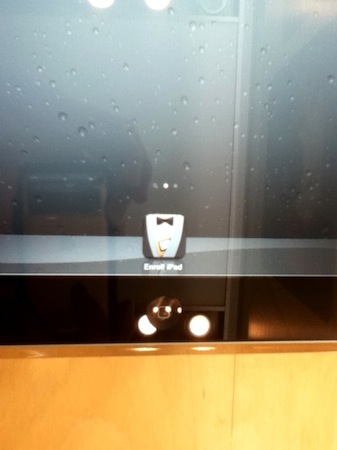
Additionally, MacRumors points out that an iPad was found unlocked in an Apple Store, with the iOS home screen displaying and “Enroll iPad” app icon. The app is not a native one but, as many suspected, a webclip that launches an AppleConnect interface in Mobile Safari to log in and associate the iPad to a Mac, iOS device or iPod inside the store. It’s likely that the custom retail software is getting all the data from Apple’s servers, meaning that all changes to iPad stores displays (prices, tech specs, artworks) can be performed remotely by Apple without local modifications by employees or store managers.

The interesting bit was the app that was on the dock which says Enroll iPad. It isnt actually an app but instead a Safari bookmark. Clicking on the app takes you to Safari shown in the last image. I tried to go back to the homescreen but I couldn’t seen the Home Button does not do anything.

Of all the rumors we’ve heard in the past weeks about the “Apple Store 2.0 experience”, there was one that claimed employees were instructed to download a folder containing GBs of data from Apple’s corporate servers – some suggested that private folder could be a retail-specific disk image for OS X Lion. We’re just speculating here, but it could be possible that employees were simply told to download the app data from the servers to test the retail software hours before launch, and the rumors posted were incorrect. Private folder or not, the new Apple Store experience has launched today, and now we’re waiting for the updated Apple Store app to go live in the Store.


First Impressions and More Details On Apple’s Updated Retail Stores

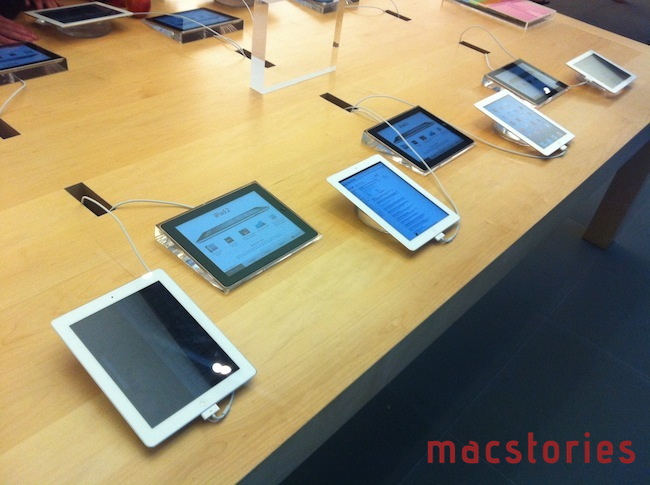
After last night’s photos of Apple’s changes to the retail experience (dubbed “Apple Store 2.0” in recent rumors and speculation), a MacTalk forum member has posted (via MacRumors) his first impressions of the new retail space and in-store tables featuring interactive iPad displays to offer more product information, compare tech specs, and call a Specialist for further assistance. As previously reported, the iPads being used by Apple next to each device and computer are special units glued to a mounting block that’s also glued to the main table, running a custom app that’s impossible to hide by locking the device or clicking the Home button. Forum poster jack112006 says he’s tried different combinations for pressing the Home button, but none of them worked as the iPads are likely impossible to hack in-store to visualize the underlying OS. Furthermore, as we saw from the pictures, the units are connected to a single cable that, once inside the mounting block, is divided into two separate cables: one for security and anti-theft measures, one (a very thin 30-pin dock connector) for charging purposes.

The second cable is quite special. It is an ultra-thin 30 pin ribbon cable. It is tight against the iPads body in the acrylic block, and is used for charging, and I would imagine periodic device re-imaging for a new product, etc. The software on all the iPads is very special, and is set up so that the Home button is inactive.

Read more


Week Calendar HD Adds New Theme, Gets More Settings and Less Leather

Week Calendar HD is an excellent replacement for Apple’s own Calendar application I reviewed here a couple of weeks ago, when the app made the transition from the iPhone to the tablet’s larger screen. The first version of Week Calendar HD was a solid release, but left many surprised because of its skin that reminded of Apple’s app and, more importantly, of the theme the company implemented in iCal’s upcoming Lion version. Either because Apple called or because the developer realized a calendar application doesn’t need to look like a real-life calendar to be useful, the new version of Week Calendar HD changes the default skin to black leather and introduces a new “Modern” theme that gets rid of the leather-ish background altogether and looks gorgeous on the iPad.

Version 1.1 also comes with several bug fixes (particularly appreciated is the better handling of overlapping events, and the new event popup no longer disappearing) and enhancements to the settings to enable you to further customize the calendar experience throughout all your configured accounts. Custom calendar colors can now be synchronized across devices running Week Calendar with a new option in the settings; it’s now possible to only show daytime hours (very welcome change, as I don’t care about displaying hours I’m not going to be available anyway) and you can set up custom recurring intervals like “every 17 days.” The day view got some improvements too, as it can be swiped to navigate; last, the month view (which I love) got the possibility to hide time of events and change the font size. I’m not sure why events from my OmniFocus Reminders subscribed calendar still look weird in Week Calendar, but I’m pretty sure I’ll figure something out not that font options are available.

Week Calendar HD is a powerful calendar application for iPad, now with a beautiful modern skin, less leather and more settings. Get it here.


Wu: iPad Production Issues Have “Significantly Improved”

According to a new report by Sterne Agee analyst Shaw Wu relayed by Fortune, the production issues that were affecting the iPad 2 supply chain over the past months have “significantly improved”, with shipments approaching 3-4 million units per month as constraints ease on the suppliers’ end. Wu now estimates 6.8 million iPads for the quarter that ends on June 25 up from 5.9 million units, as well as 17 million iPhones and 3.9 million Macs. Wu notes how the release of the white iPhone marks a “continued strong adoption” of the product, also helped by the availability of the iPhone on Verizon in the United States.

The production problems that hurt iPad shipments last quarter have “significantly improved,” writes Wu, “with better yields and higher output due to successful retooling and conversion of more production lines to iPad 2.” This would appear to contradict recent reports of shortages of both components and labor.

The iPad “still has a ways” to go to hit what Wu says is Apple’s goal of 3-4 million units per month by the second half of 2011, but is “getting closer.”

Contradicting reports posted in the past weeks indicated Apple was still facing production issues with the iPad 2 because of the Japan earthquake and tsunami, alongside other problems encountered at Foxconn’s facilities, which led FBR analyst Craig Berger to believe Apple would be unable to meet the internal goal of 40-45 million iPads produced this year. Among the technical issues mentioned by separate reports recently, the iPad 2 shortages were linked to speaker and display production issues related to light leakage problems discovered in some LG screen units shipped last quarter.


Screenshots Reveal New “Daily Download” App for Apple Retail Employees

Following all the rumors posted in the past week surrounding Apple’s internal retail meetings set for May 22 and the alleged launch of a new retail store experience dubbed Apple Store 2.0, 9to5mac has managed to get their hands on one of those retail-specific iPads we previously reported on, grabbing some screenshots of the new “Daily Download” application for employees. As the website explains, the Daily Download used to be a web application where employees could get access to an internal “newspaper” with various material including news and product indexes.

9to5mac also says that private folder Apple employees were instructed to download from Apple’s servers with GBs of data inside contained disk images of Lion, which is going to be installed on some store machines. It’s unclear, however, how Apple managed to deploy a stable, final version of Lion for retail, when the consumer version is still stuck at beta 3 with several stability issues.

The “gigs of data” for sunday, as far as I can tell from the general consensus around the store and some of my contacts is that we will infact be downloading OS X Lion images and installing on all FOH machines for a Sunday launch. Nothing else fits since all other visual content has already been pulled from the apple servers that we gather content from. Lion is the mutual feeling around the store, even from managers. Speaking of managers, they have been given a general idea about what is happening, but full details will be revealed to them on friday evening.

We’ll know more for sure come Monday morning, May 22, and you can check out more screenshots of Daily Download here. Rumors have pointed to Apple organizing a product launch, a store re-organization and a 10th anniversary celebration for retail on May 22, though at this point an overhaul of some retail store operations seems more likely.