This Week's Sponsor:

Turbulence Forecast

Know before you go. Get detailed turbulence forecasts for your exact route, now available 5 days in advance.


Posts tagged with "iPad"

Could Aperture Be Coming to iOS?

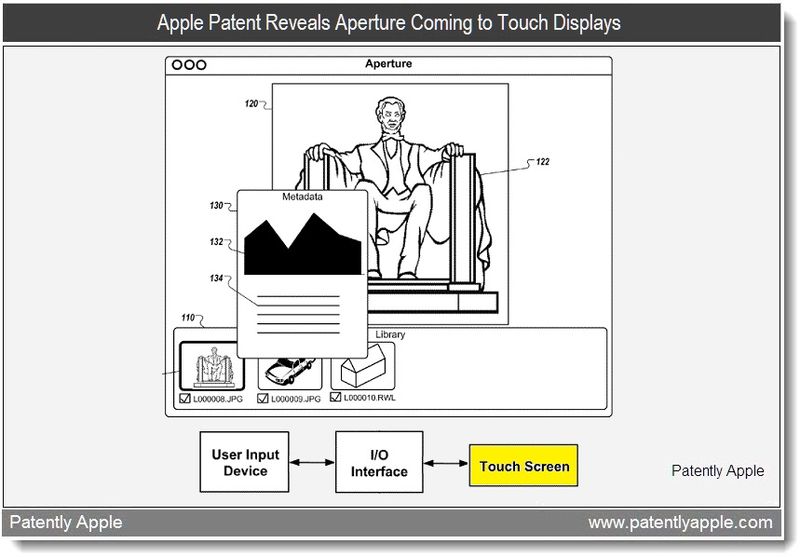
This would be a photographers dream come true wouldn’t it? Even if you prefer Adobe’s Lightroom to Apple’s Aperture, I’d love to have the iPad play a larger role in field editing for photographers. The Photos app included on the iPad isn’t exactly prime for professional work (it’s great for displaying and browsing the end result), but Aperture on the iPad would give photographers an intuitive touch interface to edit photos in a library that’s perhaps separate from Photo’s library. Patently Apple reports that Aperture could well be on its way towards touchscreen devices such as the iPad (and maybe that touchscreen iMac we’ve heard about).

It’s the latter that’s interesting in light of Apple’s latest patent revelation that Aperture is coming to touch displays including handhelds like the iPad. It may even come to future desktops and laptops that offer touch displays, according to Apple. An advanced graphics pen would be great for fast photo touch-ups and appreciated by photographers using Aperture on-the-go.

The patent covers various means of interacting with Aperture, from touch input to pen input, and the descriptions of various GUI elements that can provide authors with an easy toolset at the ready for image editing. The authors are intrigued with the idea that Apple may be moving towards various forms of alternate input, such a smart light pen, that could aid future Apple device owners in precision editing.

[via Patently Apple]


Survey Reveals How Consumers Use Their iPad

When the iPad went on sale just over a year ago, many were unsure of what people would use it for and the uncertainty has largely continued to today, where it is still a little vague as to how a tablet fits into people’s lives. Yesterday however, Business Insider published some fascinating data on a whole range of questions that surround the iPad and how it is used. The data was collated after Business Insider issued an extensive survey, on a wide variety of issues and questions, to more than 850 people.

Their survey revealed that for about 70% of respondents, there was only 1 iPad in their household and only about 23% has 2 in the one household – less than 7% had 3 or more iPads in their household. Nearly 40% had downloaded between 20 and 50 apps, whilst 30% had downloaded more than 50 apps – with few paying for more than 20 of those apps and only 6% paying for none. Below are some of the other more interesting results but jump over to The Atlantic for all the results.

  • 87.4% did not even consider an Android tablet before buying an iPad and 90% would not consider a BlackBerry PlayBook or HP TouchPad
  • The number of people with WiFi-only or the 3G iPad is fairly evenly split (52% to 48%)
  • Only 49% subscribe to a monthly 3G data plan (of those who have a 3G iPad)
  • 40% use the iPad as their primary computer
  • The most cited reasons for use of the iPad are; web browsing (35%), using social or communication apps (22%), watching video (12%), playing games (12%) and using all other apps (20%)
  • For consuming news, 38% would use the iPad’s web browser, 34% would use a news site’s app and 28% would use an aggregator like Reeder or Flipboard.
  • 72% read e-books on the iPad, mostly on iBooks but Kindle is a close second

OmniFocus for iPad Gets Calendar Integration

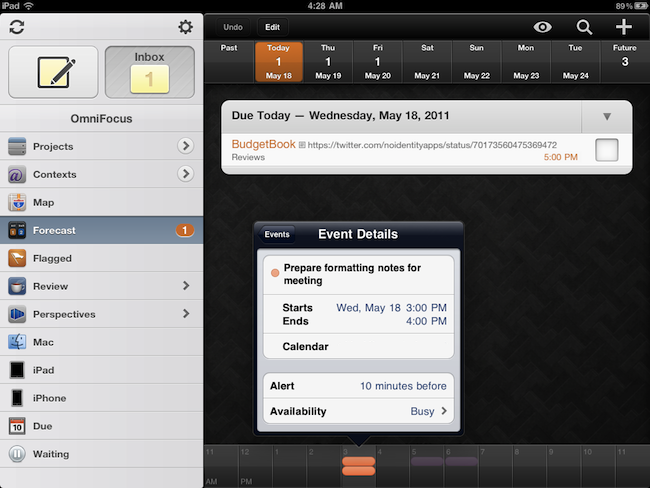
The Omni Group’s flagship GTD application, OmniFocus, received an update earlier today in its iPad version to include a number of new functionalities, bug fixes, and miscellaneous improvements to the interface. Widely regarded as the best version of OmniFocus currently available on all platforms, OmniFocus for iPad managed to win the hearts of The Omni Group’s loyal user base thanks to a clean and elegant design, a powerful sync engine that keeps tasks, projects and contexts always available across the Mac and iOS, but most of all the Forecast view, a slimmed down version of the popular Due perspective, which on the iPad has been completely reimagined as a timeline of sorts with the upcoming week’s days sitting in a top toolbar, listing all your next actions for quick reviewing and rescheduling. Coming soon on the iPhone as well and rumored to be part of OmniFocus for Mac 2.0 big upgrade (expected later this year), the Forecast view in OmniFocus 1.3 for iPad now allows you see items with a start date and, more importantly, calendar events.

Calendar integration in OmniFocus for iPad will display all events for one day through a bar along the bottom that, among other things, allows you see events in popover menus, and change your availability status. You can’t edit events within OmniFocus, as I guess the developers wanted to offer a way to see what’s going on. The addition is very welcome for users like me, who keep an organized set of tasks and projects in OmniFocus, but save other things like reminders and meetings in iCal. At first, however, I was a little disoriented by the changelog of version 1.3 that illustrated the new feature:

OmniFocus for iPad 1.3 updates Forecast Mode: Never spread yourself too thin. Enable Calendar integration to see your hard landscape events alongside your overdue and due soon OmniFocus actions. Use the View options menu to show your items with a start date. Reschedule your projects and actions—with just a tap or two—to keep your days balanced.

Forecast mode now integrates calendar events into a convenient timeline. Use the View options menu to configure which calendars appear on the timeline, and the range of hours for which events are displayed.

Because I keep my OmniFocus for iPad in sync with the Mac version through the Omni Sync Server beta, I initially thought enabling calendar integration would require me to open the desktop app and fiddle with the iCal tab in the Preferences. I clearly read the changelog wrong (and didn’t really remember iCal’s send-to functionalities on OS X), because OmniFocus for Mac doesn’t let you import events, it lets you publish tasks and contexts to a calendar. Instead, what The Omni Group is doing here is different: they’re letting you see calendar events in OmniFocus for iPad alongside tasks in the Forecast view. How does it work? Simple: by relying on the iOS calendar API, any calendar that’s already been configured on an iPad can be displayed out of the box in OmniFocus. Just tap the view icon in the upper right corner, select Calendar Events, and choose a calendar from the Calendars tab. Select a day’s start and end times and you’ll be able to view events at the bottom. Events are color-coded depending on your calendar’s settings, and like I said above you can’t edit them. I wish the developers implemented a way to see events for the next weeks as well (as I treat events differently than most of my tasks and I need to know with weeks in advance about that meeting in Rome), but I guess that breaks the whole purpose of the Forecast view. Anyway, well done.

OmniFocus for iPad 1.3 also packs other interesting features. For one, I love the new fullscreen mode for editing notes in a task’s panel. Or the fact that the app’s badge counts due, overdue and flagged items, but items that are both overdue and flagged aren’t counted twice anymore. Another new neat functionality is video mirroring: by taking advantage of the iPad 2 hardware, The Omni Group now allows you to mirror OmniFocus on a second display, with viewers being able to see gestures, taps and swipes on screen. This will be huge for OmniFocus users like Merlin Mann having a presentation about OF in the future – and it’s something more developers should support.

OmniFocus 1.3 is a huge update with lots of additional fixes and enhancements you can check out in detail here. The app is available at $39.99 in the App Store – it was worth it before, and with calendar integration in the latest version it’s simply become a must-have.


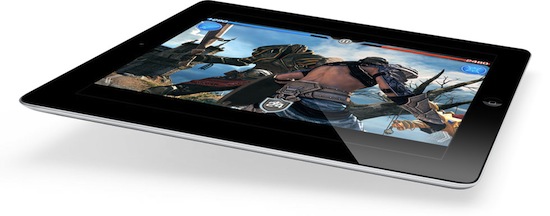
Large Pharmaceutical Companies Subscribing iPads to Sales Reps


Back in April, we reported that many medical facilities are now using iPads in the workplace, specifically The Ottawa Hospital. Apple has always enjoyed showing medical applications in keynotes and commercials; banking on our doctors using iPads in the office is now getting the attention of the pharma sales market. Eye For Pharma posted back in October about this same subject, “Will the iPad kickstart a pharma sales and marketing revolution?” This is another great article written to and for the pharma market.

Pharmaceutical sales reps are trying to find better ways to engage and sale their products during all their sales calls. Doctors and physicians typically only give these sales reps 30 seconds of their time as well. That’s not very much time so every second is important, and so is presentation.

Eric Newmark, an analyst at IDC Health Insights, says that sales reps “still struggle with their ability to differentiate themselves through clear, concise, and interactive messaging.” So the pharmaceutical industry may have a solution to the problem: Purchase many Apple iPads to give the sale reps “a quicker, lighter and more attractive way of displaying drug-related information,” Newmark wrote.

Most companies prefer the iPad to rival tablets, but they are also doing this without waiting for vendors to release salesforce apps for the iPad.

“Several major pharmaceutical companies are putting the cart before the horse by purchasing iPads in large quantities prior to even owning a single application to run on the iPad,” Newmark said. “More than one company has told us they have already purchased iPads in significant volume and are storing them for later use,” when sales apps become available.

It appears that iPads in pharma sales and marketing will put Apple in a great position to be a dominant hardware vendor in their market.

[via TUAW via Computerworld]


iPhone and iPad Win “Display of the Year” Awards

iPhone and iPad Win “Display of the Year” Awards

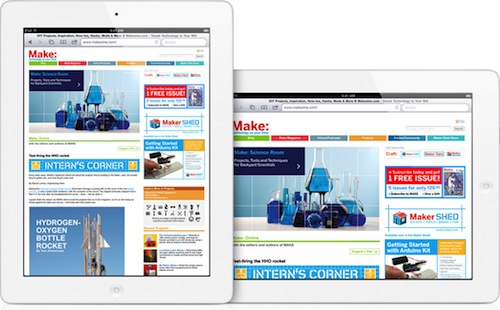
As noted by Jim Dalrymple at The Loop, Apple’s iPhone 4 and iPad have been awarded the Display of the Year prizes by the The Society for Information Display. Apple devices were mainly awarded for the usage of In-Plane Switching (IPS) technology, which provides greater viewing angles and brightness quality than other displays found on phones and tablets. The iPhone 4’s Retina Display, packing four times the pixels in the same old iPhone screen, was also mentioned for setting a new benchmark in mobile display solutions, as well as new standards in power consumption and image quality.

iPhone:

Utilizing Mobile IPS (in-plane switching) technology, the iPhone 4 Retina display achieves a viewing angle superior to conventional mobile LCDs, providing an enhanced viewing experience for the end user in virtually any application. The display features a host of technical advancements: customized LTPS TFT backplane with organic passivation and optimized pixel design; user-customizable, auto-adjustable brightness using ambient light sensing; advanced IPS compensation polarizer technology for high contrast (800:1) and color consistency regardless of viewing direction; 8-bit color depth; an ultra-thin, tiny-footprint driver IC; and patent-pending mechanical integration.

iPad:

The iPad display provides a superior viewing experience with a minimized gamma shift over viewing angles, enabling designers to create innovative apps that further enhance the viewing experience. The iPad’s fully customized design leverages the existing amorphous silicon thin-film transistor (a-Si TFT) infrastructure in an innovative, ultra-thin product with the unique LCD and an innovative power-management system that achieves maximum power efficiency – 10 hours of battery life for WiFi web surfing and 9 hours for 3G web surfing.

I’m no display expert, but in my experience with smartphones and tablets from other brands, I can say I haven’t found another screen that matches the quality of my iPhone 4 and iPad 2. The iPhone 4, despite being almost one year old, still manages to impress with its Retina Display.

Permalink


djay Now Optimized For iPad 2 Dual-Core A5

djay, the excellent app for iPhone and iPad we reviewed back in December when it first came out on the tablet, received a major update today to include exclusive functionalities for the iPad 2 and its A5 dual-core processor. After the release of a “mini” iPhone version that yet managed to include most of the features found in the iPad counterpart, algoriddim pushed an update earlier today to fully optimize performances for the iPad 2, enable higher precision audio analysis and implement a number of new features as well.

  • Key Lock / Time-Stretching: change the tempo of a song without affecting its pitch (requires iPad 2)
  • High-Precision audio analysis: improves syncing, BPM detection, beat-grid, and waveform precision (requires iPad 2, enable in Settings > Advanced)
  • Loop / Cue snapping: auto-aligned to closest snare, base drum etc. (requires iPad 2)
  • Improved playback of recordings
  • Various minor improvements for all iPad models

djay 1.2 for iPad is now available in the App Store at $19.99.


Analyst Claims Production Issues Still Affecting iPad

According to a new research note by FBR analyst Craig Berger relayed by Business Insider, Apple will be unable to meet the internal goal of 40-45 million iPads produced this year. The analyst called the number “out of reach”, and said low touchscreen supplies, component shortages and production issues at Hon Hai’s Foxconn will limit Apple and affect iPad shipments throughout the second and third calendar quarters of 2011.

For the third quarter, he sees production dropping off to 5.2 million units thanks to component shortages and production problems. He also says the effects of the Japanese earthquake could be felt in Q3. But, Berger says that could change if touchscreen supplies improve.

Ahead of the iPad 2 announcement and release in March, reports suggested the device could be delayed until June due to production issues in Foxconn’s facilities. The alleged delay didn’t happen of course, but it’s no secret Apple struggled to meet demand for the new device as also confirmed by COO Tim Cook at the company’s Q2 2011 earnings call, where he said consumer demand had been “staggering” with the iPad 2 heavily back logged at the end of the quarter. He later went on to call the iPad 2 “the mother of backlogs”, with Apple working as fast as they can to get the device in the hands of consumers. Tim Cook also said the Japan earthquake and tsunami would reduce revenue in Q3 by around $200 million, but assured Apple was on track to avoid production issues and shortages for the next quarters.

Separate reports in the past weeks noted display and speaker production issues affected iPad production in the last quarter. The iPad 2 is available on Apple’s online store, with waiting times of 1-2 weeks in most international stores.