Posts tagged with "iPad"

Apple: Donate Your Old iPads to Teach For America

Apple: Donate Your Old iPads to Teach For America

Apple is asking US customers to donate their old first-generation iPads to Teach For America on its official Retail webpage. By visiting this link, you’ll notice a box on the right that says:

Your old iPad can help teach kids a thing or two. Donate your old iPad at an Apple Retail Store, and Teach For America will give it to a teacher in a low-income community.

As noted by Macnn, there’s no mention of tax deduction for the donation, but Teach For America is a corporation listed among those that provide tax deductions for direct donations. So if you’re interested in donating your old iPad for a good cause, give your nearest Apple Store a call to get more details. I wish there was such a program in Italy.

Permalink

Due, The Best Reminder App for iPhone, Now Available on the iPad

Due, a popular reminder and timer application for the iPhone we at MacStories reviewed several times in the past, was updated last night to include a native iPad version that, together with OTA sync through Dropbox introduced in version 1.3.1, now allows you to have your reminders, timers and logbook always in sync and available across a variety of devices.

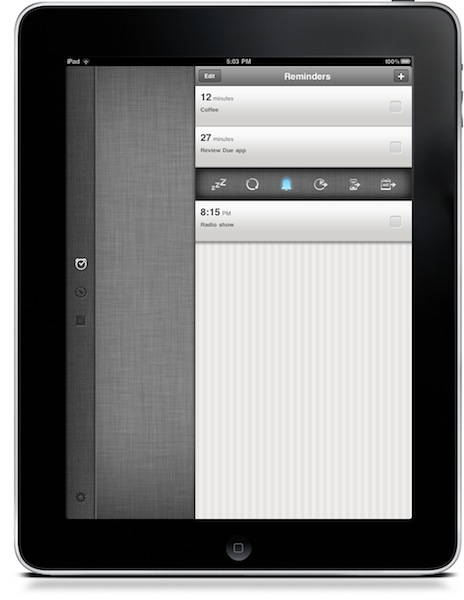
Due for iPad sports a completely new interface for the tablet that reminded me of the official Twitter app at first with a vertical navigation bar on the left and a middle panel to add and customize your reminders and timers. The bar on the left lets you switch between the sections of the app, as well as the Settings which now have their own dedicated tab. As you may know Due syncs with Dropbox upon launch and exit, so if you’re running both the iPhone and iPad versions at the same time don’t expect changes to occur simultaneously. It’s highly recommended that you only use one version of Due at a time to avoid sync conflict issues. That said, sync is pretty reliable and fast enough to enable you to switch from a device to another within seconds.

New design aside, Due for iPad follow the steps of the iPhone app to offer an easy to use solution for your reminders and timers. Many of the interface elements are the same so you’ll feel comfortable when using the new Due for iPad. This update also introduces a number of fixes and various improvements, such as the possibility to relaunch the app in its previous state (reminders / timers tabs), double tap to edit reminders and timers, extended undo support. When adding new reminders, the app will now open the “quick panel” automatically to customize snooze and repeat quickly – this one is a very welcome addition to further streamline Due’s workflow and usability.

Due keeps getting better on each release, and this iPad version plays an important role in making Due a ubiquitous way to have your reminders and timers available all the time. You can get the app for $4.99 in the App Store, and check out the full list of changes and fixes below. Read more



7,200 iPad 2s Sold at Apple’s 5th Avenue NYC Store on Day 1

Apple has not officially released Day 1 sales for the iPad 2 but Business Insider is reporting that 7,200 iPad 2 devices were sold last Friday, March 11 at the flagship Manhattan store on 5th Avenue in New York City.

They claim a strong “well-connected source” released this number to them. To back up this number, there were over 1,100 people lined up this weekend, up from 700 when the original iPad came out about a year ago.

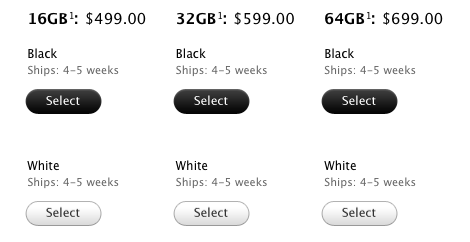
Apple has also reportedly stretched the waiting time for an iPad 2 to a 4 to 5 week wait now, it’s a good thing our Cody Fink made the hike to his local Apple store to purchase one for Federico and himself, but I am hoping that by next month I can buy one in person when I’m in Chicago. At least I hope Apple can reload and meet the more demands for the iPad 2.

[via Cult of Mac]


iPad 2 Shipping Times Blow Out To 4-5 Weeks

Its not even a week since the iPad 2 launch and the shipping times for online orders have slipped from the original 3-5 days as it was when it was released to 2-3 weeks 5 hours later, 3-4 weeks over the weekend and now to a whopping 4-5 weeks. This shipping time applies to all the various models available whether it be WiFi or 3G, Verizon or AT&T or whether it is 16GB or 64GB which effectively means if you order one today it would be late April before you get your hands on the iPad 2.

With the international launch of the iPad 2 on March 25th one must wonder whether Apple will, as they have done so frequently in the past, delay the international launch citing insufficient stock. At this stage it certainly isnt out of the realm of possibility.

[Via 9to5 Mac]


“TV Anywhere” Looks Promising: Time Warner Launching iPad App To Stream TV

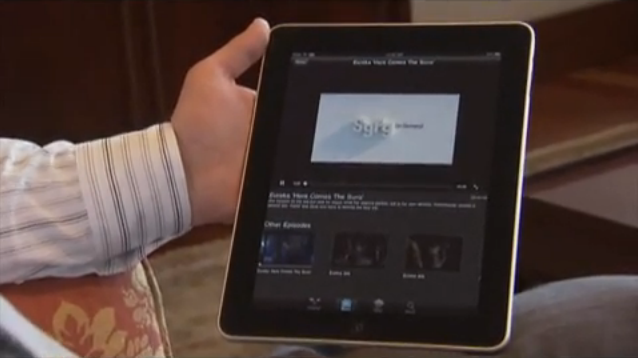
While Sling Media’s iPad app already exists to stream TV from anywhere thanks to your Slingbox, the powerplay into “TV anywhere” will ultimately be made by cable companies and Internet service providers. With companies like Hulu and Netflix competing against Time Warner, Dish Network, and Comcast, the only move left is to level the playing field by making content available everywhere. If I can get a new episode of House every week on my iPad from Time Warner (even more crucial when traveling), what’s the use in paying an additional fee for Hulu? While I’ve ditched cable all together because of the outrageous subscription fees, I may be enticed back with the promise of being able to stream content to my iPad. Read more


iPad & Productivity: One Year Later

Instapaper developer Marco Arment makes the point on his personal blog about the iPad fitting more the entertainment category, rather than the productivity one. He thinks that, one year after its introduction, Apple hasn’t found the “sweet spot” yet for this new device:

Apple is now adapting to the market’s actual use by retreating somewhat from office productivity and pushing strongly into new territory — casual media creation — to see if that gets a stronger uptake in practice. I think it will be a lot more interesting than office productivity, but there’s still a lot of work that needs to be done in iOS to make it practical (especially regarding file transfers with computers).

I still don’t think Apple has found the sweet spot for the iPad’s usage: the ideal role it fills in personal computing. And I don’t think we, as developers or iPad owners, have found it, either. But I know that sweet spot exists, and for a computer category that has only existed for one year, we’re rushing towards it remarkably quickly.

Maybe it’s just me, but in this past year I’ve found a number of ways the iPad can help me be more productive to complete a series of tasks that would require a laptop otherwise. More importantly, the iPad has also created a new category of tasks that didn’t exist before. Read more


Reports Suggest Apple Won’t Include NFC Technology In The iPhone 5

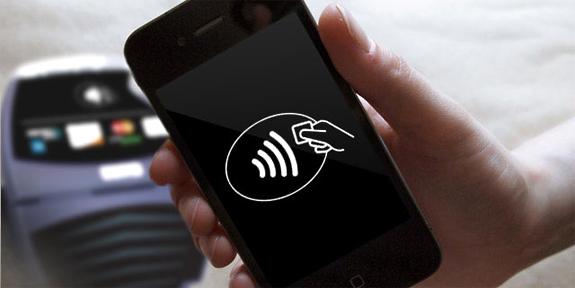
An article today by The Independent (a UK publication) has suggested that the previously rumored inclusion of Near Field Communication technology in the iPhone and iPad will not be coming this year. The technology is perceived to become a new way for consumers to pay for goods and services and it was hoped by many in the retail industry that Apple could set the standard by adding the technology to the iPhone.

It appears however, according to several sources in UK mobile operators, that Apple had decided against the inclusion of NFC technology in the next version of the iPhone. One source told The Independent “The new iPhone will not have NFC, Apple told the operators it was concerned by the lack of a clear standard across the industry.”

Read more


Browse Instagram From Your iPad With Instagallery

Instagram photos are uniquely genuine to the photographer, often showcasing beautiful sceneries, elegant dishes, and perhaps a kitten or two. Unlike a DSLR where you prepare and tailor each scene, Instagram focuses on the now, capturing life as it happens in the moment. While I don’t have an iPhone to share experiences of my own, I can enjoy what friends and Twitter associates post from the couch cushion. Instagallery brings Instagram to the iPad display, allowing you to browse through popular photos, view pictures taken at the same geo-location where you took your photo, view photos as a slideshow, and like or comment on inspiring shots all in one place. Instagallery is available for $1.99 in the App Store.