This Week's Sponsor:

Turbulence Forecast

Know before you go. Get detailed turbulence forecasts for your exact route, now available 5 days in advance.


Posts tagged with "iPad"

XBMC Comes to the iPhone, iPad, Apple TV 2

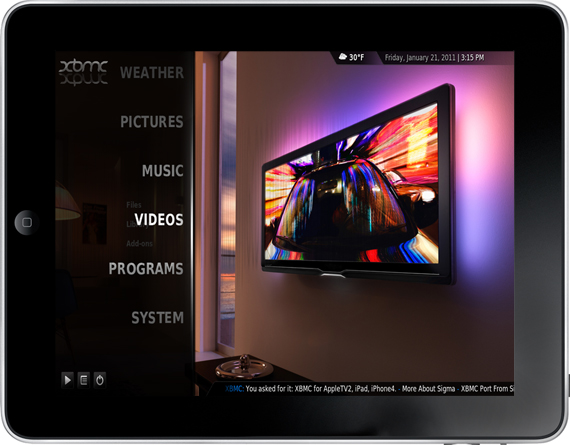
XBMC, a popular media center originally made for the first Xbox has become fairly widespread has been available for a variety of platforms, today that platform base extended to include the new Apple TV, iPhone and iPad.

The client on these new platforms is not stripped down to simply just view streams but is fully fledged with all the features you would come to expect it to have on a Windows PC. Because of this it is being distributed for the iOS devices through a Cydia repository and for the Apple TV through an apt-get install.

Scott Davilla one of the XBMC developers talked to TUAW and he revealed that development for the Apple TV 2 started only on November 1st last year and the iOS versions a few weeks later. He notes that the built in web server is currently disabled and the skin isn’t optimized but says improvements will be made including the possibility of implementing AirPlay into all the Apple related releases.

Perhaps one of the most interesting developments that occurred whilst XBMC was ported was the discovery of an API called VideoToolBox that allows hardware video decoding, encoding and scaling of the video size to match the final display size. So powerful is this API that Davilla and others that developed XBMC for iPad are able to stream full 1080p video with no transcoding to the iPad and it plays nearly perfectly, only dropping a few frames. Davilla’s confident however that the A4 processor can handle 1080p and will be working to ensure fully smooth playback.

TUAW put together some video’s demonstrating it running on all three of the new platforms, check it out here.


[Via XBMC, TUAW]


TestFlight Goes Live For Everyone - Distribute & Receive Beta Apps Effortlessly

TestFlight has been in lockdown mode for a while, and I’ve had plenty of opportunities to put the service through its paces before they opened their doors to everybody this evening. I’ll just say that TestFlight is incredibly convenient for installing beta applications on the fly - there’s nothing more annoying than unzipping iPad or iPhone files, dragging them to iTunes, syncing, and it doing all over again when updates are distributed. TestFlight simply has you log into their site via your iPad or iPhone, tap a button, and you can browse through the beta apps developers have subscribed you to for immediate downloads. It’s so much easier for developers to submit one beta to TestFlight than to package their app and distribute it to dozens of emails, and it’s much easier on the tester to be updated and install updates. It’s completely Apple worthy, and if you’re a developer we encourage you to sign up for the service so you can focus on creating content instead of worrying about beta distribution.

TechCrunch notes that the service is free to developers, while a paid Enterprise version is in the works that will allow for licensed versions of apps to be passed through the airwaves (presumably for corporate/in-house application use).

[via TestFlight, TechCrunch]


Leaked Screenshot of Internal iPhone with Gestures?

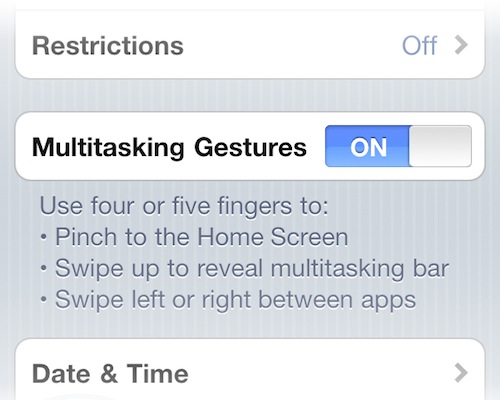
Well after the 4.3 Beta that previewed multitasking gestures on the iPad, there is now some supposed evidence that suggests that the iPhone is also being considered by Apple to have gestures thanks to an internal build that BGR claims to have gotten some screenshots of.

Obviously there is an issue with the supposedly leaked pictures, gestures on the iPhone would likely have to be different to those previewed on the iPad that used four or five finger swipes because they would be pretty unreasonable to use on the iPhone’s smaller screen. That said it remains possible that the text is left over from the iPad and whilst being tested internally has not been edited to reflect the iPhone’s gestures.

Engadget notes that information from it sources says that since the lost iPhone 4 debacle Apple made significant changes to how it keeps track of it’s devices and that it added clauses to screens saying “Confidential and Proprietary, if found, please contact…” listing a Cupertino 408 number. The photo’s BGR have gotten a hold have this message, adding credence to this leak. All three pictures posted after the break.

Read more


Further Evidence of Camera in iPad 2 and Photo Booth and FaceTime Apps

After digging around the 4.3 Beta 2 of iOS for iPad, Mac Rumors has found fairly solid evidence that pretty much confirms not only a camera addition to the iPad but also the addition of a Camera app (obviously), FaceTime and Photo Booth apps.

An image (homeScreenOverlayFaceTime~ipad.png)  used by the iPad in the Setting’s app to preview the wallpaper was found by Mac Rumors to contain three extra icons that do not exist on the image contained in iOS 4.2, those additional icons were those for a FaceTime, Camera and Photo Booth app.

FaceTime and Photo Booth are also largely dependent on the presence of a front facing camera, whilst a Camera app would seem rather redundant without a rear facing camera and so it could be thus presumed that this latest discovery seems to confirm previous reports of both a front facing and rear facing camera on the iPad 2.

Mac Rumors also says they found filters for Photo Booth that included the effects of Thermal Camera, Mirror, X-Ray, Kaleidoscope, Light Tunnel, Squeeze, Twirl and Stretch.

[Via Mac Rumors]


Apple Updates iWork Suite for iPad With Bug Fixes

Earlier today Apple issued an update for the entire iWork suite for iPad (which includes Pages, Numbers and Keynote) to address bugs found in version 1.3, released in November.

The minor 1.3.1 update for all the three apps of the suite fixes an issue with the predictive text menu when using Chinese or Japanese characters; Numbers for iPad went under a deeper bug-fixing procedure with a resolved crash due to Region Format in the Settings and the inability to save cells when the app was quit and restarted.

You can find the updates here. [Thanks, Willy]


Cydia Adds Ability to Easily View All Your Past Purchases

Cydia, the App Store equivalent for all those jailbreak required apps that Apple has or would deny, has just received a handy new feature that allows you to view in one place all the packages that you have purchased from the Cydia store.

Jay Freeman, creator of Cydia has been working hard in recent months to improving Cydia in many ways from decreasing the all to common “Reloading” times, improving the polish and adding new features. This new feature has been a fairly common suggestion not only for Cydia but the App Store too, which whilst present in the Mac App Store has yet to reach iOS App Store - something which those of us at Macstories are hopeful Apple will add in the near future.

Read more


Next Generation iPad May Have Proximity Sensor

The next generation iPad may gain additional superpowers as it automatically powers on when you lift your case’s cover.

A new string spotted in iOS 4.3 reveals that Apple may be sweating the small stuff to perfect the user experience in the latest update: one particular item notes that the future iPad may have the capability to turn its screen on and off when a cover is removed and applied. The assumption is that you’ll want to open Apple’s case to access the iPad, so why not turn it and on and off for you without having to hit the power button? The Brazilian iPhone Blog notes that this feature would be accessible via the Settings app, where it can be enabled and disabled per your preference. The current iPad does have an ambient light sensor, but the proximity sensor would further refine its environmental awareness in respect to accessories.

[via iPhone Blog]