This Week's Sponsor:

Turbulence Forecast

Know before you go. Get detailed turbulence forecasts for your exact route, now available 5 days in advance.


Posts tagged with "iPhone"

Au Naturale iPhone Dock

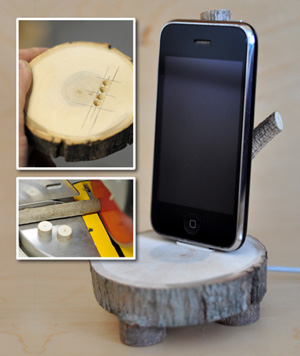
The Enchanted Woods iPhone Dock from Anthropologie is “a fun nature-meets-technology way to stand and display your iPod or iPhone.” It’s very popular but has a very high price (for what it is). Chris Gardner over at ManMade decided to make his own because at nearly $100, it’s lot to pay for something that didn’t have “speakers, a clock, or even a way to plug it into the wall.” Because it’s 100% wood and doesn’t require electricity he made a DIY instructional guide.

Garder’s version is good, if not better. As long as you have easy access to some timber and some power tools, why not make one yourself instead of forking out $100? Then you can cross ‘making something with your own hands’ off your Man Stuff To-Do list.

[via Crave]


eBoy FixPix: 25 New Levels

I love the iPhone and iPad game “FixPix” from the folks at eBoy. In fact, we’ve already covered the app a couple of times in the past here on MacStories. Don’t let the original release date fool you, though: eBoy is continually updating the game to make it one of the most impressive puzzle / pixel experiences for iOS.

The latest 2.1 update (guess what, approved right ahead of Christmas) introduces 25 new levels (they’re all great, and genius), a new app icon, new menus, a new start screen. The bad news? Your game progress will be reset after the update. Ouch.

Still, I can’t recommend eBoy FixPix more. It’s universal, gorgeous to look at and it’s only $0.99 in the App Store. Go get it.


Diacarta Adds Retina Graphics, Notifications - I Can Finally Use It

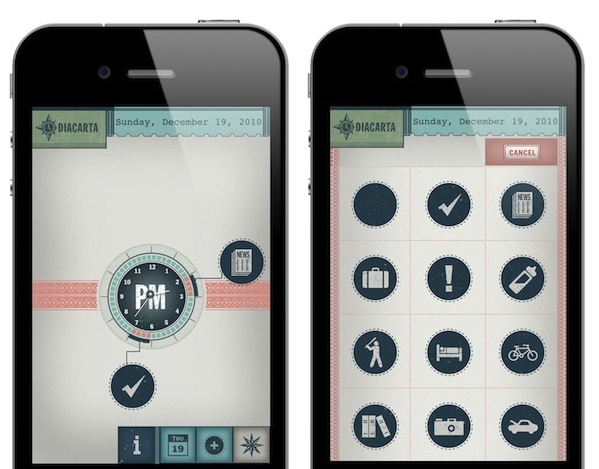
Diacarta is a cool app for the iPhone which, unlike most task managers quick reminders, doesn’t let you create items in a list. Diacarta wants to enable you to have a “picture” of your day by making an analog clock its main screen. Tasks are visualized as big icons linked to the clock in a specific time of the day. This way, Diacarts provides a quick view of your upcoming activities that you can edit at any time.

It’s visually rich and very, very custom. Read more


Facebook App Update: Improved Places & Chat, Bug Fixes

Among all the app updates that are coming out this week prior to the iTunes Connect shut down planned for December 23 (when developers won’t be able to submit new apps, updates or price changes until the 28th), the official Facebook app for iPhone was updated (to version 3.3.3) last night to include a variety of bug fixes and miscellaneous improvements.

The most notable improvements come in the chat and messages windows (which, at least for me, are not slow anymore), notifications and Places. Even if there aren’t many registered places in my town, the app seems now faster at retrieving local data information and distances. Crashes, group photos and memory usage have been addressed with bug fixes.

Other minor changes include the comeback of the ability to post on a page you administrate and the removal of the text field from walls you cannot post on.

The official Facebook app was updated in early November to include the new Groups UI and the Places functionality. The app is free, and available here.


Rage HD Update: Game Center, Gyroscope, Play It On Your TV

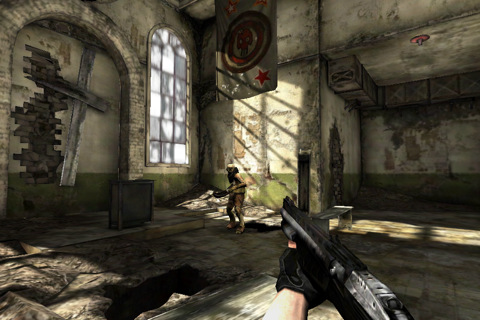
Together with Epic’s Infinity Blade, John Carmack’s Rage HD is the app that really shows what gaming on iOS devices has become: an experience that, technically speaking, is at the same level of consoles such as the Wii or the PlayStation 2. Rage is impressive, and the latest update (1.11, approved last night) adds a lot of new features to make it even better.

First off, you can now play Rage on your TV (or an external monitor) using an iPhone or iPad as a controller. You can output the game at 480p with the official Apple Component cable (Amazon) or 720p with the official Apple VGA cable (Amazon). This is neat, and reminds me of The Incident, which added a similar TV out functionality in its last update. Rage HD on a TV must be fantastic.

The app now comes with Game Center integration, but there’s no online multiplayer option. Instead, the developers implemented leaderboards and achievements. If you feel like unlocking them all, you have 50 new achievements to add to your list.

Other features include gyroscope controls for iPhone 4 and iPod touch 4th gen, mirror mode and (finally) a Museum Mode to explore the levels without mutants.

Rage HD 1.11 is a great update. As the app description says, “the update you’ve been waiting for”. Go download it here.


First Unofficial WikiLeaks App

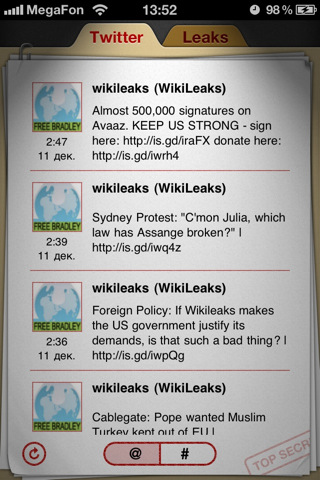
You can think Julian Assange should have been TIME’s person of the year or not – we’re not here to discuss Assange’s (and his team’s) actions. There’s an unofficial WikiLeaks iPhone and iPad app in the App Store, and it was released earlier today. It’s available now at $1.99.

The app sports a nice and clean interface design, and allows you to check on the latest WikiLeaks’ updates from Twitter or the organization’s website. Both the tweets and the website are formatted for the iPhone and iPad. WikiLeaks App can automatically forward to the latest mirror and access the CableGate page.

WikiLeaks App for iPhone and iPad is available here at $1.99.


SBSwitcher Brings SBSettings To The Multitasking Tray | Cydia Store

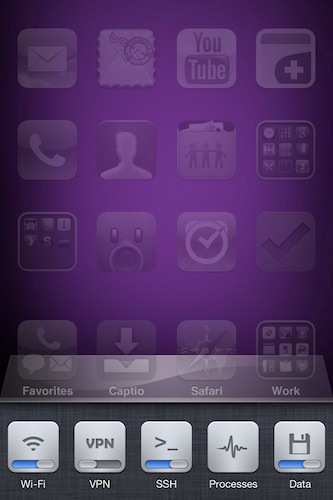
SBSwitcher is a new tweak available in the Cydia Store at $2.99 which brings the SBSettings toggles to the iOS 4 multitasking bar. SBSettings is one of the most popular applications in Cydia, which can be customized to display a series of buttons (indeed, toggles) that can perform a variety of actions otherwise buried deep down into the iPhone’s settings. I’m talking about shortcuts like “activate WiFi”, “turn on Bluetooth” or “open VPN connection”.

SBSwitcher will put these toggles in the multitasking tray, past the iPod widget controls and the volume slider introduced in iOS 4.2. The tweak supports themes for SBSettings and it’s got a bunch of options to set in the Settings app.

SBSwitcher is available at $2.99 in BigBoss’ repository.