

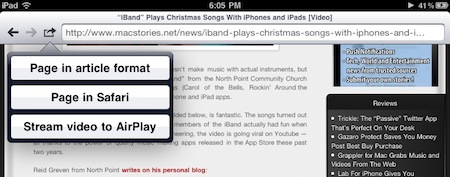
We don’t know what’s the secret behind webout, a universal app for iPhone and iPad, and we don’t know if Apple is going to remove this soon from the App Store – but it works. As you may know, you can’t stream video using AirPlay to the Apple TV with Mobile Safari. Only native Apple apps have the video functionality enabled, and if you try to open Youtube.com in the browser you’ll notice that the AirPlay icon doesn’t show up. Read more
Posts tagged with "iPhone"
Webout Enables AirPlay Video Streaming From The Browser
The ICONICSTAND Will Make You Reconsider Wooden Stands
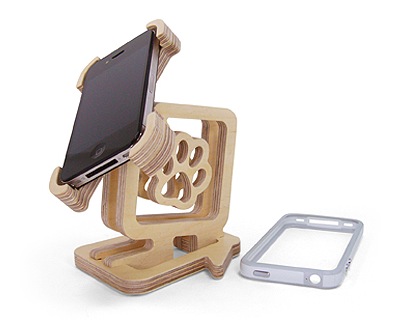
Ever thought about placing your iPhone 4 in a wooden stand? You should. It’s classy, retro and adds a natural feeling to that cold glass and aluminum made in Cupertino. Or maybe you simply haven’t managed to find a decent stand made of wood until today. Well, this one’s good.
The ICONICSTAND, realized by Korean designer Kenny Cho and made with “eco-friendly birch wood”, features an ingenious shape that allows it to hold the iPhone both in portrait and landscape mode. You can adjust the position to fit your viewing angle and there’s even room for the charging cable. There are various models and shapes available on the official website.
Added to my Christmas list. [via FSM]
MacStories’ 2010 Roundup: Top 10 iPhone Camera Apps

Welcome to MacStories’ 2010 Roundup! In this new series, we collect the best apps released in 2010 for the Mac, iPhone and iPad — apps we have probably already featured here on MacStories. Only the best apps, both free and paid. Apps you shouldn’t miss.
For me, 2010 has been the year of the iPhone camera. Since I bought my French iPhone 4 in June for a whoppin’ 800 Euros (don’t even ask), I’ve been shooting photos like never before. Sure, I know the iPhone 4 is still a cellphone and true photos don’t come from a phone. I’m OK with that. But I’m no professional photographer, nor am I willing to spend money on a DSLR. Not because I disdain quality – I just wouldn’t know how to fully enjoy it. Leave the pro tools to the pros. For me, the iPhone 4’s camera is good enough to provide photos I like, that I can share with my friends.
Which leads me to apps. The iPhone’s camera is great, but apps are there to enrich its functionalities. Apps with built-in sharing features, apps with filters, apps that rely on their own social network, apps aimed at completely replacing the stock camera…the selection is huge. Photography is, indeed, one of the best selling categories in the App Store right behind Games and Productivity.
In this second MacStories’ 2010 Roundup we have collected the top 10 camera apps for the iPhone. We could have included more, but these are the ones that in our opinion really stood out this year. So head past the break, and check out the Top 10 iPhone Camera Apps of 2010. Read more
#MacStoriesDeals - Tuesday

In case you missed our announcement yesterday, we started another new feature, and it’s called #MacStoriesDeals. We’ll try our best to update the list throughout each day.
Here’s some great deals for today on iOS & Mac apps that are on sale for a limited time, so get ‘em while they’re hot!
OK Go’s New Video Takin’ It To The Streets
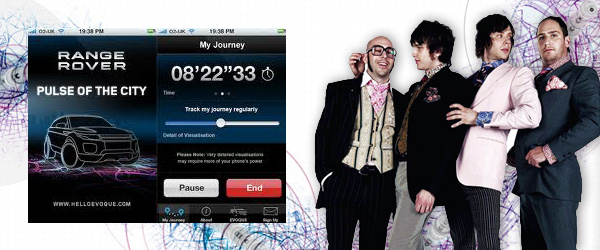
On November 17, OK Go took to the streets of Los Angeles for a GPS parade with hundreds of loyal fans and an app called The Pulse of the City. Why? Because OK Go loves high-concept music videos and for this one they wanted and outdoor concert & to spell out their name (see header image) ON the streets.
The Pulse of the City app allows users to visualize their tracks via GPS, so OK Go “wrote” their name across the LA cityscape while performing a concert along an eight-mile route in the shape of the band’s name. (video and road visual of the parade after the break) Read more
A Beautiful Instagram Facelift→
A Beautiful Instagram Facelift
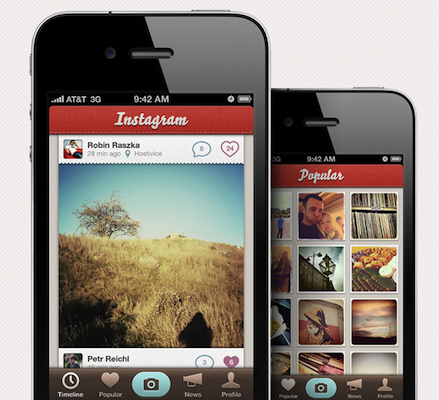
Instagram is one of the hottest photo sharing apps on the App Store right now but there’s one problem: it doesn’t look that great. At Tapmates, we take pride in our icons and user interfaces, so we decided to mock-up what it would look like if we made it.
The mockup surely sports some pretty pixels. Still, it breaks many of Apple’s interface guidelines, such as the camera button in the tab bar. Looks great nonetheless.
What do you think?
Apple Releases “iTunes 12 Days of Christmas” App for iPhone and iPad
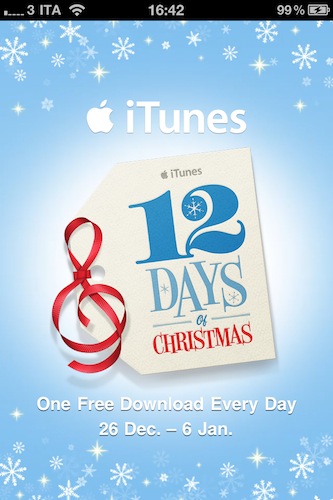
Yesterday we told you Apple re-launched the “iTunes 12 Days of Christmas” website in Europe for the 2010 holiday season. On the website, a banner suggested that an official iPhone app would come soon to let users receive push notifications for exclusive offers in the iTunes Store. The app is now available, it’s free and it runs both on the iPhone and iPad.
From December 26th until January 6th, Apple will give away a selection of books, apps, songs, movies and TV episodes for free. The app doesn’t show much right, except that it asks you for push notification authorization and it displays a countdown to the daily giveaway on screen.
The app is not available in the US Store, I downloaded my copy from the UK one. I guess it should be available in other European stores as well. If you have a UK account, you can go download the app here. Read more
Fotopedia Heritage 3.0: Instant Slideshows, Suggestions, iOS 4.2 Support

Fotopedia Heritage is one of those iOS apps (universal, free) that keeps on getting better on each release. First they released a 1.0 version that aimed at becoming the digital encyclopedia for humanity. Version 2.0 added support for the Retina Display, 25,000 more photos and shuffle mode. Today, with the release of Fotopedia 3.0, the developers re-imagined the app from the ground up and redesigned the whole experience to make it more intuitive, fast and beautiful. Read more
Trickle: The “Passive” Twitter App That’s Perfect On Your Desk
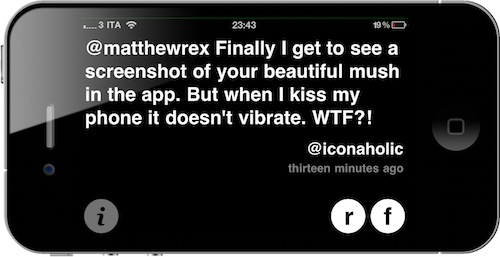
Twitter clients for iPhone and iPad, in spite of their substantial UI differences, are basically all geared towards the Twitter power user who wants to be able to do a lot of stuff with his Twitter timeline: check on users’ profiles, retweet, save to Instapaper, search, access lists, and so forth. Most Twitter clients for iOS are aimed at enabling you to enjoy the full Twitter experience.
Trickle, released a few days ago, is different. It runs on the iPhone and iPad as a universal app, but instead of bringing many of Twitter’s features to mobile devices, it focuses on turning your Apple device into a minimal, Helvetica-based, constantly up-to-date Twitter widget. Perfect for your desk, possibly with your iPhone or iPad in a dock. Read more