This Week's Sponsor:

Turbulence Forecast

Know before you go. Get detailed turbulence forecasts for your exact route, now available 5 days in advance.


Posts tagged with "iPhone"

Cydia Tweak Shows The Size Of App Store Updates On Your iPhone

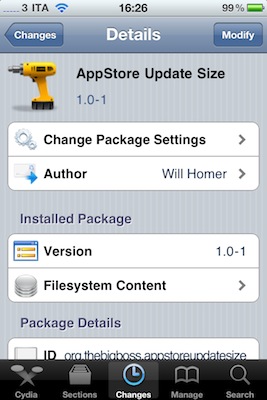
AppStore Update Size is a new tweak available for free in Cydia which can turn out to be very useful for when you’re out and about, check on your iPhone’s App Store app and find out that there are some updates available. This tweak, as the name suggests, shows the size in MBs of the updates right below the download button.

Very useful as Apple limits the download of large updates while on 3G connection, and this tweak allows you to instantly see if you can update or not.

Recommended.


Apple Posts The Best iPhone & iPad Apps of 2010

Just like every year, the iTunes Rewind section in the iTunes Store lists the best music, movies, TV shows, podcasts and audiobooks of 2010. This year’s iTunes Rewind is available here, and it includes a huge selection of apps, too.

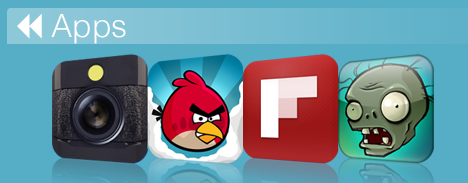
As you can see in the screenshot above, Apple is showcasing Hipstamatic, Angry Birds, Flipboard and Plants Vs. Zombies in the iTunes Rewind 2010 main page. As you click through, you can check out the “Hot Trends” in iPhone and iPad apps in 2010 – and many more apps are listed there.

The “Hot Trends” contains other sub-sections, such as “Shoot, Edit, Share” (iTunes) which features apps like Instagram and Path. Read more


iPhone Clock Icon, Animated With WebKit

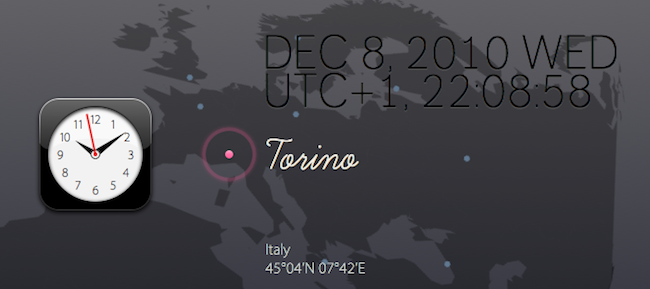
WebKit Clock is a neat experiment by Ono Takehiko aimed at recreating the original iPhone clock icon in CSS3 and animate it using the WebKit rendering engine. Actually, the whole website is based on modern web technologies such as HTML5 canvas, CSS3, JavaScript, Web Fonts, SVG. No image files are being used.

As you can see on the website, you can move an airplane between cities in the world based in different time zones, and see the icon update in real-time. It’s very cool.

In the past we have seen many other iOS-related experiments, such as the iPhone icons rendered entirely using CSS3.


Finally: App Store Promo Codes No Longer Limited To The U.S.

This is great news. With a brief note on iTunes Connect’s website, Apple informed developers that promo codes, the ones to redeem apps in the App Store, are now working worldwide:

Your promo code distribution is no longer limited to U.S. customers. Promo codes in iTunes Connect can now be redeemed by all App Store customers worldwide. Your Team Agent can request 50 codes per version of your app in iTunes Connect and your customers can redeem these codes in any App Store. To learn more about requesting promo codes in iTunes Connect, see the iTunes Connect Developer Guide.

Previously, promo codes only worked in the U.S. Store, forcing developers who were willing to gift apps to the press or users to make sure they had a U.S. iTunes account. Now promo codes are international. In the past we at MacStories indeed had a few headaches trying to explain you guys that, due to Apple’s limitations, promo codes were only available for US customers.

It took Apple two years, but it’s over. Really good news for users, developers and bloggers.

Finally! [9to5 via MacKinando]


“iBand” Plays Christmas Songs With iPhones and iPads [Video]

Here we are again, featuring a band that doesn’t make music with actual instruments, but decided to go the iOS way instead. The “iBand” from the North Point Community Church (website), indeed, played 3 Christmas songs (Carol of the Bells, Rockin’ Around the Christmas Tree and Feliz Navidad) using only iPhone and iPad apps.

The result, as you can see in the video embedded below, is fantastic. The songs turned out great when played through the apps, and the members of the iBand actually had fun when performing on stage all together. Crowd was cheering, the video is going viral on Youtube – all thanks to the power of quality music making apps released in the App Store these past two years.

Reid Greven from North Point writes on his personal blog:

Jared arranged “Rockin’ Around the Christmas Tree” and “Feliz Navidad” using the apps, and creating a demo by multitracking them in Apple’s Logic software (though any Digital Audio Workstation would do the trick).

Jared, Eddie Kirkland and I arranged the first song, “Carol of the Bells“. It’s amazing what you come up with when you sit in a room, hook 3 iPhones up to some speakers, and get adventurous!

The apps used in the performance include SoundGrid, Guitarist, iGog, Pianist and Percussions. Back in October we featured New York-based band Atomic Tom, performing a song using only iPhone apps.

Once again, I’m amazed by the results some people can accomplish by solely relying on modern Apple devices and applications. Check out the video below, then tweet it. It has to go viral.

Read more


There’s An Official Inception App In The App Store. And It’s Mind-Blowing.

I specialize in a very specific type of coverage. iOS apps coverage.

In all seriousness, I think Inception is the best movie of 2010. I watched it four times already, my friends love it – we all love it. There’s no need to keep saying that Inception is a great movie. But the iPhone app released today and developed by Remote Control Productions, the film music company run by Hans Zimmer? It’s completely awesome. And kind of surreal. An experience that it’s not easy to describe in words. Read more


Flight Control for iPhone Update: Online Multiplayer, Voice Chat

Flight Control, popular iPhone game from award-winning development studio Firemint, was updated a few hours ago to version 1.9.2. As promised by Firemint developers before the public release of iOS 4.2 in November, this update follows “HD” iPad version and introduces support for online multiplayer through Game Center, with the possibility to start a voice chat with your opponent.

You can invite a friend to play, or let the app search for a random match in Game Center. The voice chat option is turned off by default but can be activated at any time. I just tried the online multiplayer mode with one of my Game Center contacts and it works pretty well, although I noticed some lags.

Flight Control is available at $0.99 in the App Store. Check out the full changelog below. Read more


Infinity Blade Now Available In The App Store - Not The U.S. One Yet

Infinity Blade is one of the most anticipated games for iPhone and iPad to hit the App Store this holiday season. Demoed on stage at Apple’s event back in September and released as a tech demo known as Epic Citadel back then, the game is built on top of the Unreal Engine 3 for iOS devices and it shows impressive graphics and animations. Apparently, Steve Jobs couldn’t believe the game was running on an iPhone when he first saw it either.

As previously confirmed in November, the game changed its name from Project Sword to Infinity Blade and was set to come out in December. TouchArcade also revealed that the app would be released on December 9th at $5.99, but we just took a look inside the New Zealand App Store and found out that, as usual, iTunes started propagating the app on its own due to time zone differences.

Infinity Blade is available at $8.29 over there, and you can take a look at the screenshots and full description from iTunes below. The app isn’t available in other stores for now, but we believe it’ll start propagating in European ones in 10 hours. The app is universal and runs on iPhone 3GS, iPhone 4, iPad, iPod Touch 3, or iPod Touch 4 – with Retina Display-ready graphics optimized for the iPhone 4.  From what we can read in iTunes, it seems like there will be customization possibilities, a “dynamic single player campaign” and support for Game Center leaderboards and achievements.

We’ll take a deeper look at the game once it becomes available in the U.S. Store. Read more


Watch Flash Videos On iPhone & iPad, No Jailbreak or Apps Required

Most of web video has been optimized to display just fine on iOS devices, but it’s still annoying to open an article from your favorite blog and find out that the author didn’t use Vimeo’s updated embed code compatible with the iPhone and iPad. Vimeo offers a new embed technology to support iOS devices, but it’s not turned on by default. Just like Vimeo, other services such as Flickr, Megavideo and Dailymotion sometimes struggle in offering video embeds capable of being displayed on Apple’s mobile devices.

The Skyfire browser has been making the rounds recently: an iPhone app that can take any Flash video from any web page, and convert it in seconds to an HTML5-based video you can watch on the iPhone. The app is paid though, and perhaps many users don’t need all of its functionalities. Then, some developers even released tweaks and hacks in Cydia to activate Flash on iOS – with very disappointing results, I have to say. Put simply: either you jailbreak your device to sorta gain access to some Flash content on the web, or you buy Skyfire to convert Flash videos. But there’s no easy way built in Mobile Safari to play that Vimeo embed on the iPhone.

This is changing today, thanks to this neat bookmarklet called iOSFlashVideo I found on iSpazio (Italian) and installed on my iPhone and iPad a few minutes ago. With just the tap on the bookmarks bar, you’ll be able to instantly watch videos from Dailymotion, Flickr Video, MegaVideo and Vimeo through the iOS standard media viewer. It’s very simple to install. Read more