This Week's Sponsor:

Turbulence Forecast

Know before you go. Get detailed turbulence forecasts for your exact route, now available 5 days in advance.


Posts tagged with "iPhone"

The Making Of The Glif [Video]

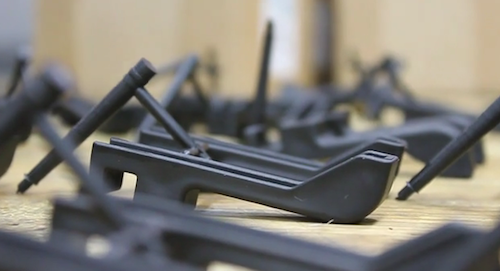
The Glif is an iPhone accessory we’re really looking forward to. It’s a tripod mount / stand for the iPhone 4 we’ve covered quite a few times in the past, and now the project is nearing completion with mass production of the units at Premier Source in Brookings, South Dakota.

The creators of The Glif posted a “making of” video of the product last night, which we have embedded below. Check it out, and go pre-order it if you still haven’t. Read more


“There’s A Nap For That”

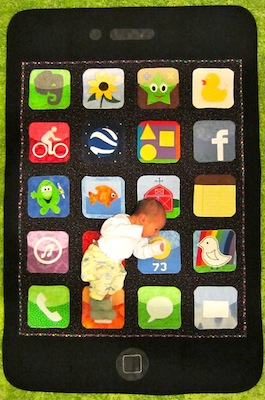
Some people have just the right idea at the right time. We have seen iPhone-based weddings, cakes, pillows, pins, iPad cakes and Steve Jobs actions figures. Could one be more creative? Meet the iPhone quilt, knitted by Grandma Harriet for her grandson Gabriel Augusto Stein, a six day old baby. It’s even got an Evernote icon.

Isn’t this insanely awesome? We think it is. The father even says “there’s a nap for that”. I want one. [TUAW via The Daily What via Benjamin Stein]


Put Things Off 2: Fun, Beautiful Task Manager for iPhone

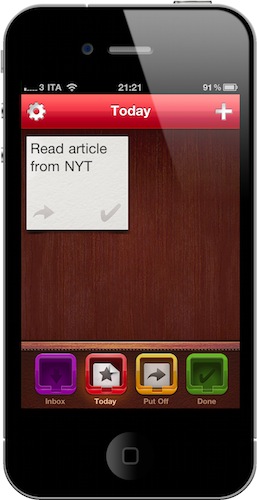
I wrote many times in the past that most users don’t need the complexity and feature set of GTD apps such as OmniFocus (for Mac and iOS) and online project management tools like Basecamp. Even if apps like OmniFocus and, to an extent, Things have their loyal userbase, most people just want a simple and effective app to manage their daily activities and reminders.

Put Things Off, recently updated to version 2.0, tries to merge task management with straightforward “reminder” functionalities to create a mix that’s beautiful to look at and simple enough to capture lots of App Store dwellers’ hearts. Read more


Turn Your iPhone and iPad Into Pinball Cabinets

Oh, those dear old pinball machines. I used to spend actual money on those things during summer at the beach – I remember there was a Spider Man one at the bar I somehow managed to break the record on. Anyway, the money-spending trend stopped when I found out that there were well-done pinball videogames (bear with me, I was 10) and, years later, iPhone apps for that.

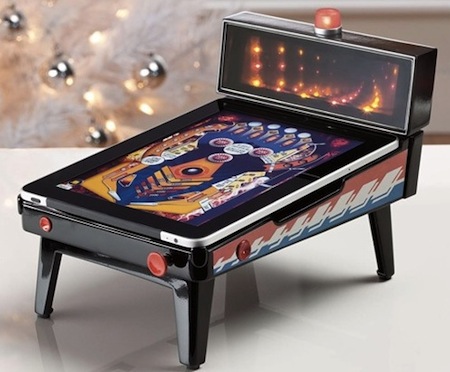
For as much as they look “real”, apps and console games don’t give you that feeling of touching the whole structure, tilting and pressing buttons. No wonder building an actual pinball machine requires a lot of money: each machine is a work of art and state-of-the art engineering. If you’re feeling like you don’t want to go back to spending bucks on real machines and you want to keep playing pinball on your iOS devices, here comes a cabinet for iPhone and iPad that does just that: it turns the phone and tablet into pinball cabinets, with working flipper buttons and the possibility to tilt.

You just have to place the device inside the mini-machine and download the free app to play. That’s it. Sounds awesome! Too bad the iPad version isn’t available now and will cost you $79.95 once it’s out. The Pinball Magic for iPhone is in stock and available at $29.95. [Gizmodo via Brookstone]


$250,000 Engagement Ring Sold Through iPhone App

$250,000 Engagement Ring Sold Through iPhone App

Forbes reports:

Blue Nile, of course, is the online website dear to the hearts of many hopeful girlfriends: on it one can design an engagement ring from a wide choice of stones, settings and prices. Its main shoppers, though, are men  - a group to whom Blue Nile has taken considerable pains to target. That list of top ten engagement rings on the homepage? It was put together with the befuddled male shopper in mind. So were the mobile tools the site launched in recent months, including a new iPad app.

Blue Nile hit pay dirt with the latter a number of days ago when it sold a $250,000 ring through the app.

This is the app. It even integrates with PayPal Mobile. [via Rosa]

Permalink


Soon, You’ll Be Able To Control Chopper 2 for Mac With Your iPhone

A few weeks ago we saw the first screenshots of the next version of The Incident, which will allow you to mirror the game on your TV and control it with your iPhone. Admittedly, the iPhone can serve as a great “external” controller, even better than when you’re using it to control and play at the same time because you don’t have the actual game covered by your fingers. With a small multi-touch surface in your hands, the possibilities for TV gaming are endless.

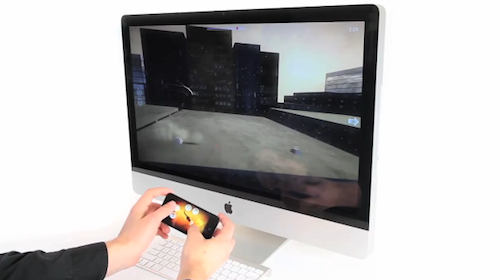
The next version of Chopper for Mac, Chopper 2, will allow for a similar setup, although the TV isn’t involved this time. Instead, Chopper 2 will let you pair your iPhone with your Mac and control the game on your computer using the accelerometer and multi-touch technology on your iPhone. The demo video below gives you a brief preview of what’s coming, and it’ll be interesting to see whether Mac games that will be published in the Mac App Store will take advantage of this pairing technology or not.

What’s for sure is, the iPhone can be a great game controller. Read more