This Week's Sponsor:

Turbulence Forecast

Know before you go. Get detailed turbulence forecasts for your exact route, now available 5 days in advance.


Posts tagged with "iPhone"

AnyRing & Ringtone Designer Pro, Two Easy Ways To Create iPhone Ringtones

I haven’t been a huge fan of custom iPhone ringtones until I found out that Apple revised its policy about apps that allow you to edit songs on-device (the revision apparently came with the public release of the Review Guidelines) and directly export them to iTunes. When I did, I downloaded Ringtone Designer Pro for iPhone and started rolling with it.

Last week, though, I also discovered a neat app in the Cydia Store called AnyRing (BigBoss repository, $3.99) that, in a very ugly interface, lets you set any song on your iPhone as your default ringtone. Read more


Skyfire For iPhone Now Available, Reviewed [Update x2: It’s Back]

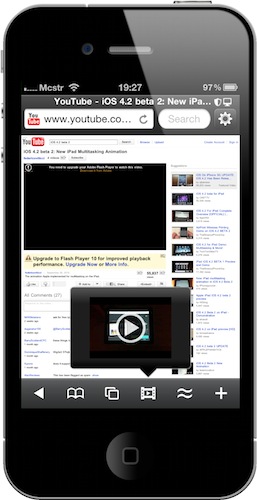
It was supposed to come out tomorrow, but SkyFire Web Browser is already available in the App Store at $2.99. Featuring SkyFire’s technology that allows you to view flash videos on the iPhone through a server-side conversion to HTML5, SkyFire for iPhone also features Facebook and Twitter sharing in-app, a Facebook “Quickview” menu to check on your Facebook wall with one tap, private browsing, tabs and a desktop user agent option.

Read more


Facebook iPhone App Getting Updated with New Groups, Improved Places Tagging

At the mobile event at Facebook HQ in Palo Alto, Facebook’s CEO Mark Zuckerberg announced that the iPhone app – the app that, in his own words, it’s being used on the vast majority of iPhones –is getting an update with the new Groups interface they launched a few weeks ago, improved tagging in Places and easier photo attaching in check-ins.

The app update still isn’t live in iTunes, it’ll probably will be later today. Other new features Facebook is announcing today are single sign-on for mobile apps, new location APIs and a Deals platform.

[image via TechCrunch]


Apple Posts Support Document About Daylight Saving Time Bug on iOS 4.1

As noted by MacRumors, earlier today Apple posted a new support document detailing the issues experienced by many users with the Clock app on iOS 4.1 after the switch to DST. It happened in New Zealand back in October and Europe earlier this week, but Apple still hasn’t released a firmware update to address the issue.

It’s very likely that iOS 4.2 –now in Gold Master version, final release really around the corner – will put an end to this annoying bug.

From the support document:

In some regions, shortly before or after the daylight saving time (DST) change, repeating alarms created in the Clock app may work incorrectly.

To resolve this behavior for existing alarms, set the repeat interval to Never. You will need to reset these alarms for each day you need them.

After November 7th, 2010, you can set your alarms to repeat again.


Sneak Peek: Discourse, Beautiful Dictionary App for iPhone

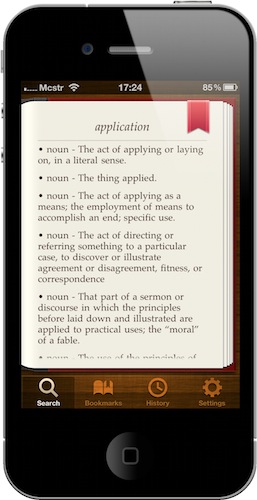
A few days ago I stumbled upon the preview page of Discourse, an upcoming iPhone app developed by Emilio Peláez (the developer of Notified, available in Cydia) and designed by Mathieu White which, according to the website, aims at being a unique and fresh dictionary app for iPhone. Can a dictionary app be unique? – I asked on Twitter. What could a developer ever do to make sure his take on digital dictionaries – a rather boring subject, one might think – feels fresh and innovative?

I got into Discourse’s beta group and Emilio was kind enough to let me talk about the app on MacStories. I’ve been running the app on my iPhone since last night and, admittedly, they’re building something that feels fresh, beautiful and, to an extent, unique. Here’s a sneak peek. Read more


Elements 1.5: Sub-folders, Markdown Preview, Better File Saving

Second Gear’s Elements for iPhone and iPad has been updated to version 1.5 today, a major revision of the popular Dropbox-based text editor that adds lot of new (and much requested) features together with a plethora of bug fixes. We previously covered Elements here and here.

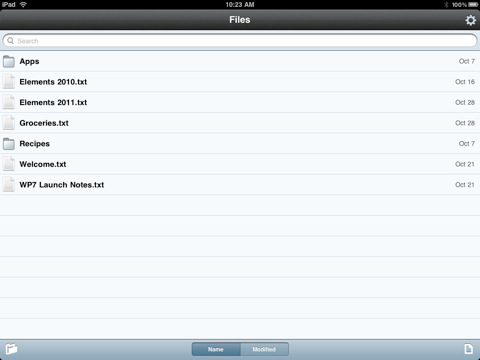
First off, Elements now supports sub-folders and Markdown previews. Sub-folders are really a huge deal for many users out there, as now you’ll be able to hook Elements up with other Dropbox-based apps that organize their documents with a similar structure, such as Plaintext. The family of Dropbox text editors keeps on getting more connected and better integrated.

For me, however, the really huge deal is the improved Markdown support: the app can now view Markdown formatted files (.md, .markdown, .mdown, .mdwn) and open Markdown files from external applications that support the “Open in…” feature. Similarly to Second Gear’s own MarkdownMail, Elements can now generate a live HTML preview of Markdown formatted text for you to instantly check on. Read more


T-Mobile Makes Fun of Apple’s FaceTime With “Get a Mac”-like Ad

With its latest ad to promote the MyTouch 4G, T-Mobile makes fun of Apple’s FaceTime restrictions (it only works on wifi, remember?) and blames AT&T for slowing down the entire iPhone 3G experience.

In the ad, very similar to the old “Get a Mac” ones, a young lady says “Hi. I’m a T-Mobile MyTouch 4G.”, then the camera reveals a man who says “And I’m an iPhone 4.” Another man is hanging on his back –he’s the old AT&T network. The ad goes on to say that Apple’s FaceTime works “everywhere there’s wifi, like in airports”, while you can make video calls anywhere with T-Mobile’s strong 4G network.

It’s a clever ad, and I like it. [via TUAW]


Project Sword Renamed “Infinity Blade”, Coming This Holiday

Remember Project Sword by Epic Games? Yes, that impressive tech demo we saw at Apple’s last music event on stage, the one that made our jaws drop due to that stunning graphics, light effects and animations. The same day, we were also able to download a demo of the demo, called “Epic Citadel” and based on the same graphic engine (the Unreal Engine 3 for mobile devices) but limited to a single town without any people and / or enemies.

Today Epic Games announced the final title of the game, which is now dubbed “Infinity Blade” and will be available on iPhone, iPad and iPod Touch this holiday season. Infinity Blade will feature both a single player and a multiplayer mode based on Game Center, RPG elements, even better graphics than before and free updates with new features in the next months.

The developers worked hard for 4 months on the development of Infinity Blade and, hopefully, we’ll enjoy the great results of the Unreal Engine 3 together with an equally great gameplay in a few weeks.

Check out the press release, screenshots and the old demo video of Project Sword below. Read more


JotAgent for Dropbox: 5 Promo Codes Up for Grabs

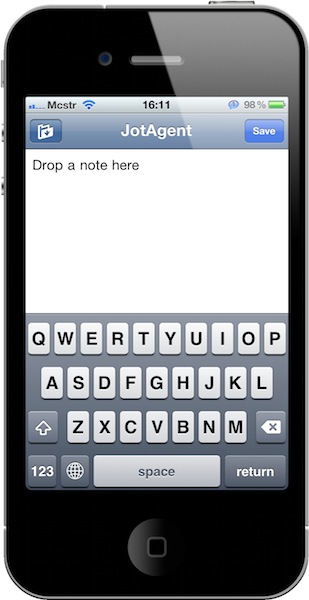
JotAgent is a neat little utility for iPhone and iPad that lets you quickly save notes in Dropbox with literally two taps. I reviewed it here a few weeks ago:

The concept is simple: you link the app to your Dropbox account, you fire it up and start writing. With the tap of a button, the note gets quickly saved in Dropbox. That’s it. You can then browse all the notes you saved, or simply write a new one.

JotAgent is not a tool for professional writers: it’s a lightweight app to “jot” down an idea and have it stored on Dropbox, which runs on your iOS devices, the web and Mac. It’s a great way to save random ideas, thoughts and pieces of text in a service that works anywhere, on any device.

The app is available at $0.99 in the App Store, but in case you haven’t bought it yet we have 5 promo codes up for grabs. Jump after the break, check out the giveaway rules and good luck!

Read more