
This Week's Sponsor:

Turbulence Forecast

Know before you go. Get detailed turbulence forecasts for your exact route, now available 5 days in advance.


Posts tagged with "iPhone"

First Leaked Photos Of The Verizon iPhone?

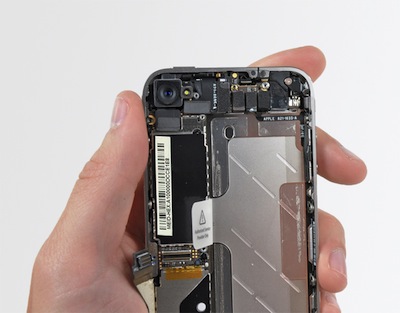
Website Richy Rich has posted a series of blurry images of what they claim to be a N92 CDMA iPhone or as most people would call it, the Verizon iPhone. The device is running a testing operating system (the “inferno” we mentioned a few times in the past) and seems identical to the current iteration of the iPhone 4 in shape. The photos are not that much revealing, and they seem to come from the “usual” Vietnamese sources.

Just yesterday BGR reported that the Verizon iPhone hit the “AP” stage, which is the last step before mass production.

Today, I’m happy to report a follow up to that post with live shots of an “N92DVT” device, which was reported to be the CDMA version of the iPhone 4 back in August by John Gruber. To my knowledge, these shots originated from a repair shop in Vietnam, and according to the “DVT” (Design Verification Test) label, it is in final testing stages before production.

I was told that the side of the device does in fact have a micro-sim slot, like the current GSM-only variant; although the device is no longer in my sources possession, therefore I wasn’t able to obtain photos for proof. This coincides with Boy Genius’ aforementioned post, which enables us to speculate if this means it has global roaming capabilities, if it’s a one device for all unit, or both.
Read more


Review: FLAC Player for iPhone

If you care about your digital music library and you care about quality, I guess you know what the FLAC format is all about. The Free Lossless Audio Codec (FLAC) is an advanced (free and open source) audio compression codec that allows decompression into a perfect copy of the original audio data. Basically, it’s a high-quality compression method that generates state-of-the-art rips and (here’s the downside) huge data files.  If you lose a CD you care about but have a FLAC digital copy, you have an exact duplicate.

To give you an example, a standard 13-tracks album can go up to 450MB in size. Now think about encoding that Beatles collection you have in FLAC and you get the idea.

FLAC is great, but isn’t as supported by hardware makers as other standards such as MP3 are. Luckily enough for iPhone owners, there’s an for that (sorry Apple, I know it’s a trademark now). FLAC Player for iPhone (and iPad, it’s a universal app) is a simple way to import your lossless albums and songs on your iDevice and listen to them. Read more


New York Band Performs Live On iPhones [Video]

We know there are hundreds of music applications for the iPhone out there; some even managed to win an Apple Design Award earlier this year. Yet, we also know there are some people on the internet who regularly quickly diss iOS devices as “consumption-only” devices.

So take a look at the video below. Brooklyn-based band Atomic Tom performed one of their hits  - “Take Me Out”  - entirely on their iPhones, in the subway. At first the crowd thought they were going to bomb the train (seriously? with those hipster moustache?), but Atomic Tom eventually managed to make quite an impression on the passengers. Great video.

[9to5 via Recombu] Read more


Humail: A New “Emotional” Email Client for iPhone

When it comes down to email, my choice is simple: Gmail. I use Gmail for my work email addresses (everything runs smoothly on Google Apps), and I have a dozen of personal accounts I’ve used in these past years to keep my identity well conceived on the internet. I know you do that, too. Here’s a good tip: create a Gmail account just for your signups (Facebook, Twitter, Gowalla, etc) and forget about your main inbox getting overloaded. It saved my life.

Anyway, while I use the Gmail web interface on the desktop, I’m forced to stick with Mail.app on the iPhone and iPad: the app works fine (could be a lot better though), but the main reason why I don’t use and haven’t even tried other clients is because there are no other clients on iOS. I don’t know if this is about high development costs (maybe) or some restrictions imposed by Apple (likely), still we’re not getting the possibility of installing 3r party mail clients like on our Macs and PCs. That sucks.

There are some Gmail-specific applications in the App Store: Mailroom is one of them, and I love it. It’s like a mobile version of Mailplane, a Cocoa wrapper for multiple Gmail accounts. I use it on a daily basis, but it’s not (and can’t be) my default client. I’ve recently stumbled upon this new app called “Humail” which aims at becoming your new “personal” and “emotional” email client. I gave it a try, and here’s what’s behind the marketing slogans of Humail. Read more


Tasks Touch: The Simplenote of GTD Apps

Maybe you don’t need OmniFocus, and you don’t need Things. You don’t care about whatever David Allen has to say and seriously - the Emergent Task Planner? You just want to enter tasks and have them always available, right? I got you. You’re that kind of user who don’t care about features and UX innovations as long as what needs to be accomplished during the day is driven by a simple software that doesn’t get in the way and doesn’t require you to read a manual.

You’re anything like me, but I think I’ve got the app that might just change your productivity worfklow on the iPhone: meet Tasks Touch, the Simplenote of productivity apps. Read more


US iPhone Data for International Visitors: A Guide

US iPhone Data for International Visitors: A Guide

I’ve just returned from a two-week holiday on the West Coast of the US, and during my trip was asked a number of times how I was using mobile data whilst away. As I gather a number of people are interested, here’s what I was doing during the trip. This method will likely work for most carriers around the world (you just have to get the right SIM card and set up your unlocked iPhone’s data settings correctly): but I’ve tried and tested it on AT&T with a GoPhone account.

Great tips.

Permalink