This Week's Sponsor:

Turbulence Forecast

Know before you go. Get detailed turbulence forecasts for your exact route, now available 5 days in advance.


Posts tagged with "iPhone"

Google Goggles for iPhone Gains Ad Recognition and…Sudoku

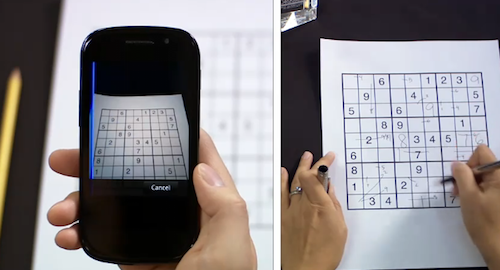
Earlier today, the Google mobile team announced an update to their official Goggles application for Android and the Goggles component in the Google Mobile App for iPhone. While Android users get advanced barcode scanning in version 1.3 of the app, printed ad recognition and Sudoku puzzle solving have been enabled both on iOS and Android. Yes, that’s right: as part of the Google Goggles labs experiments, the app can now solve Sudokuy puzzles. Just take a clear picture and let Goggles provide some help.

As for ad scanning, Goggles for iPhone can now take a look at any printed ad and return web search results for that brand or product.

Goggles will recognize print ad and return web search results about the product or brand. This new feature of Goggles is enabled for print ads appearing in major U.S. magazines and newspapers from August 2010 onwards. This feature is different from the marketing experiment that we announced in November. We’re now recognizing a much broader range of ads than we initially included in our marketing experiment.

The official Google iPhone app doesn’t seem to be updated yet, the new version should be propagating in iTunes in the next hours. In the meantime, check out the promo video for Sudoku support in Google Goggles below. Google Goggles for iPhone was launched in October as part of the Google mobile app. Read more



Little List Is The Simplest GTD App Ever Made

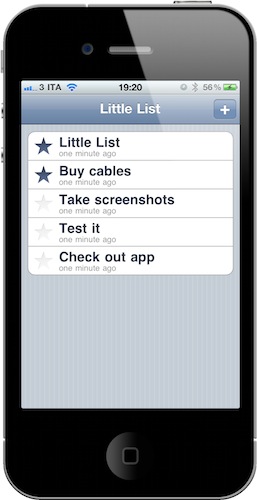
…Or maybe it’s not really a GTD app at all. Little List is an iPhone app developed by Caleb Thorson, the same guy behind the Trickle Twitter client we reviewed here. And just like Trickle, Little List is a minimal, elegant and focused app that takes a simple approach at a complex system: getting things done. Instead of providing tags, folders, projects and contexts, Little List is, well, a simple and clean list of things you have to do.

Many apps in the App Store have tried to go extremely simple against the most fundamental GTD principles. Little List, however, has a cool trick up its sleeve: it’s got yet another implementation of Loren Brichter’s “Pull to refresh”, but instead of refreshing, the gesture sorts items. The command is, in fact, called “Pull to sort”. So what do you sort? Normal items and starred ones. You can create a new entry by tapping on the + button and start typing; if you have important tasks you’d like to highlight, you can star them with an additional tap. “Pull to sort” will put the starred items on top.

Little List is as simple as it gets. It’s available at $0.99, it doesn’t have any kind of OTA sync – it doesn’t have any kind of anything, actually. It’s just a list, with starred items. And with a nice icon. Give it a try if you’re looking for a different take on aggregating your to dos.


Acclaimed Film Director Creates New Movie with an iPhone

South Korean film director Park Chan-wook has a new favorite gadget: an iPhone. The director of popular movies such as “Old Boy” and “Thirst”, in fact, managed to realize his latest short film using only an iPhone. The fantasy-horror movie, called “Paranmanjang”, was shot with an iPhone 4 and has a budget of around $130,000. It will debut in South Korean theaters on January 27.

Park Chan-wook says realizing the 30-minute with Apple’s smartphone was easy and fun, and minor edits were required in the post-processing stage. The only downside to the experiment is a little shakiness in the first minutes of footage – although this “real life” feeling of the film should help as far as “horror” and anxiety are concerned.

The short is a fantastical tale that begins with a middle-aged man fishing one afternoon and then, hours later at night, catches the body of a woman. The panicked man tries to undo the intertwined fishing line, but he gets more and more entangled. He faints, then wakes up to find himself in the white clothes that the woman was wearing. The movie’s point of view then shifts to the woman and it becomes a tale of life and death from a traditional Korean point of view.

Intriguing (and kind of insane) plot aside, it’s exciting to see filmmakers and directors exploring new ways to produce content using Apple devices. We know the iPad is already popular among directors at Hollywood, and we look forward to seein its little brother, the iPhone, in the credits of more movies and short films in the next months. [9to5mac via Wall Street Journal via Yahoo]


OmniVision’s New Camera Sensor Would Be Great On Future iPhones

OmniVision, the company behind the current iPhone 4’s camera sensor and among the rumored iPad 2 camera suppliers, has announced a new native 16:9 CMOS image sensor that will provide 1080p HD video recording with simultaneous 10 MP image capturing capabilities. OmniVision is promoting the OV10810 as the “ideal choice for digital still and video camera hybrids and high-end smartphones”, and there’s no doubt such specs would be more than welcome on a future iPhone – perhaps not the iPhone 5 that should come out later this year as that’s likely already been built and it’s in the middle of testing stages.

Still, this new camera sensor from OmniVision sets the bar higher for digital cameras and smartphones, thanks to its 1080p or 720p video recording at 30 fps and the possibility to capture photos at the same time. Sounds a bit like the future of smartphones – no doubt several camera / smartphone makers will adopt this in the next months.

In the meantime, check out the press release below and imagine an iPhone with 1080p videos. [via Engadget] Read more


More Hints At Verizon iPhone Announcement Tomorrow

Last weekend, the big news was that Verizon is holding a special media event tomorrow in New York. Rumor has it, the event will (finally) be about the long-awaited Verizon iPhone. After years of speculation and rumors from major publications such as the New York Times and the Wall Street Journal, it looks like the announcement is happening and the device is going on sale in the first week of February.

Over the weekend, further hints to the device have surfaced online. SAI reports of AT&T public relations head Larry Solomon “attacking” the rumored CDMA iPhone saying that Apple’s phone is built for speed, and that’s not what you get with CDMA:

The iPhone is built for speed, but that’s not what you get with a CDMA phone. I’m not sure iPhone users are ready for life in the slow lane.”

He says AT&T’s GSM technology is faster than Verizon’s CDMA technology.

Read more


Spotted: History of Apple’s Devices

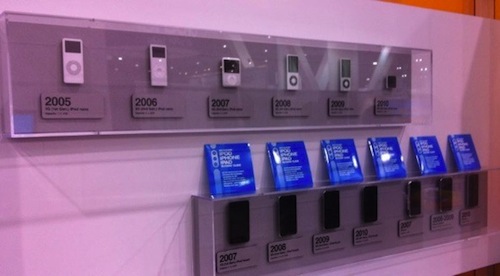
Spotted by TUAW at iLounge’s CES booth, here’s a gallery of Apple’s mobile devices through the years. The collection starts from the original iPod in 2001 and goes straight to the latest iPhones and iPods released in 2010, with the exception of the iPad, which is probably not considered a mobile device by iLounge either.

Looking at the photos, it’s clear how much is changed in 10 years. Even more than iTunes’ interface. Look at the original iPod, or a model from 2005 and 2006 and then take a look at the devices listed under 2007 and 2008. The difference is enormous. Sure, the iPod Classic is still alive and kicking (I have a 160 GB one right here), but we know the majority of consumers are buying iPod touches or Nanos now. These photos are the best example of Apple’s evolution and refinement process from 2001, and then 2007,  through today.

Check out the full gallery here.


Social Radio Reads Your Friends’ Status Updates Aloud

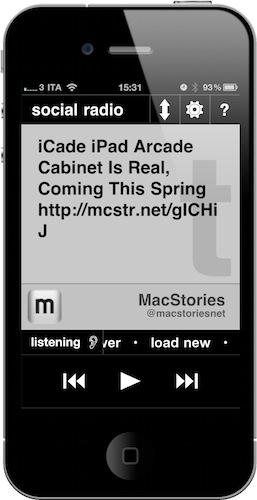
Social Radio for iPhone is a new app developed by @anshuchimala which is available at $0.99 in the App Store. And it has to be one of the weirdest, most original and useful utilities for Twitter and Facebook I’ve seen in a while. Or should I say “listened to”. This app, in fact, once granted authorization to access your Twitter and Facebook timelines, can read your friends’ status messages aloud. And, you can control the app with your voice, too. That’s it.

What’s cool about Social Radio, besides the fact that it’s developed by our friend Anshu, is that it looks minimal, it’s got Helvetica and it really reads Twitter and Facebook with iOS’ built-in accessibility features. I also appreciated the fact that each status updates comes with the original author, so you’ll listen to the app say something like “Federico Viticci wrote”. Usernames will be spoken aloud, http:// links will be excluded. Smart. The app plays a continuos stream of messages from your timeline starting from the most recent ones, until you hit pause or tell it to stop. You can swipe on the screen to move between status updates or just let Social Radio do its job and auto-play them.

Social Radio may look like a silly experiment to get iOS to read Twitter and Facebook messages. If you think about it, though, the app can be very useful for the visually impaired (just set it up once, then listen to it) or for when you’re driving and you really want to stay on top of your social networks.

Social Radio is a cool app that can be yours for just .99 cents. Give it a try.


VLC for iOS Pulled From The App Store, Now on Cydia

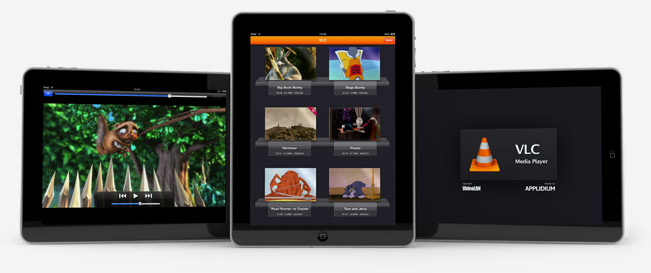
Just like we expected in October, VLC for iOS has been removed from the App Store. But this time, the removal of one of the most popular free apps for iPhone and iPad has nothing to do with Apple and the app review team’s rules. Instead, we have to thank developer Rémi Denis-Courmont, who since October has been busy trying to get the app out of the App Store because it violated VLC’s GNU public license. Rather than keep calm, carry on and let other developers (Applidium, the guys behind the VLC port to iOS) distribute VLC for iOS for free, he forced to get the app removed. Read more