Posts tagged with "mac"

Mac App Store Preview: WordCrasher

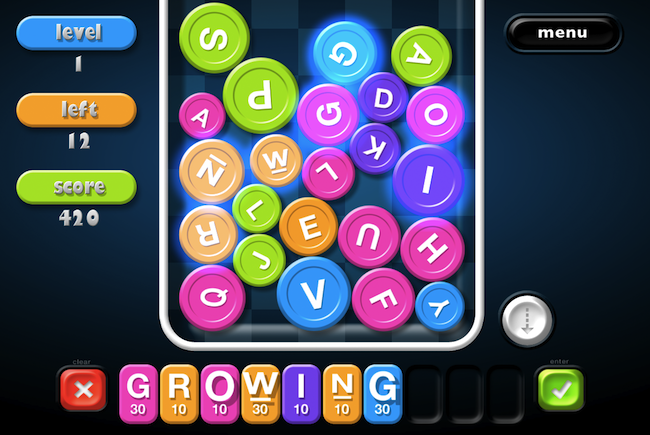
Coming tomorrow for the Mac App Store launch, WordCrasher is an addictive game already available on the iPhone and iPod touch which is based on a simple concept: create words out of letters falling from the top of the screen. Yes, it sounds a lot like Tetris’ bricks, only you have letters and you have to combine them to create words and empty the screen. As the screen is filled up with blocks, it’s game over.

The Mac version of WordCrasher will take the iOS experience and add some new features to make suitable for the desktop. Together with redesigned graphics and new sounds, Mac users will be able to create words not just by catching letters with the trackpad: you can use the keyboard for fast typing and gaming.

WordCrasher will be available tomorrow and I believe it will be one of the many iOS games ported to the Mac platform. Whether or not this will turn out to be a great or terrible idea, we’ll find out in less than 24 hours.

Mac App Store Preview: Todolicious, The Simple To Do App

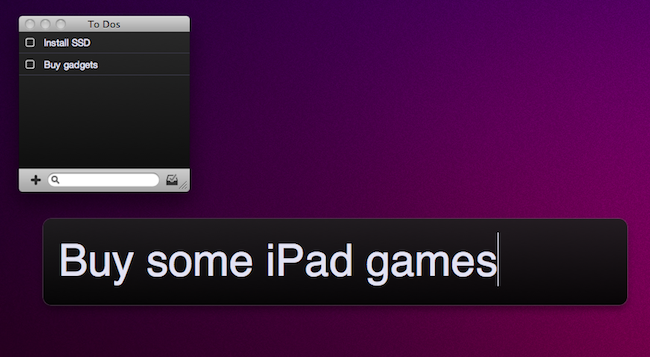
Of all the new apps that are coming out tomorrow in the Mac App Store, Todolicious by Mustacheware is among those we’re most excited about. Created by our friend Steve Streza, who also happens to be the guy behind the great iPhone webapp Swearch.me, Todolicious wants you to stop wasting time organizing your to dos and tasks. Todolicious is a simple app that’s also customizable, and it’s aimed at those people who just want an app to quickly write down the things they need to do. No projects, tags or contexts. Todolicious is a sexy, digital version of the classic sticky notes.

Without giving away all the details just yet (you should be able to play with the app in less than 24 hours), I want to focus on the single most intriguing aspect of the app: the new to do entry field. Instead of displaying a popup window with dozens of options, text fields and buttons, Todolicious provides a simple panel that asks you “What do you need to do?”. It reminds me of Alfred’s straightforward search interface, and you can assign a system-wide shortcut to it so you can enter new to dos no matter what you’re doing with your Mac.

Todolicious will be available tomorrow at $4.99 in the Mac App Store. It’s a simple app we’re really excited about, and we bet that thousands of Mac users who don’t need the functionalities of Things or OmniFocus will give Todolicious a try. Check out the website here, or follow @todolicious for updates.


Mac App Store Preview: Lyrica

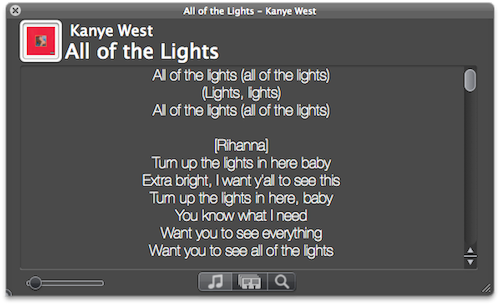
Lyrica is an upcoming new Mac app created by 17 year-old German developer Florian Zand which has been submitted to Apple for approval and should be available on the Mac App Store on January 6. As the name suggests, the app is aimed at fetching and displaying song lyrics – which is a pretty common task, although Lyrica has a few tricks up its sleeve that should grant it a relevant position in the new App Store. First off, the app queries 6 different lyric databases to find the most appropriate lyrics for the songs you’re listening to. Of course, Lyrica automatically takes the music that’s playing in iTunes and contacts the servers on its own. You just have to fire it up and wait a few seconds for the lyrics to show up on screen.

Lyrica can change from a classic OS X grey window to a more unobtrusive translucent black panel that can easily sit on top of any app without getting in the way. If lyrics for a song can’t be found, you can add them manually from the app itself. In addition for “now playing” capabilities, the app can also add lyrics to a specific playlist or your entire iTunes library – that will take a few minutes though, as it’ll have to tag your whole music collection.

We look forward to seeing Lyrica available in the Mac App Store on January 6. More information about the app will be available on the developer’s website here.


Mac App Store Preview: QuickMark QR Code Reader

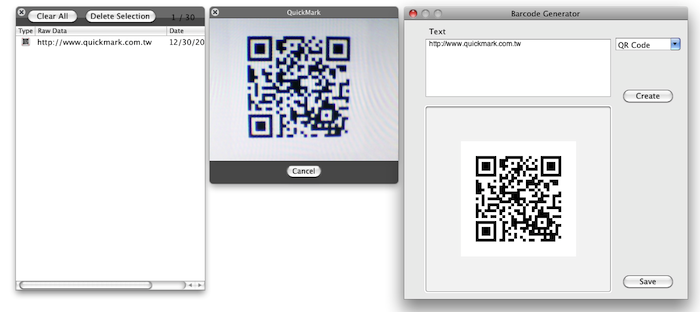
Currently waiting in Apple’s review queue and hopefully launching on the Mac App Store on January 6, QuickMark is a new app that will let your Mac “read” the increasingly popular QR codes. Thanks to the built-in iSight every Mac (which Apple is apparently rebranding as “FaceTime camera”) will be able to recognize 2D barcode images or, if a Mac doesn’t come with an iSight, load an image file and scan it. You can also create your own 2D codes, if you wish.

QuickMark’s reader is capable of doing a bunch of stuff with a correctly scanned code, too. For example, the app can follow a web link with a Mac’s default browser, send an email or add a contact to the Address Book. The app also sports a neat Skype integration as it can send SMS and make a phone call; if you don’t like making phone calls and you’re more for meeting your friends in person, the app can also navigate to a Google Maps’ specific point of interest.

QuickMark for Mac should be available in the App Store soon.


Logitech’s HD Pro Webcam Adds Mac Support - FaceTime in Hi-Def

The iSight is okay if you’re casually chatting with friends and family, but why not kick it up a notch with Logitech’s version of Microsoft’s 1080p LifeCam Studio?

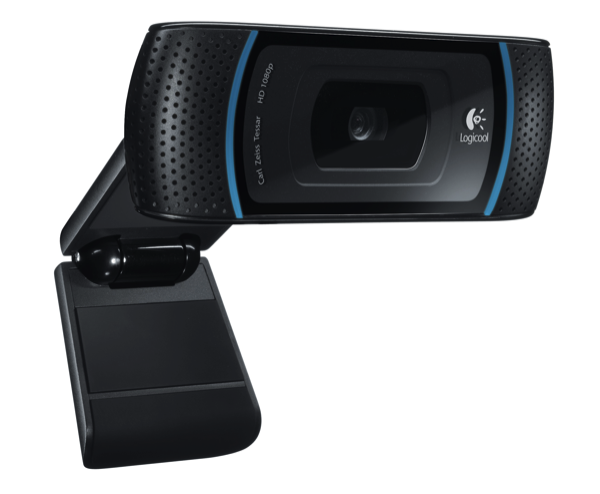
The Logitech HD Pro Webcam C910 gains Mac support, allowing you to record 1080p video, while streaming live in glorious 720p. Compatible with Skype, FaceTime, Gmail Voice and Video Chat, the Logitech HD Pro Webcam autofocuses to produce the best images while recording stereo audio thanks to its dual mics. Logitech’s Webcam Software enables simple one-click uploading to Facebook and Youtube as well for sharing those awesome MacStories product reviews, and if you’re into photos, you can snap 10 megapixel shots of that morning mug.

This is a solid offering from Logitech (especially for iMac owners) that brings high-definition to your favorite Macintosh. You can read the full press-release over at BusinessWire for more information. [via BusinessWire]


Mac App Store Preview: Tembo, A New Take On Spotlight

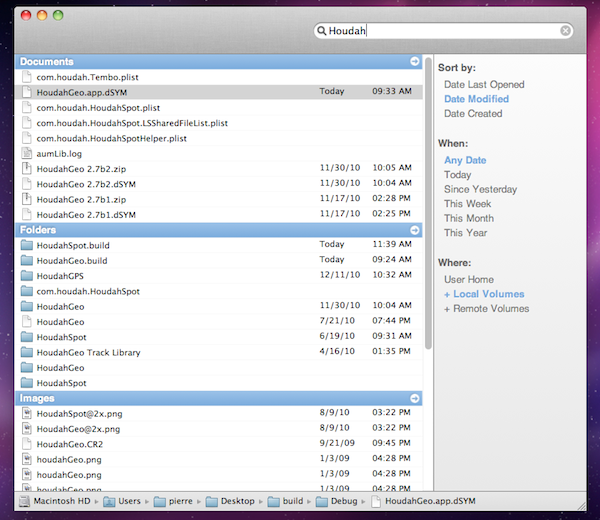
Coming to the Mac App Store this Thursday, Tembo is a new app from the guys behind popular OS X software like HoudahGeo and HoudahSpot that aims at providing a fast, fun and easy interface for Spotlight. Tembo will allow you to easily find music, mail messages, documents and bookmarks through a window that resembles the Spotlight UI you were used to on OS X Tiger.

Search results are grouped by categories, and you can enable, disable or reorder these categories in the app’s Preferences. A top bar for each category in the search results window will let you filter through these results already neatly organized in categories. It’s really powerful, but user-friendly at the same time. Tembo can list up to 2500 items in a single group, and can work as an extension to Mail and iChat to find messages and conversations, or Safari to search through bookmarks and history.

Tembo will be available on January 6 at $20 with a free trial available on the developers’ website.


Clickfree Unveils $249 Time Capsule Alternative

Looking for an unofficial, cheaper, black-er Time Capsule alternative? Perhaps you just don’t want your Time Capsule to die prematurely while you were just getting to love it? You’re in luck. Amongst CES fever, new gadgets and weird round-shaped televisions, Clickfree has announced a wanna-be Time Capsule competitor that’s basically a hard drive with a built-in 802.11n radio that automates backups from your Macs and PCs.

If you’re familiar with Apple’s Time Capsule, or like me you own an AirPort Extreme with an attached USB external drive, you know how it works: in your Mac’s System Preferences you set the external network drive as a Time Machine destination, and backups will happen wirelessly in the background all the time. It’s unobtrusive, smart and pretty damn awesome. Clickfree is showcasing the product at CES as we speak, and they say no software is needed to run the backup system after an initial setup. One of the Time Capsule and AirPort Extreme advantages is the AirPort Utility app Apple gives you to configure almost anything in the device, so I don’t know about Clickfree’s approach. Maybe it’s one of those things that really just works without manual setup.

The Clickfree Wireless comes in two flavors: a 500 GB one that retails at $179, and a 1 TB one that can be yours at $249. [via Engadget]


SwiftRing for Mac Combines Gestures and Keyboard Shortcuts

SwiftRing is a new app for OS X that’s still in beta and available as a free download here. It’s also one of the new apps for the Mac I’m most excited about, as I believe it shows great room for improvement, it’s promising and it combines two of my favorite things about the Mac platform: gestures and keyboard shortcuts. I love to get things done with the keyboard, especially when I’m in a hurry and shortcuts come in handy to save precious time. Still, multi-touch gestures on my MacBook’s trackpad (and Magic Trackpad on the iMac) have spoiled me with their ease to use, speed and, sometimes, “cool factor”.

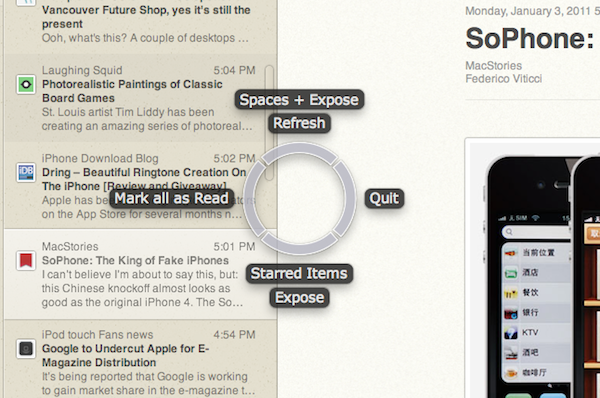
SwiftRing aims at delivering the best of both worlds through a system-wide circular interface that appears as an overlay to any app (even the Finder itself) and allow you to perform any action that has a keyboard shortcut with a simple gesture. Read more