Posts tagged with "mac"

Dock Spaces Brings Multiple Docks to OS X - Review & Giveaway

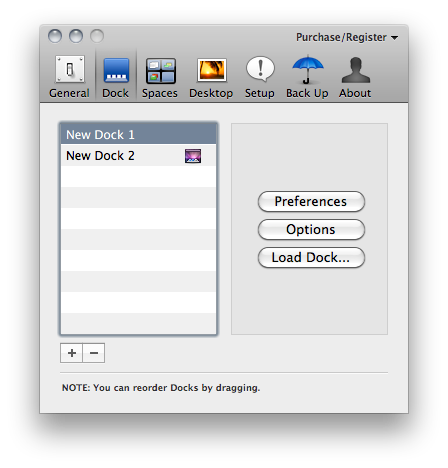
By default, OS X allows you to set up one and only one dock on your machine. Many users keep their dock at the bottom, with all the apps installed on their computer, some prefer to keep it hidden with only the most used apps – others keep it on the left. The dock is one of the most recognizable features of the Mac, the tool that lets you access your application with just a click. But the default dock doesn’t come with all the customization features offered by Patrick Chamelo’s Dock Spaces.

Dock Spaces, recently updated to version 4.0, enables you to set up multiple and customized docks depending on what kind of dock you need at any given time. Just like other apps like Hyperspaces let you create multiple spaces with different preferences, Dock Spaces is a tweak that comes as a preference panel which you can use to switch between different, contextual docks. Say you’re working on Photoshop and together with that you need easy access to other apps for graphic design: you can create a dock with all those apps, other than your “default” OS X dock. Basing on this same concept, you can set up as many docks as you want for all the different contexts and situations you’re going to use your computer. Read more





#MacStoriesDeals - HUGE Wednesday!

TODAY is the last day before iTunes Connect shutdown for the holiday, so we’re re-running a few things you may have missed -> Here’s some great deals for today on iOS & Mac apps that are on sale for a limited time, so get ‘em before they’re gone!

Read more


twttr.mediaTypes - A Great Safari Extension For #NewTwitter

A while back I stumbled upon a few Safari extensions by Norio Nomura that embedded extra image service viewing into newtwitter that it didn’t yet support. There was originally one for dribbble and another for Instagram when it was still unsupported. I am a dribbble member and use Instagram so they were no brainers for me. I use the twitter.com website with Safari when I am at work (and sometimes at home), so it’s always open. Last week I visited Nomura’s github page and noticed he had combined the 2 extensions and added even more including post.ly, withings, moby.to and a few more, it’s now called twttr.mediaTypes. I tweeted a few days ago that this extension was my Safari extension of the day and it had a very good response and was retweeted a lot.

After yesterday’s huge Camera+ news / update, I wondered how easy it would be for him to add Camera+’s image hosting service to this already great extension. It took him less than an hour to get back to me with an updated version supporting Camera+, it even interested him enough that he bought the app as well. It works fantastic, just like it did before, placing the image into the details pane of twitter.com’s timeline.

twttr.mediaTypes is not a must-have for everyone but anyone that uses twitter.com as their client of choice with Safari or Chrome (yeah, he has a version for that too) should really check it out. I have also asked him to add img.ly support as well, but no word back yet.


Apple Releases iPhoto 9.1.1

A few minutes ago Apple released an update to iPhoto ‘11, which adds new email features and improves the overall stability of the app. The new version is available now on Software Update or on Apple’s website.

Full changelog below.

- Adds a preference allowing photos to be emailed using an external email application

- Adds “Classic” and “Journal” themes to email.

- Photos attached to an email can now be sized to Small, Medium or Large

- Improves reliability when upgrading a library from an earlier version of iPhoto

- iPhoto now correctly preserves the sort order of Events after upgrading a library

- Event titles displayed in headers can now be edited in Photos view

- Addresses a problem that could cause duplicate photos to be added to a MobileMe album

- Scrolling overlay now correctly displays ratings when photos are sorted by rating

- Photos are now sorted correctly when a rating is changed and photos are sorted by rating

- Fixes a problem that could cause text formatting controls to become inaccessible when editing a calendar


Apple Shuts Down Mac OS X Downloads Page

Well, we all knew this was going to happen sooner or later. Apple is shutting down the OS X Downloads page, in lieu of the Mac App Store which is launching on January 6th. Here’s the email Apple just sent out to Mac developers:

Thank you for making the Mac OS X Download site a great destination with apps that offer users new ways to work, play, learn, and create on their Mac.

We recently announced that on January 6, 2011, the Mac App Store will open to users around the world, presenting you with an exciting, new opportunity to reach millions of customers. Since the introduction of the App Store in 2008, we’ve been thrilled with the incredible support from developers and the enthusiastic response from users. Now we’re bringing the revolutionary experience of the App Store to Mac OS X.

Because we believe the Mac App Store will be the best destination for users to discover, purchase, and download your apps, we will no longer offer apps on the Mac OS X Downloads site. Instead, beginning January 6, we will be directing users to explore the range of apps available on the Mac App Store.

We appreciate your support of the Mac platform and hope you’ll take advantage of this new opportunity to showcase your apps to even more users. To learn how you can offer your apps on the Mac App Store, visit the Apple Developer website at http://developer.apple.com/programs/mac.

The Mac OS X Downloads website provided for years a way for developers to showcase their Mac apps for free to the large audience of Apple’s website. It also served as a great way to get new Mac users started on third-part software for OS X. Clearly Apple thinks this is all going to change with the Mac App Store, which will be included in a Software Update for all Snow Leopard users.

No details have been provided about other categories of software currently promoted on the Downloads site, such as Automator workflows and Dashboard widgets.