Posts tagged with "mac"

New Version of Skype for Mac Coming “Soon”

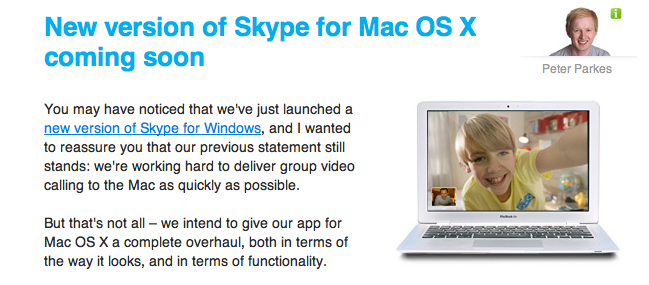
This morning Skype launched a brand new version of its official Windows client with direct Facebook integration. That’s a biggie. And what about Mac users? We’re still left behind with a clunky old version of Skype that doesn’t even support multi-video chat, nor does it have the new UI introduced in the Windows counterpart.

Still, Skype promises we only have to wait a little more before we can put our hands on a “complete overhaul, both in terms of the way it looks, and in terms of functionality”.

No problem, Skype: we’re used to wait for Mac updates. Just one thing: where’s the iPad app, again?


Licensing State of the Union

Licensing State of the Union

Interesting article over at Flyosity on the various techniques developers can use to prevent their apps from being cracked and shared. The last bit, though:

There are a number of ways to protect your application from piracy. However, when it comes down to it, piracy cannot be stopped. Whether you like it or not, if someone wants to steal your application, they will. On this note, pirated copies should not be considered lost sales. Most pirates had no intention of purchasing your application in the first place. Donʼt hurt your real customers. If your application is good enough, people will buy it. The best way to prevent piracy?

Make great apps.

I couldn’t agree more. The whole thing is a must-read, especially for developers.

Permalink

Walt Mossberg Loves The New Outlook for Mac

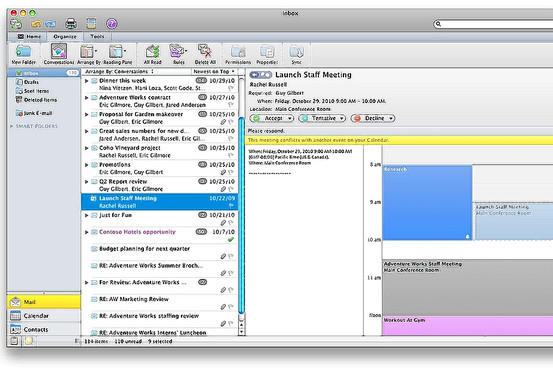
Our beloved Walt Mossberg is loving the new version of Office for Mac, dubbed “2011” and dropping on October 26th. Particularly, he seems to be liking the new Outlook a lot:

I was able to import a nearly 3-gigabyte Windows Outlook data file with no problems. And I was able to easily and perfectly import all my messages and settings from Apple’s own built-in Mail program and to sync with Apple’s (AAPL) built-in Mac address book. But Microsoft is still working on syncing with Apple’s iCal calendar program, and the Outlook calendar can’t sync with Google Calendar. Also, while the new Mac Outlook can import Windows Outlook data, it can’t export its data to Windows yet. Microsoft says it is also working on that.

In general, Outlook on the Mac proved fast and capable in my tests. It doesn’t work exactly like its Windows counterpart, but Windows users will find it very similar. And it has some Mac-specific features. For instance, its contents can be easily searched by the Mac’s built-in universal search feature, Spotlight, and can be backed up by the Mac’s Time Machine backup system.

Microsoft’s new Mac Office is by far the best Mac version of the suite I’ve used, and I can recommend it.

For as much as I understand the needs of companies willing to use Macs, but stuck on Office, there’s no way I’m giving up on Mail for when it comes to desktop email. I’ll give it a try, though.


Is The Mac Ready for Multitouch?

Is The Mac Ready for Multitouch?

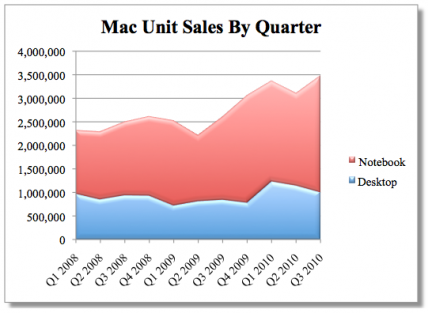
As good as I think Apple’s touch products are, I find it hard to believe they’d let the Mac grow stagnant, especially when sales continue to climb. The Mac may have taken a backseat to iOS products at WWDC, but it’s going to remain a core product for the foreseeable future. They’re not going to suggest you write iPhone apps on a Windows machine, if nothing else.

That’s why there’s some speculation—at least in the Gizmodo editor’s chat room—that the October 20th event could hold a big reveal for a new MacBook Air that includes some sort of new multitouch method, a flip-over touchscreen that turns the Air into a tablet. Instead of running iOS, however, the new Air would run OS X.

Something feels off to me about that idea. I have a hard time imagining that Apple would release a hybrid product that instantly makes current Macs feel outdated and makes iOS products like the iPad seem less powerful.

But at the same time, if Apple were going to experiment with bringing multitouch to the Mac, the Air would be the product with which to do it.

Joel Johnson over at Gizmodo argues that the Mac’s transition to multitouch technology is inevitable. I agree, but I think it’s in Apple’s best interest to keep product lines well separated and distinct. I frankly don’t see Apple releasing a “convertible computer” because the way I see it, Apple thinks compromises suck. They never liked “half & half” products. I may be mistaken (we’ll know on Wednesday), but I don’t see Apple ever shipping something like this.

Permalink

Zune could Befriend iPod in Possible Mac Matrimony (Update: Windows Phone Sync Confirmed)

Microsoft was never able to hang with the cool kids even after they released a rather sublime MP3 player you might now as the Zune. In its three iterations from a brown rubber brick to sexy brushed metal beast, wanting Mac owners could never tap into Microsoft’s Zune Marketplace (which offers a pretty good subscription service) through their Xbox inspired Zune software, or enjoy the startling good looks of the Zune’s eerily minimal (and sometimes purposefully illegible) interface.

Now with the release of Windows Phone 7, Microsoft may finally be willing to reach out to Macintosh owners interested in experiencing Redmond’s take on social media, communication, and of course music and video. Engadget reports this evening that the Zune software (and of course all the Zuney hardware that goes with it) may be ported to OS X thanks to a tip from a UK Microsoft Marketing guru (and Microsoft does have gurus you know) by the name of Oded Ran. In an exclusive #WP7 announcement on Twitter, the promise of being able to use “Zune” on our Macs to sync with all of the upcoming phones was made, though the announcement was deleted shortly after.

Read more


Making Gmail Play Nice With Mac OS X Mail

Making Gmail Play Nice With Mac OS X Mail

So, you want to use Mac OS X Mail with Gmail, which is an excellent, free webmail service from Google? While Snow Leopard makes the default setup is very easy, there are some rough edges of Google’s somewhat-wonky IMAP setup that need to be smoothed off for a better experience.

I’ve written out the steps to reach “Gmail IMAP in Mac OS X Mail” nirvana. While that doesn’t roll of the tongue, it does soothe the soul of the Gmail-using Mac lover.

Great guide. Some neat tricks I didn’t know about in there. [via Brooks Review]

Permalink