


Here are some great #MacStoriesDeals for 4th of July! We will be updating this post throughout the week so check back. You can find us as @MacStoriesDeals on Twitter.
Posts tagged with "mac"
#MacStoriesDeals - 4th of July Edition!
Apple’s Desktop Pictures→
The public unveiling of each new version of Mac OS X has brought a new default desktop picture, and a new hunt to find a full-res copy of that wallpaper before the official release. The introduction of OS X Mavericks was no different, only this time instead of a space-themed galaxy or nebula, Apple decided to bring Mac’s default look and feel back to earth.
Thomas Brand takes a look back at Apple’s history with Mac OS and OS X default desktop pictures.
#MacStoriesDeals - Tuesday
Here are some great #MacStoriesDeals so far this week! You can find us as @MacStoriesDeals on Twitter.
Search For Rdio Lyrics with Keyboard Maestro
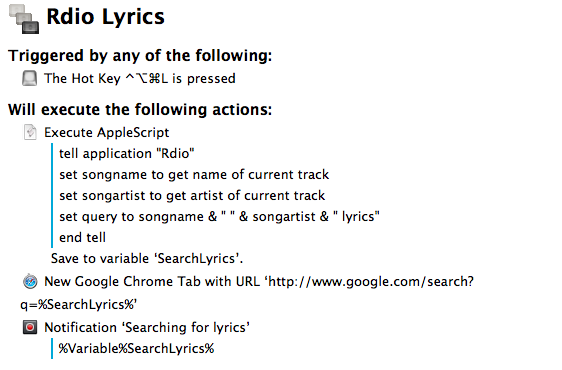
In spite of the existence of various Mac apps to display lyrics of a song that’s currently playing in iTunes or Rdio, I often find myself having to manually look them up through a web browser. It’s not uncommon to see a dedicated lyrics app being unable to fetch lyrics for a certain song, and, unsurprisingly, that always seems to happen when I’m in the mood for learning new lyrics. Having to Google lyrics and type a song’s name is a tedious process that ought to be automated, so that’s what I did. Read more
Quickly Append Browser URLs To Evernote with Keyboard Maestro
I often come across webpages and interesting links that I can’t check out right away, but that I also don’t want to send to Instapaper, Pinboard, or my OmniFocus inbox. They are, put simply, “stuff to check out”; I append these URLs to an Evernote note carrying the same name:

As I detailed in my review of Drafts 3.0 for iOS, appending text from an iPhone or iPad is easy with Agile Tortoise’s app and a combination of Evernote actions and browser bookmarklets, but I had to think of an equally straightforward workflow for the Mac. Unfortunately, the lack of a Drafts app for OS X forced me to resort to AppleScript to achieve the same kind of functionality, but the deal was (partially) sweetened by the new features introduced in Keyboard Maestro 6.0, released back in May.
#MacStoriesDeals - Thursday
Here are some great #MacStoriesDeals so far this week! You can find us as @MacStoriesDeals on Twitter.
#MacStoriesDeals - Wednesday
Here are some great #MacStoriesDeals so far this week! You can find us as @MacStoriesDeals on Twitter.
Chatology Review: Flexibits Reinvents Messages.app Search
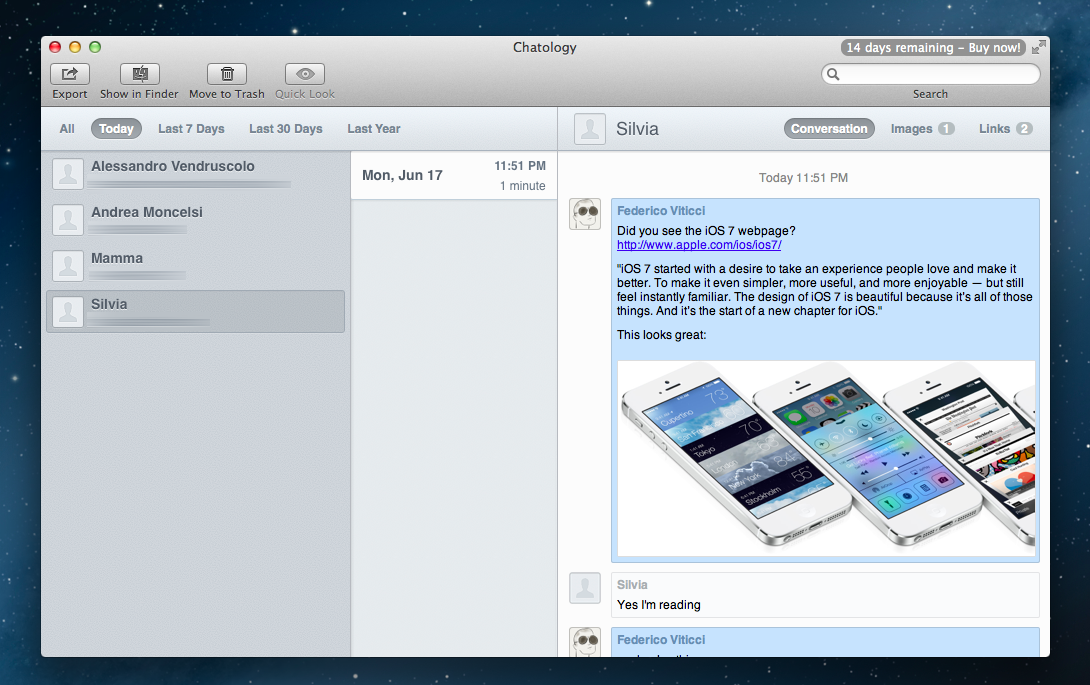 Chatology’s main window. I only couldn’t buy it because the Store wasn’t available during the beta.
Flexibits, run by Michael Simmons and Kent Sutherland, makes two of my favorite apps. With Fantastical for Mac, released almost two years ago, they removed friction from event creation on OS X through a simple yet powerful menubar app that leveraged natural language processing. Fantastical is the only calendar interface that I interact with on my Mac, as it can send events to configured accounts directly – in the background – without needing Apple’s Calendar. Last November, they brought everything they had learned on the Mac to the iPhone with the release of Fantastical for iOS, a fantastic Calendar replacement with native iOS integration, a gorgeous Day Ticker interface, and advanced features such as a URL scheme and multiple alarms.
With the Fantastical brand, Flexibits has established itself as capable of building apps that use existing Apple technologies to create new, enjoyable experiences that are equally efficient, reliable, and rich in detail. Today, with the release of Chatology, Flexibits aims at supercharging a tough and infamous subject: Messages for Mac. Read more
#MacStoriesDeals - Friday
With WWDC right around the corner, there are lots of great #MacStoriesDeals this weekend! You can find us as @MacStoriesDeals on Twitter.