


Here are today’s @MacStoriesDeals on iOS, Mac, and Mac App Store apps that are on sale for a limited time, so get them before they end!
Posts tagged with "mac"
#MacStoriesDeals - Wednesday
Apple Highlights Why Macs, iPads and iPhones Are For College
 Apple has promoted the best features of the Mac, iPad, iPhone and iPod Touch for students in three new web pages on Apple.com. The three pages, found on the Student portal on Apple’s website all start with premise of “Why Mac for College” or “Why iPad for College” and proceed to list some of the features that will appeal to students such as the Mac’s compatibility with Windows and Office, or watching iTunes U videos on the iPad, or recording audio memos on the iPhone or iPod Touch.
It’s interesting to note how Apple continues to put significant effort into marketing their products to students in College - despite their success in recent years in attracting more of the mainstream community. Whether it is the continued education discounts, Back to School promotions or this refresh of the student portal, Apple sure doesn’t want to let go of the student market.
If you want to have a look for yourself at how Apple is marketing their products to students, you can jump through to the student portal or go straight to the new pages for Mac, iPad and iPhone and iPod Touch.
[Via AppAdvice]
Postbox 2.5 Released: New UI, Faster, Lots Of New Features
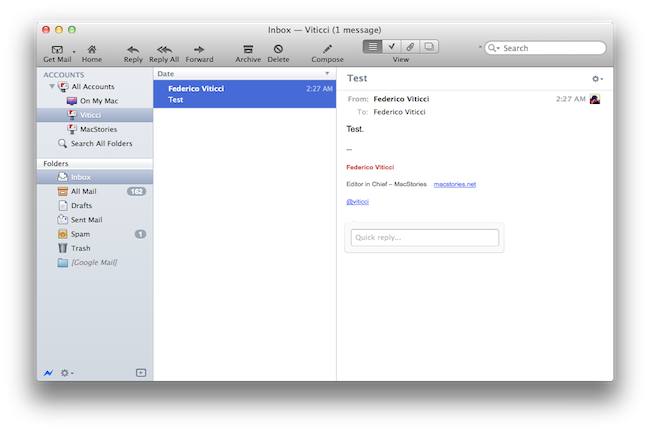
Earlier today, we published an article detailing some of the interface changes set to be introduced in Postbox 2.5, a major update for the popular alternative email application for Mac and Windows that, among other things, was teased by the developers as one of the biggest rewrites of the app to date. With a series of blog posts, the Postbox team had in fact already announced that the client would get an overall improved interface, new toolbar icons on the Mac, a completely re-imagined message view, and a vertical pane view to take advantage of widescreen monitors – admittedly one of the glaring omissions from the previous versions of Postbox. Read more
Designing GitHub for Mac→
Designing GitHub for Mac
It blows my mind that no one tried to do anything special. Git (and it’s DVCS cousins like Mercurial & Bazaar) provide an amazing platform to build next generation clients — and it’s like the entire OS X ecosystem left their imagination at home.
Eventually, I (well, many of us) decided that better native clients (OSX, Windows, Linux, Eclipse, Visual Studio, etc) was the best way to grow GitHub. And since we all use Macs — we should start off with an OS X application.
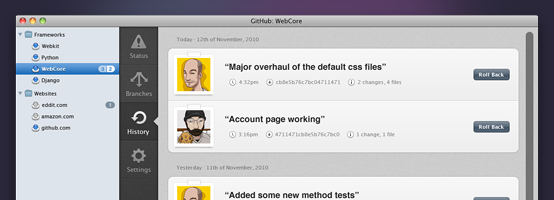
Kyle Neath has posted an excellent overview of what designing the official GitHub Mac app was like, the challenges he and his team had to face when dealing with Apple’s recent interface changes coming in Lion, and the overall “new trend” of Mac apps inspired by their counterparts.
Check out the whole story and screenshot gallery here.
Postbox 2.5 Will Bring A Completely New Mac Interface
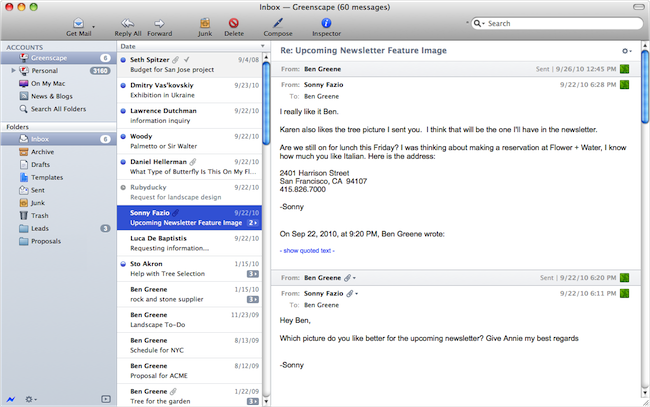
Postbox, the “first-class” email application that shipped a major 2.0 release last year with features such as unified inboxes and quick reply, will have a completely redesigned user interface once the 2.5 version ships this summer on the Mac App Store. Currently in private beta for lifetime Postbox users only, the upcoming 2.5 update has been teased several times by the company in the past weeks, showing off new functionalities like vertical view, a redesigned message view that’s cleaner, elegant and more readable, as well as new toolbar icons also in monochrome variations to get ready for OS X Lion’s new UI paradigms.
Earlier today, the Postbox team has posted a series of screenshots of the UI overhaul they’ve been busy working on with the help of Belgian designer Benjamin De Cock. As you can see from the screenshots in this post and the full gallery here, Postbox 2.5 looks like a massive update design-wise that will be aimed at cleaning the overall experience on OS X which, quite frankly, kind of resembled a Windows program in its previous iterations. With the final goal of “reducing clutter and complexity” in mind, the Postbox team has set out to create an email client that’s just as beautiful as a native Apple app would be, with the addition of unique features like attachment browser, topics, file sidebar, and much more.
There are a lot features and a lot of different ways to use Postbox. It was important for us to account for those different needs, but we also wanted to keep the interface as clean as possible. Mac OS is a huge inspiration for this, as they’re doing a terrific job in reaching people who are less tech-savvy and hardcore geeks. It has been a real benchmark for me for Postbox 2.5.
Postbox 2.5 is a terrific design milestone, and more design improvements are on the way to make Postbox even more user-friendly and accessible for everyone.
The new version of Postbox looks really promising and we can’t wait to get our hands on it to see what’s improved, changed, and refined. Postbox 2.5 will be a free upgrade for existing 2.x customers, so if you haven’t yet, go get Postbox from the Mac App Store at $19.99. Check out more screenshots of the app after the break. Read more
Carousel Instagram Client Gets Gestures, Search, Refined UI

Back in May I reviewed the first version of Carousel, a beautiful Instagram client for Mac that, thanks to the Chameleon framework built by The Iconfactory, brought Instagram’s photo streams and profiles to the desktop with a gorgeous iOS-like user interface. Whilst in the past month, with Lion nearing its final release and the WWDC, we’ve seen several examples of iOS apps making the big leap to the Mac, Carousel was one of the first apps to try the iPhone-inspired approach with a vertical layout, tabs, and popover menus. Together with Twitterrific, Carousel is a fine example of iOS interface schemes coexisting with more standard Mac applications.
Carousel 1.1, released today, adds a number of new features and refinements to make the Instagram experience on OS X even more beautiful and easy to use. First off, search: you can now search for specific @users or #keywords on Instagram, pin your searches as you would in Twitter for Mac, or click on tags and usernames in photo comments, which now are better styled to indicate the original author’s caption. Saved searches sit below the search bar, but to perform a search you’ll have to choose an element from a popover menu. The app has gained a new “likes” tab to see all the photos you’ve liked and a fetch separator to start where you left off in the stream, but more importantly gestures are now supported to easily open a photo in Quick Look (pinch and zoom) or check out a profile (swipe on the photo). It feels very natural and smooth using a Magic Trackpad.
Among the little fixes and refinements, the developers have updated the iOS-like toolbar to make sure the selector is draggable (try it, neat animation in there) and the comment form remains visible even if you click outside of Carousel’s main window.
Carousel 1.1 is a solid update for the most beautiful and intuitive Instagram client currently available on the Mac. You can buy Carousel at $4.99 on the Mac App Store.
#MacStoriesDeals - Tuesday

Here are today’s @MacStoriesDeals on iOS, Mac, and Mac App Store apps that are on sale for a limited time, so get them before they end!
Opera 11.5 Released, Features Streamlined UI, Live Speed Dials And Password Sync

Opera has today released Opera 11.5, a fairly major upgrade on Opera 11, which was released six months ago. The update’s most obvious feature to users will be its new and improved “featherweight” UI that has been significantly streamlined – shredding a number of buttons and increasing the display area. According to Jan Standal, VP of Desktop Products at Opera, a major reason for the change was that users were reporting that Opera was slower than the other browsers. In 11.5, Opera is now around 10-15% faster in SVG rendering.
Opera’s Speed Dial is another feature that has received some big improvements in 11.5, and now touts a new ‘Live Speed Dial’ feature. The feature allows a new type of extension that lets developers create live content for a Speed Dial box. Some examples of this include a stock ticker, weather information and a Twitter box.
As all web browsers have been doing, Opera 11.5 continues to improve support for web standards and in particular HTML5. Another nice new feature is that passwords can now be kept in sync on multiple computers with Opera Link in 11.5 – but Opera makes special note that they have focused on improving security to enable this feature and have also introduced features to help users create secure passwords. The final new feature of note in Opera 11.5 is simplified installation of missing plug-ins, whether it be Flash, Java or some other plug-in, it can be installed with a few clicks and users do not have to restart the browser to start using them.
You can download Opera 11.5 for Mac and Windows directly from their website, the Mac App Store version has not yet been approved. Jump the break for some screenshots of Opera 11.5.
[Via TechCrunch]
Thunderbolt Firmware Update Released
A few minutes ago Apple released Thunderbolt Firmware Update through its downloads website and the desktop Software Update control panel, targeting all machines running the recently introduced Thunderbolt I/O connectivity standards. Until today, Apple has released new MacBook Pros and iMacs featuring the Thunderbolt technology from Intel. The update brings “performance and stability fixes”.
This update provides Thunderbolt performance and stability fixes.
When your computer restarts a gray screen will appear with a status bar to indicate the progress of the update.
Do not disturb or shut off the power on your computer during this update.
Apple’s release notes don’t specifically mention the targeted machines so we assume it applies to all 2011 Macs with at least a Thunderbolt port. The new MacBook Airs rumored to be getting a Sandy Bridge and Thunderbolt update later this month or in July will likely come with these fixes pre-installed, so if you need to download the patch now go ahead and pull the 486 KB package from Apple’s website.