


Here are today’s @MacStoriesDeals on iOS, Mac, and Mac App Store apps that are on sale for a limited time, so get them before they end!
Posts tagged with "macappstore"
#MacStoriesDeals - Friday
New Macs Give Users iPhoto, iMovie, GarageBand For Free On All Macs
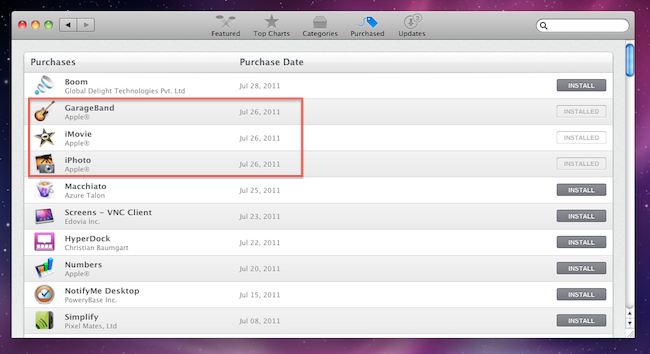
When I received my new MacBook Air three days ago, I immediately launched the Mac App Store to re-download all my apps with a few clicks thanks to Apple’s unified solution that makes it easy to get all the software you already own on a new machine. As I headed over the Purchased tab, however, I noticed downloads for three iLife ‘11 apps – iPhoto, iMovie, and GarageBand – automatically started in the background. With new Mac purchases, in fact, it turns out Apple is giving away the iLife suite as standalone apps available on the Mac App Store. Normally, these apps would set you back $14.99 each – instead, I got them for free on my new MacBook Air with OS X Lion pre-installed.
As reported by Macworld, the new Mac Minis and MacBook Airs released on July 20th come with the latest versions of OS X and iLife bundled for free. Owners of Macs purchased between June 6 and July 20 can request a copy of OS X Lion through Apple’s Up-to-Date program, whilst the Minis and Airs released two weeks ago already have Lion, but don’t have a physical copy or backup of the OS in the box. This is because Apple will start selling a Lion USB Thumb Drive at $69 in August, and Lion automatically creates a Recovery HD partition that, among other things, allows you to re-install the operating system via an online system that, through a series of security, hardware and Apple ID checks, pulls Lion directly from Apple’s servers.
The iLife apps users will receive with a new Mac, however, can easily be “ported” to an old Snow Leopard installation through the Mac App Store. Once the apps are downloaded and tied to your account, the usual Mac App Store licensing terms apply: apps can be downloaded on any of your Macs authorized with your Apple ID. And because these apps are not exclusive to Lion, they’ll appear in the Purchased tab on a Snow Leopard’s Mac App Store.
The iLife license you get when you set up one of the latest Macs is no different. Which means that if you haven’t yet gotten around to upgrading to iLife ’11, buying a new Mac mini or MacBook Air essentially gets you iPhoto, iMovie, and GarageBand for all your Macs running OS X 10.6.6 or later (since you need at least that version of Snow Leopard to run the Mac App Store). And this isn’t sneaky or dishonest—it’s right there in the Mac App Store’s software license.
Obviously, these free downloads won’t include digital versions of iWeb and iDVD, which are not available on the Mac App Store. Apple had previously announced its intention to discontinue iWeb, suggesting existing users to find an alternative solution to host their iWeb-designed websites.
#MacStoriesDeals - Thursday

Here are today’s @MacStoriesDeals on iOS, Mac, and Mac App Store apps that are on sale for a limited time, so get them before they end!
#MacStoriesDeals - Wednesday

Here are today’s @MacStoriesDeals on iOS, Mac, and Mac App Store apps that are on sale for a limited time, so get them before they end!
#MacStoriesDeals - Monday

Here are today’s @MacStoriesDeals on iOS, Mac, and Mac App Store apps that are on sale for a limited time, so get them before they end!
Lion: 1 Million Downloads In First Day
With a press release, Apple just announced over million copies of OS X Lion were downloaded on the first day of availability through the Mac App Store. That’s roughly $30 million for Apple in just 24 hours, with the OS receiving around 90% of positive reviews in the Store. Currently, Lion has over 9000 ratings with 8120 being five-star ones. Lion marks the first time Apple is distributing a new OS digitally through an online platform, though the company confirmed yesterday a USB Thumb Drive will be made available at $69 for people without a broadband connection to download the OS. As Lion is distributed through the Mac App Store, which is likely part of the iTunes services running on Apple’s North Carolina data centers, Apple’s new infrastructure should have moved 3.6 petabytes in the latest 24 hours.
Lion is off to a great start, user reviews and industry reaction have been fantastic,” said Philip Schiller, Apple’s senior vice president of Worldwide Product Marketing. “Lion is a huge step forward, it’s not only packed with innovative features but it’s incredibly easy for users to update their Macs to the best OS we’ve ever made.
You can read more about Lion’s new features in our coverage. Full press release embedded below. Read more
ROAR! #MacStoriesDeals - Wednesday

With today’s release of OS X 10.7, there are many great Mac deals! Here are today’s @MacStoriesDeals on iOS, Mac, and Mac App Store apps that are on sale for a limited time, so get them before they end!
Apple Releases OS X Lion, USB Thumb Drive Coming at $69
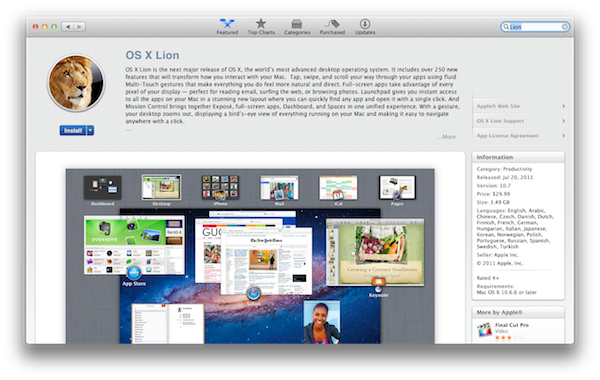
As widely expected, Apple released the next major version of OS X, Lion, on the Mac App Store today. The new OS is now available at $29.99 as digital-only download and is propagating through all the international App Stores at the moment of writing this.
You can download OS X Lion here. OS X Lion Server is available as a separate add-on here.
Lion is a major upgrade to Apple’s desktop OS that introduces over 250 new features and blends several typical desktop UI elements with design concepts and implementations first explored on the iPhone and iPad. Indeed, at the “Back to the Mac” event in October 2010, Apple described Lion as “OS X meets the iPad”. The Launchpad, for example, is a new way to install, organize and launch apps that’s heavily inspired by iOS’ Springboard, which lays out app icons in a grid against a default background with possibility of creating, moving, and deleting folders. Mission Control, a new way to manage app windows, combines the best elements of Snow Leopard’s Exposè and Spaces to create a new experience that unifies windows, desktops and full-screen apps in a single, easy to use interface. Lion brings hundreds of changes and subtle refinements, most of them delightfully added throughout the whole operating system in apps like iChat and System Preferences, others immediately visible like “All My Files” and “AirDrop”, two new Finder features to browse all documents and share files locally with others, respectively.
Lion brings new functionalities and APIs that should make users and developers alike excited to try out the new OS. For instance, developers can enable the new Automatic Termination and Resume APIs in their applications to make sure the “state” of an app is always saved upon quitting, and resumed on the next OS boot or app launch. This behavior can be reversed, but it’s enabled by default to put the emphasis on an operating system capable of saving your work and “app state” without you even thinking about it – app state means anything from open windows to position on screen and mouse cursor. Similarly, the new Auto Save when combined with Lion’s Versions will allow you to never worry about “saving” a document again, and have the OS perform continuos versioning in the background that you can access from a new Time Machine-like UI. Versions allow you to restore a document’s previous changes and edits from any point in time since you first created it.
Lion is a milestone in Apple’s desktop OS history, and we’ll have a complete review, as well as a detailed installation guide, in a few minutes on our site’s homepage.
Update: In the official press release, also embedded below, Apple confirms that Lion will be made available on a USB thumb drive at $69 for users without broadband access.
Mac OS X Lion is available as an upgrade to Mac OS X version 10.6.6 Snow Leopard® from the Mac App Store for $29.99 (US). Lion is the easiest OS X upgrade and at around 4GB, it is about the size of an HD movie from the iTunes Store®. Users who do not have broadband access at home, work or school can download Lion at Apple retail stores and later this August, Lion will be made available on a USB thumb drive through the Apple Store® (www.apple.com) for $69 (US). Mac OS X Lion Server requires Lion and is available from the Mac App Store for $49.99 (US).
Adobe Photoshop Elements 9 Editor Available On The Mac App Store
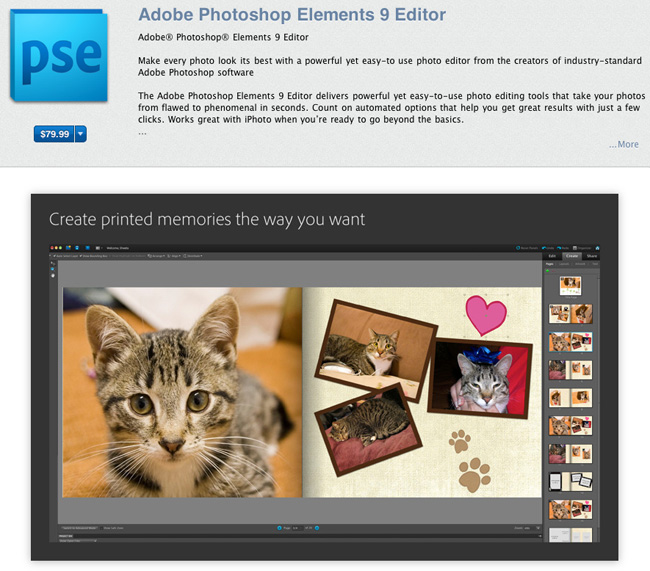
Some of us thought this day would never come - Adobe has an app in the Mac App Store. Adobe has released today Photoshop Elements 9 Editor via the Mac App Store, and it comes as a hefty 1GB download that’s aimed at the average consumers for editing photos on their Macs. The $80 Mac App Store version isn’t the same as the $100 Adobe.com version, as it’s got the Adobe Elements Organizer omitted. Perhaps they left the Organizer out to have a better price point but it’s still more expensive than other similar apps such as iPhoto, Acorn or Pixelmator. The app is only available in English, too.
Winston Hendrickson, Adobe’s VP of Digital Imaging Products, said “The powerful capabilities in Photoshop Elements 9 Editor complement iPhoto perfectly, for users who want to take their photos to the next level with advanced compositing and stunning effects.”
The Adobe Photoshop Elements 9 Editor delivers powerful yet easy-to-use photo editing tools that take your photos from flawed to phenomenal in seconds. Count on automated options that help you get great results with just a few clicks. Works great with iPhoto when you’re ready to go beyond the basics.
The Mac App Store version of Photoshop Elements 9 has many of the same photo tools that made the full version popular, like content aware-fill, Group Shot, Panorama, and Style Match Photomerge tools. Elements offers guided edit modes that walk the user though using effects and cleaning up photos.
Personally, I think there are much better options out there for the beginner / average consumer and they’re cheaper and help support small developers; maybe now Adobe is rethinking their Mac App Store strategy and we’ll see more applications later, especially ones that aren’t stripped down.
Elements 9 is available now for $79.99 in the Mac App Store. More screens after the break. [via Macworld] Read more