This Week's Sponsor:

Turbulence Forecast

Know before you go. Get detailed turbulence forecasts for your exact route, now available 5 days in advance.


Posts tagged with "macappstore"

App Preview: Harald By Stealthy Cactus Software

We’ve been there before: you just finished a ridiculously long report on the colonization of Mars and you’re ready to toss the excess scrap work into the trash bin. In your sleep deprived daze, grouped with those pictures of space aliens and rock robots is your digital manifesto, hot of the press and steaming as it’s shredded with a click of the empty button. Come tomorrow morning, you find that file is damned near irrecoverable before the paper is due. Those bogus moments always creep up when we’re either brain dead or because of pesky Mac viruses (I guess I can’t slip that unicorn in here can I?), but you can prevent the total obliteration of your files by safeguarding them with Harald.

Don’t risk accidental deletions, Scoble’s children, or my habit of renaming your files in Dropbox with your critical documents. Harald is the knight in shining armor for files that shouldn’t ever end up in the trash can. Accidentally delete a file? Harald will block your eagerness to hit that delete button in favor of reminding you that the file is of great importance. Does it save the day? You betcha. Simply select your files, tap that menubar icon, and mark them for protection under the Harald shield. It’s pretty easy, and if you don’t believe me, you’ll want to check out the teaser video after the break. It’s coming to the Mac App Store soon, so prepare a meager $3.99 for when it launches.

Read more


Windows Phone 7 Connector: Microsoft’s First Mac App Store App

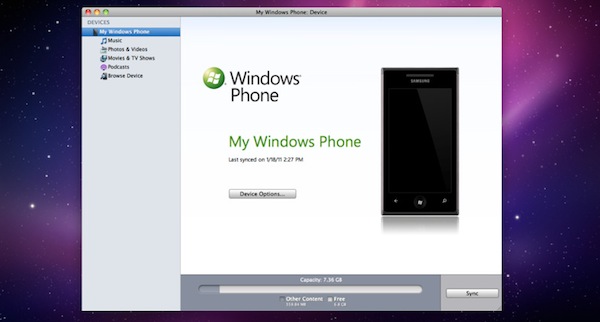
After being in public beta form since October, Microsoft’s Windows Phone 7 Connector application for Mac has lost its beta tag and is available in the Mac App Store – Microsoft’s first app to be in Apple’s new app store. The application gives Mac users the ability to sync music, photos, videos and podcasts to a Windows Phone 7 phone or a Zune.

Whilst Windows Phone 7 Connector is simplistic and not as full featured as the Zune software on Windows, it does feature iTunes compatibility and can also update the firmware on Windows Phone 7 phones. It is available for free in the Mac App Store.

[Via Engadget]


Intego’s Free Antivirus for Mac Gets 500K Downloads in 30 Days

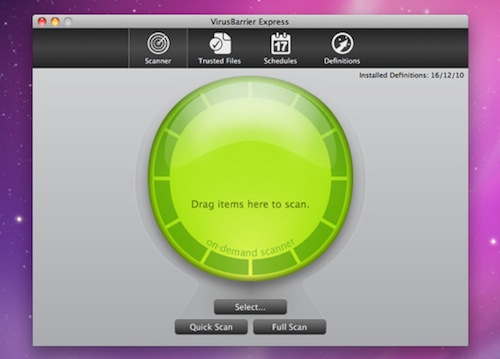
In its first month of downloads, Intego’s VirusBarrier Express, which is being distributed exclusively on the Mac App Store, has racked up an impressive 500,000 downloads. VirusBarrier Express is Intego’s free antivirus and anti-malware offering that claims to protect Mac users from viruses, Trojan horses and other malware, including Windows malware that could be accidently passed on.

Read more


iOS Developers Making Leap to the Mac

iOS Developers Making Leap to the Mac

Chris Foreman at Ars Technica reports about several iOS developers porting their apps to the Mac App Store:

These developers warned, however, that it wasn’t fair to make direct comparisons with the iOS App Store at this early stage. For one, every iOS device has access to the iOS App Store, while only those who applied the Mac OS X 10.6.6 update can access the Mac App Store. And, as Crawford pointed out, there are more iOS devices in active use than there are Macs.

Frampton compared initial sales volumes to the early days of the App Store on the iPhone. “The overall size of the market seems very similar to the early days of the iOS App Store, and in fact I get a very distinct feeling of déjà vu,” he said. “The Mac App Store market may never catch up, but it certainly has a lot of room to grow.”

“Sales tend to eventually level out and that’s yet to happen on the Mac App Store,” Comi agreed.

As more users upgrade to 10.6.6 (a friend of mine ran Software Update a week ago, almost a month after the Mac App Store introduction), there will still be a considerable userbase stuck on previous versions of Snow Leopard. That’s the problem with the Mac App Store coming as an “add-on” to the OS. However, I believe that, in the end, apps will be the reason why these people will be “forced” to upgrade to the latest SL version. The more great apps are released in the Mac App Store, the more people will say “Hey, maybe I really need to update”.

It’s not the Mac App Store as a “feature” by itself, it’s the ecosystem of a platform for great software.

Permalink

Super Mega Worm Goes Free To Celebrate Verizon iPhone, Mac App Store Release

Super Mega Worm! The game that lets you control the Death Worm Wojira to save the Earth from extinction. The iOS game packed with retro graphics and awesome pixel art. One of the most successful iPhone and iPad games to date thanks to its humour and Game Center support. Well, to celebrate the release of the Verizon iPhone and the availability of the app in the Mac App Store, Super Mega Worm for iOS (universal for iPhone and iPad) has gone free. Free, as in “free for a limited time before it goes up again”.

Go download it here.


Apple Launches First Mac App Store Section: “Personal Projects”

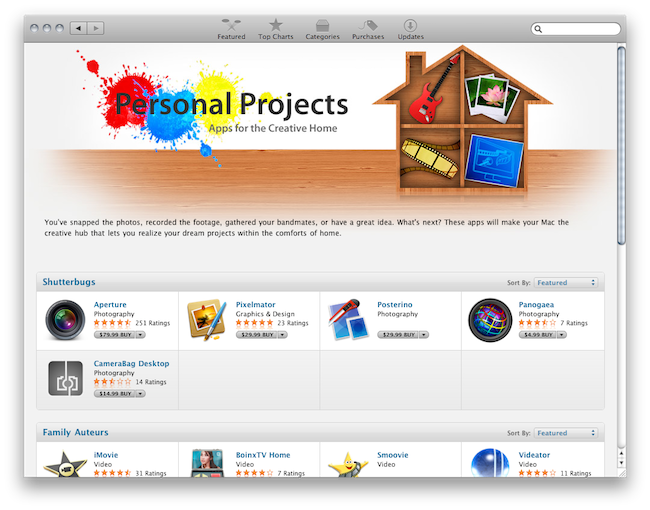
It’s Friday, which means Apple has refreshed the iOS and Mac App Store homepages to include new featured apps and fancy graphics to showcase products released this week. With today’s refresh, Apple has also launched the first Mac App Store section: Personal Projects, available here, aggregates apps to make your Mac “a creative hub” for professionals who want to organize their projects and ideas at home. It’s got apps for musicians, designers, photographers and video editors.

With the iOS App Store, Apple inaugurated this weekly trend of launching new sections to collect apps for a specific audience. We think the idea is very cool, but we would like to have a unified way to access all these sections Apple created in the past. Perhaps the Mac App Store will fix this.


Twitterrific 4 For Mac Review

My first exposure to Twitterrific was when MacHeist casually offered Ollie as part of their first nanoBundle, alongside great applications such as WriteRoom and TinyGrab. While the third version quickly grew outdated in part because of Twitter’s continual feature growth and the IconFactory’s focus on providing parity between iPhone and iPad iterations, Ollie remained perched in my menubar for quite a while thanks to its minimal HUD interface. It was this Aqua-less client that faded into the background as I went about my other tasks that was supposed to be a permanent mainstay on my MacBook. I loved everything about it despite criticisms of it being ugly or lacking features, and if I wasn’t as vigorous on Twitter as I am today it would still be perfect for simply reading the latest incoming tweets. Though times changed, and I shelved my favorite mascot for Echofon while Tweetie garnered droves of followers in its presence.

While the OS X version of Twitterrific remained seemingly stagnant, the IconFactory made a rather large push into the Twitter realm with the iOS versions we’re familiar with today. Starting with the iPhone, the IconFactory practiced bringing a familiar experience across mobile devices by simplifying how we interact with Twitter. There is no excess interface or useless presentation of information: the IconFactory replaces Twitter’s originally dull and now confusing web interface with an inline, color-coded approach whose design is recognizable across the Apple community. Macworld named Twitterrific the ‘Twitter Client of the Year’ in 2010’s App Gem Awards, and you can bet the IconFactory would take their award winning design to the desktop. Steve Jobs wasn’t kidding when he said everything was coming, “Back to the Mac.”

Today, I’m glad to say that with the launch of Twitterrific 4 for OS X, it has once again reclaimed dominance on my Coca-Cola bottled desktop.

Read more