This Week's Sponsor:

Turbulence Forecast

Know before you go. Get detailed turbulence forecasts for your exact route, now available 5 days in advance.


Posts tagged with "macappstore"

Sparrow Launches On The App Store For $9.99

The long awaited and much anticipated Sparrow for OS X just launched in the App Store for $9.99, with an expected launch of $19.99. Merging the elegance of Tweetie with the bravado of Gmail, Sparrow is a beautiful email client whose gorgeous interface enables users to effortlessly manage, label, and compose messages through intuitive actions. With Growl support, multiple accounts, and quick replies to seamlessly manage inbox cruft, Sparrow is a no-brainer if you live in Gmail, but don’t want the heft of a traditional email client. IMAP support for Aol., Yahoo, and MobileMe is promised for a future update. We’ve been following Sparrow for quite a while on MacStories, and I have nothing but good things to say about this sleek client after many Twitter followers turned me on this once public beta project.

You can purchase Sparrow on the Mac App Store via the following link: Sparrow for Mac

Edit: Have I told you how much I love Sparrow’s new icon? It looks great in the menubar too!
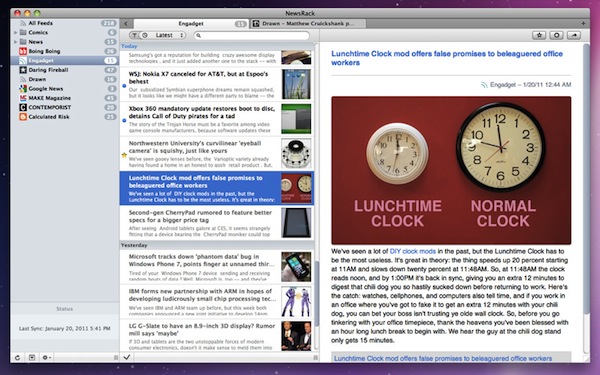

NewsRack RSS Reader Now Available In The Mac App Store

NewsRack is a RSS feed reader for iPhone and iPad that’s very popular among iOS users and used to be many people’s favorite choice in the App Store before Reeder came out. Especially in the early iPad days, I remember using NewsRack to stay up to date with Google Reader; the app is fast, stable and provides an elegant approach to RSS feeds. Silvio Rizzi eventually released Reeder for iPad, but I’m pretty sure NewsRack still has a loyal user base out there.

Last night, omz:software released a new version of NewsRack in the Mac App Store. The app is new to the Mac platform, and exclusively available in the Store at $6.99. NewsRack for OS X is very similar to its iOS counterpart: native interface with a sidebar for feed and folder management; unread articles in a middle panel and feed preview in the right column. The app has got a tabbed interface à la NetNewsWire to navigate between websites easily with tabs that sit on the top of the main window. NewsRack syncs with Google Reader but you can also import your feeds manually, although I wonder if there’s anyone who’s still doing that - especially considering cross-platform RSS syncing between OS X and iOS.

The app supports drag & drop for feed management, keyboard shortcuts for tabs and refresh, thumbnail previews for feeds – which should come in handy if you’re subscribed to several photo blogs and you want to quickly skim through their latest entries. Overall, the design looks really polished and based on usual OS X interface guidelines.

Personally, I don’t think I will move away from using Reeder just yet. Silvio Rizzi’s app is still in beta, but we’re pretty confident it will find its way to the Mac App Store soon. If you’re looking for a good alternative though, NewsRack in the Mac App Store is a great choice for now.


Mac App Store Gets Purchase Confirmation Warning

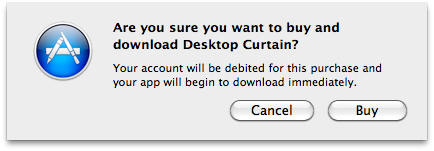
When Apple launched the Mac App Store on January 6, one of the most notable missing features was the “purchase confirmation warning” when buying apps. We’re talking about the dialogue box that usually pops up in the iOS App Store when you’re logged in with your Apple ID and you hit the “Buy” button; the confirmation warning is an effective way to help users prevent accidental downloads (and thus credit card charges) when browsing the Store. It happened a few times in the past that I was scrolling a list of apps (usually the Top Paid chart) and accidentally clicked on the button to download a (paid) app.

The Mac App Store now displays an additional pop-up menu after clicking the “Buy” button in the Store. It appears that there is no option to disable the warning for now, unlike the iOS App Store. As you can see in the screenshot above, you’ll have to click on a second “Buy” button before start downloading an application.

The feature is a nice addition, although we would like to have it as an option, rather than enabled by default. Other features we’re still waiting for include a better uninstallation process (would be great to have an Uninstall tab in the Mac App Store’s window), possibility to gift apps and a Wish List, which is still surprisingly missing from the Mac App Store.


Developers: You Can Now Generate Promo Codes for Mac Apps

An update in iTunes Connect shows that developers can now generate promo codes for apps sold in the Mac App Store:

You can now generate promo codes for your Mac apps in iTunes Connect. These promo codes can be redeemed in any Mac App Store worldwide. For each version of your app, you can request up to 50 promo codes.

Up until today, Apple didn’t allow developers to generate promo codes for Mac apps. The also-updated iTunes Connect Developer guide further explains:

Promo codes can now be generated for Mac OS X apps and redeemed through any Mac App Store internationally.

Read more


Shuttie: Set A Timer For Your Mac To Shutdown Or Sleep

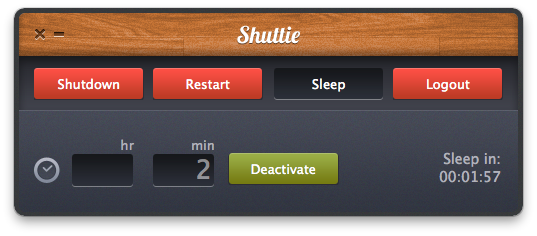
Shuttie, a $0.99 app available in the Mac App Store, is the kind of utility I’ve been looking for these days, as I’m tweaking my workflow to include Time Machine backups through Dolly Drive, and hard drive clones with SuperDuper. My problem with backups is that I want them to run at night, but I’d like my MacBook to sleep once backup sessions are completed. And even though I know it’s possible to trigger AppleScripts to put a Mac to sleep with iCal, or tweak the System Preferences to enable display and computer sleep, Shuttie is a simple app with a nice design that offers more options, and it’s very easy to use.

Shuttie lets you set a timer for shutdown, sleep, restart and logout. Set a time (hours and minutes are supported), activate the timer and forget it. Once the countdown is up, Shuttie will perform the function you assigned it. This is quite handy for me, as I can let Dolly Drive and SuperDuper do their backups, then put the computer to sleep after 3 hours, when the backups are completed. This way, I don’t have to leave my MacBook running all night.

Shuttie provides a nice interface for things that can be accomplished manually in other ways, and it works very well. If you don’t want to mess with System Preferences and AppleScripts, give it a try.


Mac App Store Developers Fall Into Open Source Rabbit Hole

Lugaru, the game that is available for the Mac and other platforms about a violent rabbit is now available on Mac App Store. Except there are two apps for the same game, one at $10 and one at $2, the pricier one called Lugaru HD is made by the original developers whilst the other called Lugaru is made by a Michael Latour from iCoder. The original developers of the game have no idea who Latour is and are quite understandably angry that someone else has started selling the exact same game at a much cheaper price.

Lugaru’s developers claim Latour’s app is a complete fraud of their own app with their own source code being sold by a guy with no affiliation to them. Jeffrey Rosen, one of the Lugaru developers told Kotaku “We are not happy about this situation. It is not uncommon for people to sell pirated copies of our game, but we were completely caught off guard that Apple would approve this for sale on the App Store without any due diligence.”

Read more


Mac App Store: Miro Converts Videos for iOS, For Free

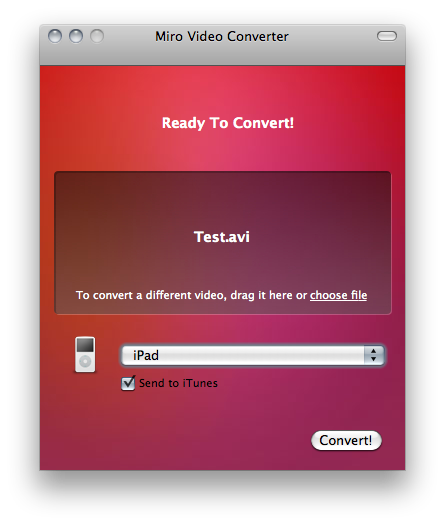
Available for free in the Mac App Store, Miro Video Converter is a little utility that converts almost any kind of video to formats compatible with iOS and other Apple devices, Android handsets, WebM, Theora and a variety of other platforms. As you can guess, Miro Video Converter comes from the creators of Miro, video player and torrent downloader.

The app doesn’t offer all the control and customization possibilities seen, for example, in the popular Handbrake video conversion tool, but it’s got a nice and simple interface where all you have to do is drop a file, select the output and hit Convert.

Miro Video Converter is available here. Check out the list of supported formats and devices below. Read more


Mac App Store: Developers Make App Free, Gain 24,000 Downloads in 48 Hours

Todolicious is a neat todo app for the Mac we originally previewed ahead of the Mac App Store launch. The app was priced at $4.99 and, since the new Store’s grand opening, has been selling hundreds of copies, slowly sliding to lower sales numbers due to new apps taking over the Top Paid and Category charts. That’s what usually happens after the launch of a new app, when new apps are released and you’re not Angry Birds.

The Mustacheware developers, however, tried to make the app free for two days to see how would the experiment play out. It turns out, making a simple and useful app like Todolicious free for 48 hours over the weekend brought in more than 24,000 downloads. See the graph above to see the difference between paid vs. price drop.

We have heard several stories of success in the Mac App Store in the past weeks. Autodesk announced the new Store doubled a year’s sales of Sketchbook Pro in just 20 days, Pixelmator grossed $1 million in the same amount of time and another developer went from 7 sales a day to 1,500. Given the youth of the Mac App Store, it’s too early to say “free apps do better than paid apps”, because Pixelmator and Sketchbook Pro are here to remind us paid software can do great as well. It also needs to be mentioned, though, that Todolicious was sold at $4.99, not exactly the “premium” $29.99 you would spend for a graphic editing app. As strange as it sounds, many users are willing to pay a premium to download a pro app rather than “yet other 5 bucks” to download a simple Mac app. Still, the numbers are in and they are surprising: 24,000 downloads aren’t bad for a small indie development studio that’s seeking to build a user base for the future iPhone version of the app, and whether or not these 24,000 people will stick around the exposure provided by the Mac App Store and Top Free charts is incredible.


Key Codes, Free App To Display Unicode Values

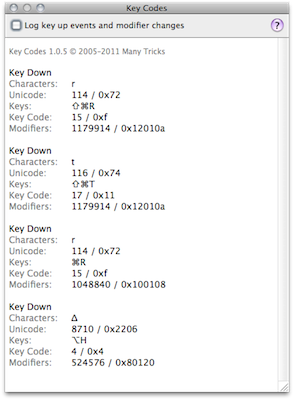
If you’re a developer that always needs access to unicode values and modifier keys state or you simply want to quickly paste keys like ⌘ and ⌥ to your clipboard because you don’t know the proper keyboard shortcut, Key Codes may come in handy. A free download in the Mac App Store and developed by Many Tricks (the same guys behind Witch, Name Mangler and Desktop Curtain), Key Codes displays key code, unicode value “and modifier keys state for any key combination you press.”

A little utility for sure, but useful. Get it here.