This Week's Sponsor:

Turbulence Forecast

Know before you go. Get detailed turbulence forecasts for your exact route, now available 5 days in advance.


Posts tagged with "macappstore"

Sparrow Email Client Is Coming To The Mac App Store

Sparrow Email Client Is Coming To The Mac App Store

Here at MacStories, we’ve been following the development of the Sparrow email client for Mac very closely. The app first came out as public beta in October of last year, and many quickly dismissed it as a “clone of Tweetie” built for Gmail. The developers listened, improved the client and fixed bugs. The app really grew to become a full-featured Gmail client for the desktop.

With a blog post this morning, the developers announced Sparrow is coming to the Mac App Store in the next weeks, with the app already submitted to Apple for approval.

2 versions of Sparrow will be released. They’ll both be available in the Mac AppStore and on our website:
Paid: Sparrow will cost $24,99 but early birds will benefit from the $19,99 introductory price.
Free: Sparrow Lite will be ad-supported. Carbon Ads is providing the nice ads you have certainly seen in the latest Beta version. The free version will allow one-account creation only.
We can’t provide any precise release date yet as the application has to be approved by Apple.

We are looking forward to the debut of Sparrow in the Mac App Store. Also, the new application icon you see above looks pretty sweet.

Permalink

A Better Way To Search The Mac App Store

The Mac App Store is great and everything, but searching for a specific app might be an annoying procedure for many: open the Mac App Store, place the cursor in the search box (or hit CMD + F), type, wait, scan results. Wouldn’t it be great to do it from the keyboard, in seconds, from the app launcher / Spotlight replacement you use every day?

I use Alfred, and this tip has incredibly improved how I search for apps in the Mac App Store. In Alfred, in fact, you can create custom search queries for any website / search engine and assign them to a quick shortcut that can associate terms to the query. Like “google MacStories” will open a tab in your default browser with a Google search for MacStories, and so forth. With this same method, you can create a Mac App Store search query that will let you search for an app’s name directly in Alfred and have the search results page open automatically in the Mac App Store. Read more


DoublePane, The Keyboard-Only Version of Cinch

With Cinch you can grab windows from anywhere in the desktop and drag them to various edges to snap them left or right, or make the windows fullscreen. With DoublePane, keyboard shortcuts dictate all of your happy snapping, with the same abilities using your control, option, and arrow keys. The keyboard shortcuts are static, which may cause incompatibilities in apps like Linkinus that also use those keyboard shortcuts. I would like to see an option in the future to return the window (or undo) position with the down arrow, and for custom shortcuts. The app is a lightweight addition to your Mac which will certainly improve your workflow, and it can be had for only $2.99 on the App Store.


Lyrica 2: Redesigned, And Still The Best App To Tag Songs

A few days ahead of the opening of the Mac App Store, we previewed a nifty little app for the Mac called “Lyrica” which helped you display lyrics from songs playing in iTunes through a translucent black, HUD interface. The Mac App Store launched, the app was priced at .99 cents, it was one of the few useful apps in the Music category – it snowballed. It quickly jumped the charts to get in the first spots of Top Paid, and two weeks after the grand opening it’s still firmly positioned in the top 30 apps.

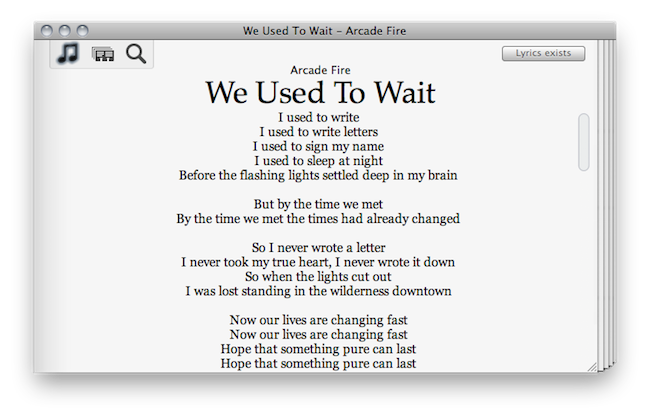
It turns out, though, that many users didn’t like the HUD style of the app, which may or may not make it difficult to read lyrics on a translucent background. So developer Florian Zand redesigned the entire application and added some new features during the process. Lyrica now comes with a white, cleaner look with a stacked style that kind of reminds me of a newspaper. I also like the fact that I can choose between different fonts – personally, I sticked with Georgia.

Graphics changes aside, the app now searches through seven lyrics databases, including AZLyrics and MetroLyrics. Several preferences have been added (Lyrica can still automatically tag any song playing in iTunes, even if it already has lyrics on its own) and the developer also implemented a new functionality to replace and remove broken lyrics. Useful for those (like me) who tried to tag their music library in the past with some shady Mac app that didn’t work at all.

Lyrica is available at $0.99 in the Mac App Store. It’s getting better on every release, and even though it’s not perfect yet (and design-obsessed folks will still have something to say about it) it just works, better than many other apps sold at a higher price by well-known developers. Give it a try.


Window Cleaner Hides Inactive Apps To Prevent Desktop Clutter

The desktop isn’t iOS. On our Macs, we tend to open lots of apps and create new windows every minute, and we rarely remember to close them once we’re done with them. Unless you’re a serious window management geek who has installed scripts and utilities to keep your Mac’s screen elegant and neatly organized, free of useless and inactive windows, then I guess you’re looking for a simple, automated way to prevent “window clutter” from taking over your machine.

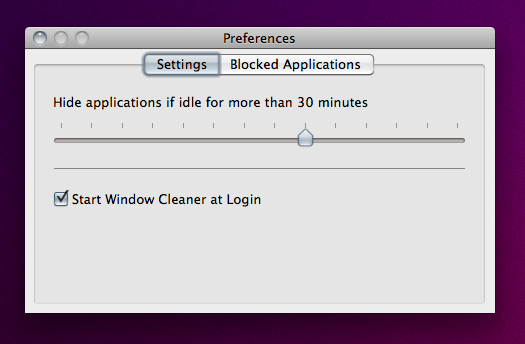
Window Cleaner, a $0.99 utility available in the App Store, does one thing very well: it hides app windows that have been inactive for a certain amount of time. The app, which lives in the menubar, comes with a Preferences panel that allows you to set an amount of minutes after which inactive windows will be hidden. You can opt to start the app at login (recommended) and “whitelist” applications that you want to be open all the time, like DVD Player or Movist, for instance.

This app just works, and even though I guess it’s possible to achieve similar results with a bit of Applescript – the average user will appreciate the advantages offered by a user interface and automatic Mac App Store updates. One thing that I would like to see in Window Cleaner is the possibility to set per-app expiration times, instead of a single amount of time to hide all apps.

Go get Window Cleaner here.


Get Lion’s Launchpad On Your Mac Now with QuickPick

One of the most intriguing features of Lion that Apple previewed at its “Back to the Mac” event in October was, in my opinion, the Launchpad. In pure iPad fashion, Launchpad will be “a home for your apps”, with fast and easy access to software downloaded from the Mac App Store, or folders created to better organize these apps. It all looks like an iPad’s Springboard brought to the Mac, with pages and iOS-like folders.

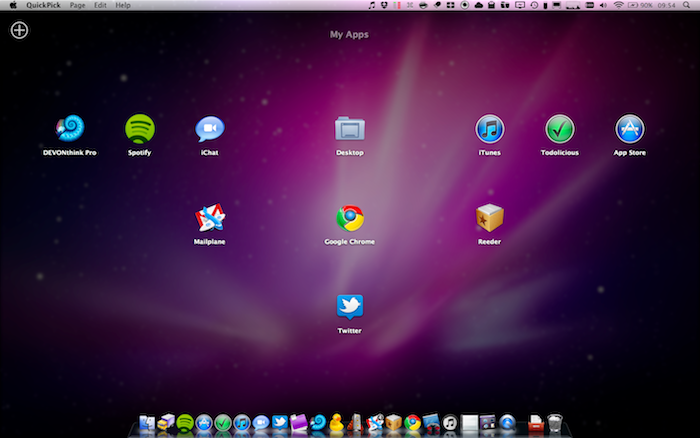
QuickPick, a $9.99 app available on the Mac App Store, brings some of the features we’ll see on Lion’s Launchpad this summer to OS X now. QuickPick lets you access apps and folders through an overlay interface that will sit on top of your currently opened apps, Finder windows and Spotlight searches. Once installed, QuickPick can be invoked either through a keyboard shortcut, a click on its dock icon or an active OS X corner. As QuickPick’s grid comes in the foreground, you’ll be able to arrange apps and create pages for your most used apps, folders or documents. Almost any file that can be dragged out of the Finder can be taken into QuickPick’s grid. In the app, you can adjust the grid’s spacing and text size. You can even create multiple pages of apps / documents thanks to a “Page Dock” that allows you to set up as many “grids” as you want. Alternatively, you can move between pages with a three-finger swipe. Again, just like the Launchpad in Lion.

QuickPick, of course, doesn’t bring all the features and details we saw demoed in Launchpad, such as the iOS folders or page indicators. If you drag a folder from the Finder to QuickPick, in fact, that folder won’t open in-app but will launch a new Finder window instead. I guess it’s a fair trade-off, considering that this app is running on Snow Leopard and we haven’t seen enough of Launchpad anyway. Still, everything’s smooth and works just as advertised.

QuickPick is available at $9.99 in the Mac App Store, and it gives us a taste of things to come in Lion by providing an alternative solution for OS X 10.6. Will Launchpad be different and more refined come Lion’s public release? For sure. But until then, you should give QuickPick a try. Check out our brief demo video of the app below.
Read more


Solar Walk for Mac Now Available

Winner of an Apple Design Award in the iPad category in June 2010, Vito Technologies today released a Mac version of Solar Walk, available now in the Mac App Store at $2.99. Pretty much like Star Walk for the iPhone and iPad (which Cody originally reviewed here), Solar Walk for Mac is a full-featured 3D solar system model that allows you to move between stars and planets with your mouse, zoom in to check on the planets’ details and read accurate descriptions about them. You can zoom out to view the entire galaxy (well, at least through what’s known of this galaxy), see a planet’s inner structure and learn about its history of exploration. The 3D graphics aren’t breathtaking but they get the job done, the popover menus with descriptions seem to be taken out of the iPad app.

The app also allows you to move in time to see the position of planets and satellites in a certain day, month and year. There’s even a 3D mode that will require you to wear cyan-red glasses – too bad I don’t have them here right now. Neat stuff anyway.

Solar Walk is available in the Mac App Store at $2.99. A demo video of the iPad version, very similar to the Mac counterpart, is embedded below. Read more


There’s a 3D Kinect Viewer In The Mac App Store

We have talked about the coolness and the hacking possibilities offered by Microsoft’s Kinect before. First we heard Apple almost bought the technology from its original creators in 2008 (the rest is history, it got sold to Redmond), then we saw Kinect connected and displaying stuff on OS X and also somehow hooked up to a computer and an iPad with…futuristic cubes.

Now, thanks to the Mac App Store, we have a free 3D viewer for Kinect. When connected to a Mac via USB, the app can visualize tridimensional images of the depth data, and map RGB values onto this depth image. You can zoom, rotate and, of course, take a good screenshot with your Mac to show to your friends on Twitter.

Kinect 3D Viewer for Mac is free and available here.